
Use a ready-to-use no-code nomination form template, or a downloadable Word or PDF template, to collect consistent, judge-ready nominations. These options cover most internal, school, and community awards without extra setup. Upgrade to a full platform only when you need reviewer scoring workflows, public voting, or paid-vote fundraising built into the same process.
TL;DR:
- Word and PDF forms suit low volume awards collected by email or in person, while builder templates add uploads, conditional questions, and automatic closing.
- Require nominee and nominator details, a fixed award category, achievement statement, timeframe, and optional evidence; set upload limits and obtain publication consent.
- Define eligibility rules, scoring criteria, and a retention period before launch, then restrict reviewer exports to evaluation fields and track disqualifications separately.
- Verify nominator emails, add a bot check, and flag duplicates with a unique nominee identifier; publish only approved nominees for any public vote.
- Send a reminder about a week before the deadline, since nominations often arrive in the final 48 hours; include examples of strong achievement statements.
Table of Contents
- Where to find ready-to-use nomination form templates
- What fields belong on a judge-ready nomination form
- Customizing and sharing your nomination form
- From nomination to final decision: the typical workflow
- A quick pre-launch checklist worth running every time
- Verifying eligibility and catching duplicate nominations
- Keeping your nomination form secure from fraudulent entries
- Moving from nomination intake to the voting phase
- Promoting your nomination form to get enough entries
- Managing nomination data after submissions close
- What most nomination-form advice gets wrong
- When a voting platform makes more sense than a form alone
- FAQ
- Sources
Where to find ready-to-use nomination form templates
Three types of templates cover almost every award program, and each one fits a different scale of event.
Downloadable Word and PDF templates work best for low-volume or internal awards where you collect nominations by email or in person. They print well, require no software setup, and are easy to adapt for a staff recognition program or a small club award.
No-code form-builder templates handle higher volume and more complex requirements. Pages like Typeform’s awards nomination form template, Jotform’s awards nomination form, and Formpl support file uploads, conditional logic, and automatic form closing at a set deadline. You can publish one of these in under an hour and share it by link, embed, or QR code.
Template libraries and AI-assisted generators sit between the two. They let you start from a near-finished layout and adjust fields, wording, and branding quickly, which suits organizers running an annual award who want a fresh look without rebuilding the form from scratch.
- Internal or small-scale awards: a Word or PDF template distributed by email is usually enough.
- Community, school, or industry awards with many nominators: a no-code builder template handles volume and file uploads better.
- Public or fan-voted awards: a template still works for intake, but you will need a separate voting step once nominations close.
The right starting point depends less on how “official” the award feels and more on how many nominations you expect and whether reviewers need to score or compare them side by side.
What fields belong on a judge-ready nomination form
A nomination form only works if every submission gives reviewers the same information in the same format. Based on the field sets used across major template providers, a solid form includes:
- Nominee details: full name, title or role, organization or department.
- Nominator contact information: name, email, and relationship to the nominee.
- Award category, selected from a dropdown rather than typed in freely.
- A concise achievement statement describing why the nominee qualifies.
- The relevant timeframe (the period the achievement or contribution covers).
- Optional supporting evidence: a letter of endorsement, a short CV, or images.
Typeform’s template guidance confirms these fields as standard across employee, student, member, and community award forms. For supporting documents, set clear file-type and size limits upfront. The Zayed Award for Human Fraternity nomination form caps its letter of endorsement at 1,000 words and specifies accepted upload formats, which is a useful benchmark for your own limits.
Word limits and short hint text under each field push nominators toward focused, comparable answers instead of long, unstructured essays. Add a plain-language checkbox asking for permission to publish the nomination and use any submitted photos if the nominee wins.
Pro Tip: Cap the achievement statement at a moderate length to ensure succinct and focused entries. Reviewers read faster, and nominators write tighter, more specific entries.
Customizing and sharing your nomination form
Once your fields are set, a few configuration choices determine whether the form feels easy or clunky to fill out.
- Use conditional logic so category-specific questions only appear after the nominator selects a category, keeping the form short for everyone.
- Match the form’s branding, colors, and header image to your event or organization to build trust and reduce drop-off.
- Set a visible deadline with a stated time zone, an automatic close date, and a confirmation email sent to each nominator.
- Share the form through whichever channel reaches your audience fastest: a direct link, an embedded widget on your event page, a QR code on printed materials, or a line in an email newsletter.
Formpl.us and Cognito Forms both note that templates publish quickly, but larger programs still need reviewer access controls, scheduled notifications, and export options once nominations start arriving. Build those settings in before you share the link, not after submissions begin.
From nomination to final decision: the typical workflow
Most award programs, regardless of size, move through the same sequence of stages. The HRSA condition nomination process is a useful public example of how a staged review structure works in practice: intake, eligibility screening, committee evaluation, and a final recommendation.
For a public or member-voted award, the stages typically look like this:
- Nomination intake: the form collects entries until the deadline closes.
- Eligibility and administrative review: staff check for completeness and basic qualification.
- Committee scoring: reviewers rate nominees against a shared rubric.
- Shortlist publication: qualifying nominees move forward with public profiles.
- Voting or ranking: the audience or a judging panel ranks the shortlist.
- Final approval: results are confirmed and winners are notified.
A staged review and voting process like this gives large or high-stakes award programs a documented, auditable path from first submission to final decision.
A template handles the first stage well on its own. You need a platform once reviewer scoring, public voting, paid voting, audit logs, or real-time dashboards become part of the requirement, because stitching those features onto a basic form usually means manual spreadsheet work and lost data.
A quick pre-launch checklist worth running every time
Before publishing any nomination form, I run three checks: are categories and evaluation criteria clearly defined, are file and word limits set so submissions stay comparable, and is the close date locked to a stated time zone with a notification flow in place for nominators and reviewers.
A platform with built-in reviewer controls and live dashboards removes most of the manual tracking that makes nomination season stressful for organizers.
— Joshua
Verifying eligibility and catching duplicate nominations
Eligibility problems and duplicate entries cause most of the late-stage headaches in award programs, so it pays to design the form to catch them early.
Ask nominators to confirm eligibility criteria directly on the form, such as tenure, membership status, or geographic region, rather than assuming they have checked the rules elsewhere. A required checkbox or short eligibility question filters out a share of ineligible entries before they ever reach a reviewer.
For duplicates, require a unique identifier for each nominee, such as an employee ID, member number, or email address, so your form or spreadsheet can flag repeat entries automatically. Many no-code builders support a duplicate-detection rule based on a specific field; set this up before the form goes live rather than cleaning duplicates manually afterward.
Keep a running list of nominees as submissions arrive, and cross-check new entries against that list weekly rather than waiting until the deadline. This catches both duplicate nominations for the same person and nominations submitted under slightly different name spellings. For larger programs, assign one reviewer to eligibility screening specifically, separate from the committee members scoring the content of each nomination, so eligibility checks don’t bottleneck the scoring process.
Keeping your nomination form secure from fraudulent entries
A nomination form that collects names, contact details, and sometimes photos needs basic safeguards against spam and manipulated submissions.
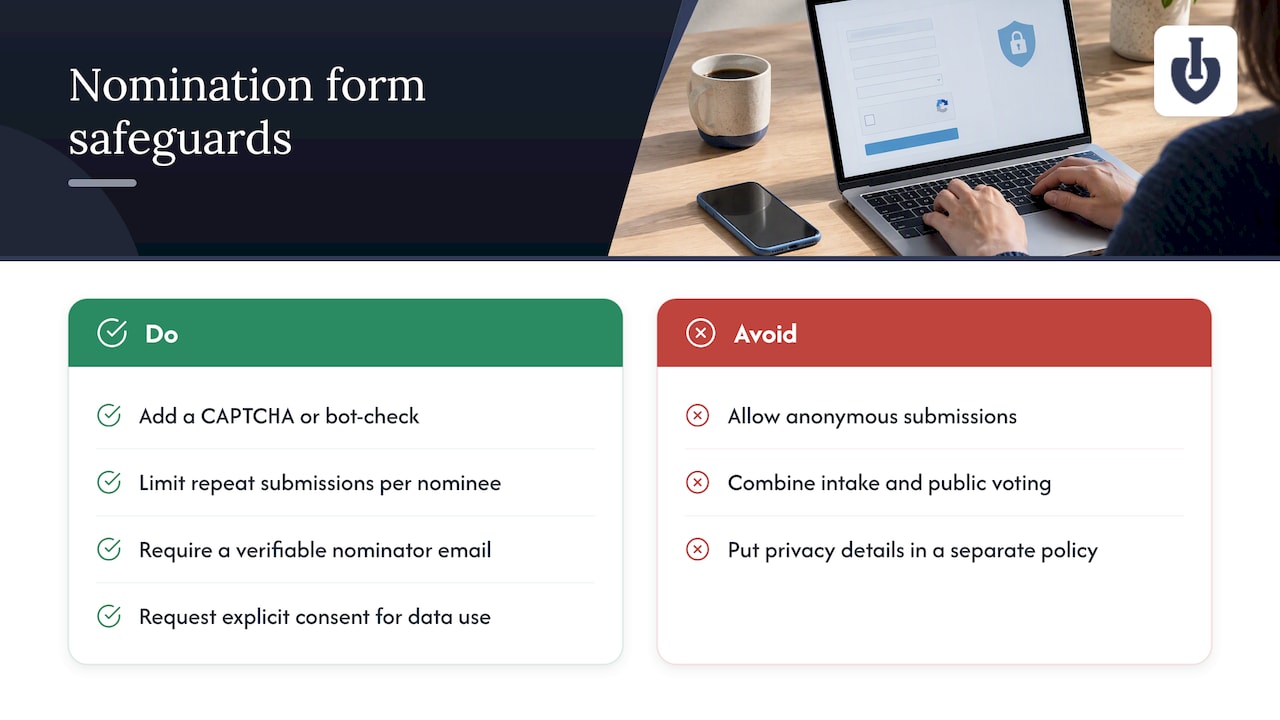
Add a CAPTCHA or similar bot-check to block automated spam submissions, which is standard on most no-code form builders without extra cost. Limit one submission per nominator per nominee where your form tool supports it, which cuts down on repeat or coordinated entries meant to inflate a single nominee’s visibility.
Require a verifiable nominator email address rather than allowing anonymous submissions. This single step discourages most fraudulent entries, since nominators know their submission is traceable. For public or fan-facing awards, keep nomination intake and any public voting completely separate: verify and shortlist nominees first, then publish only the approved shortlist for voting. Cognito Forms’ guidance on award nomination workflows recommends this separation specifically to prevent unverified or low-quality entries from appearing in a public ballot.
Finally, request explicit consent for data use and publication at the point of submission. The National Privacy Commission’s nomination form guidance notes that a clear privacy statement, stated retention period, and contact point for data correction all belong on the form itself, not in a separate policy document nominators have to go looking for.
Moving from nomination intake to the voting phase
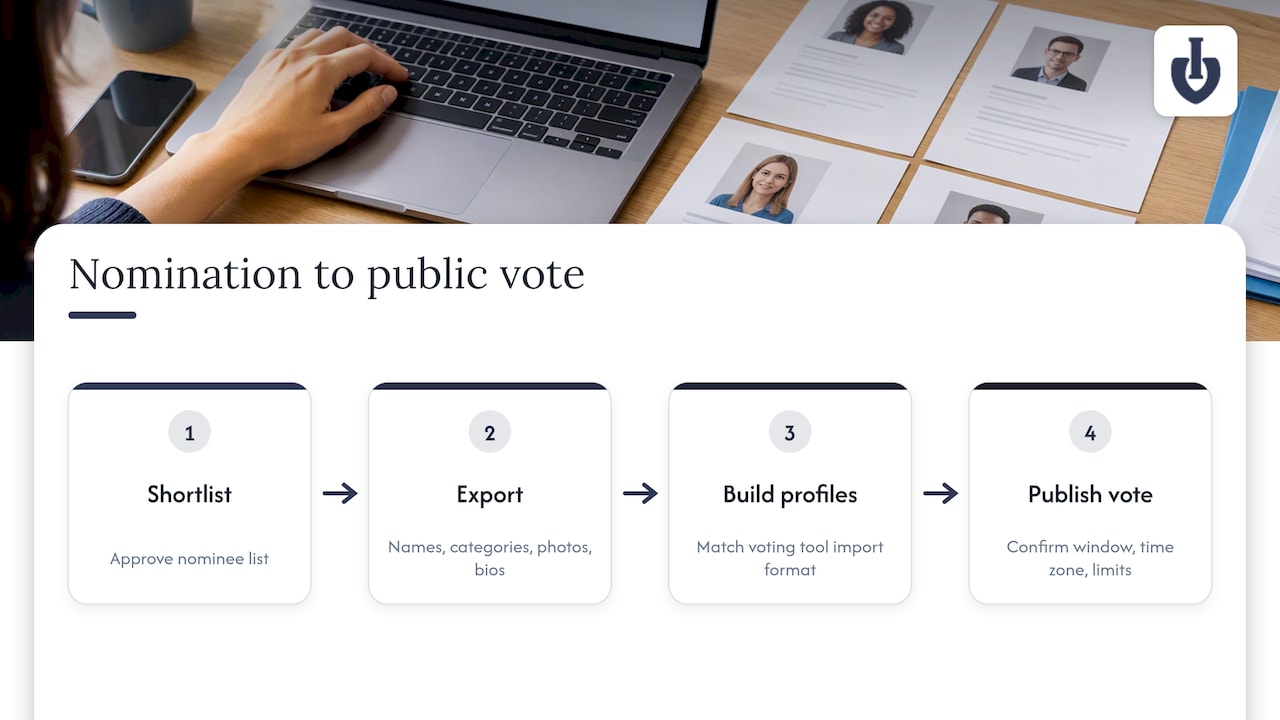
Once your shortlist is finalized, the transition to voting works best as a distinct second step rather than an extension of the same form. Export your approved nominee list, including names, categories, and any photos or profile text you plan to display publicly.
A spreadsheet export from your nomination form typically includes everything you need to build voting profiles: nominee name, category, submitted bio or achievement statement, and any uploaded image. Match this data against your voting tool’s import format before the shortlist goes live, since reformatting after voting opens creates delays.
If your award includes a public or fan vote, this is the point where a dedicated voting setup, rather than a second form, becomes worth considering. A platform built for online voting for awards and competitions can take an approved shortlist directly into a branded voting page with photos, categories, and live results, without requiring a second round of manual data entry. Confirm your voting window, time zone, and any vote-limit rules before publishing the shortlist publicly, since changing these mid-vote undermines trust in the result.
Promoting your nomination form to get enough entries
A well-built form still needs visibility, and most award programs underestimate how much reminder communication nominations actually require.
Share the form link across every channel your audience already uses: email newsletters, social posts, and any event or organization website where you can embed the form directly rather than linking out. A QR code on printed flyers or at in-person events works well for awards tied to a physical venue or conference.
Send at least one reminder email roughly a week before the deadline, since a meaningful share of nominations typically arrive in the final 48 hours of any open call. Give nominators a short list of example achievement statements or past winners (where privacy allows) so they understand what a strong nomination looks like before they start writing. Clear, specific hint text on the form itself does some of this work automatically, as Typeform’s design guidance notes: shorter prompts and category-specific questions tend to increase both completion rates and the usability of what gets submitted.
If your award program runs annually, keep a short list of past promotion channels that worked and skip the ones that didn’t, so each cycle gets faster to launch than the last.
Managing nomination data after submissions close
Once the deadline passes, how you handle the incoming data determines how smoothly the review stage goes.
Export all submissions into a single spreadsheet or dashboard view as soon as the form closes, rather than letting entries sit scattered across email and form-tool exports. Most no-code builders support a direct CSV or Excel export, which should include every field plus a timestamp and submission ID for tracking.
Build a simple reviewer-facing version of this export with only the fields judges need to see: nominee name, category, achievement statement, and any supporting files. Strip out nominator contact details from the reviewer copy unless your process specifically calls for reviewers to know who submitted each entry.
Keep a separate record of eligibility decisions and duplicate flags, so you can explain any disqualification later if a nominator asks. Set a clear data retention period for nomination records, consistent with the privacy statement on your form, and delete or archive entries once that period ends. This keeps your records manageable for next year’s cycle and avoids holding onto personal data longer than your stated policy allows.
What most nomination-form advice gets wrong
Most guidance on award nominations spends its energy on form design: field order, button colors, how many questions is too many. That matters, but it is not where programs actually run into trouble. The real failure point is the gap between intake and decision: nominations arrive, pile up in a spreadsheet, and nobody has a clear rule for scoring, eligibility, or what happens to the data afterward.
A good template solves the first problem. It does nothing for the second. If you only remember one thing from this guide, make it this: decide your scoring rubric and your data retention rule before you publish the form, not after nominations start arriving. Everything else, branding, word limits, file formats, is secondary to having a reviewer process that can actually handle what the form collects.
Organizers who skip this step usually end up rebuilding their process midway through, after the first batch of nominations exposes a rule nobody agreed on.
— Joshua
When a voting platform makes more sense than a form alone
A template covers nomination intake well. Once your award includes public or fan voting, especially with paid votes or multiple voting rounds, a dedicated platform removes a lot of the manual work that a form and spreadsheet combination can’t handle on its own.
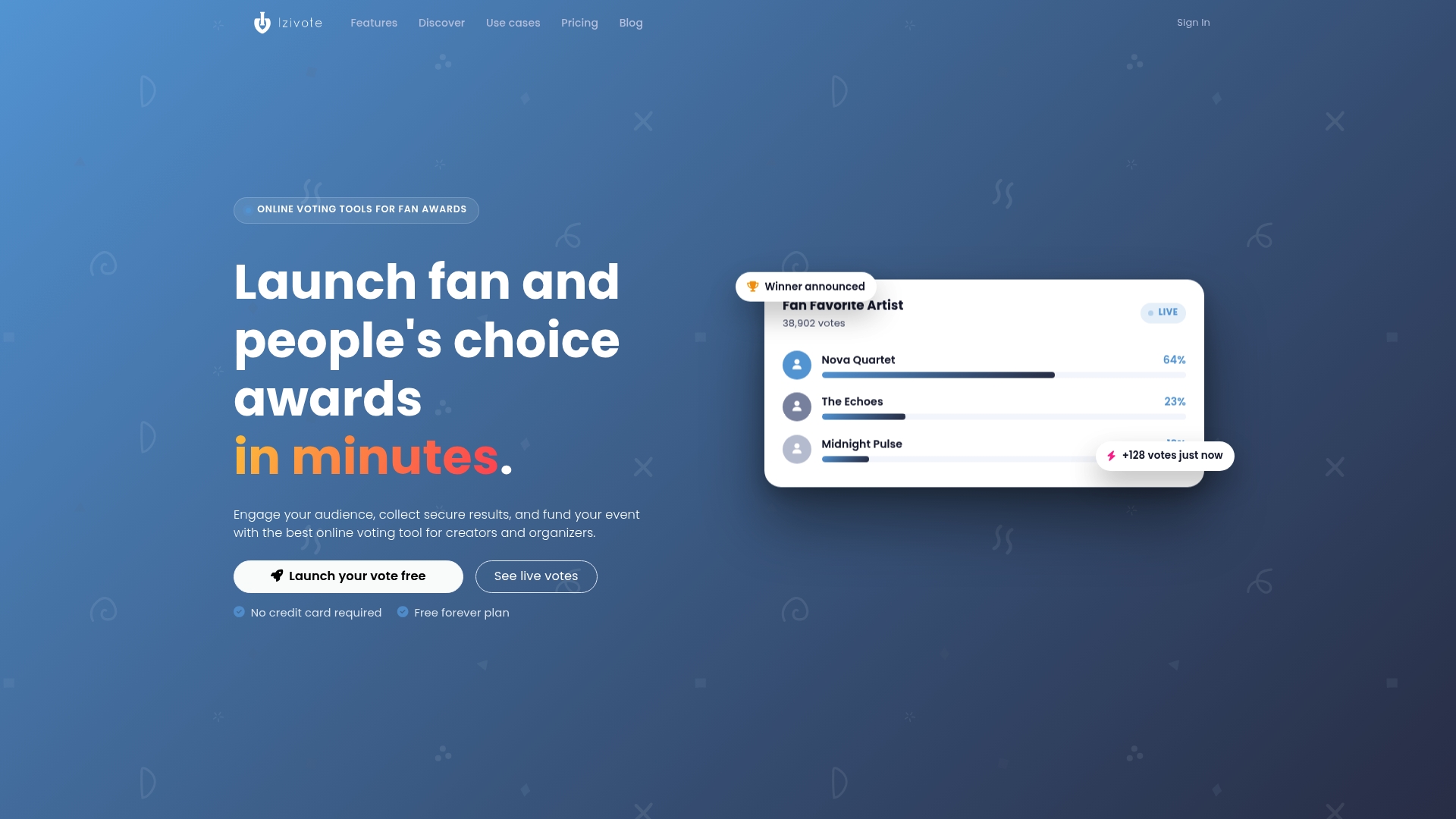
We built a platform specifically for public and people’s choice awards, where nomination intake needs to flow directly into secure, branded voting. The platform supports:
- Embeddable nominee profiles with photos, pulled straight from your approved shortlist.
- Multiple voting modes, including open voting, login-based voting, and paid voting with payment handling built in.
- Live result dashboards so organizers and audiences can watch standings update in real time.
- Automatic vote closing and real-time analytics, so you are not manually tracking a deadline across spreadsheets.
This setup fits fan awards, school and student election voting, and community or club awards where public engagement matters as much as the final result. Our pricing page lists our Free plan alongside Pro at $6 per month ($60 per year) and Premium at $14 per month ($140 per year), plus a 10% platform fee on paid votes. If your award is ready to move from nominations into a public vote, check our people’s choice awards use case to see how the setup works end to end.
FAQ
What should you write when nominating someone for an award?
Focus on a specific, concise achievement statement that explains what the nominee did, who it affected, and when it happened, rather than a general description of their character. Reference the exact award category criteria so reviewers can match your statement to what they’re scoring, and keep it within any stated word limit.
How do you get nominated for an award?
Nominations typically come from colleagues, members, or community contacts who submit a form on your behalf, so visibility and a track record in your category matter more than directly requesting a nomination. Some programs also allow self-nomination, which is worth checking in the award’s stated eligibility rules.
Is it okay to nominate yourself for an award?
Self-nomination is allowed by many award programs and is explicitly permitted on some nomination forms, so check the specific program’s rules rather than assuming it’s off-limits. When self-nomination is allowed, the same evidence standards apply: a clear achievement statement and any required supporting documents.
Can you share an example of how to write an award nomination?
A strong nomination opens with a one-sentence summary of the achievement, follows with two or three specific examples or outcomes, and closes with why the contribution fits the award category. Template pages like Typeform’s awards nomination form include hint text and category prompts that model this structure directly on the form.
What is the difference between a nomination form and a voting platform?
A nomination form collects and organizes entries for review, while a voting platform takes an approved shortlist and runs public or member voting on top of it, often with live results and payment handling for paid votes. Programs that only need to collect and score nominations can use a form alone; programs adding a public vote typically need both.
Sources
- Awards nomination form template — Typeform
- Condition nomination process — HRSA advisory committees
- Formpl
- Privacy Awareness Week nomination form — National Privacy Commission