Google Forms work fine for informal polls and casual team votes, but it falls short for formal elections where results need to hold up to scrutiny. The core problem is structural: Forms gives you no end-to-end verifiability and no cryptographic audit trail, so nobody can independently confirm that every vote was counted as cast. If your vote has real stakes, test thoroughly first or move to a system built for it.
TL;DR:
- Collecting verified Google Account emails helps flag duplicate submissions, but it removes anonymity and still cannot stop voters from using multiple accounts.
- Before launch, test the public link on a phone and laptop, verify the connected Sheet’s file ID, and submit from separate accounts and an incognito window.
- Keep Forms to informal, nonbinding polls; binding elections, board or union votes, and decisions with legal consequences need verifiable audit trails Forms cannot provide.
- Large votes should account for a 50,000 response summary cap and Sheet sync issues above roughly 100,000 rows; voter emails also create manual privacy duties.
Table of Contents
- Why Google Forms lacks the security guarantees elections need
- Common technical issues that break voting forms
- What Google Forms can be used for: safe, limited voting scenarios
- Pre-vote checklist: how to test a Google Form voting flow before launch
- Impact of multiple or duplicate submissions and prevention strategies
- Addressing and managing ballot stuffing and vote manipulation risks
- Limitations in customizing voting options and question types relevant to awards
- Integration challenges with third-party analytics and reporting tools
- User experience issues affecting voter turnout
- Handling of voter data privacy under relevant regulations
- Organizer perspective: balancing convenience and trust
- A purpose-built alternative to Google Forms voting issues
- FAQ
- Sources
Why Google Forms lacks the security guarantees elections need
End-to-end verifiability means a voter can confirm their own ballot was recorded correctly, and any observer can confirm the final tally matches every submitted ballot, without exposing who voted for what. It is the standard that separates a casual poll from a system you can defend if someone challenges the result.
Google Forms was not built with this standard in mind. Academic research on election security consistently draws a line between general-purpose survey tools and dedicated voting systems: specialist platforms implement verifiability and audit mechanisms that general-purpose tools lack, and organizers should not assume Forms provides election-grade guarantees just because it collects structured responses. There is no confirmation code a voter can check, no published proof a third party can audit, and no independent tally verification.
Toolkits built specifically for this purpose show what the gap looks like in practice. ElectionGuard and similar cryptographic toolkits generate confirmation codes and verifiable tallies that let voters confirm their ballot was cast as intended and let auditors confirm the count without seeing individual choices. Forms exposes none of this.
There is also a hard trade-off built into how Forms handles identity:
- Collect email addresses and you get authentication, but you lose anonymity because responses are tied to Google Accounts.
- Skip email collection and you get anonymity, but you lose any way to verify who actually voted or whether someone voted twice.
One structural gap drives most of the risk: Forms offers no cryptographic receipt or independent audit log, so a disputed result has no technical way to be resolved beyond trusting the raw spreadsheet.
Common technical issues that break voting forms
Most vote-day problems are mundane, not malicious. They still cost you results if you do not catch them early.
- A voter leaves a required field blank on mobile because the field was hidden below the fold, and the submission silently fails.
- A browser extension (ad blocker, privacy tool, or script blocker) interferes with the submission script and the vote never reaches Google’s servers.
- A weak or dropped connection cuts off submission mid-transfer, and the voter assumes it went through.
- The linked response Sheet does not match the live form because an admin edited a copy or linked the wrong file ID, so votes land somewhere nobody is watching.
- The account hosting the form hits a storage limit and stops accepting new responses without an obvious warning to voters.
- A burst of simultaneous submissions during a close vote creates response-limit edge cases that behave unpredictably.
Practitioner support threads confirm this pattern: most failed submissions trace back to mobile UI issues, connectivity, or browser extensions rather than anything exotic. Separately, a frequent admin mistake is linking an edit view instead of the live form, which makes real responses appear to vanish.
Pro Tip: Test the exact public link voters will use, not the edit link in your browser tab, on at least one phone and one laptop before you announce the vote.
What Google Forms can be used for: safe, limited voting scenarios
Forms earns its popularity honestly: it is free, familiar, and fast to set up. That makes it a reasonable fit for low-stakes situations where a disputed result would not carry real consequences.
- Informal team polls, like choosing a meeting time or a lunch spot.
- Small private club votes where the group already trusts each other and a tie just gets discussed.
- Non-binding popularity votes that feed into a larger decision rather than deciding it outright.
If you want to add a light layer of authentication without destroying anonymity entirely, one workable pattern is to require sign-in through Google Account email collection, then export the raw responses and manually strip identifying columns before anyone sees the tally. Google’s own documentation confirms Forms can require verified sign-in or allow anonymous responses, but not both at once without manual work on your part.
What Forms should never carry: binding governance decisions, board elections, union votes, or any public election with legal consequences. These need verifiable audit trails that a spreadsheet export cannot produce.
Pro Tip: Keep the voting window short (hours, not days) and spot-check a sample of responses manually. Shorter windows reduce the time available for coordinated manipulation.
Pre-vote checklist: how to test a Google Form voting flow before launch
Run this sequence before you send the link to a single voter:
- Confirm you are sharing the live published form URL, not an edit link.
- Open the linked response Sheet and confirm its file ID matches what you expect, not a duplicate or an old copy.
- Submit a test response from an incognito window, a phone, and a second Google Account to confirm the full path works end to end.
- Simulate a weak connection (airplane mode toggled mid-submission, or a throttled network) to see how the form fails.
- If you expect a surge of simultaneous votes, have several test accounts submit at nearly the same moment and check whether the Sheet records every one of them.
- Export the responses to CSV and confirm the format matches what you plan to use for counting or reporting.
Before announcing results, document what you will keep and for how long:
- A timestamped export of raw responses immediately after closing the form.
- A written note of who had edit access during the voting window.
- A backup copy of the response Sheet stored separately from the live file.
Google’s documentation on managing responses confirms Forms can stop accepting submissions once you close it, but closing does not retroactively fix a sync mismatch you missed during testing.
Impact of multiple or duplicate submissions and prevention strategies
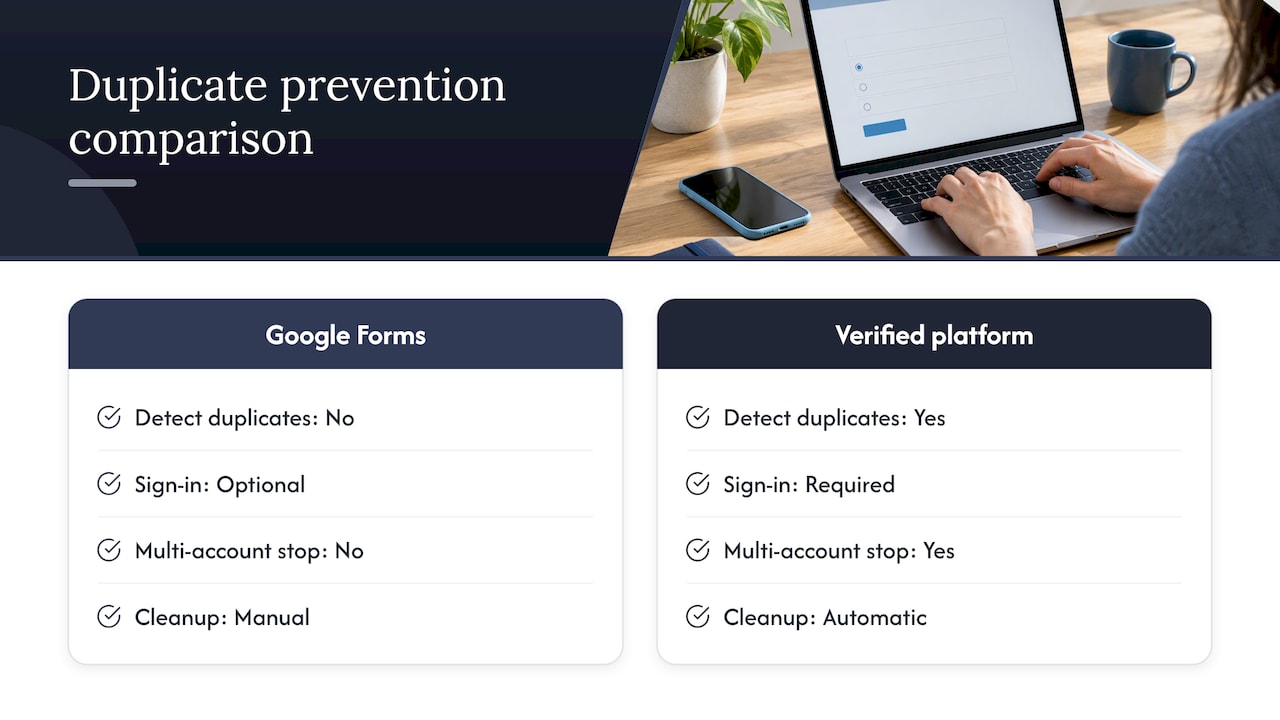
Duplicate submissions are one of the most common ways a Google Forms vote gets challenged after the fact. Without an authenticated voter roster, Forms cannot natively tell whether the same person submitted twice from two devices, two browsers, or a shared link passed around a group chat.
The practical impact scales with the size of the vote. In a ten-person team poll, a duplicate is a minor annoyance you can spot by eye. In a public awards vote with thousands of entries, duplicates can shift a close result and you have no reliable way to detect them after the fact, since anonymous responses carry no identifying marker to deduplicate against.
The only partial fix within Forms itself is requiring sign-in to collect verified Google Account emails, which lets you flag and remove duplicate submissions tied to the same account during your post-vote review. This does not stop someone from using multiple accounts, and it reintroduces the authentication-versus-anonymity trade-off covered earlier. Response limits can cap total submissions, but a response limit stops the count, not the duplication within it.
For votes where duplicate prevention actually matters, a platform with built-in identity verification at the point of voting, rather than a manual post-hoc cleanup, removes this failure mode by design rather than by spreadsheet triage.
Addressing and managing ballot stuffing and vote manipulation risks
Ballot stuffing is the more deliberate cousin of duplicate submissions: one person or a coordinated group submitting many votes to push a result. Google Forms has no native rate limiting per device or per network, so a determined voter can refresh and resubmit from the same browser repeatedly unless you require account sign-in.
Even sign-in requirements have a ceiling. Someone can create multiple free Google Accounts in minutes, and nothing in Forms flags that pattern for you. Security community discussions on this exact question conclude that Forms cannot verify an eligible voter list or detect coordinated manipulation, which is precisely why practitioners warn against using it for anything resembling a real election.
Research into coercion-resistant voting protocols goes further, showing that even verified sign-in does not address vote-buying or coercion, since someone can watch over a voter’s shoulder or demand proof of how they voted. Mitigating this in Forms requires manual vigilance: watching submission timestamps for suspicious clustering, cross-referencing IP-adjacent timing where visible, and manually disqualifying accounts created the same day as the vote. None of this scales past a small, low-stakes audience.
Limitations in customizing voting options and question types relevant to awards
Awards voting has specific needs that generic survey question types were not designed for: nominee photos next to each choice, grouped categories with a single winner per group, write-in options that do not break the tally, and a visual layout that makes browsing twenty nominees easy on a phone.
Forms gives you multiple choice, checkboxes, and dropdowns, which cover the basics but flatten everything into plain text options. There is no native way to attach a nominee’s photo directly beside their name in a multiple choice question, so organizers resort to workarounds like numbered lists referencing a separate image gallery, which adds friction exactly where you want voting to feel effortless.
Multi-category awards compound the problem. Each category needs its own question block, and voters scrolling through a long form for ten award categories are more likely to abandon partway through or miss a required field, which loops back into the submission failures covered earlier. There is also no built-in way to prevent a voter from selecting the same nominee across categories where that would be considered a conflict, since Forms has no cross-question validation logic for that use case.
Integration challenges with third-party analytics and reporting tools
Once a vote closes, many organizers want more than a raw count. They want engagement trends, vote distribution by category, or a public-facing results page that updates live. Google Forms routes everything into a connected Sheet, which works as a data dump but was not built as a reporting layer.
Pulling that Sheet data into a dashboard or analytics tool means building your own export and import pipeline, usually a manual CSV download followed by a reformat before anything else can read it cleanly. There is no native live connection to common business intelligence tools, so “real-time” results generally mean refreshing a Sheet and re-running a chart, not an actual live feed.
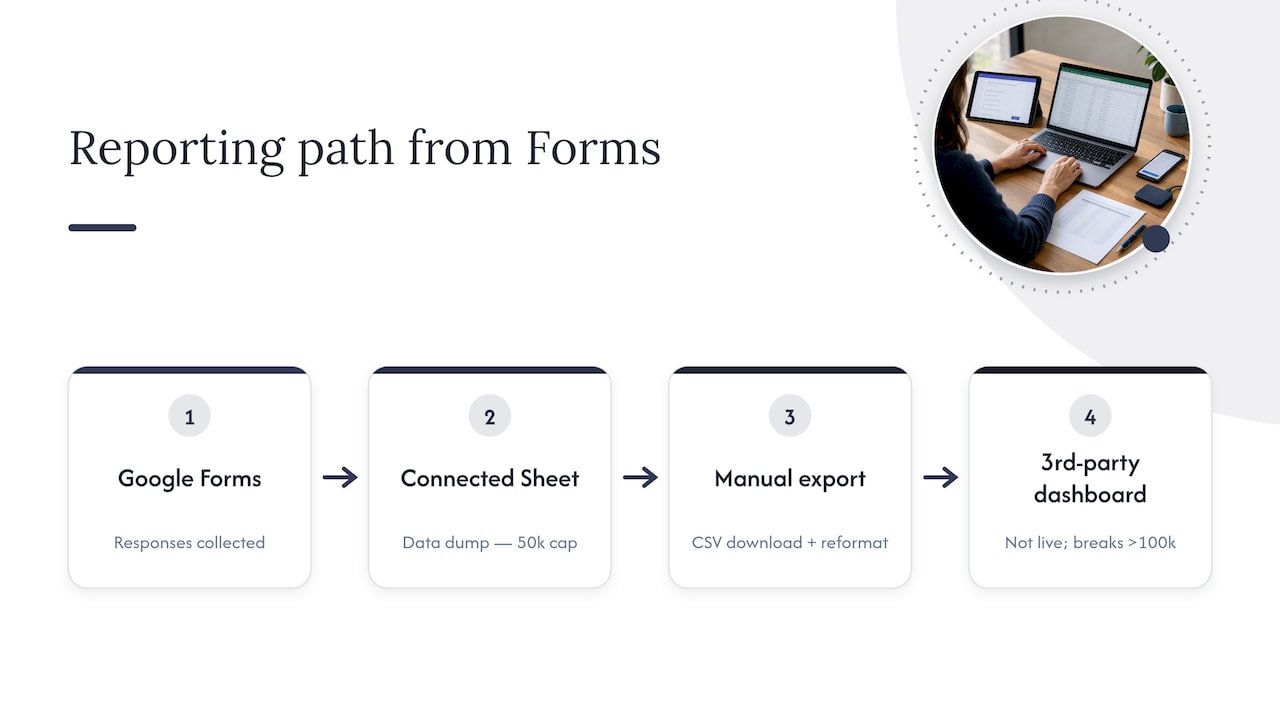
At scale, this gets harder. Google’s own documentation notes that very large response sets hit summary and sync limits, including a 50,000 response summary cap and sync issues once a connected Sheet grows past roughly 100,000 rows. For an organizer trying to show a public live leaderboard during an active vote, that is a meaningful ceiling, and it means any third-party dashboard you build on top is only ever as current as your last manual export.
User experience issues affecting voter turnout
A voting form that is hard to use loses votes, full stop. Forms was designed as a generic survey tool, and that shows up in small frictions that matter more during a time-limited public vote than they would in an internal team survey.
Long scrolling lists of nominees with no photos or grouping make it hard for a voter to quickly find their favorite in a crowded category, and that friction tends to show up as abandoned sessions rather than complaints. Mobile responsiveness is generally solid, but required-field errors are easy to miss on a small screen, which ties directly back to the submission failures covered earlier. There is also no progress indicator for multi-category awards forms, so a voter filling in category six of ten has no sense of how much is left, which can prompt them to give up.
None of these are catastrophic individually, but together they shape turnout more than organizers expect. A form that takes ninety seconds to complete with clear visual cues keeps more voters through to submission than one that takes three minutes of scrolling through plain text options.
Handling of voter data privacy under relevant regulations
Collecting voter emails for authentication means you are collecting personal data, and that triggers privacy obligations depending on where your voters are located. Google’s infrastructure handles storage and account security on its end, but the responsibility for how you collect, use, and retain that data as an organizer sits with you, not with Google.
Under regulations like the EU’s GDPR, collecting email addresses for voter verification generally requires a lawful basis for processing, a clear statement of what the data will be used for, and a defined retention period after which you delete it. Google Forms gives you no built-in consent management, no automatic data retention timer, and no built-in mechanism for honoring a deletion request beyond manually editing the Sheet yourself. If a voter later asks you to remove their data, that is a manual process you have to track and execute.
For a ten-person office poll this is a minor administrative task. For a public vote collecting emails from voters across multiple countries, it becomes a real compliance obligation that a spreadsheet was never built to manage, and organizers should treat that gap as a planning requirement, not an afterthought.
Organizer perspective: balancing convenience and trust
Forms earns its place in a lot of toolkits because it is free and nobody needs onboarding to use it. The tipping point usually arrives the moment a vote has real stakes attached: money, reputation, or a result someone is willing to challenge. That is when organizers start asking for receipts, audit logs, and a tally nobody can quietly edit after the fact, and a general-purpose survey tool was never built to answer that ask.
The question is never whether Forms works. It’s whether you can defend the result if someone asks you to prove it.
— Joshua
A purpose-built alternative to Google Forms voting issues
When a vote needs to hold up to scrutiny, we built Izivote to close the exact gaps covered above. Identity-based voting ties each ballot to a verified participant without forcing you to manually strip and reconcile a spreadsheet afterward, and our paid voting mode handles payment collection directly.

Our dashboard shows live results as they come in, without the manual export-and-reformat cycle a connected Sheet requires, and embeddable voting pages let you run the vote directly on your own event site instead of sending voters to a separate link.
Upgrading makes sense once a vote crosses from informal into binding: elections with real consequences, large public audiences where duplicate detection matters, or fundraising votes where your supporters expect a receipt.
- Identity-based and paid voting modes built to support authenticated, auditable results.
- Live public results dashboard instead of a manual Sheet export.
- Embeddable voting pages for your own site.
- A free tier for small events, with Pro and Premium plans for larger ones.
See current plans and pricing to find the right fit for your next vote.
FAQ
Can Google Forms be hacked or manipulated during a vote?
Google Forms has no built-in protection against a single voter submitting multiple times unless you require sign-in, and even sign-in can be bypassed with multiple free accounts. Security community analysis confirms Forms cannot verify an eligible voter list or detect coordinated manipulation, which is why practitioners treat it as unsuitable for binding elections.
How do I stop bots or duplicate votes in Google Forms?
Requiring sign-in to collect verified Google Account emails is the main built-in option, letting you manually flag and remove duplicates tied to the same account. It does not stop someone using multiple accounts, so for votes where this risk matters, a platform with identity verification built into the voting step is a more reliable approach.
Why isn’t my Google Form syncing responses to my spreadsheet?
The most common cause is linking the wrong file, often an edit link or a duplicate copy instead of the live form’s actual response destination. Google’s troubleshooting documentation recommends verifying the file ID and ownership of the connected Sheet before assuming responses are missing.
Is Google Forms GDPR compliant for collecting voter data?
Google Forms gives you no built-in consent management or automatic data retention controls, so compliance with regulations like GDPR depends on how you, as the organizer, collect, store, and delete voter data manually. For public votes collecting personal information across multiple countries, this becomes a real administrative obligation rather than a minor detail.
What is the response limit for Google Forms?
Google’s documentation notes a 50,000 response summary limit, along with sync issues that can appear once a connected Sheet grows past roughly 100,000 rows. For smaller polls this rarely matters, but large public votes should test this behavior ahead of time.
Sources
- POLYAS / GI elections paper: online voting security and verifiability (2019)
- ElectionGuard: a Cryptographic Toolkit to Enable Verifiable Elections (USENIX paper)
- Community thread: Can not submit Google Form — how to fix it?