Category: Events

  • Pageant Voting Setup: How to Launch Fair Online Voting

    Pageant Voting Setup: How to Launch Fair Online Voting

    Setting up pageant voting comes down to six decisions: who votes, how votes are counted, whether votes are free or paid, how voters prove they are real, how contestants appear, and when voting opens and closes. Make those choices first, then build the voting page, test it, and publish. With a self-serve platform like Izivote, the build itself can be quick. The planning is what protects your pageant’s reputation.

    This guide walks through the whole setup in the order you will do it, with checklists you can copy into your own planning document.

    Izivote
    izivote.com
    Make Pageant Voting Clear and Secure
    Izivote helps pageant organizers run public audience awards with identity-based voting, transparent results, and real-time vote analytics.

    Set up pageant voting

    Key Takeaways

    • Decide the scoring model before you touch any software: public vote only, judges only, or a weighted blend of both.
    • Choose a voting mode that matches your risk. Open voting is easiest, while login-based or identity-based voting makes duplicate votes harder.
    • If you allow paid votes, publish the price per vote, the fee, where the money goes and the closing time before voting opens.
    • Test on a private run with real phones, then announce the rules and schedule to contestants in writing.
    • On Izivote you can start free, and paid voting carries a 10% platform fee per vote.

    Table of Contents

    Start With the Scoring Model

    Before you create anything online, answer one question: what decides the winner? Pageants usually land on one of three models.

    ModelWho decidesBest forWatch out for
    Public vote onlyFans and audienceFan favorite, People’s Choice, Miss Popularity titlesContestants with bigger social followings can dominate
    Judges onlyA scoring panelFormal titles with interviews and talent roundsLittle audience involvement
    BlendJudges plus publicMain crowns that need credibility and buzzNeeds a clear, published formula

    Izivote is built for public audience awards, so it is the right tool for the public side of any of these models. A common and clean approach is to run the public vote online as its own award, such as Audience Favorite, and keep the judges’ scoring on your own scoresheets. If you want a blend, announce the formula in advance, for example the share of the final result that comes from the public and the share from the panel. Contestants accept results more easily when the math was visible from day one.

    If your pageant already has a main crown decided by judges, a separate public award is often the simplest first step. It adds excitement without changing the way your core title is decided.

    Plan Categories and Contestant Profiles

    Categories drive how people vote, so plan them on paper first.

    Choose your categories

    Typical pageant categories include:

    • Audience Favorite or People’s Choice
    • Best Talent
    • Best Evening Wear
    • Most Photogenic
    • Best Community Impact
    • Rising Star (for juniors or first-timers)

    Keep the list short. Every extra category splits attention and multiplies the questions you will answer from contestants. Three to five categories is plenty for most local pageants. Izivote supports multi-category voting, so voters can move through your categories in one visit rather than returning several times.

    Gather contestant materials

    Voters pick faces and stories, so collect assets from every contestant before you build:

    1. A clear, well-lit headshot in a consistent crop. Square or portrait photos work best on mobile screens.
    2. A short bio of 40 to 80 words.
    3. Contestant number or sash name, spelled exactly as it will appear on stage.
    4. Optional: one social link and a sponsor or cause they represent.
    5. Written permission to publish the photo and details online. For contestants under 18, get this from a parent or guardian.

    Izivote supports nominee photos and profiles, and also self-nomination, which lets contestants submit their own entries. Self-nomination is useful when you have an open call. If you want full control of the field, enter the contestants yourself instead.

    Give every contestant the same amount of information. A page where one contestant has a paragraph and a video while another has a single line looks unfair, even if nobody meant it.

    Pick the Right Voting Mode

    The mode is the rule for who may vote and how often. Izivote offers open, paid, login-based and identity-based voting. The voting types and voter identity guide explains each in detail. Here is how to think about the choice for a pageant.

    ModeHow it works in practiceGood fit
    OpenAnyone with the link can voteSmall community pageants, low stakes
    Login-basedVoters sign in before votingMid-size pageants that want fewer duplicate votes
    Identity-basedVoters are tied to a verified identityPageants with prizes, scholarships or sponsors on the line
    PaidVoters buy votesFundraising pageants and fan-driven titles

    A useful rule: the more the title is worth, the more identity you should require. A school spirit pageant can run open. A pageant with a scholarship or a cash prize should use login or identity-based voting. You can read how login-based voting works and how to set it up before deciding.

    Free Votes or Paid Votes

    Many pageants use voting to raise money, and that is a legitimate goal when it is done openly. The question is which approach fits your event.

    Free voting maximizes participation and avoids any impression that a title can be bought. It suits titles where credibility matters more than revenue.

    Paid voting turns audience enthusiasm into funds for your cause, scholarship pool or production costs. On Izivote, paid voting is handled through the platform, with a 10% platform fee per vote. Our guides on open versus paid voting and on how fees, sponsors and fairness fit together go deeper on the trade-offs.

    A hybrid works well for many pageants: one free vote per person per day, plus the option to buy more. Another is to keep the main crown free and make a separate fan award paid.
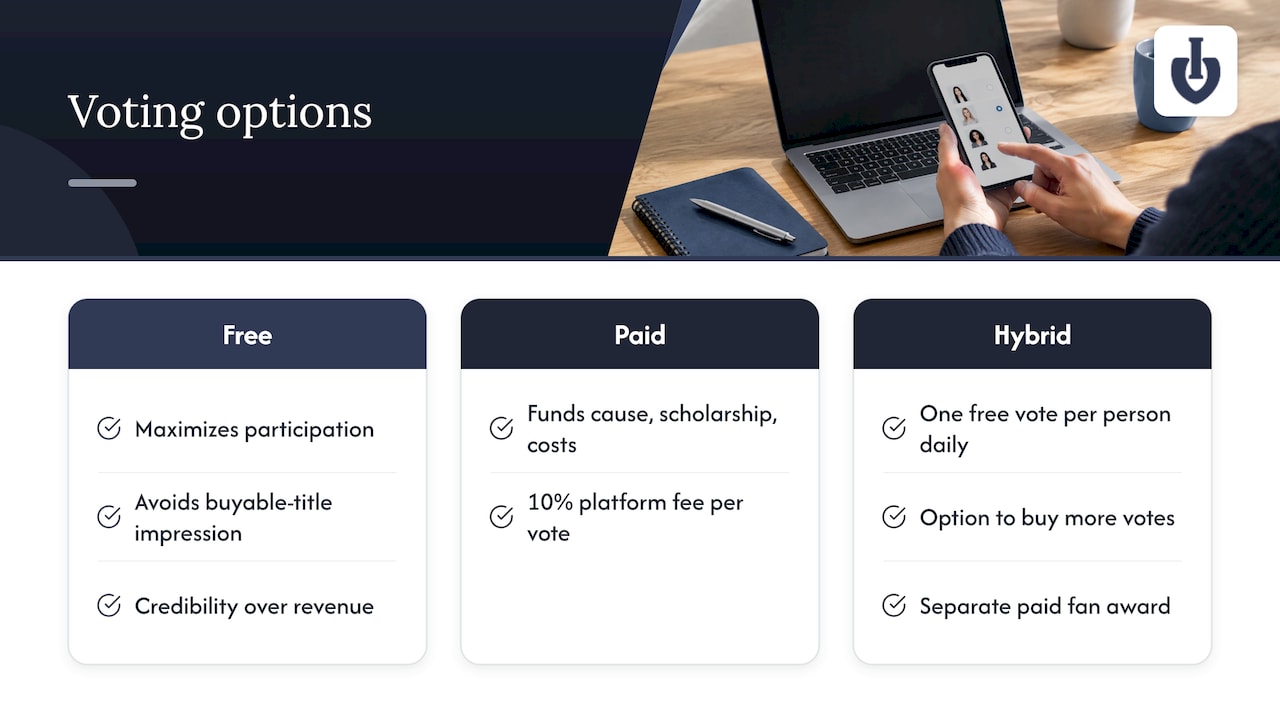
    Free, paid, and hybrid voting options compared

    What to disclose before voting opens

    If any votes are paid, put these in writing on the voting page and in your announcements:

    • The price of a vote or vote bundle
    • What the money funds, and who receives it
    • Whether paid votes count toward the main title or only a fan award
    • The platform fee applied to each paid vote
    • The exact opening and closing time, with time zone
    • How ties are broken
    • Refund policy, if any

    Paid voting and prize contests can be regulated differently depending on where you are and who benefits, so check with your attorney or your local regulator before you launch a fundraising pageant. Do that before announcing, not after.

    Step-by-Step Pageant Voting Setup

    Here is the build sequence on Izivote. The create a vote page starts the process and you can begin on the free plan.

    1. Create your account and a new vote. Give it a clear name, such as the pageant name and year.
    2. Add categories. Enter the categories you planned. Put the headline award first.
    3. Add contestants. Upload each headshot, name and bio. Use the same photo crop for everyone.
    4. Select the voting mode. Choose open, paid, login-based or identity-based voting for each the way you planned above.
    5. Set prices if paid. Enter your vote price and check how the 10% platform fee applies to your totals.
    6. Set the schedule. Pick start and close times. Automatic vote closing means the voting ends exactly when you said it would, with no one needing to log in at midnight.
    7. Brand the page. Add your logo, title and a short description with the rules.
    8. Preview on a phone. Most votes will come from mobile devices.
    9. Publish and share the link.

    For the people’s choice side, see the people’s choice voting tools, and for broader contest formats see online voting for awards and competitions.

    Branding and Embedding

    Your voting page should feel like part of the pageant, not a detour. Use the pageant’s logo, colors and wording. Write the page description in the same tone as your social posts.

    If you already have a pageant website, you can embed the voting page there so fans vote without leaving your site. That keeps traffic, sponsor logos and your story in one place. If you do not have a site, share the voting link directly on social media, in email and on printed programs or posters.

    Create a short, memorable message for contestants to share, such as “Vote for me in the Audience Favorite award.” Contestants who promote themselves drive most of the traffic, so make it easy for them.

    Running Voting Live and Showing Results

    Pageants have two rhythms: weeks of online voting before the show, and a live moment when the winner is revealed. Plan both.

    Before the show

    Decide whether the public can see the live standings. Izivote offers real-time results, and public results add excitement and transparency. The tradeoff is that visible leaderboards can encourage a late rush or discourage contestants who are far behind. Some organizers show results throughout, while others hide totals until the final days. Either approach is fine if you say which one you will use in advance.

    As the organizer, use the dashboard to monitor activity. The guide on real-time vote monitoring shows what to watch for, such as sudden spikes at odd hours.

    During the live show

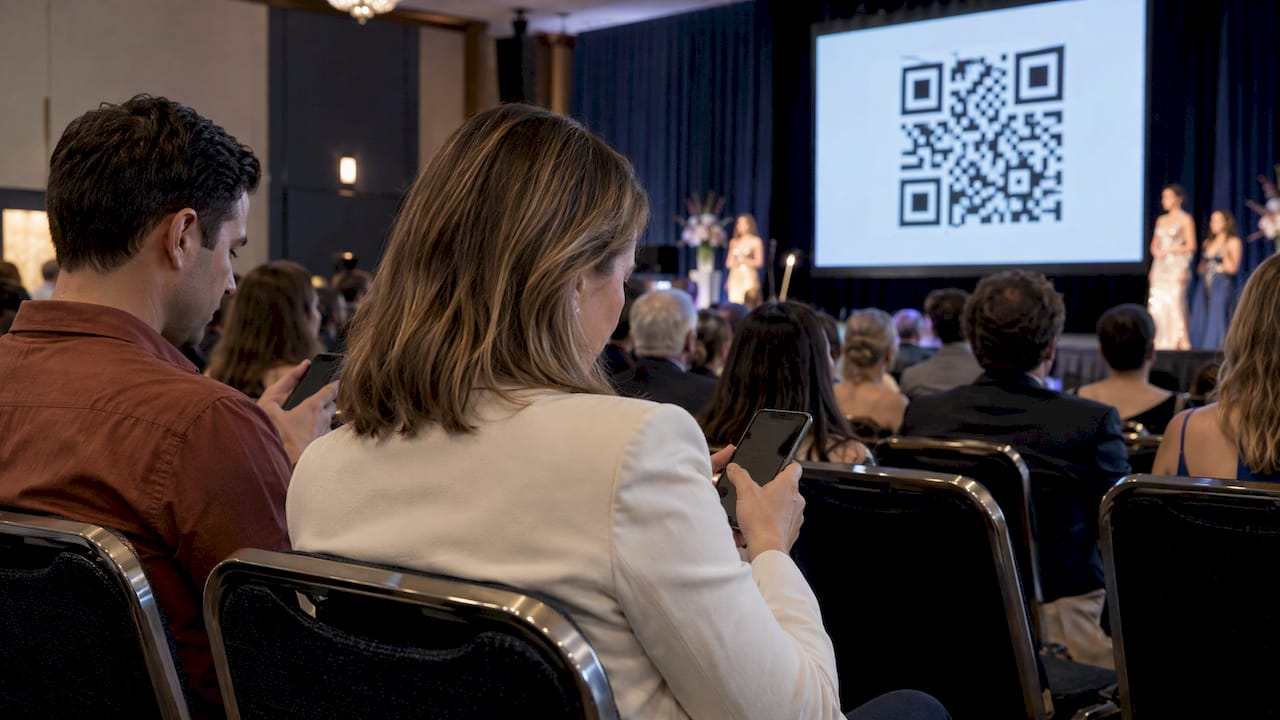
    For a live event, you can show the voting page on a screen and invite the audience to vote from their phones with a QR code. Our live event voting use case covers that format. Close voting at a set moment during the program, announce it from the stage, and let automatic closing lock the count.

    If you blend public votes with judges’ scores, have a person you trust combine the numbers using the published formula, and announce the public results first or last in a consistent way.

    Promoting the vote

    Voting only works if people show up. Think about who your contestants’ audiences are, and aim promotion at them: families, school communities, local businesses and sponsors. A primer on audience targeting basics can help you shape the messages. Give each contestant the same promo kit, including the link, the closing time and a short caption.

    Security and Fairness

    The biggest threat to a pageant’s reputation is a result people do not believe. Plan for duplicate votes, bots and ballot stuffing from the start.

    A well-documented example from a large TV talent show shows the principles. In that case study of a cloud-based voting platform, voting required an authenticated user, each session received a short-lived token, all calls ran over HTTPS, and tokens could be revoked if abuse was detected. Contestant videos were also shown in random order so each hopeful received an even share of exposure.

    You can borrow those ideas at pageant scale:

    • Require sign-in or identity for any title with real stakes. Our guide to preventing duplicate votes in online contests explains the options.
    • Make order fair. If your page lists contestants, avoid always putting the same person first.
    • Watch the dashboard for unusual surges, and set a rule in your terms that suspicious votes may be reviewed.
    • Keep a record of how you handled any disputes, so your decisions are consistent.

    Say in your rules that the organizer’s decision on irregular votes is final. Contestants need to know this before voting starts.

    Test Before You Open Voting

    A private test run catches most problems. Do it at least a few days before launch.

    1. Vote from three devices: an iPhone, an Android phone and a laptop.
    2. Try each voting path: open, sign-in and paid, whichever you will use.
    3. Check every contestant card. Photos, spelling, number and bio.
    4. Make a test payment if you use paid votes, and confirm the amount matches the price you announced.
    5. Confirm the schedule and time zone. Check that the closing time displays correctly.
    6. Ask two people outside the pageant to find the page and vote without help. If they stumble, simplify the wording.
    7. Check the results view so you know what the public will see.

    Once you are happy, clear out any test data before going public.

    Communicate With Contestants and Voters

    Send contestants a short written note before the public launch. Include:

    • The voting link and the opening and closing times
    • Whether voting is free or paid, and the vote price if paid
    • How the winner will be decided, including any judge blend
    • What contestants may and may not do to get votes (for example, no fake accounts, no offering gifts for votes)
    • Who to contact with problems

    For voters, put a plain rules summary directly on the voting page. Three or four lines is enough. Repeat the closing time in every post you publish.

    After voting closes, announce results quickly and thank all contestants. A prompt, well-explained result calms disputes before they begin.

    Start Your Pageant Vote With Izivote

    Izivote is an online voting platform made for fan and people’s choice awards, with multiple voting modes, nominee profiles, live results and a dashboard for organizers. You can start on the Free plan. Pro costs $6 per month or $60 per year, and Premium costs $14 per month or $140 per year. Paid voting carries a 10% platform fee per vote. See the full plan details to compare.
    Izivote

    Ready to build? Create your pageant vote and have a draft page ready to preview today.

    FAQ

    How long does pageant voting setup take?

    The build can be quick once your photos, bios and rules are ready. Gathering contestant materials usually takes longer than the software. Plan a few days for a private test before you go public.

    Should I let the public vote, or only judges?

    It depends on the title. A public vote suits fan favorite and People’s Choice awards, while judges suit formal crowns. Many pageants run both, with a published formula or a separate public award.

    Can I raise money with pageant votes?

    Yes, with paid voting. On Izivote, paid votes carry a 10% platform fee. Disclose the price, the cause and the closing time up front, and check local rules with your attorney before launching.

    How do I stop one person from voting many times?

    Choose login-based or identity-based voting for any pageant with real prizes, and monitor the dashboard for unusual spikes. State in your rules that irregular votes may be reviewed.

    Sources

    Recommended

  • Award Show Live Results: How to Run Them Right

    Award Show Live Results: How to Run Them Right

    Live results at an award show come from three things working together: a fixed voting window, a counting system that updates as votes arrive, and a verification step before anyone announces a winner. Big broadcasts keep a live leaderboard moving, then validate the final tally before the reveal. You can run the same model for a fan award, a pageant or a community event with an online voting platform, a results screen and a clear rulebook.

    This guide explains how the big shows do it, what you can borrow at any size, and how to set up your own live results without losing the audience’s trust.

    Izivote
    Bring Live Results to Your Award
    Manage fan and people’s choice voting with real-time analytics and a dashboard to monitor votes.

    Key Takeaways

    • Live results are a display choice. You can show a running leaderboard, show nothing until the reveal, or share a temporary ranking and confirm the final tally after voting closes.
    • Set the voting window, the rules and the voter identity method in writing before voting opens.
    • Protect the count with identity checks, vote limits and monitoring. Then verify before you announce.
    • Leave time between the close of voting and the reveal. Live programming needs that gap for the final tally.
    • A platform with real-time dashboards, embeddable voting pages and automatic vote closing removes most of the manual work.

    Table of Contents

    What “live results” means at an award show

    People search for “award show live results” for two different reasons. Some want the winners as they are announced on television. Others, and this guide is for them, run an award and want to show results while the audience votes.

    For organizers, live results usually means one of three formats:

    1. Running leaderboard. Vote totals update on a public page or a screen as votes come in.
    2. Hidden count, live reveal. Votes are collected and counted in the background. Nobody sees totals until the announcement.
    3. Hybrid. A temporary ranking or a top-three view is shown during voting, and the confirmed result follows once voting closes and the tally is checked.

    Each format changes how people behave. A running leaderboard drives excitement and sharing, because nominees and their fans can watch progress and push for more votes. A hidden count protects the surprise and cuts down on last-minute vote swings. The hybrid keeps energy high without promising a final result before it is verified.

    Choose the format first. Everything else, from the technology to the script on stage, follows from it.

    How the big broadcasts handle live voting

    Television shows are a useful model because they deal with huge volumes, hard deadlines and public scrutiny.

    Eurovision: instant recording, careful validation

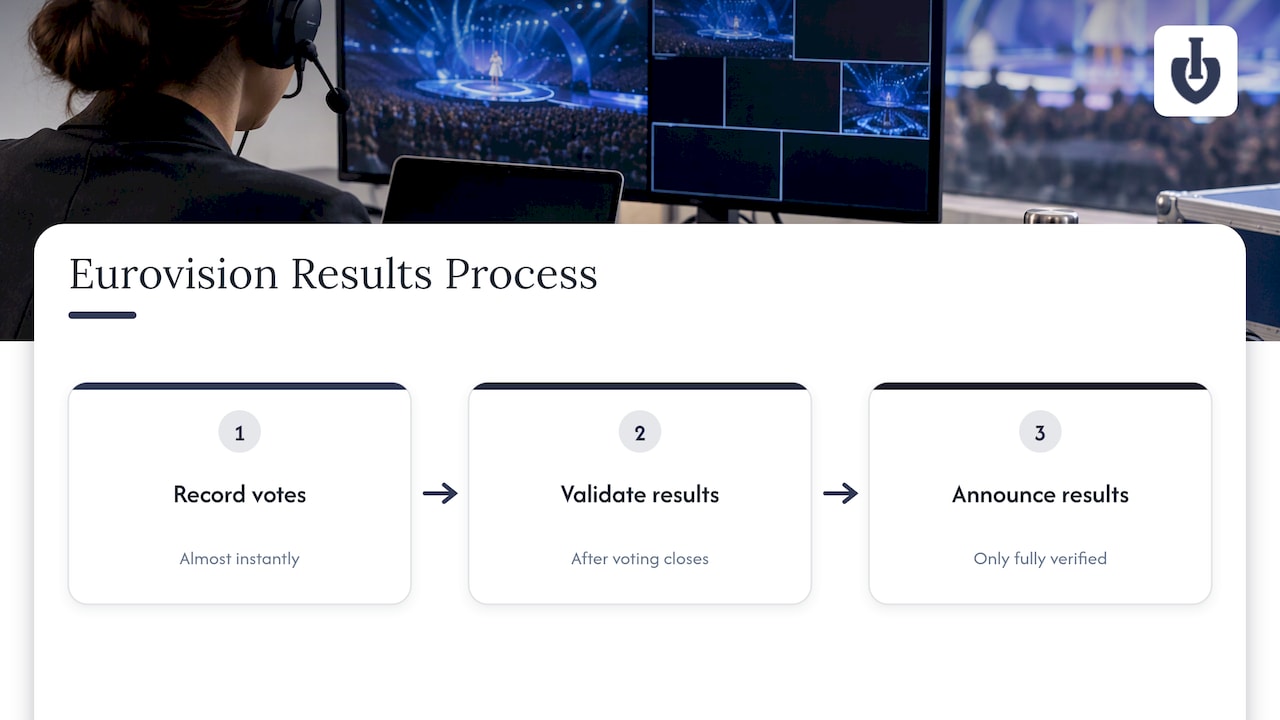
    Eurovision says its votes are transmitted and recorded almost instantly as they are cast, with real-time monitoring of incoming traffic. Final validation and reconciliation happen right after voting closes, and an on-site team makes sure only fully verified results are displayed and announced during the broadcast.

    The lesson for any organizer is the split between two jobs. Collecting and counting votes happens continuously. Declaring a winner happens only after validation.

    Eurovision: instant recording, careful validation

    America’s Got Talent: a hard cutoff and an on-the-spot count

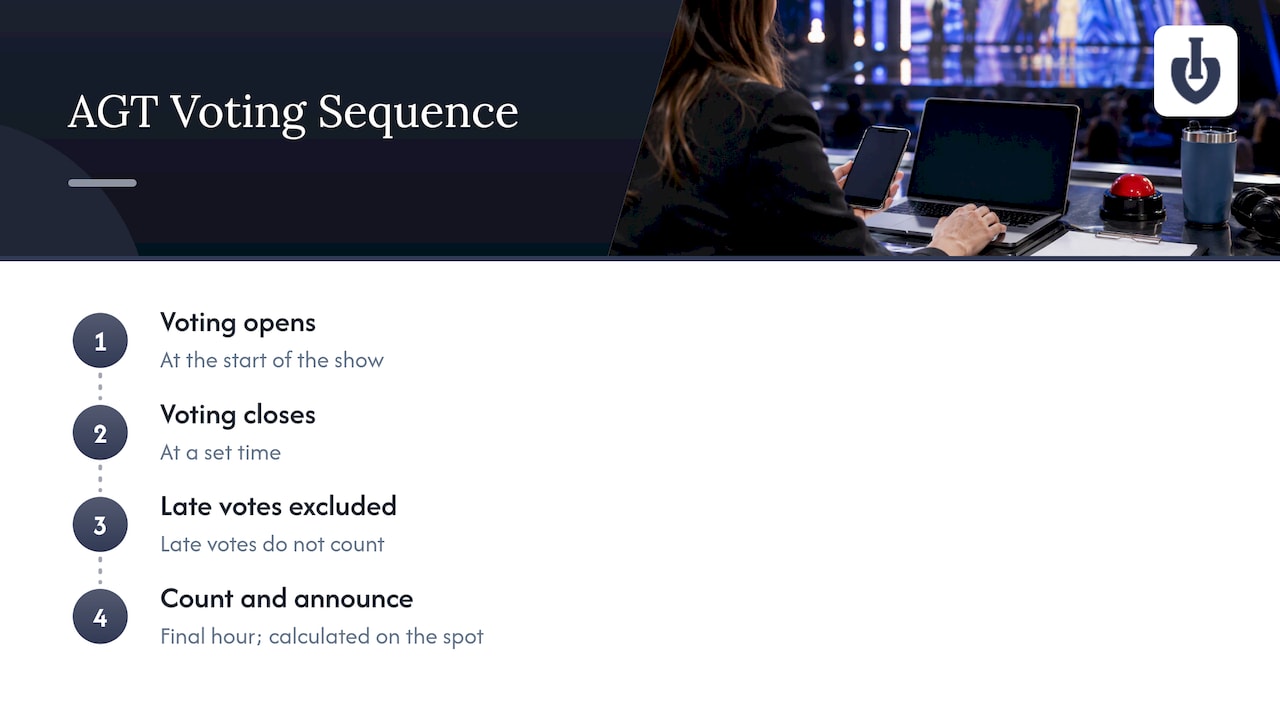
    NBC’s guide to the live episode explains that voting opens at the start of the show and closes at a set time, and that the final hour is a results show where votes are calculated on the spot and announced right away. Viewers have to vote early because late votes do not count.

    For your own event, this is the case for a visible countdown and automatic closing. A voting window that ends at a defined moment is easier to defend than one that someone closes by hand.

    America's Got Talent: a hard cutoff and an on-the-spot count

    Sky Italia’s X Factor: sharing a temporary ranking

    Sky Italia’s report on its voting platform describes near real-time results sharing introduced in 2022, where the host shares a temporary ranking while voting is still in progress. It also notes that closed sessions are checked live by a notary who documents the results, and that the platform reached a peak of 400,000 votes per minute.

    That is the hybrid format at broadcast scale: a ranking you can talk about on stage, plus a documented check when voting ends.

    Choose your results format and rules before voting opens

    The most common live-results problem is not technical. It is a rule that nobody wrote down. Before you launch, settle these points and publish them where voters can see them.

    The BBC’s audience interactivity guidance says organizers should consider whether a public vote is appropriate, choose a method that suits the target audience, make sure rules and terms are clear, plan with adequate resources, and agree a contingency plan before the vote runs. Referendum Lab’s guide to online voting adds that the building blocks are a defined ballot, a fixed voting window and an automatic count with an audit trail.

    Turn that into a short rulebook:

    DecisionWhat to fix in writing
    Voting windowExact opening and closing time, with time zone
    Who can voteAnyone, logged-in users, or verified identities
    Votes per personOne per category, one per day, or unlimited if paid
    Paid votesWhether they exist, their price, and whether they affect the ranking
    What is shown liveFull leaderboard, top few, percentages only, or nothing
    Tie ruleHow a tie is resolved and who decides
    Final announcementWhen and how winners are confirmed
    ContingencyWhat happens if the site goes down or a result is challenged

    The tie rule and the contingency line are the two most often skipped. Write both now, because you will not want to invent them under pressure.

    Choose a voting method that matches your audience

    Izivote supports several voting modes, so you can match the method to the event. Our voting types guide covers how each one works.

    • Open voting. Anyone with the link can vote. It is fast and low friction, which suits casual community contests and school events. It also needs the most monitoring.
    • Login-based voting. Voters sign in first, which ties each vote to an account. Read how login-based voting works before you choose it.
    • Identity-based voting. Voters confirm who they are, for example by email. Our guide to email verification voting explains when this fits.
    • Paid voting. Voters buy votes, which turns the contest into a fundraiser. See the comparison of open and paid voting for how each affects fairness.

    A simple way to decide: the higher the stakes and the more money involved, the stronger the identity check should be. A office photo contest can run open. A pageant with a cash prize or a charity gala with ticketed votes should not.

    Show live results without losing trust

    A live display can create excitement or doubt. What decides which is mostly how you present it.

    Label what the audience is seeing

    If a leaderboard moves while voting is open, say it is provisional. A line such as “Current standings, final results confirmed after voting closes” sets the expectation. Sky Italia’s practice of sharing a temporary ranking while voting is still in progress works because the host frames it that way.

    Pick the right display for the room

    • On a big screen at a live event: show the top three or top five per category with large nominee photos, not a full table. Audiences read a screen from a distance.
    • On a public results page: show every nominee with a photo, name and vote count or share, so entrants can point their followers to it.
    • On social channels: post screenshots at set intervals, such as at the halfway point and one hour before close, instead of constant updates.

    Live scoreboards change how participants feel about an event. A write-up on why live results change the participant experience makes the case for tournaments, and the same logic applies to fan awards. Pairing a visible leaderboard with good audience engagement strategies keeps people returning to the page while voting is open.

    Decide what you hide

    If the reveal is part of the show, hide the final hours. A common approach is to freeze the public display shortly before close while the count continues behind the scenes. Announce the freeze in your rules, so nobody reads it as manipulation.

    Keep the count clean: duplicates, fraud and monitoring

    A live leaderboard attracts attention, and attention attracts gaming. Eurovision describes its integrity approach as a combination of telecom controls, platform safeguards, real-time monitoring and post-vote verification, so only valid votes are counted. You can use the same layers at your own scale.

    1. Limit what one person can do. Decide how many votes each voter gets, and enforce it through accounts or verified identities, not only a browser cookie.
    2. Watch the live feed for spikes. A nominee who jumps by thousands of votes in minutes deserves a look. Our guide to real-time vote monitoring shows what to watch for during an event.
    3. Use the strongest identity method you can afford in friction. Each extra step reduces abuse and also reduces turnout, so match it to the stakes.
    4. Review flagged votes before the reveal. Keep a short list of anomalies and decide ahead of time what you will do with them.
    5. Keep a record. An export of votes by time and category lets you answer a challenge with facts.

    Security researchers also warn that polls, whether authenticated or anonymous, can be manipulated if validation is weak, which is why oversight matters more than a polished interface.

    Verify the tally and announce winners

    The reveal is where trust is won or lost. The big awards share a pattern: a defined count, an independent check and tight control over who knows the result.

    • The Academy says Oscars voting is by secret online ballot tabulated by an independent accounting firm, and winners are announced live on the broadcast.
    • The Tony Awards rules say online balloting runs in the weeks before the ceremony and that strict precautions keep the winners’ names known only to a limited number of accounting firm representatives until the telecast.
    • Eurovision describes an audit step after voting closes to confirm compliance with the rules before results enter the official tally.
    • The BBC says votes must be run in a robust, fair and accurate manner, and that enough time must be allowed between closing and announcing so votes can be received, verified and collated, especially in live programming.

    For a fan award, you do not need an accounting firm. You do need a repeatable routine:

    1. Voting closes automatically at the published time.
    2. One named person exports the final totals and checks them against the live dashboard.
    3. Flagged or invalid votes are handled by the rule you wrote earlier.
    4. A second person confirms the winners before they go into the script or the envelope.
    5. Winners are announced, and the results page is updated to show the confirmed standings.

    Allow at least a short buffer between close and reveal. Even a few minutes lets you complete steps two to four without rushing.

    A run-of-show timeline for a live award

    This timeline works for a gala, a stream or a school showcase.

    WhenWhat happens
    Weeks beforePublish rules, categories and nominee profiles. Open the voting page.
    During the campaignShare nominee links. Check the dashboard daily for unusual activity.
    Day of the eventRemind voters of the closing time. Test the results screen.
    During the showShow a provisional ranking if your rules allow it. Take final votes up to the cutoff.
    CloseVoting ends automatically. Freeze the display if you planned a reveal.
    VerificationExport totals, check flags, confirm winners with a second person.
    AnnouncementReveal winners and publish the confirmed results page.

    Privacy, accessibility and payments to plan for

    A few practical points belong on your checklist before you collect votes from the public.

    • Privacy. If voters sign in or verify an email address, tell them what you collect and why, and link to your privacy notice from the voting page. Collect only what the voting method needs.
    • Accessibility. Make sure nominee names, photos with descriptive text, buttons and the results display can be used by people with different abilities. Check your screen colors for contrast, and do not rely on color alone to show who leads.
    • Payments. If you run paid voting, state the price per vote, what a vote does, and whether purchases are refundable, before the voter pays. On Izivote, paid voting carries a platform fee of 10% per vote, which is listed on our pricing page. Our article on the 10% fee, sponsors and fairness explains how organizers handle it.

    If your event involves minors, regulated fundraising or a prize with legal conditions, check the rules that apply where you operate with a local attorney or your fundraising regulator before launch. Rules differ by country and state.

    Run live results with Izivote

    Izivote is built for public audience awards, so the pieces in this guide are part of the platform: multi-category voting pages, nominee photos and profiles, several voting modes, automatic vote closing, and a dashboard with real-time analytics for organizers. You can embed the voting page on your own site and use paid voting to raise funds for the event.

    Izivote

    The Free plan lets you set up a small event without a published fee. The Pro plan is $6 per month or $60 per year, and Premium is $14 per month or $140 per year, as listed on the pricing page. Ready to build your first ballot? Create a fan award or online vote, or see how the platform handles people’s choice awards and live event voting.

    Pre-launch checklist

    Go through this list the week before voting opens.

    • Rules published, including the closing time, vote limits, tie rule and what the live display shows.
    • Voting method chosen and tested on a phone and a laptop.
    • Nominee photos and short profiles uploaded for every category.
    • Results display tested on the actual screen or stream you will use.
    • Two named people assigned: one to monitor the dashboard, one to confirm the final tally.
    • Contingency plan agreed: what you do if the connection drops, a result is disputed or a fraud pattern appears.
    • Announcement script written with a line that separates provisional standings from confirmed results.

    FAQ

    How do award shows show live results?

    Most shows count votes continuously and display a provisional ranking or nothing at all until the reveal. When voting closes, the totals are validated and checked before the winners are announced. Eurovision, for example, validates results right after voting closes and displays only verified ones.

    Should I show a live leaderboard during voting?

    Show one if you want excitement and sharing, and hide it if the surprise matters more. A hybrid works well: show standings while voting is open, label them provisional, and freeze the display shortly before close. Whatever you choose, put it in the rules.

    How do I stop people from voting more than once?

    Use a voting method that matches the stakes: login-based or identity-based voting for important awards, and open voting only for casual contests. Add vote limits, watch the dashboard for spikes and review flagged votes before you announce winners.

    How long should I wait between closing the vote and announcing winners?

    Long enough to export the totals, review flagged votes and have a second person confirm the result. The BBC’s guidance requires enough time between closing and announcing for votes to be received, verified and collated, particularly in live programming. For most fan awards, a few minutes is the minimum.

    Sources

    Recommended

  • The 2026 Oscars: Nominees, Records and What to Watch For in Hollywood’s Biggest Night

    The 2026 Oscars: Nominees, Records and What to Watch For in Hollywood’s Biggest Night

    The 98th Academy Awards are here, celebrating the finest films of 2025 at the Dolby Theatre at Ovation Hollywood. This year’s ceremony is one for the history books — Ryan Coogler’s Sinners leads with a record-breaking 16 nominations, the most ever in Oscar history, while Paul Thomas Anderson’s One Battle After Another follows with 13. The night also marks a historic first: Best Casting makes its debut as a brand new competitive category, the first new Oscar category since Best Animated Feature was introduced in 2001.

    Nominees were determined by the Academy’s global membership of over 11,000 film industry professionals spanning 19 branches, with members nominating within their own area of expertise.

    Host Your Own Voting Events with Izivote

    The Oscars are a reminder of how exciting a well-run voting event can be. That same energy is something anyone can bring to their own events — and that’s exactly what Izivote is built for.

    Izivote is an online voting platform that makes it simple for individuals, organisations, schools, and businesses to create and manage professional voting events. Whether you’re running an awards night, a talent competition, a club election, or a community poll, Izivote has you covered.

    Key features include multiple voting methods, real-time results, customisable voting periods, website embedding, and a responsive design that works seamlessly on any device. Best of all, it’s completely free to get started — no credit card required.

    Izivote makes every vote count, with transparency and trust at the core of every event it powers.

    Visit izivote.com to create your free account and launch your first event today.

    All 2026 Oscar Nominees by Category

    This year’s nominations span 24 categories, recognising excellence across every craft in filmmaking — from acting and directing to costume design, documentary storytelling, and international cinema. Sinners and One Battle After Another dominate the conversation, but there are compelling contenders in every category. Here is the full list of nominees for the 98th Academy Awards.

    Actor in a Leading Role

    • Timothée Chalamet — Marty Supreme
    • Leonardo DiCaprio — One Battle after Another
    • Ethan Hawke — Blue Moon
    • Michael B. Jordan — Sinners
    • Wagner Moura — The Secret Agent

    Actor in a Supporting Role

    • Benicio Del Toro — One Battle after Another
    • Jacob Elordi — Frankenstein
    • Delroy Lindo — Sinners
    • Sean Penn — One Battle after Another
    • Stellan Skarsgård — Sentimental Value

    Actress in a Leading Role

    • Jessie Buckley — Hamnet
    • Rose Byrne — If I Had Legs I’d Kick You
    • Kate Hudson — Song Sung Blue
    • Renate Reinsve — Sentimental Value
    • Emma Stone — Bugonia

    Actress in a Supporting Role

    • Elle Fanning — Sentimental Value
    • Inga Ibsdotter Lilleaas — Sentimental Value
    • Amy Madigan — Weapons
    • Wunmi Mosaku — Sinners
    • Teyana Taylor — One Battle after Another

    Animated Feature Film

    • Arco — Ugo Bienvenu, Félix de Givry, Sophie Mas and Natalie Portman
    • Elio — Madeline Sharafian, Domee Shi, Adrian Molina and Mary Alice Drumm
    • KPop Demon Hunters — Maggie Kang, Chris Appelhans and Michelle L.M. Wong
    • Little Amélie or the Character of Rain — Maïlys Vallade, Liane-Cho Han, Nidia Santiago and Henri Magalon
    • Zootopia 2 — Jared Bush, Byron Howard and Yvett Merino

    Animated Short Film

    • Butterfly — Florence Miailhe and Ron Dyens
    • Forevergreen — Nathan Engelhardt and Jeremy Spears
    • The Girl Who Cried Pearls — Chris Lavis and Maciek Szczerbowski
    • Retirement Plan — John Kelly and Andrew Freedman
    • The Three Sisters — Konstantin Bronzit

    Casting (New Category)

    • Hamnet — Nina Gold
    • Marty Supreme — Jennifer Venditti
    • One Battle after Another — Cassandra Kulukundis
    • The Secret Agent — Gabriel Domingues
    • Sinners — Francine Maisler

    Cinematography

    • Frankenstein — Dan Laustsen
    • Marty Supreme — Darius Khondji
    • One Battle after Another — Michael Bauman
    • Sinners — Autumn Durald Arkapaw
    • Train Dreams — Adolpho Veloso

    Costume Design

    • Avatar: Fire and Ash — Deborah L. Scott
    • Frankenstein — Kate Hawley
    • Hamnet — Malgosia Turzanska
    • Marty Supreme — Miyako Bellizzi
    • Sinners — Ruth E. Carter

    Directing

    • Hamnet — Chloé Zhao
    • Marty Supreme — Josh Safdie
    • One Battle after Another — Paul Thomas Anderson
    • Sentimental Value — Joachim Trier
    • Sinners — Ryan Coogler

    Documentary Feature Film

    • The Alabama Solution — Andrew Jarecki and Charlotte Kaufman
    • Come See Me in the Good Light — Ryan White, Jessica Hargrave, Tig Notaro and Stef Willen
    • Cutting through Rocks — Sara Khaki and Mohammadreza Eyni
    • Mr. Nobody against Putin — David Borenstein, Pavel Talankin, Helle Faber and Alžběta Karásková
    • The Perfect Neighbor — Geeta Gandbhir, Alisa Payne, Nikon Kwantu and Sam Bisbee

    Documentary Short Film

    • All the Empty Rooms — Joshua Seftel and Conall Jones
    • Armed Only with a Camera: The Life and Death of Brent Renaud — Craig Renaud and Juan Arredondo
    • Children No More: “Were and Are Gone” — Hilla Medalia and Sheila Nevins
    • The Devil Is Busy — Christalyn Hampton and Geeta Gandbhir
    • Perfectly a Strangeness — Alison McAlpine

    Film Editing

    • F1 — Stephen Mirrione
    • Marty Supreme — Ronald Bronstein and Josh Safdie
    • One Battle after Another — Andy Jurgensen
    • Sentimental Value — Olivier Bugge Coutté
    • Sinners — Michael P. Shawver

    International Feature Film

    • Brazil — The Secret Agent
    • France — It Was Just an Accident
    • Norway — Sentimental Value
    • Spain — Sirāt
    • Tunisia — The Voice of Hind Rajab

    Live Action Short Film

    • Butcher’s Stain — Meyer Levinson-Blount and Oron Caspi
    • A Friend of Dorothy — Lee Knight and James Dean
    • Jane Austen’s Period Drama — Julia Aks and Steve Pinder
    • The Singers — Sam A. Davis and Jack Piatt
    • Two People Exchanging Saliva — Alexandre Singh and Natalie Musteata

    Makeup and Hairstyling

    • Frankenstein — Mike Hill, Jordan Samuel and Cliona Furey
    • Kokuho — Kyoko Toyokawa, Naomi Hibino and Tadashi Nishimatsu
    • Sinners — Ken Diaz, Mike Fontaine and Shunika Terry
    • The Smashing Machine — Kazu Hiro, Glen Griffin and Bjoern Rehbein
    • The Ugly Stepsister — Thomas Foldberg and Anne Cathrine Sauerberg

    Music (Original Score)

    • Bugonia — Jerskin Fendrix
    • Frankenstein — Alexandre Desplat
    • Hamnet — Max Richter
    • One Battle after Another — Jonny Greenwood
    • Sinners — Ludwig Göransson

    Music (Original Song)

    • “Dear Me” from Diane Warren: Relentless — Music and Lyric by Diane Warren
    • “Golden” from KPop Demon Hunters — Music and Lyric by EJAE, Mark Sonnenblick, Joong Gyu Kwak, Yu Han Lee, Hee Dong Nam, Jeong Hoon Seo and Teddy Park
    • “I Lied To You” from Sinners — Music and Lyric by Raphael Saadiq and Ludwig Göransson
    • “Sweet Dreams Of Joy” from Viva Verdi! — Music and Lyric by Nicholas Pike
    • “Train Dreams” from Train Dreams — Music by Nick Cave and Bryce Dessner; Lyric by Nick Cave

    Best Picture

    • Bugonia — Ed Guiney & Andrew Lowe, Yorgos Lanthimos, Emma Stone and Lars Knudsen, Producers
    • F1 — Chad Oman, Brad Pitt, Dede Gardner, Jeremy Kleiner, Joseph Kosinski and Jerry Bruckheimer, Producers
    • Frankenstein — Guillermo del Toro, J. Miles Dale and Scott Stuber, Producers
    • Hamnet — Liza Marshall, Pippa Harris, Nicolas Gonda, Steven Spielberg and Sam Mendes, Producers
    • Marty Supreme — Eli Bush, Ronald Bronstein, Josh Safdie, Anthony Katagas and Timothée Chalamet, Producers
    • One Battle after Another — Adam Somner, Sara Murphy and Paul Thomas Anderson, Producers
    • The Secret Agent — Emilie Lesclaux, Producer
    • Sentimental Value — Maria Ekerhovd and Andrea Berentsen Ottmar, Producers
    • Sinners — Zinzi Coogler, Sev Ohanian and Ryan Coogler, Producers
    • Train Dreams — Marissa McMahon, Teddy Schwarzman, Will Janowitz, Ashley Schlaifer and Michael Heimler, Producers

    Production Design

    • Frankenstein — Production Design: Tamara Deverell; Set Decoration: Shane Vieau
    • Hamnet — Production Design: Fiona Crombie; Set Decoration: Alice Felton
    • Marty Supreme — Production Design: Jack Fisk; Set Decoration: Adam Willis
    • One Battle after Another — Production Design: Florencia Martin; Set Decoration: Anthony Carlino
    • Sinners — Production Design: Hannah Beachler; Set Decoration: Monique Champagne

    Sound

    • F1 — Gareth John, Al Nelson, Gwendolyn Yates Whittle, Gary A. Rizzo and Juan Peralta
    • Frankenstein — Greg Chapman, Nathan Robitaille, Nelson Ferreira, Christian Cooke and Brad Zoern
    • One Battle after Another — José Antonio García, Christopher Scarabosio and Tony Villaflor
    • Sinners — Chris Welcker, Benjamin A. Burtt, Felipe Pacheco, Brandon Proctor and Steve Boeddeker
    • Sirāt — Amanda Villavieja, Laia Casanovas and Yasmina Praderas

    Visual Effects

    • Avatar: Fire and Ash — Joe Letteri, Richard Baneham, Eric Saindon and Daniel Barrett
    • F1 — Ryan Tudhope, Nicolas Chevallier, Robert Harrington and Keith Dawson
    • Jurassic World Rebirth — David Vickery, Stephen Aplin, Charmaine Chan and Neil Corbould
    • The Lost Bus — Charlie Noble, David Zaretti, Russell Bowen and Brandon K. McLaughlin
    • Sinners — Michael Ralla, Espen Nordahl, Guido Wolter and Donnie Dean

    Writing (Adapted Screenplay)

    • Bugonia — Screenplay by Will Tracy
    • Frankenstein — Written for the Screen by Guillermo del Toro
    • Hamnet — Screenplay by Chloé Zhao & Maggie O’Farrell
    • One Battle after Another — Written by Paul Thomas Anderson
    • Train Dreams — Screenplay by Clint Bentley & Greg Kwedar

    Writing (Original Screenplay)

    • Blue Moon — Written by Robert Kaplow
    • It Was Just an Accident — Written by Jafar Panahi; Script collaborators: Nader Saïvar, Shadmehr Rastin, Mehdi Mahmoudian
    • Marty Supreme — Written by Ronald Bronstein & Josh Safdie
    • Sentimental Value — Written by Eskil Vogt, Joachim Trier
    • Sinners — Written by Ryan Coogler