Category: Ideas

  • People’s Choice Awards Setup for Organizers: Match Checks to Stakes

    People’s Choice Awards Setup for Organizers: Match Checks to Stakes

    To run people’s choice awards setup quickly and safely, use a purpose-built, self-serve online voting platform such as Izivote, then work through the checklist below. Build your process around the usability and transparency principles in NIST’s VVSG guidance, and plan to publish a short verification summary after the vote closes. That one habit does a lot for your legitimacy.

    Izivote
    Run a More Transparent Awards Vote
    Izivote helps organizers run people’s choice awards with clear, secure voting, real-time analytics, and a user-friendly dashboard.

    Get started

    Key Takeaways

    Using a purpose-built online voting platform like Izivote ensures transparency, security, and ease in managing people’s choice awards effectively.

    PointDetails
    Define rules earlyEstablish nomination categories, eligibility, and voting rules before collecting nominees to avoid confusion later.
    Match voting method to stakesChoose a voting process that aligns with your event’s importance, balancing ease of use and security.
    Design clear ballotsCreate simple, mobile-friendly ballots with consistent nominee presentation and limits on choices to boost participation.
    Layer anti-fraud controlsImplement multiple defenses such as rate limits, device fingerprinting, and verification to prevent gaming the vote.
    Use Izivote for streamline managementIzivote offers customizable voting options, live result tracking, and proven reliability for events worldwide.

    Table of Contents

    What should you finish before building the vote?

    Scan this list before you touch any software:

    • Define categories, eligibility and nomination rules before you collect a single nominee.
    • Pick a voting method that fits your stakes: open, login-gated, identity-verified or paid.
    • Gather nominee photos and short bios, and decide between single-choice and ranked ballots.
    • Set anti-fraud guardrails and write down who decides when to pause voting.
    • Schedule a load test and a dry run, and plan to publish audit logs after close.

    Each item gets its own section below.

    How do you plan categories, rules and a timeline?

    Start with the structure, because every later decision depends on it. Choose between open nominations, where anyone can suggest a nominee, and a curated shortlist your team assembles. Whichever you pick, write the process down and publish it.

    Then work through these steps in order:

    1. Write eligibility rules that say who can nominate and who can vote.
    2. Set a tie-break policy now, such as a runoff round or a shared win, so you never improvise under pressure.
    3. Build the timeline: nomination window, verification window, voting window, then an audit and appeal period.
    4. Add lead time for assets. Photos and bios arrive late more often than not.
    5. If you plan paid voting, budget for fees. On Izivote, paid voting carries a 10% platform fee per vote, so factor that into any fundraising target.

    A realistic timeline gives you room to promote the vote and still leave a few days to check results before the ceremony.

    Which voting method fits your event?

    Match the method to what is at stake. A local fan favorite poll and a nationally watched industry award need very different protection, and the Financial Conduct Authority’s speech on calibrating controls makes the same point: simple browser-based duplicate prevention may be enough for low-stakes polls, while high-stakes awards call for stronger checks such as single sign-on or phone-based authentication.

    • Open voting: lowest friction and the highest turnout, but the easiest to game.
    • Login gating: email and password add a speed bump for repeat voters without much effort for real ones.
    • SSO or phone verification: the strongest one-person-one-vote protection, at the cost of more steps.
    • Paid votes: good for raising money, but you take on payment handling and platform fees.

    Keep the voter’s effort in mind. Research on voting design cautions that over-complicating the flow suppresses participation, for example by forcing email confirmation on every vote.

    Pro Tip: Use device fingerprinting or single sign-on to enforce one vote per person while keeping the ballot to one or two taps.

    Our features page lists the verification modes we support.

    How should you design ballots and nominee pages?

    A ballot should be obvious at a glance. Voters on a phone, in a hurry, will abandon anything confusing.

    • Use one clear call to action and a consistent nominee order within each category.
    • Set sensible limits on how many choices a voter can make.
    • Specify nominee assets up front: one image size and aspect ratio for everyone, plus a bio of a couple of sentences.
    • Design mobile first, with readable labels and full keyboard navigation.
    • Offer audio or other alternatives where you can. VVSG 2.0 describes accessibility modes including visual, audio, touch and limited dexterity.
    • For multi-category ballots, group categories on one scrolling page or one step per category, and use ranked layouts only when the format truly needs them.

    Before launch, run your ballot past a few people who have never seen it. The NIST usability handbook recommends prototype testing early and complete voting-session testing before deployment.

    Which anti-fraud controls and tests do you need?

    Layer your defenses, adding more as the stakes rise.

    • Rate limits and IP throttling to slow bulk voting.
    • Device fingerprinting to catch repeat voters.
    • SMS or phone verification for sensitive categories.
    • SSO where your audience already has accounts.

    Watch for vote spikes, odd geographic patterns and repeated identical behavior. Decide your escalation steps in advance: pause the window, investigate, then communicate. Prepare a short message for nominees whose votes are disqualified, stating what happened and how to appeal.

    Venue Wi-Fi often cannot handle high concurrency, so test simultaneous connections before your event. If you plan to show live voting on site, simulate the crowd or batch requests rather than trusting the room’s network.

    Run a full rehearsal at least a few days before launch, with test votes, a simulated spike and a practice pause.

    What does a live voting runbook look like?

    Write your runbook so anyone on the team can follow it:

    1. Confirm start and stop controls and the countdown timer.
    2. Open voting and check the first votes arrive correctly.
    3. Monitor your dashboard at a fixed cadence.
    4. Close voting at the announced time and freeze results.
    5. Finalize and verify winners before announcing them.

    If you show live results at the ceremony, decide the refresh rate, which screen displays them and whether nominees see counts before the reveal. Our results and presenting guide covers the display options. Prepare fallbacks: freeze results, announce winners manually, or name provisional winners if something looks wrong. Tell voters and nominees plainly how progress will be shared.

    How do you audit results and report transparently?

    After close, check the results before you celebrate them.

    • Review timestamped logs and anonymized records for unusual patterns.
    • Publish a short summary of your verification steps, any disqualified votes and your methodology. Deloitte’s research on transparency notes that explaining how results were verified reduces skepticism and raises perceived legitimacy.
    • Encrypt personal data, delete what you no longer need and state your retention policy. The Cratos principles recommend encryption, deletion of personal data and auditability of processes.
    • For high-stakes awards, invite an independent party to verify the count.

    Why do we recommend Izivote for people’s choice awards?
    Izivote

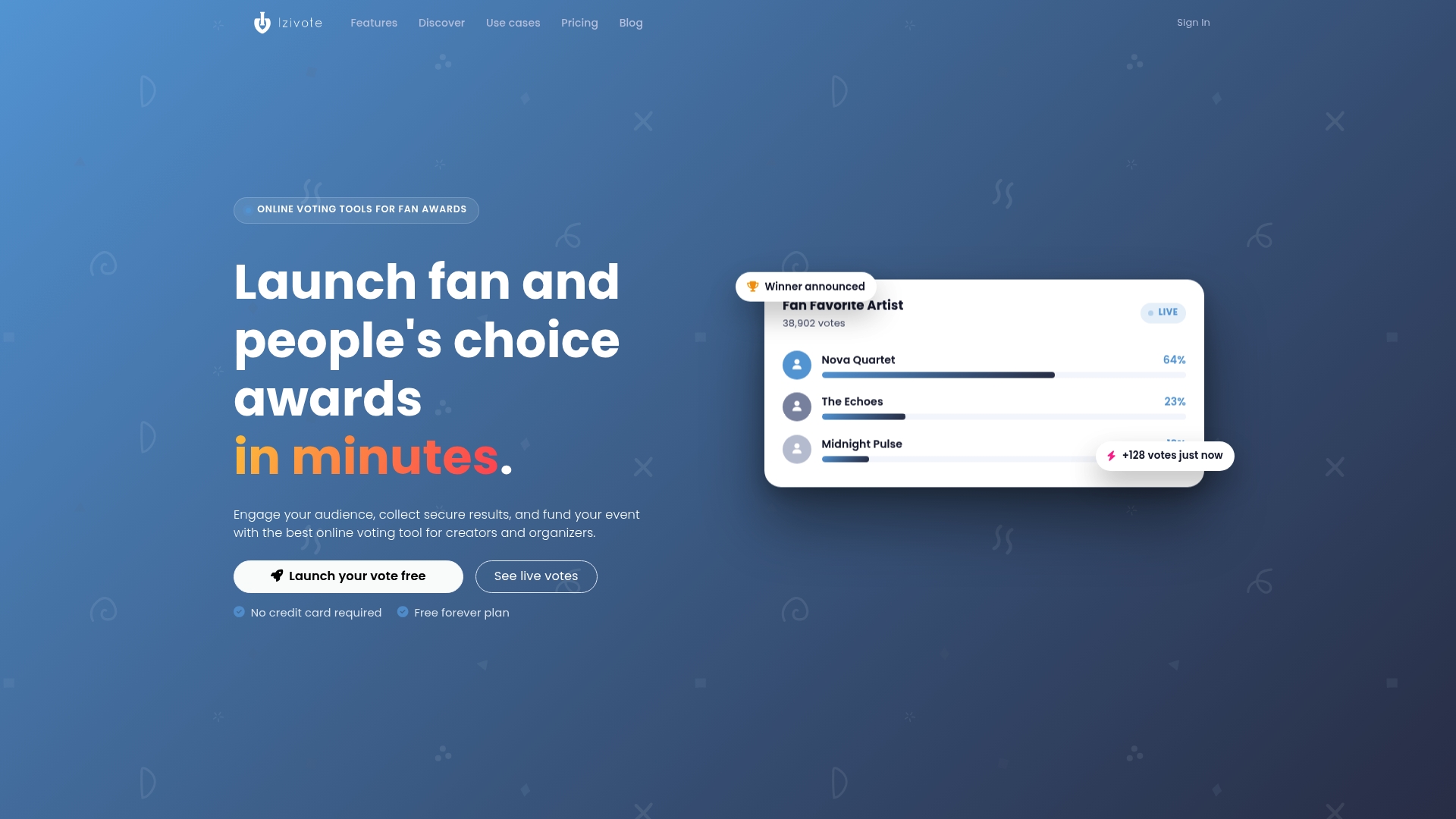
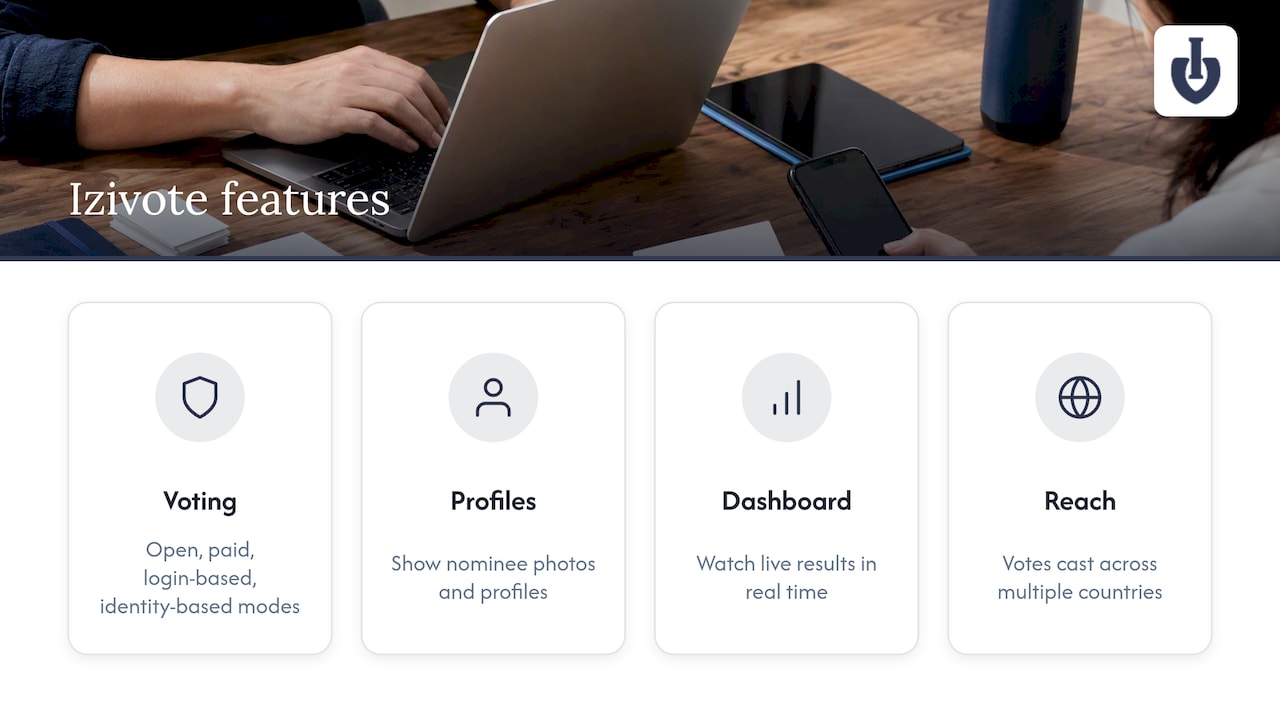
    We built Izivote for exactly this job. You can set up a vote yourself, choose from open, paid, login-based or identity-based voting, show nominee photos and profiles, and watch live results on a real-time dashboard. Votes have been cast across events in multiple countries, and our customer stories show how organizers use it.

    Start with a free vote, run your rehearsal, then compare plans on our pricing page. For more detail on awards workflows, see our people’s choice use case. When you are ready, create your free vote and send the link to your team for a dry run today.
    Why do we recommend Izivote for people's choice awards? — overview diagram

    FAQ

    How long should a people’s choice vote stay open?

    Long enough to promote and short enough to keep energy high. Many organizers run a nomination window, a verification window and then a voting window, with an audit period at the end. Set the dates before you announce anything.

    Do I need voter verification for a people’s choice award?

    It depends on the stakes. For a casual fan poll, simple duplicate prevention may be enough, but high-stakes awards need stronger checks such as single sign-on or phone verification.

    Can I show live results at the ceremony?

    Yes, if you plan for it. Test your connection first, because venue Wi-Fi often struggles with many devices at once. Keep a fallback ready, such as freezing results and announcing winners manually.

    How do I prove the results are legitimate?

    Publish a short verification summary that describes your checks, any disqualified votes and your method. Keeping timestamped logs makes that summary easy to write.

    Sources

    Recommended

  • Nonprofit Voting Fundraisers: Use $2 Votes to Build Donor Lists

    Nonprofit Voting Fundraisers: Use $2 Votes to Build Donor Lists

    Paid-vote fundraisers can raise real money and deepen supporter engagement when nonprofits run them transparently, price them clearly, and keep the contest framed as a donation, never as influence over a public election. The best next step is a small pilot: pick one contest, set a simple price per vote, run a short voting window, and communicate the rules plainly before launch.


    TL;DR:

    • Use a flat $2 vote price or test 10 votes for $15, and cap the voting window at 2 to 4 weeks to maintain momentum.
    • Give nominees a photo, caption, and voting link; send three email reminders, including a final message 24 to 48 hours before closing.
    • Keep copy focused on the nonprofit’s own contest, never public elections; set device or card limits and pause voting if confirmed vote rates drop sharply.
    • Track net revenue after processing fees, new email signups, and repeat giving; thank every voter within 48 hours and share how funds will be used.

    Izivote
    Turn Supporter Votes Into Engagement
    Run a paid-vote contest with identity-based voting and real-time analytics to engage supporters and monitor participation.

    Table of Contents

    How a donate-to-vote fundraiser actually raises money

    A paid-vote fundraiser lets supporters cast votes for a nominee or entry by making a small payment, often $1 to $5 per vote, with the option to buy vote packages at a discount for larger amounts. The organizer sets up a voting page, nominees recruit their own supporters, and a payment processor handles each transaction as it comes in.

    The math is simple to model: if 400 supporters each buy an average of 3 votes at $2 per vote, that is 1,200 votes and $2,400 in gross contributions before any processing costs. The real value often extends past that number.

    • Nominees recruit their own networks, bringing in people who have never donated before.
    • Every vote purchase is a chance to capture an email address for future appeals.
    • Contests generate organic social sharing that a standard donation ask rarely produces.

    Contest formats nonprofits run most often

    Format choice depends on audience size, season, and how easy it is for nominees to rally a network.

    1. Pet photo contests work well for animal shelters and humane societies, where owners submit photos and ask friends and family to vote.
    2. Calendar contests fit organizations that want a tangible product and a reason to keep fundraising across the full year, since the calendar itself becomes a thank-you gift.
    3. Student and youth awards, like “most spirited” or academic recognition contests, engage school communities and parent networks.
    4. Community “best of” awards suit chambers of commerce and local nonprofits that want to highlight small businesses or volunteers while drawing in civic pride votes.

    Each format succeeds by giving nominees a personal reason to share the voting link, which is what pulls in supporters beyond the organization’s existing donor list.

    Setting up your campaign: nominees, pricing, and payments

    A clean setup process prevents most of the problems that derail paid-vote campaigns. Start with nominee intake: collect a photo, a short bio, and a consent form, and build in an approval step so every entry meets your guidelines before it goes live. Think about accessibility too, including alt text for photos and a mobile-friendly voting page, since most votes will come from phones.

    Pricing works best when you test a simple structure rather than overcomplicate it:

    • A flat per-vote price, such as $2 per vote, is easiest for supporters to understand.
    • Vote packages, like 10 votes for $15, encourage larger single purchases.
    • A capped voting window, typically 2 to 4 weeks, creates urgency without fatiguing supporters.

    Before launch, confirm your payment processor, decide whether purchases qualify for a tax receipt in your jurisdiction, and write a plain-language refund policy since vote purchases are generally treated as nonrefundable donations. Configure your leaderboard to update in near real time so nominees and voters stay motivated to check back.

    Pro Tip: Run a 48-hour internal test with a handful of staff votes before the public launch to confirm pricing, payment flow, and leaderboard display all work as expected.

    Test votes pass through three launch checks

    On launch day, monitor the voting page load speed, confirm payment confirmations are arriving, and check that every nominee’s page displays correctly on mobile.

    Getting the word out: email, social, SMS, and partners

    Votes come from channels you already have plus a few you build out for the contest. Email remains the backbone: send an announcement when voting opens, a midpoint reminder highlighting leaderboard standings, and a last-call message in the final 24 to 48 hours.

    • Give each nominee a simple toolkit: a profile photo, a pre-written social caption, and their direct voting link.
    • Post leaderboard updates on social media to create momentum and light competitive pressure among nominees.
    • Use SMS reminders for supporters who have opted in, since text messages tend to get read faster than email during a short voting window.
    • Bring in sponsors or local business partners to match a portion of votes or offer a prize, which widens your promotional reach beyond your own list.
    • Tie the finale to a live event, like an announcement at a gala or community gathering, to convert online momentum into in-person attendance.

    Nominee-driven sharing is usually what separates a contest that raises a modest amount from one that significantly outperforms expectations, since each nominee effectively becomes a volunteer fundraiser for their own entry.

    Staying compliant: legal limits and practical safeguards

    Paid-vote contests for awards, calendars, or community recognition are not the same as voting in a public election, but the line needs to stay clear in how you frame the campaign. Federal law prohibits knowingly and willfully paying or offering to pay someone to vote in a federal election, and willful violations can carry penalties of up to two years in prison. That prohibition applies to public elections, not to a nonprofit’s own fan or award contest, but the safest practice is to keep your messaging unmistakably about your organization’s contest and never reference candidates, ballots, or public office in any way.

    A nonprofit voter engagement toolkit recommends that 501©(3) organizations keep any civic engagement work strictly nonpartisan, a principle worth carrying into your contest naming and promotional copy even though the contest itself is unrelated to public voting.

    • Monitor the ratio of initiated to confirmed votes and pause the campaign if it drops sharply, which can signal fraud or a technical failure.
    • Set a per-device or per-card rate limit to prevent one supporter from flooding the leaderboard.
    • Send a clear payment receipt for every vote purchase that states the amount and the campaign it supports.
    • Define escalation rules in advance, including who reviews flagged activity and when to pause voting.

    Turning vote totals into measurable, lasting support

    Track a short list of numbers during and after the campaign: total votes sold, net revenue after processing costs, new email signups, social share rate, and how many one-time voters convert into recurring donors afterward. These figures tell you whether the contest is working as a fundraiser, an engagement tool, or both.

    • Send a thank-you message within 48 hours of the contest closing, thanking everyone who voted, not just the winner’s supporters.
    • Follow with a short impact story showing what the funds raised will support.
    • Invite new contacts to subscribe to your newsletter or join a recurring giving program while their interest is still fresh.
    • Use this campaign’s analytics, including peak voting times and nominee performance, to set pricing and timing for your next one.

    What organizers get wrong about paid-vote campaigns

    Most organizers underestimate how much of the revenue comes from nominee networks rather than existing donors, and they overestimate how much a longer voting window helps. A tight, well-promoted two-week contest usually outperforms a drawn-out one that loses momentum. The organizations that do well treat the first contest as a pilot: small scope, clear pricing, and a plan to follow up with every new contact afterward.

    — Joshua

    Running your paid-vote fundraiser on Izivote

    Our platform is designed for public, nominee-driven contests nonprofits rely on for this kind of fundraising. Paid voting is handled directly through our paid voting platform, where you set your own price per vote and payment is processed without needing a separate system bolted on. Nominee profiles, embeddable voting pages, and a real-time leaderboard are part of the setup, so results update as votes come in rather than waiting on a batch report.

    Izivote

    • Explore our people’s choice use case for layout and format ideas that fit community and fan-driven contests.
    • Review plan pricing, including a Free plan with no published price, Pro at $6 per month or $60 per year, and Premium at $14 per month or $140 per year, plus a 10% platform fee per paid vote.
    • Check our feature set to see how leaderboards and analytics are configured before you launch.

    If you are ready to test a pilot contest, start on our pricing page to pick the plan that fits your first campaign size.

    FAQ

    Is it legal to charge people to vote in a nonprofit contest?

    Yes, charging for votes in your own award, calendar, or community contest is a common nonprofit fundraising practice distinct from voting in public elections. The federal prohibition applies specifically to paying someone to vote in a federal election, so keep your contest framed clearly around your own cause and avoid any election-related language.

    How much should we charge per vote?

    Most nonprofits start with a simple flat price, such as $2 per vote, then add discounted packages like 10 votes for $15 to encourage larger purchases. Testing one structure in a small pilot before scaling up helps you find what your specific audience responds to.

    What if a vote purchase needs a refund?

    A clear, published refund policy stated before launch, typically noting that vote purchases are nonrefundable donations, prevents most disputes. Sending an immediate payment receipt that states the amount and campaign name also builds trust and reduces refund requests.

    How do we prevent fraud during a paid-vote contest?

    Set rate limits per device or payment method and monitor the ratio of initiated to confirmed votes throughout the campaign, pausing if that ratio drops unexpectedly. Defining escalation rules and who reviews flagged activity before launch keeps your team ready to respond quickly if something looks off.

    How do we turn contest voters into long-term supporters?

    Follow up within 48 hours with a thank-you message, then share a short story about what the funds raised will support. Inviting new contacts to join your newsletter or a recurring giving program while their interest is fresh is one of the more reliable ways to convert a one-time voter into a repeat supporter.

    Sources

    For legal boundaries, review the nonprofit voter engagement toolkit and the AFJ guidance on incentives. For campaign planning tactics that pair well with contest promotion, see this digital campaign planning guide.

    Recommended

  • Monetize Fan Voting: The 10% Fee, Sponsors, and Fairness

    Monetize Fan Voting: The 10% Fee, Sponsors, and Fairness

    Charge-per-vote pricing and bundled micropayments run on a purpose-built voting platform are the fastest practical way to turn fan engagement into reliable revenue. We built Izivote around this model, pairing paid voting with real-time dashboards so organizers can launch a campaign and start collecting funds within days. The roadmap below covers pricing, formats, setup, and fairness safeguards that keep campaigns both profitable and credible.


    TL;DR:

    • Izivote charges a 10% fee on each paid vote, while payouts follow the processor’s schedule rather than the campaign’s closing date.
    • Ranked voting or point distribution can feel fairer than ballots with one option; add a judges’ save for close calls and publish rules before launch.
    • Per vote sales work best with an engaged audience; smaller events should weigh sponsorships more heavily, and forecast revenue from conversion, votes, and price.
    • Reserve bundle discounts for the final 48 hours, and use daily leaderboard resets or vote limits to sustain participation and curb runaway spending.

    Izivote
    Turn Fan Votes Into Event Revenue
    Izivote supports paid voting, identity-based methods, and real-time analytics for organizers running fan and people’s choice awards.

    Get started with Izivote

    Table of Contents

    How paid voting works: mechanics, payment flows, and hosting

    Paid voting is straightforward in concept: a fan selects a nominee, pays for one vote or a bundle, and the payment confirmation triggers an immediate tally update. Getting the mechanics right is what separates a campaign that feels trustworthy from one that invites complaints.

    Organizers need to configure a few things before launch:

    • Payment flow: connect a processor that confirms the charge and records the vote in the same transaction, so counts update live rather than after a batch delay.
    • Authentication: decide whether voters log in, verify by email or phone, or vote anonymously, since identity checks reduce duplicate or bot-driven votes.
    • Hosting choice: use a hosted vote page for speed or embed the voting widget directly on an existing event site for brand continuity.
    • Dashboard visibility: give staff and sponsors a live view of totals so results, and revenue, are transparent as the campaign runs.

    A platform fee typically applies per transaction rather than as a flat subscription cost, and settlement usually follows the payment processor’s standard payout schedule rather than the vote closing date. Clarifying these details before launch avoids disputes once voting opens.

    Pricing and revenue models: sample options and simple forecasting math

    Most fan voting campaigns combine a few pricing structures rather than relying on one:

    1. Price-per-vote: a flat charge for a single vote, simplest to explain to fans.
    2. Bundles: discounted packs (five votes, ten votes) that raise average spend per voter.
    3. Donation tiers: a vote tied to a charitable minimum, common in fundraiser formats.
    4. Subscriptions or passes: a flat fee for unlimited voting during a window, useful for long campaigns.

    A simple forecasting model multiplies expected attendance by conversion rate, by average votes per converted voter, by price-per-vote. For example, a campaign with thousands of engaged fans, a low single-digit conversion rate, a few votes per converter, and a $1 price-per-vote can generate several hundred dollars in gross vote revenue before the platform fee.

    Izivote applies a 10% platform fee per paid vote processed through the platform, so organizers can build that cost directly into their forecasts rather than discovering it after settlement. Bundles and short-term surge pricing during finals tend to raise average revenue per voter, and branded category sponsorships (a sponsor underwriting “Best Newcomer,” for example) add a second revenue stream layered on top of direct vote sales.

    Formats and use cases that monetize best

    Fans respond differently depending on how a vote asks them to express a preference. Simple approval voting (one click, one choice) is fast but shallow. Ranking or point-distribution formats let fans signal intensity, and behavioral research on digital voting design finds these expressive formats correlate with higher perceived fairness and stronger ongoing engagement than single-choice approval votes.

    Formats and events that tend to monetize well include:

    • Fan choice awards with multiple nominee categories and photo profiles.
    • Talent shows and creator contests with elimination rounds that reward repeat voting.
    • Pageants where ranked voting adds perceived legitimacy to results.
    • Fundraisers where a vote doubles as a small donation.

    Leaderboards that reset daily, or that apply decaying point values, keep competitions from going stale when one nominee builds an early lead. Pairing votes with exclusive content, backstage passes, or merchandise discounts gives fans a reason to buy more than one vote.

    Pro Tip: Offer a bundle discount only during the final 48 hours of voting, it creates urgency without undercutting early-campaign revenue.

    Implementation checklist: step-by-step setup and launch tasks

    Launching a paid voting campaign is mostly a sequencing problem. A practical order looks like this:

    1. Pick the format and pricing tiers: decide on ranking versus approval voting and set per-vote or bundle prices.
    2. Build nominee pages: add photos, short bios, and category assignments, then choose hosted or embedded voting.
    3. Connect payments and confirm fees: test transactions end to end before opening voting to the public.
    4. Turn on fraud controls: enable identity or login verification where duplicate voting is a risk.
    5. Activate analytics: confirm the real-time dashboard is tracking votes and revenue accurately.
    6. Prepare marketing assets: share-ready graphics, sponsor messaging, and published voting terms should be ready before launch day.

    Running a short pre-launch test with a handful of real transactions catches payment or display issues before they affect paying voters.

    Best practices to protect fairness, sustain engagement, and reduce churn

    Revenue depends on fans trusting the result. A hybrid model, mixing fan votes with a judges’ panel that holds a save or override on close calls, preserves credibility without eliminating the fan-driven appeal. Research on explainable voting audits found that a dual-safeguard system combining rank-based aggregation with a judges’ save substantially reduced unfair eliminations compared to simple percentage-based tallying, while keeping audience engagement intact.

    A few safeguards consistently hold up:

    • Favor ranking or point-distribution inputs over single-choice approval, since expressive formats are tied to higher perceived fairness.
    • Apply daily leaderboard resets or decaying point values to prevent one early leader from discouraging later voters.
    • Cap votes per account or session to limit runaway spending by a single voter.
    • Publish voting rules, windows, and result timelines before the campaign opens, not after.

    Hybrid systems that combine rank-based aggregation with expert intervention substantially reduce historical unfair eliminations while preserving engagement.

    That kind of transparency matters more when money is involved, since fans scrutinize paid results far more closely than free ones.

    Author perspective: quick trade-offs and operational tips

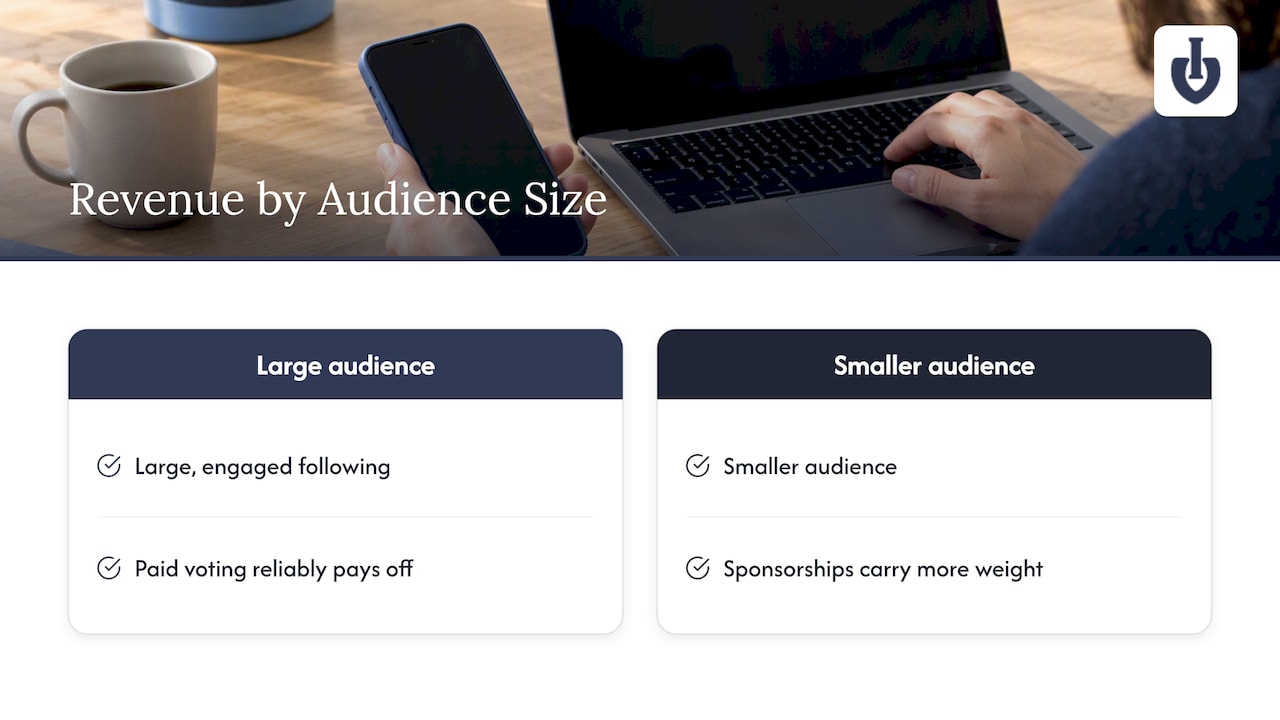
    Paid voting reliably pays off when a nominee pool already has an engaged following, think fan awards or talent contests. When the audience is smaller, sponsorships usually carry more weight than per-vote revenue.

    Audience size compared with paid votes and sponsorship

    Watch for leaderboard fatigue: once a result looks locked in, voting drops off fast. Unclear terms about refunds or vote limits are the other common complaint.

    My practical advice: price for volume, not margin, and spend more effort on fairness perception than on squeezing extra cents per vote.

    — Joshua

    Izivote: implement paid voting, analytics, and embeds

    We built a voting platform specifically for fan and people’s choice awards, which means organizers skip the setup work a generic form tool would require. Paid voting, identity-based voting, and open voting all run on the same dashboard, so switching formats between categories or events takes minutes rather than a rebuild.

    Izivote

    What organizers get with us:

    • Self-serve setup that launches a voting page without a developer.
    • Embeddable voting widgets that keep the experience on an organizer’s own site.
    • Real-time dashboards showing vote counts and revenue as they happen.
    • Multiple voting modes, including paid, login-based, and identity-verified voting, selectable per category.

    Our plans start with a free tier for small events and scale to paid plans for larger campaigns with more categories and features. Check Izivote pricing to compare plans and see the paid voting fee structure before you launch.

    FAQ

    What does paid voting mean for a fan awards campaign?

    Paid voting means fans pay a small fee, either per vote or in a discounted bundle, instead of voting for free. Organizers keep the revenue minus the platform fee, which on Izivote is a flat 10% per vote processed.

    How much can a fan voting campaign realistically earn?

    Earnings depend on audience size, conversion rate, and price-per-vote, so there’s no single figure that applies everywhere. A rough estimate comes from multiplying expected voters by conversion rate, average votes per voter, and price, which gives organizers a conservative revenue band before launch.

    How long does a paid voting campaign typically run?

    Most fan voting campaigns run anywhere from a few days for a single event to several weeks for a multi-round talent contest or awards season. Shorter campaigns tend to use daily leaderboard resets, while longer ones often add bundle discounts near the close to sustain late-stage voting.

    What keeps a paid voting result from feeling unfair to fans?

    Publishing clear rules, voting windows, and result timelines before the campaign opens is the single biggest factor in perceived fairness. Using ranking or point-based voting instead of simple approval, and adding a judges’ save for close calls, also helps preserve credibility.

    What legal or compliance steps matter when monetizing votes?

    Payment processing needs to meet standard card-processing compliance, and voter data should be handled under applicable privacy rules for the regions where fans are voting. Organizers running fundraising-tied votes should also confirm local rules on charitable solicitation before launch.

    Recommended

  • Google Forms Voting: 6 Checks Before a Formal Election

    Google Forms Voting: 6 Checks Before a Formal Election

    Google Forms work fine for informal polls and casual team votes, but it falls short for formal elections where results need to hold up to scrutiny. The core problem is structural: Forms gives you no end-to-end verifiability and no cryptographic audit trail, so nobody can independently confirm that every vote was counted as cast. If your vote has real stakes, test thoroughly first or move to a system built for it.


    TL;DR:

    • Collecting verified Google Account emails helps flag duplicate submissions, but it removes anonymity and still cannot stop voters from using multiple accounts.
    • Before launch, test the public link on a phone and laptop, verify the connected Sheet’s file ID, and submit from separate accounts and an incognito window.
    • Keep Forms to informal, nonbinding polls; binding elections, board or union votes, and decisions with legal consequences need verifiable audit trails Forms cannot provide.
    • Large votes should account for a 50,000 response summary cap and Sheet sync issues above roughly 100,000 rows; voter emails also create manual privacy duties.

    Izivote
    Choose Voting Built for Awards
    Izivote offers fan and people’s choice awards clear, secure voting, with identity-based options and real-time analytics for organizers.

    Explore Izivote

    Table of Contents

    Why Google Forms lacks the security guarantees elections need

    End-to-end verifiability means a voter can confirm their own ballot was recorded correctly, and any observer can confirm the final tally matches every submitted ballot, without exposing who voted for what. It is the standard that separates a casual poll from a system you can defend if someone challenges the result.

    Google Forms was not built with this standard in mind. Academic research on election security consistently draws a line between general-purpose survey tools and dedicated voting systems: specialist platforms implement verifiability and audit mechanisms that general-purpose tools lack, and organizers should not assume Forms provides election-grade guarantees just because it collects structured responses. There is no confirmation code a voter can check, no published proof a third party can audit, and no independent tally verification.

    Toolkits built specifically for this purpose show what the gap looks like in practice. ElectionGuard and similar cryptographic toolkits generate confirmation codes and verifiable tallies that let voters confirm their ballot was cast as intended and let auditors confirm the count without seeing individual choices. Forms exposes none of this.

    There is also a hard trade-off built into how Forms handles identity:

    • Collect email addresses and you get authentication, but you lose anonymity because responses are tied to Google Accounts.
    • Skip email collection and you get anonymity, but you lose any way to verify who actually voted or whether someone voted twice.

    One structural gap drives most of the risk: Forms offers no cryptographic receipt or independent audit log, so a disputed result has no technical way to be resolved beyond trusting the raw spreadsheet.

    Common technical issues that break voting forms

    Most vote-day problems are mundane, not malicious. They still cost you results if you do not catch them early.

    1. A voter leaves a required field blank on mobile because the field was hidden below the fold, and the submission silently fails.
    2. A browser extension (ad blocker, privacy tool, or script blocker) interferes with the submission script and the vote never reaches Google’s servers.
    3. A weak or dropped connection cuts off submission mid-transfer, and the voter assumes it went through.
    4. The linked response Sheet does not match the live form because an admin edited a copy or linked the wrong file ID, so votes land somewhere nobody is watching.
    5. The account hosting the form hits a storage limit and stops accepting new responses without an obvious warning to voters.
    6. A burst of simultaneous submissions during a close vote creates response-limit edge cases that behave unpredictably.

    Practitioner support threads confirm this pattern: most failed submissions trace back to mobile UI issues, connectivity, or browser extensions rather than anything exotic. Separately, a frequent admin mistake is linking an edit view instead of the live form, which makes real responses appear to vanish.

    Pro Tip: Test the exact public link voters will use, not the edit link in your browser tab, on at least one phone and one laptop before you announce the vote.

    What Google Forms can be used for: safe, limited voting scenarios

    Forms earns its popularity honestly: it is free, familiar, and fast to set up. That makes it a reasonable fit for low-stakes situations where a disputed result would not carry real consequences.

    • Informal team polls, like choosing a meeting time or a lunch spot.
    • Small private club votes where the group already trusts each other and a tie just gets discussed.
    • Non-binding popularity votes that feed into a larger decision rather than deciding it outright.

    If you want to add a light layer of authentication without destroying anonymity entirely, one workable pattern is to require sign-in through Google Account email collection, then export the raw responses and manually strip identifying columns before anyone sees the tally. Google’s own documentation confirms Forms can require verified sign-in or allow anonymous responses, but not both at once without manual work on your part.

    What Forms should never carry: binding governance decisions, board elections, union votes, or any public election with legal consequences. These need verifiable audit trails that a spreadsheet export cannot produce.

    Pro Tip: Keep the voting window short (hours, not days) and spot-check a sample of responses manually. Shorter windows reduce the time available for coordinated manipulation.

    Pre-vote checklist: how to test a Google Form voting flow before launch

    Run this sequence before you send the link to a single voter:

    1. Confirm you are sharing the live published form URL, not an edit link.
    2. Open the linked response Sheet and confirm its file ID matches what you expect, not a duplicate or an old copy.
    3. Submit a test response from an incognito window, a phone, and a second Google Account to confirm the full path works end to end.
    4. Simulate a weak connection (airplane mode toggled mid-submission, or a throttled network) to see how the form fails.
    5. If you expect a surge of simultaneous votes, have several test accounts submit at nearly the same moment and check whether the Sheet records every one of them.
    6. Export the responses to CSV and confirm the format matches what you plan to use for counting or reporting.

    Before announcing results, document what you will keep and for how long:

    • A timestamped export of raw responses immediately after closing the form.
    • A written note of who had edit access during the voting window.
    • A backup copy of the response Sheet stored separately from the live file.

    Google’s documentation on managing responses confirms Forms can stop accepting submissions once you close it, but closing does not retroactively fix a sync mismatch you missed during testing.

    Impact of multiple or duplicate submissions and prevention strategies

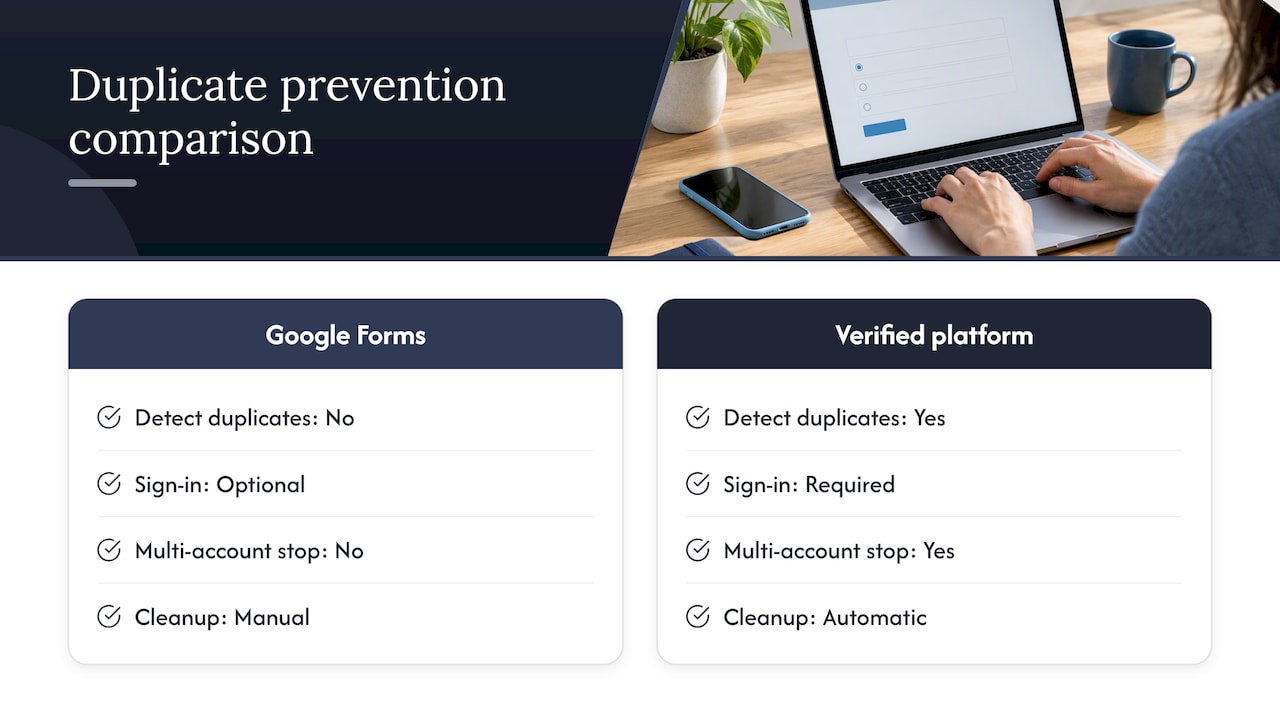
    Duplicate submissions are one of the most common ways a Google Forms vote gets challenged after the fact. Without an authenticated voter roster, Forms cannot natively tell whether the same person submitted twice from two devices, two browsers, or a shared link passed around a group chat.

    The practical impact scales with the size of the vote. In a ten-person team poll, a duplicate is a minor annoyance you can spot by eye. In a public awards vote with thousands of entries, duplicates can shift a close result and you have no reliable way to detect them after the fact, since anonymous responses carry no identifying marker to deduplicate against.

    The only partial fix within Forms itself is requiring sign-in to collect verified Google Account emails, which lets you flag and remove duplicate submissions tied to the same account during your post-vote review. This does not stop someone from using multiple accounts, and it reintroduces the authentication-versus-anonymity trade-off covered earlier. Response limits can cap total submissions, but a response limit stops the count, not the duplication within it.

    For votes where duplicate prevention actually matters, a platform with built-in identity verification at the point of voting, rather than a manual post-hoc cleanup, removes this failure mode by design rather than by spreadsheet triage.

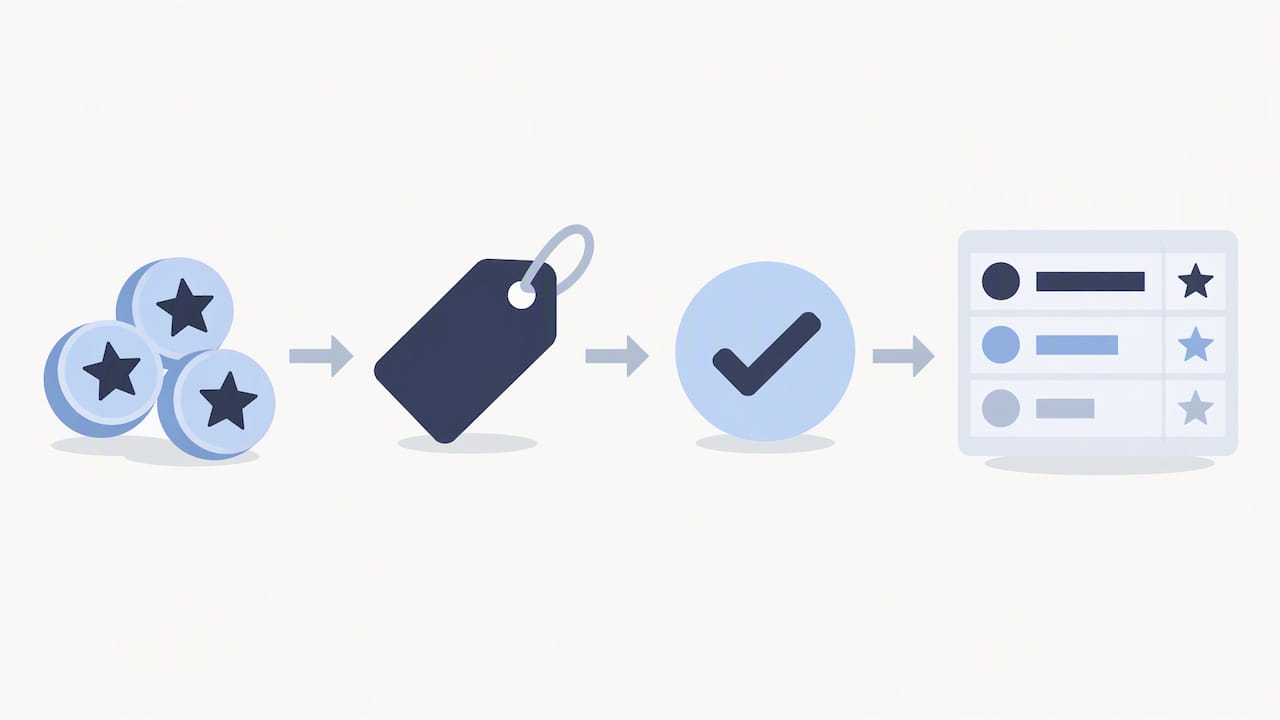
    Impact of multiple or duplicate submissions and prevention strategies — overview diagram

    Addressing and managing ballot stuffing and vote manipulation risks

    Ballot stuffing is the more deliberate cousin of duplicate submissions: one person or a coordinated group submitting many votes to push a result. Google Forms has no native rate limiting per device or per network, so a determined voter can refresh and resubmit from the same browser repeatedly unless you require account sign-in.

    Even sign-in requirements have a ceiling. Someone can create multiple free Google Accounts in minutes, and nothing in Forms flags that pattern for you. Security community discussions on this exact question conclude that Forms cannot verify an eligible voter list or detect coordinated manipulation, which is precisely why practitioners warn against using it for anything resembling a real election.

    Research into coercion-resistant voting protocols goes further, showing that even verified sign-in does not address vote-buying or coercion, since someone can watch over a voter’s shoulder or demand proof of how they voted. Mitigating this in Forms requires manual vigilance: watching submission timestamps for suspicious clustering, cross-referencing IP-adjacent timing where visible, and manually disqualifying accounts created the same day as the vote. None of this scales past a small, low-stakes audience.

    Limitations in customizing voting options and question types relevant to awards

    Awards voting has specific needs that generic survey question types were not designed for: nominee photos next to each choice, grouped categories with a single winner per group, write-in options that do not break the tally, and a visual layout that makes browsing twenty nominees easy on a phone.

    Forms gives you multiple choice, checkboxes, and dropdowns, which cover the basics but flatten everything into plain text options. There is no native way to attach a nominee’s photo directly beside their name in a multiple choice question, so organizers resort to workarounds like numbered lists referencing a separate image gallery, which adds friction exactly where you want voting to feel effortless.

    Multi-category awards compound the problem. Each category needs its own question block, and voters scrolling through a long form for ten award categories are more likely to abandon partway through or miss a required field, which loops back into the submission failures covered earlier. There is also no built-in way to prevent a voter from selecting the same nominee across categories where that would be considered a conflict, since Forms has no cross-question validation logic for that use case.

    Integration challenges with third-party analytics and reporting tools

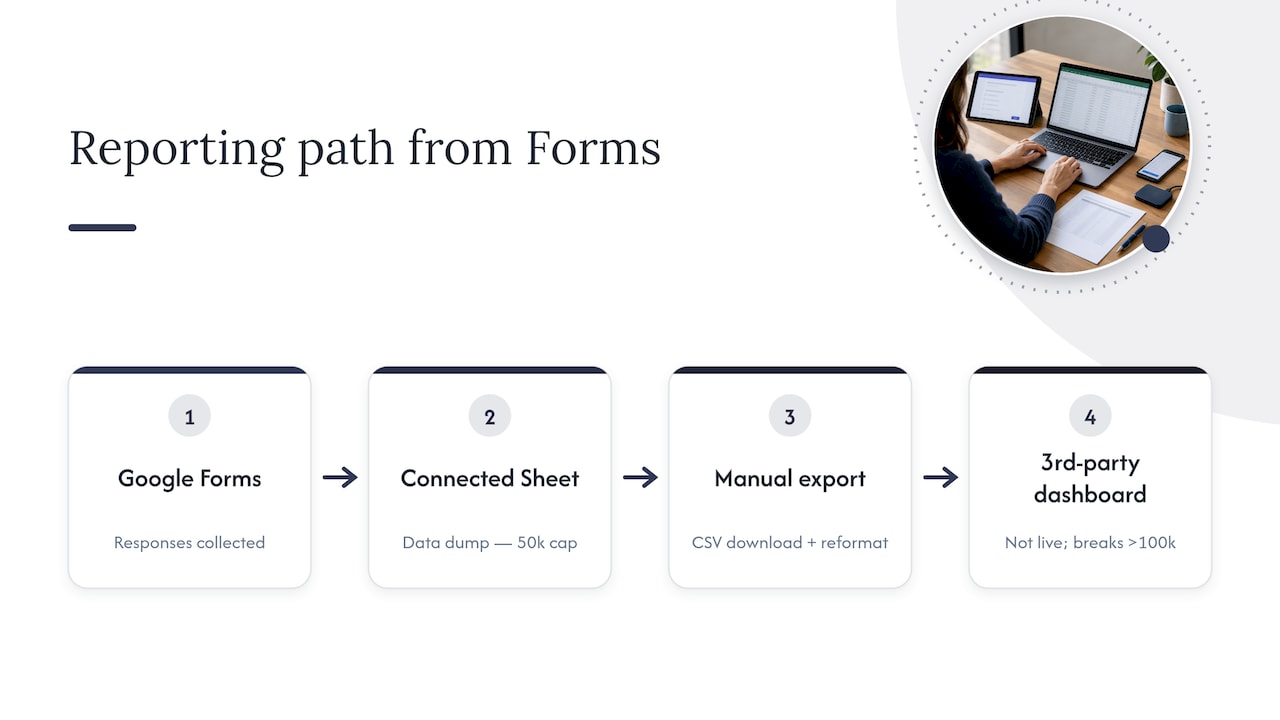
    Once a vote closes, many organizers want more than a raw count. They want engagement trends, vote distribution by category, or a public-facing results page that updates live. Google Forms routes everything into a connected Sheet, which works as a data dump but was not built as a reporting layer.

    Pulling that Sheet data into a dashboard or analytics tool means building your own export and import pipeline, usually a manual CSV download followed by a reformat before anything else can read it cleanly. There is no native live connection to common business intelligence tools, so “real-time” results generally mean refreshing a Sheet and re-running a chart, not an actual live feed.

    Google Forms reporting path and data limits

    At scale, this gets harder. Google’s own documentation notes that very large response sets hit summary and sync limits, including a 50,000 response summary cap and sync issues once a connected Sheet grows past roughly 100,000 rows. For an organizer trying to show a public live leaderboard during an active vote, that is a meaningful ceiling, and it means any third-party dashboard you build on top is only ever as current as your last manual export.

    User experience issues affecting voter turnout

    A voting form that is hard to use loses votes, full stop. Forms was designed as a generic survey tool, and that shows up in small frictions that matter more during a time-limited public vote than they would in an internal team survey.

    Long scrolling lists of nominees with no photos or grouping make it hard for a voter to quickly find their favorite in a crowded category, and that friction tends to show up as abandoned sessions rather than complaints. Mobile responsiveness is generally solid, but required-field errors are easy to miss on a small screen, which ties directly back to the submission failures covered earlier. There is also no progress indicator for multi-category awards forms, so a voter filling in category six of ten has no sense of how much is left, which can prompt them to give up.

    None of these are catastrophic individually, but together they shape turnout more than organizers expect. A form that takes ninety seconds to complete with clear visual cues keeps more voters through to submission than one that takes three minutes of scrolling through plain text options.

    Handling of voter data privacy under relevant regulations

    Collecting voter emails for authentication means you are collecting personal data, and that triggers privacy obligations depending on where your voters are located. Google’s infrastructure handles storage and account security on its end, but the responsibility for how you collect, use, and retain that data as an organizer sits with you, not with Google.

    Under regulations like the EU’s GDPR, collecting email addresses for voter verification generally requires a lawful basis for processing, a clear statement of what the data will be used for, and a defined retention period after which you delete it. Google Forms gives you no built-in consent management, no automatic data retention timer, and no built-in mechanism for honoring a deletion request beyond manually editing the Sheet yourself. If a voter later asks you to remove their data, that is a manual process you have to track and execute.

    For a ten-person office poll this is a minor administrative task. For a public vote collecting emails from voters across multiple countries, it becomes a real compliance obligation that a spreadsheet was never built to manage, and organizers should treat that gap as a planning requirement, not an afterthought.

    Organizer perspective: balancing convenience and trust

    Forms earns its place in a lot of toolkits because it is free and nobody needs onboarding to use it. The tipping point usually arrives the moment a vote has real stakes attached: money, reputation, or a result someone is willing to challenge. That is when organizers start asking for receipts, audit logs, and a tally nobody can quietly edit after the fact, and a general-purpose survey tool was never built to answer that ask.

    The question is never whether Forms works. It’s whether you can defend the result if someone asks you to prove it.

    — Joshua

    A purpose-built alternative to Google Forms voting issues

    When a vote needs to hold up to scrutiny, we built Izivote to close the exact gaps covered above. Identity-based voting ties each ballot to a verified participant without forcing you to manually strip and reconcile a spreadsheet afterward, and our paid voting mode handles payment collection directly.

    Izivote

    Our dashboard shows live results as they come in, without the manual export-and-reformat cycle a connected Sheet requires, and embeddable voting pages let you run the vote directly on your own event site instead of sending voters to a separate link.

    Upgrading makes sense once a vote crosses from informal into binding: elections with real consequences, large public audiences where duplicate detection matters, or fundraising votes where your supporters expect a receipt.

    • Identity-based and paid voting modes built to support authenticated, auditable results.
    • Live public results dashboard instead of a manual Sheet export.
    • Embeddable voting pages for your own site.
    • A free tier for small events, with Pro and Premium plans for larger ones.

    See current plans and pricing to find the right fit for your next vote.

    FAQ

    Can Google Forms be hacked or manipulated during a vote?

    Google Forms has no built-in protection against a single voter submitting multiple times unless you require sign-in, and even sign-in can be bypassed with multiple free accounts. Security community analysis confirms Forms cannot verify an eligible voter list or detect coordinated manipulation, which is why practitioners treat it as unsuitable for binding elections.

    How do I stop bots or duplicate votes in Google Forms?

    Requiring sign-in to collect verified Google Account emails is the main built-in option, letting you manually flag and remove duplicates tied to the same account. It does not stop someone using multiple accounts, so for votes where this risk matters, a platform with identity verification built into the voting step is a more reliable approach.

    Why isn’t my Google Form syncing responses to my spreadsheet?

    The most common cause is linking the wrong file, often an edit link or a duplicate copy instead of the live form’s actual response destination. Google’s troubleshooting documentation recommends verifying the file ID and ownership of the connected Sheet before assuming responses are missing.

    Is Google Forms GDPR compliant for collecting voter data?

    Google Forms gives you no built-in consent management or automatic data retention controls, so compliance with regulations like GDPR depends on how you, as the organizer, collect, store, and delete voter data manually. For public votes collecting personal information across multiple countries, this becomes a real administrative obligation rather than a minor detail.

    What is the response limit for Google Forms?

    Google’s documentation notes a 50,000 response summary limit, along with sync issues that can appear once a connected Sheet grows past roughly 100,000 rows. For smaller polls this rarely matters, but large public votes should test this behavior ahead of time.

    Sources

    Recommended

  • The Blueprint for Better Awards: 6 Features Your Voting Software Needs

    The Blueprint for Better Awards: 6 Features Your Voting Software Needs

    When you launch an online award or competition, you aren’t just collecting data. You are hosting a high-stakes digital event.

    General form builders and survey tools are engineered to quietly collect private feedback. Because they lack the mechanics of a competitive race, using them for public voting usually results in spam, frustrated voters, and an administrative nightmare for your team.

    If you are evaluating software for an upcoming awards show, contest, or election, you need a system built specifically for the dynamics of a race. Here is the blueprint for choosing a dedicated online voting platform that drives engagement and protects your credibility.

    The 6 Must-Haves for a True Voting Platform

    When evaluating a voting solution, grade the software against these six capabilities. If a tool cannot handle these natively, you will end up doing the heavy lifting manually.

    1. Voter Identity Verification: You need a frictionless way to prove every voter is a unique person. Without it, your “winner” is simply the nominee with the best voting bot.
    2. Granular Frequency Caps: Standard tools usually force a binary choice of unlimited voting or one vote per lifetime. A true platform lets you set precise rules, such as “one vote per category” or “one vote per day,” to match your campaign goals.
    3. Visual Nominee Profiles: Displaying a high-quality photo and context for every competitor honors the nominees. A race should feel like a visual showcase instead of a plain-text pop quiz.
    4. Customizable Result Visibility: A live, public tally builds massive excitement and trust. However, not every race should be public. Your software must include a toggle allowing you to display real-time leaderboards to voters or keep results strictly hidden until the official announcement.
    5. Automated Scheduling: The ballot must open and lock automatically at predetermined times. This hardcodes your deadline directly into the voting interface.
    6. Integrated Pay-Per-Vote: If you are monetizing your event, payments must instantly convert into credited votes. Manual spreadsheet reconciliation leads to lost votes and angry fans.

    Matching the Setup to Your Audience

    Identity verification and frequency caps are crucial, but your exact setup depends on who is voting:

    • Media Brands & Radio: You need your audience to return daily. Prioritize: Daily voting caps, seamless native website embeds to retain ad impressions, and live tallies for on-air reads.
    • Creators & Blog Communities: You are dealing with highly motivated fan bases and heavy traffic spikes. Prioritize: Frictionless social sign-ins, daily frequency limits, and visual nominee profiles.
    • Campus & Corporate Elections: Integrity is your only metric. Prioritize: Strict SSO (Single Sign-On) directory integration, rigid one-time voting, and hidden results.

    The Cost of the “Manual Workaround”

    When you force a generic form to act like a voting platform, you pay with your time. You have to manually monitor IP addresses, export data, merge text entries, and build charts in Excel.

    If you charge for votes, the headache worsens. Form builders leave you staring at a list of payment transactions. This forces you to manually match payments to nominees and calculate bulk bundles by hand.

    A dedicated platform automates the administration. For example, if you run paid voting on Izivote, you can set tiered bundles to offer discounted bulk votes, and the system instantly updates the tally the moment a payment clears. Organizers keep 90% of the revenue, which is deposited directly into their own connected processor account. There is no messy reconciliation and no hidden booking fees.

    When Standard Tools Are Actually the Right Choice

    Voting platforms aren’t a universal replacement for forms. Stick with a standard survey builder if:

    • You are gathering internal feedback or conducting market research.
    • Your form requires complex conditional logic or heavy file uploads.
    • You are running a program that relies entirely on a closed panel of expert judges reviewing private scorecards. This requires dedicated awards management software rather than public voting tools.

    Defending the Result

    The true test of your software happens the moment the polls close. In any competitive event, the runner-up’s supporters will demand to know the race was fair.

    If you use a form builder, your only defense is a private spreadsheet and a promise that you cleaned the data properly. A purpose-built voting platform removes human error entirely. When you can point to a system that automatically authenticated users, enforced limits, and managed the clock, the results are bulletproof. This leaves your audience to focus purely on the celebration.

  • How to Run Award Show Voting: The Complete Guide

    How to Run Award Show Voting: The Complete Guide

    Whether your final ceremony is a glittering in-person gala or a live-streamed event, the first time you run online awards voting, things tend to break in the exact same two places. Nominations devolve into a chaotic flood of DMs and emails, and on announcement night, someone inevitably claims the results were rigged.

    Neither of these is a software problem. Both are solved by structural decisions you make weeks before a single vote is cast. If you want to run a flawless award campaign, here is the proven framework to keep your nominations organized, your voting secure, and your final results bulletproof.

    Start With Your Purpose and Categories

    Before you name a single category, define what winning actually means. A career-boosting industry award requires strict integrity rules, while a local community volunteer award relies more on tone than audited vote counts. Defining your core purpose settles future debates.

    When it comes to building your ballot, resist the urge to add categories just so more people can win. A first-year show works best with six to ten specific, competitive categories. Nine highly competitive races will always generate better engagement than twenty thin ones.

    Mix your category types deliberately to balance credibility with engagement:

    • Peer categories: Judged by industry insiders to build professional credibility.
    • Popular categories: Decided by public online voting to drive mass traffic.
    • Committee awards: Selected by your organizing team to recognize overlooked contributions.

    Tame the Nomination Process

    Open nominations are where most organizers lose control. If you allow it, submissions will arrive across every social channel you own.

    Make one route the only route. Host a single nomination form directly on your vote page and keep it open for a strict 10 to 14 days. Limit entries to one nomination per category per person to prevent spam, and require basic assets upfront, like a high-quality photo and a one-line bio.

    Most importantly, never surprise your nominees. Once you assign an impartial moderator to verify eligibility, ask the nominees for permission before publishing the shortlist. Give voters a clean, focused list of three to six names per category.

    Set Bulletproof Voting Mechanics

    Your authentication method determines whether the public trusts your results. For standard public awards, requiring a social login (like Google) is the sensible default. It sharply cuts down on double-voting without forcing users through a tedious account creation process. If you are running a high-stakes corporate or student award, use a restricted pre-approved email list. (You can even run paid voting for charity fundraisers, though you should always check local competition laws first).

    Whatever rules you choose, such as limiting votes to one per day, publish them clearly on the page before voting starts.

    Crucially, let your software close the vote automatically. Publish your exact opening and closing times with time zones. An automated close is an indisputable fact. A manual close clicked by an organizer at 11:45 PM invites instant suspicion, especially if the leaderboard recently shifted.

    To build even more trust, make the vote look like it belongs to you. Sending your audience to a third-party website kills momentum. With platforms like Izivote, you can embed the vote page directly onto your own site with a single snippet of code, keeping the entire experience natively within your own branding.

    Promote the Vote and Announce the Winners

    Nominees will do the heavy lifting for your promotion if you make it easy. Give each nominee a direct link to their category and a custom graphic. If they have to explain how to navigate a complex website, they will post once and give up.

    Plan your promotional pushes around natural attention spikes: launch day, a midpoint update highlighting neck-and-neck races, and a massive 48-hour urgency push right before closing, which is historically the highest traffic day for online voting.

    When it is time to announce the winners, use hard data. Announcing a winner with zero data invites skepticism, but stating that a winner took 41% of 2,300 votes ends the argument before it begins. Publish the full percentage breakdown so runners-up can also proudly share their strong performance.

    The Award Show Action Plan

    Running a tight ship means following a clear checklist. Because platforms like Izivote make the technical setup instant, you do not need to drag your planning out over months. You can launch quickly and put your energy entirely into promotion and community building.

    Here is the step-by-step breakdown to guide your event:

    • Phase 1: Strategy and Setup. Define the show’s purpose, draft the categories, set your exact dates, and document all voting rules. Build a page for voting and publish the rules.
    • Phase 2: The Nomination Drive. Officially open public nominations. Let them run while you chase down entries for quiet categories and prepare your social media graphics.
    • Phase 3: Shortlisting. Let the system close nominations automatically. Verify eligibility, gather headshots, ask nominees for permission, and finalize your shortlist.
    • Phase 4: Voting Begins. Open the polls! Execute your launch day push, followed later by a midpoint update on close races to keep momentum high.
    • Phase 5: The Final Push and Reveal. Execute the final 48-hour push. Let voting close automatically, then announce your winners using hard percentages.

    The true quality of an award show is decided in the planning phase. Take an hour this week to lock down your categories, rules, and action plan. By the time the votes start rolling in, you will be free to focus on promoting the event and preparing for an incredible physical gala or live stream.

  • Stop Hacking Survey Tools: How to Run a Flawless Award Show Without the Panic

    Stop Hacking Survey Tools: How to Run a Flawless Award Show Without the Panic

    If you are behind a local award show, university gala, or talent competition, you know the physical room demands all of your attention. Yet, too many organizers spend their live events hiding in the back room, refreshing generic survey forms and manually tallying votes.

    When you hack together basic polling tools for a live event, you are signing up for unnecessary panic. Those tools require constant supervision, forcing you to act as a human calculator rather than an event producer. It is time to automate the voting process so you can actually run your show. By switching to a “set and forget” platform built specifically for live awards, you can put the tech on autopilot and step back out into the room.

    The Danger of the Manual Shutoff

    The most stressful moment of an award campaign is the exact minute voting is supposed to close. If you are using a repurposed corporate form, someone has to physically sit at a laptop, watch the clock, and manually pull the plug to prevent late votes from altering the results.

    A purpose-built event platform eliminates this entirely through automated scheduling. You simply set your closing time during your initial setup. When the clock strikes, the system automatically shuts off voting. Nobody has to be awake to monitor the poll, no late entries slip through, and the integrity of the deadline is perfectly maintained without a single click from your team.

    Real-Time Math, Zero Tallying

    Generic forms dump raw data into rows and columns, leaving you to calculate the winners while the audience waits. This creates a massive bottleneck right before the climax of your event.

    By upgrading to a dedicated award platform, the heavy lifting happens in the background. Live leaderboards and progress bars update instantly as votes arrive. When the poll auto-closes, the final results are immediately locked in and formatted for you. The system does the math in real time, completely eliminating the frantic back-room counting and ensuring you always know exactly who the winner is the second voting ends.

    Built-In Duplicate Control

    Another massive time-sink for organizers is auditing the vote to ensure fairness. When you use basic tools, you often have to manually comb through the data to spot fake accounts, bot activity, or duplicate entries.

    When you use a platform designed for audience competitions, duplicate control is enforced by design. Built-in safeguards—like one-click Google sign-in or verified invite lists—automatically prevent ballot stuffing before it happens. The system acts as the bouncer, ensuring every vote is legitimate so you do not have to play detective on event night.

    You spend months planning the perfect event. On the night of the show, your focus belongs on the stage, the guests, and the experience, not on managing the vote. By upgrading to a seamless, automated system like Izivote, you can step out of the back room, trust the technology to run itself, and actually enjoy the incredible event you built.

  • The “Community Choice” Initiative: Letting Your Audience Build Your Next Big Thing

    The “Community Choice” Initiative: Letting Your Audience Build Your Next Big Thing

    Have you ever wondered if your customers actually like that new product colour? Or would your neighbourhood prefer a community garden over a new parking lot?

    Instead of guessing, the Community Choice Initiative turns your audience into your board of directors. Using Izivote’s secure voting system, you can move beyond simple likes and comments into structured, data-backed decision-making. 

    Why Decisions Drive More Engagement

    People love to be heard, but they love impact even more. When you host a “Community Choice” vote, you aren’t just entertaining—you’re empowering.

    • Real-World Stakes: Voters feel a sense of ownership when they know the winner will actually be implemented.
    • Structured Feedback: Izivote allows for multiple categories, meaning you can vote on “Design,” “Pricing,” and “Launch Date” all in one place.
    • Professional Integrity: Features like authenticated voting ensure that your results are legitimate and not manipulated by bots. 

    3 Ways to Use “Community Choice” Right Now

    1. The “Next Product” Showdown
    Are you a creator or a small business? Upload three mockups of your next launch. Let your fans vote on their favourite. This not only builds hype but guarantees a market for the winner before you even start production.

    2. The “Charity Tie-In.”
    Allocate a portion of your monthly proceeds to a cause. List four local non-profits on your Izivote page and let your community decide where the donation goes. This builds immense brand trust.

    3. The “Event Planner.”
    Planning a meetup, webinar, or office party? Use Izivote’s embed feature on your own site to let attendees pick the keynote topic or the dinner menu. 

    Setting Up Your Initiative

    Getting started is simple and doesn’t require a credit card:

    1. Categorize Your Options: Break your big decision into digestible categories.
    2. Use Visual Evidence: Upload high-quality photos for each “nominee” or choice.
    3. Share the Link: Use Izivote’s social integration to blast the link across your platforms.
    4. Analyze the Data: Check your dashboard for real-time statistics on who is voting and what they’re choosing.

    Stop guessing and start listening. Create your first “Community Choice” poll on Izivote today.