Category: General

  • Award Nomination Forms Online: 6 Fields, When to Add Voting

    Award Nomination Forms Online: 6 Fields, When to Add Voting

    Use a ready-to-use no-code nomination form template, or a downloadable Word or PDF template, to collect consistent, judge-ready nominations. These options cover most internal, school, and community awards without extra setup. Upgrade to a full platform only when you need reviewer scoring workflows, public voting, or paid-vote fundraising built into the same process.


    TL;DR:

    • Word and PDF forms suit low volume awards collected by email or in person, while builder templates add uploads, conditional questions, and automatic closing.
    • Require nominee and nominator details, a fixed award category, achievement statement, timeframe, and optional evidence; set upload limits and obtain publication consent.
    • Define eligibility rules, scoring criteria, and a retention period before launch, then restrict reviewer exports to evaluation fields and track disqualifications separately.
    • Verify nominator emails, add a bot check, and flag duplicates with a unique nominee identifier; publish only approved nominees for any public vote.
    • Send a reminder about a week before the deadline, since nominations often arrive in the final 48 hours; include examples of strong achievement statements.

    Izivote
    izivote.com
    Move from Nominations to Voting
    When your award is ready for public voting, Izivote helps organizers run secure, transparent votes and monitor results with real-time analytics.

    Explore the voting platform

    Table of Contents

    Where to find ready-to-use nomination form templates

    Three types of templates cover almost every award program, and each one fits a different scale of event.

    Downloadable Word and PDF templates work best for low-volume or internal awards where you collect nominations by email or in person. They print well, require no software setup, and are easy to adapt for a staff recognition program or a small club award.

    No-code form-builder templates handle higher volume and more complex requirements. Pages like Typeform’s awards nomination form template, Jotform’s awards nomination form, and Formpl support file uploads, conditional logic, and automatic form closing at a set deadline. You can publish one of these in under an hour and share it by link, embed, or QR code.

    Template libraries and AI-assisted generators sit between the two. They let you start from a near-finished layout and adjust fields, wording, and branding quickly, which suits organizers running an annual award who want a fresh look without rebuilding the form from scratch.

    • Internal or small-scale awards: a Word or PDF template distributed by email is usually enough.
    • Community, school, or industry awards with many nominators: a no-code builder template handles volume and file uploads better.
    • Public or fan-voted awards: a template still works for intake, but you will need a separate voting step once nominations close.

    The right starting point depends less on how “official” the award feels and more on how many nominations you expect and whether reviewers need to score or compare them side by side.

    What fields belong on a judge-ready nomination form

    A nomination form only works if every submission gives reviewers the same information in the same format. Based on the field sets used across major template providers, a solid form includes:

    1. Nominee details: full name, title or role, organization or department.
    2. Nominator contact information: name, email, and relationship to the nominee.
    3. Award category, selected from a dropdown rather than typed in freely.
    4. A concise achievement statement describing why the nominee qualifies.
    5. The relevant timeframe (the period the achievement or contribution covers).
    6. Optional supporting evidence: a letter of endorsement, a short CV, or images.

    Typeform’s template guidance confirms these fields as standard across employee, student, member, and community award forms. For supporting documents, set clear file-type and size limits upfront. The Zayed Award for Human Fraternity nomination form caps its letter of endorsement at 1,000 words and specifies accepted upload formats, which is a useful benchmark for your own limits.

    Word limits and short hint text under each field push nominators toward focused, comparable answers instead of long, unstructured essays. Add a plain-language checkbox asking for permission to publish the nomination and use any submitted photos if the nominee wins.

    Pro Tip: Cap the achievement statement at a moderate length to ensure succinct and focused entries. Reviewers read faster, and nominators write tighter, more specific entries.

    Customizing and sharing your nomination form

    Once your fields are set, a few configuration choices determine whether the form feels easy or clunky to fill out.

    • Use conditional logic so category-specific questions only appear after the nominator selects a category, keeping the form short for everyone.
    • Match the form’s branding, colors, and header image to your event or organization to build trust and reduce drop-off.
    • Set a visible deadline with a stated time zone, an automatic close date, and a confirmation email sent to each nominator.
    • Share the form through whichever channel reaches your audience fastest: a direct link, an embedded widget on your event page, a QR code on printed materials, or a line in an email newsletter.

    Formpl.us and Cognito Forms both note that templates publish quickly, but larger programs still need reviewer access controls, scheduled notifications, and export options once nominations start arriving. Build those settings in before you share the link, not after submissions begin.

    From nomination to final decision: the typical workflow

    Most award programs, regardless of size, move through the same sequence of stages. The HRSA condition nomination process is a useful public example of how a staged review structure works in practice: intake, eligibility screening, committee evaluation, and a final recommendation.

    For a public or member-voted award, the stages typically look like this:

    • Nomination intake: the form collects entries until the deadline closes.
    • Eligibility and administrative review: staff check for completeness and basic qualification.
    • Committee scoring: reviewers rate nominees against a shared rubric.
    • Shortlist publication: qualifying nominees move forward with public profiles.
    • Voting or ranking: the audience or a judging panel ranks the shortlist.
    • Final approval: results are confirmed and winners are notified.

    A staged review and voting process like this gives large or high-stakes award programs a documented, auditable path from first submission to final decision.

    A template handles the first stage well on its own. You need a platform once reviewer scoring, public voting, paid voting, audit logs, or real-time dashboards become part of the requirement, because stitching those features onto a basic form usually means manual spreadsheet work and lost data.

    A quick pre-launch checklist worth running every time

    Before publishing any nomination form, I run three checks: are categories and evaluation criteria clearly defined, are file and word limits set so submissions stay comparable, and is the close date locked to a stated time zone with a notification flow in place for nominators and reviewers.

    A platform with built-in reviewer controls and live dashboards removes most of the manual tracking that makes nomination season stressful for organizers.

    — Joshua

    Verifying eligibility and catching duplicate nominations

    Eligibility problems and duplicate entries cause most of the late-stage headaches in award programs, so it pays to design the form to catch them early.

    Ask nominators to confirm eligibility criteria directly on the form, such as tenure, membership status, or geographic region, rather than assuming they have checked the rules elsewhere. A required checkbox or short eligibility question filters out a share of ineligible entries before they ever reach a reviewer.

    For duplicates, require a unique identifier for each nominee, such as an employee ID, member number, or email address, so your form or spreadsheet can flag repeat entries automatically. Many no-code builders support a duplicate-detection rule based on a specific field; set this up before the form goes live rather than cleaning duplicates manually afterward.

    Keep a running list of nominees as submissions arrive, and cross-check new entries against that list weekly rather than waiting until the deadline. This catches both duplicate nominations for the same person and nominations submitted under slightly different name spellings. For larger programs, assign one reviewer to eligibility screening specifically, separate from the committee members scoring the content of each nomination, so eligibility checks don’t bottleneck the scoring process.

    Keeping your nomination form secure from fraudulent entries

    A nomination form that collects names, contact details, and sometimes photos needs basic safeguards against spam and manipulated submissions.

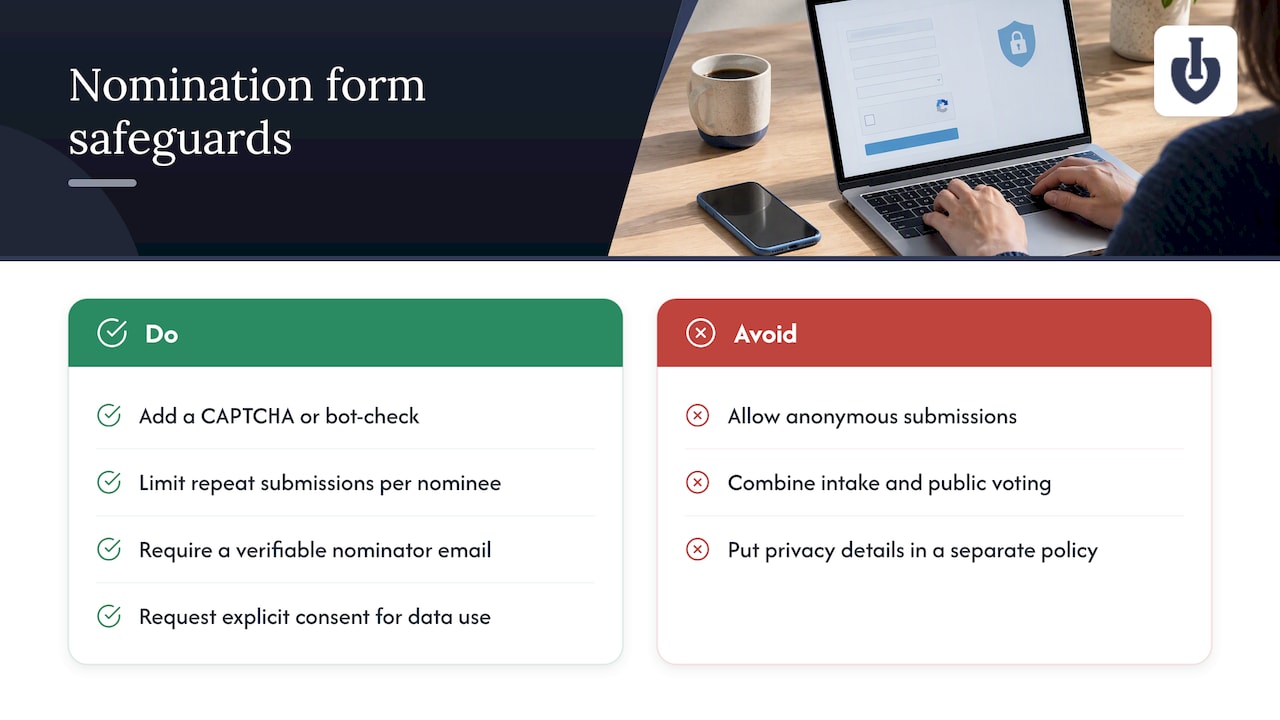
    Add a CAPTCHA or similar bot-check to block automated spam submissions, which is standard on most no-code form builders without extra cost. Limit one submission per nominator per nominee where your form tool supports it, which cuts down on repeat or coordinated entries meant to inflate a single nominee’s visibility.

    Require a verifiable nominator email address rather than allowing anonymous submissions. This single step discourages most fraudulent entries, since nominators know their submission is traceable. For public or fan-facing awards, keep nomination intake and any public voting completely separate: verify and shortlist nominees first, then publish only the approved shortlist for voting. Cognito Forms’ guidance on award nomination workflows recommends this separation specifically to prevent unverified or low-quality entries from appearing in a public ballot.

    Finally, request explicit consent for data use and publication at the point of submission. The National Privacy Commission’s nomination form guidance notes that a clear privacy statement, stated retention period, and contact point for data correction all belong on the form itself, not in a separate policy document nominators have to go looking for.
    Keeping your nomination form secure from fraudulent entries — overview diagram

    Moving from nomination intake to the voting phase

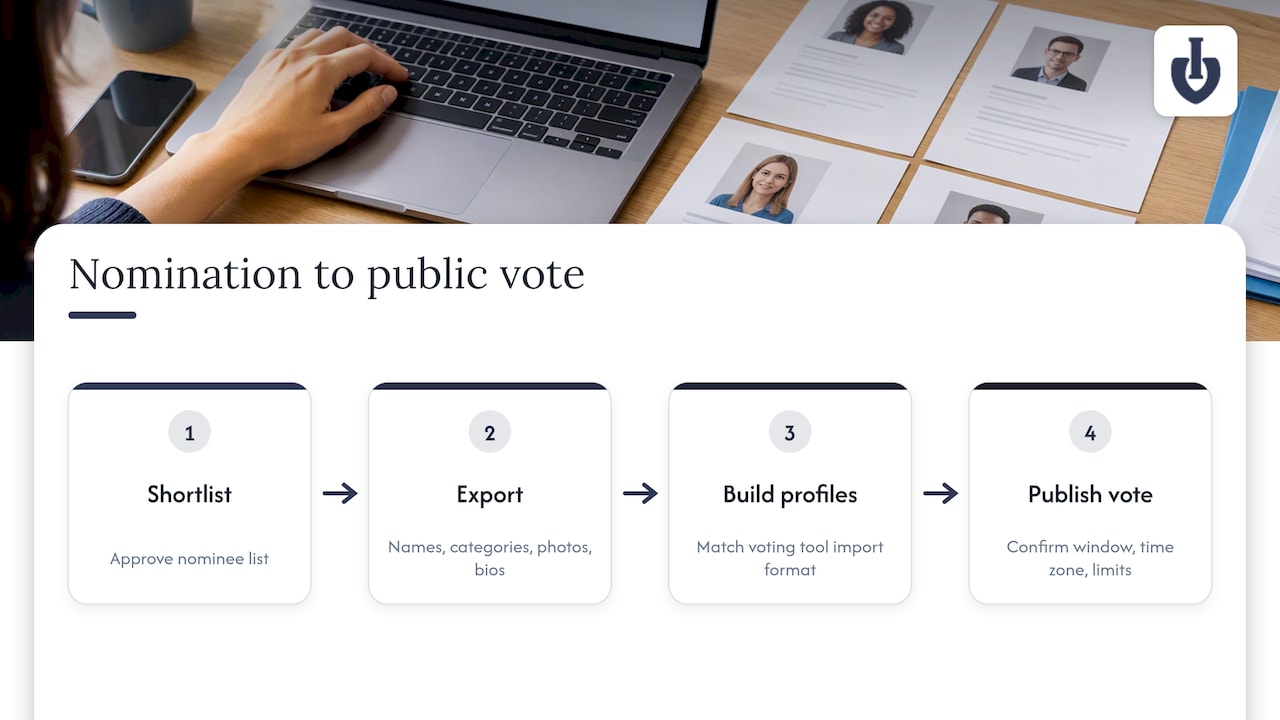
    Once your shortlist is finalized, the transition to voting works best as a distinct second step rather than an extension of the same form. Export your approved nominee list, including names, categories, and any photos or profile text you plan to display publicly.

    A spreadsheet export from your nomination form typically includes everything you need to build voting profiles: nominee name, category, submitted bio or achievement statement, and any uploaded image. Match this data against your voting tool’s import format before the shortlist goes live, since reformatting after voting opens creates delays.

    If your award includes a public or fan vote, this is the point where a dedicated voting setup, rather than a second form, becomes worth considering. A platform built for online voting for awards and competitions can take an approved shortlist directly into a branded voting page with photos, categories, and live results, without requiring a second round of manual data entry. Confirm your voting window, time zone, and any vote-limit rules before publishing the shortlist publicly, since changing these mid-vote undermines trust in the result.
    Award nominations moving into public voting

    Promoting your nomination form to get enough entries

    A well-built form still needs visibility, and most award programs underestimate how much reminder communication nominations actually require.

    Share the form link across every channel your audience already uses: email newsletters, social posts, and any event or organization website where you can embed the form directly rather than linking out. A QR code on printed flyers or at in-person events works well for awards tied to a physical venue or conference.

    Send at least one reminder email roughly a week before the deadline, since a meaningful share of nominations typically arrive in the final 48 hours of any open call. Give nominators a short list of example achievement statements or past winners (where privacy allows) so they understand what a strong nomination looks like before they start writing. Clear, specific hint text on the form itself does some of this work automatically, as Typeform’s design guidance notes: shorter prompts and category-specific questions tend to increase both completion rates and the usability of what gets submitted.

    If your award program runs annually, keep a short list of past promotion channels that worked and skip the ones that didn’t, so each cycle gets faster to launch than the last.

    Managing nomination data after submissions close

    Once the deadline passes, how you handle the incoming data determines how smoothly the review stage goes.

    Export all submissions into a single spreadsheet or dashboard view as soon as the form closes, rather than letting entries sit scattered across email and form-tool exports. Most no-code builders support a direct CSV or Excel export, which should include every field plus a timestamp and submission ID for tracking.

    Build a simple reviewer-facing version of this export with only the fields judges need to see: nominee name, category, achievement statement, and any supporting files. Strip out nominator contact details from the reviewer copy unless your process specifically calls for reviewers to know who submitted each entry.

    Keep a separate record of eligibility decisions and duplicate flags, so you can explain any disqualification later if a nominator asks. Set a clear data retention period for nomination records, consistent with the privacy statement on your form, and delete or archive entries once that period ends. This keeps your records manageable for next year’s cycle and avoids holding onto personal data longer than your stated policy allows.

    What most nomination-form advice gets wrong

    Most guidance on award nominations spends its energy on form design: field order, button colors, how many questions is too many. That matters, but it is not where programs actually run into trouble. The real failure point is the gap between intake and decision: nominations arrive, pile up in a spreadsheet, and nobody has a clear rule for scoring, eligibility, or what happens to the data afterward.

    A good template solves the first problem. It does nothing for the second. If you only remember one thing from this guide, make it this: decide your scoring rubric and your data retention rule before you publish the form, not after nominations start arriving. Everything else, branding, word limits, file formats, is secondary to having a reviewer process that can actually handle what the form collects.

    Organizers who skip this step usually end up rebuilding their process midway through, after the first batch of nominations exposes a rule nobody agreed on.

    — Joshua

    When a voting platform makes more sense than a form alone

    A template covers nomination intake well. Once your award includes public or fan voting, especially with paid votes or multiple voting rounds, a dedicated platform removes a lot of the manual work that a form and spreadsheet combination can’t handle on its own.
    Izivote

    We built a platform specifically for public and people’s choice awards, where nomination intake needs to flow directly into secure, branded voting. The platform supports:

    • Embeddable nominee profiles with photos, pulled straight from your approved shortlist.
    • Multiple voting modes, including open voting, login-based voting, and paid voting with payment handling built in.
    • Live result dashboards so organizers and audiences can watch standings update in real time.
    • Automatic vote closing and real-time analytics, so you are not manually tracking a deadline across spreadsheets.

    This setup fits fan awards, school and student election voting, and community or club awards where public engagement matters as much as the final result. Our pricing page lists our Free plan alongside Pro at $6 per month ($60 per year) and Premium at $14 per month ($140 per year), plus a 10% platform fee on paid votes. If your award is ready to move from nominations into a public vote, check our people’s choice awards use case to see how the setup works end to end.

    FAQ

    What should you write when nominating someone for an award?

    Focus on a specific, concise achievement statement that explains what the nominee did, who it affected, and when it happened, rather than a general description of their character. Reference the exact award category criteria so reviewers can match your statement to what they’re scoring, and keep it within any stated word limit.

    How do you get nominated for an award?

    Nominations typically come from colleagues, members, or community contacts who submit a form on your behalf, so visibility and a track record in your category matter more than directly requesting a nomination. Some programs also allow self-nomination, which is worth checking in the award’s stated eligibility rules.

    Is it okay to nominate yourself for an award?

    Self-nomination is allowed by many award programs and is explicitly permitted on some nomination forms, so check the specific program’s rules rather than assuming it’s off-limits. When self-nomination is allowed, the same evidence standards apply: a clear achievement statement and any required supporting documents.

    Can you share an example of how to write an award nomination?

    A strong nomination opens with a one-sentence summary of the achievement, follows with two or three specific examples or outcomes, and closes with why the contribution fits the award category. Template pages like Typeform’s awards nomination form include hint text and category prompts that model this structure directly on the form.

    What is the difference between a nomination form and a voting platform?

    A nomination form collects and organizes entries for review, while a voting platform takes an approved shortlist and runs public or member voting on top of it, often with live results and payment handling for paid votes. Programs that only need to collect and score nominations can use a form alone; programs adding a public vote typically need both.

    Sources

    Made with BabyLoveGrowth to get recommended by ChatGPT

  • Google Forms Voting: 6 Checks Before a Formal Election

    Google Forms Voting: 6 Checks Before a Formal Election

    Google Forms work fine for informal polls and casual team votes, but it falls short for formal elections where results need to hold up to scrutiny. The core problem is structural: Forms gives you no end-to-end verifiability and no cryptographic audit trail, so nobody can independently confirm that every vote was counted as cast. If your vote has real stakes, test thoroughly first or move to a system built for it.


    TL;DR:

    • Collecting verified Google Account emails helps flag duplicate submissions, but it removes anonymity and still cannot stop voters from using multiple accounts.
    • Before launch, test the public link on a phone and laptop, verify the connected Sheet’s file ID, and submit from separate accounts and an incognito window.
    • Keep Forms to informal, nonbinding polls; binding elections, board or union votes, and decisions with legal consequences need verifiable audit trails Forms cannot provide.
    • Large votes should account for a 50,000 response summary cap and Sheet sync issues above roughly 100,000 rows; voter emails also create manual privacy duties.

    Izivote
    Choose Voting Built for Awards
    Izivote offers fan and people’s choice awards clear, secure voting, with identity-based options and real-time analytics for organizers.

    Explore Izivote

    Table of Contents

    Why Google Forms lacks the security guarantees elections need

    End-to-end verifiability means a voter can confirm their own ballot was recorded correctly, and any observer can confirm the final tally matches every submitted ballot, without exposing who voted for what. It is the standard that separates a casual poll from a system you can defend if someone challenges the result.

    Google Forms was not built with this standard in mind. Academic research on election security consistently draws a line between general-purpose survey tools and dedicated voting systems: specialist platforms implement verifiability and audit mechanisms that general-purpose tools lack, and organizers should not assume Forms provides election-grade guarantees just because it collects structured responses. There is no confirmation code a voter can check, no published proof a third party can audit, and no independent tally verification.

    Toolkits built specifically for this purpose show what the gap looks like in practice. ElectionGuard and similar cryptographic toolkits generate confirmation codes and verifiable tallies that let voters confirm their ballot was cast as intended and let auditors confirm the count without seeing individual choices. Forms exposes none of this.

    There is also a hard trade-off built into how Forms handles identity:

    • Collect email addresses and you get authentication, but you lose anonymity because responses are tied to Google Accounts.
    • Skip email collection and you get anonymity, but you lose any way to verify who actually voted or whether someone voted twice.

    One structural gap drives most of the risk: Forms offers no cryptographic receipt or independent audit log, so a disputed result has no technical way to be resolved beyond trusting the raw spreadsheet.

    Common technical issues that break voting forms

    Most vote-day problems are mundane, not malicious. They still cost you results if you do not catch them early.

    1. A voter leaves a required field blank on mobile because the field was hidden below the fold, and the submission silently fails.
    2. A browser extension (ad blocker, privacy tool, or script blocker) interferes with the submission script and the vote never reaches Google’s servers.
    3. A weak or dropped connection cuts off submission mid-transfer, and the voter assumes it went through.
    4. The linked response Sheet does not match the live form because an admin edited a copy or linked the wrong file ID, so votes land somewhere nobody is watching.
    5. The account hosting the form hits a storage limit and stops accepting new responses without an obvious warning to voters.
    6. A burst of simultaneous submissions during a close vote creates response-limit edge cases that behave unpredictably.

    Practitioner support threads confirm this pattern: most failed submissions trace back to mobile UI issues, connectivity, or browser extensions rather than anything exotic. Separately, a frequent admin mistake is linking an edit view instead of the live form, which makes real responses appear to vanish.

    Pro Tip: Test the exact public link voters will use, not the edit link in your browser tab, on at least one phone and one laptop before you announce the vote.

    What Google Forms can be used for: safe, limited voting scenarios

    Forms earns its popularity honestly: it is free, familiar, and fast to set up. That makes it a reasonable fit for low-stakes situations where a disputed result would not carry real consequences.

    • Informal team polls, like choosing a meeting time or a lunch spot.
    • Small private club votes where the group already trusts each other and a tie just gets discussed.
    • Non-binding popularity votes that feed into a larger decision rather than deciding it outright.

    If you want to add a light layer of authentication without destroying anonymity entirely, one workable pattern is to require sign-in through Google Account email collection, then export the raw responses and manually strip identifying columns before anyone sees the tally. Google’s own documentation confirms Forms can require verified sign-in or allow anonymous responses, but not both at once without manual work on your part.

    What Forms should never carry: binding governance decisions, board elections, union votes, or any public election with legal consequences. These need verifiable audit trails that a spreadsheet export cannot produce.

    Pro Tip: Keep the voting window short (hours, not days) and spot-check a sample of responses manually. Shorter windows reduce the time available for coordinated manipulation.

    Pre-vote checklist: how to test a Google Form voting flow before launch

    Run this sequence before you send the link to a single voter:

    1. Confirm you are sharing the live published form URL, not an edit link.
    2. Open the linked response Sheet and confirm its file ID matches what you expect, not a duplicate or an old copy.
    3. Submit a test response from an incognito window, a phone, and a second Google Account to confirm the full path works end to end.
    4. Simulate a weak connection (airplane mode toggled mid-submission, or a throttled network) to see how the form fails.
    5. If you expect a surge of simultaneous votes, have several test accounts submit at nearly the same moment and check whether the Sheet records every one of them.
    6. Export the responses to CSV and confirm the format matches what you plan to use for counting or reporting.

    Before announcing results, document what you will keep and for how long:

    • A timestamped export of raw responses immediately after closing the form.
    • A written note of who had edit access during the voting window.
    • A backup copy of the response Sheet stored separately from the live file.

    Google’s documentation on managing responses confirms Forms can stop accepting submissions once you close it, but closing does not retroactively fix a sync mismatch you missed during testing.

    Impact of multiple or duplicate submissions and prevention strategies

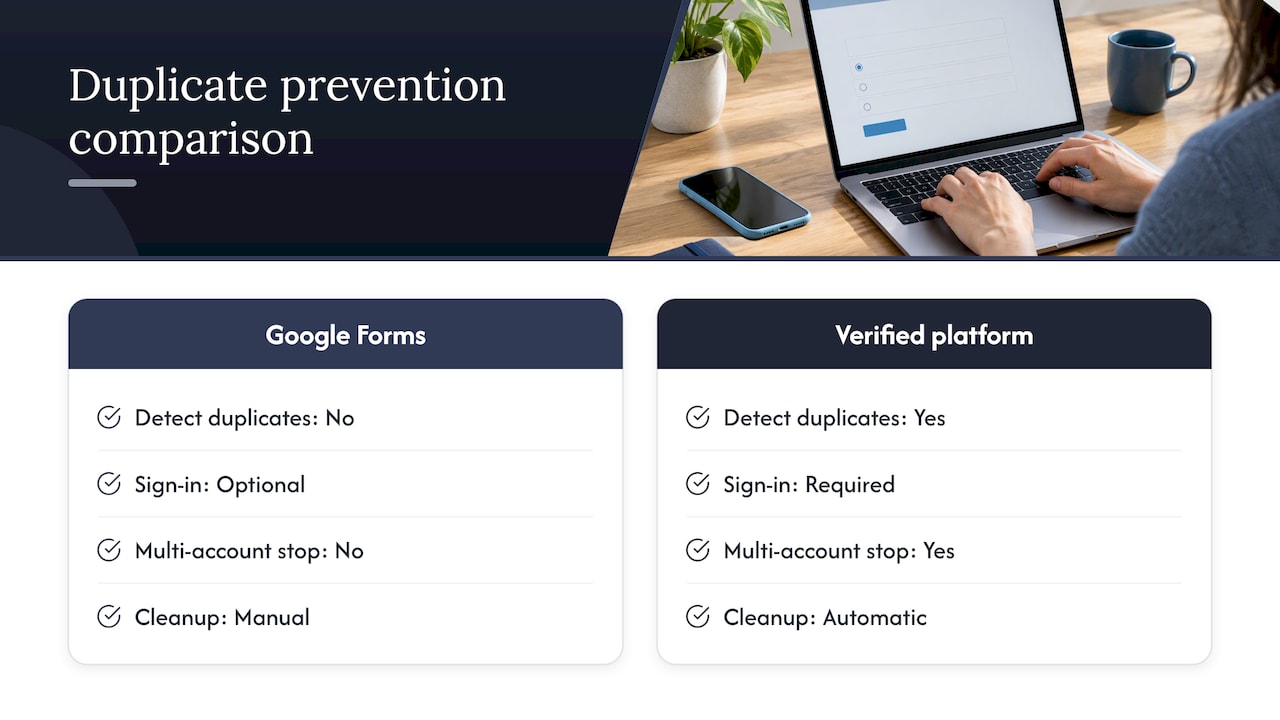
    Duplicate submissions are one of the most common ways a Google Forms vote gets challenged after the fact. Without an authenticated voter roster, Forms cannot natively tell whether the same person submitted twice from two devices, two browsers, or a shared link passed around a group chat.

    The practical impact scales with the size of the vote. In a ten-person team poll, a duplicate is a minor annoyance you can spot by eye. In a public awards vote with thousands of entries, duplicates can shift a close result and you have no reliable way to detect them after the fact, since anonymous responses carry no identifying marker to deduplicate against.

    The only partial fix within Forms itself is requiring sign-in to collect verified Google Account emails, which lets you flag and remove duplicate submissions tied to the same account during your post-vote review. This does not stop someone from using multiple accounts, and it reintroduces the authentication-versus-anonymity trade-off covered earlier. Response limits can cap total submissions, but a response limit stops the count, not the duplication within it.

    For votes where duplicate prevention actually matters, a platform with built-in identity verification at the point of voting, rather than a manual post-hoc cleanup, removes this failure mode by design rather than by spreadsheet triage.

    Impact of multiple or duplicate submissions and prevention strategies — overview diagram

    Addressing and managing ballot stuffing and vote manipulation risks

    Ballot stuffing is the more deliberate cousin of duplicate submissions: one person or a coordinated group submitting many votes to push a result. Google Forms has no native rate limiting per device or per network, so a determined voter can refresh and resubmit from the same browser repeatedly unless you require account sign-in.

    Even sign-in requirements have a ceiling. Someone can create multiple free Google Accounts in minutes, and nothing in Forms flags that pattern for you. Security community discussions on this exact question conclude that Forms cannot verify an eligible voter list or detect coordinated manipulation, which is precisely why practitioners warn against using it for anything resembling a real election.

    Research into coercion-resistant voting protocols goes further, showing that even verified sign-in does not address vote-buying or coercion, since someone can watch over a voter’s shoulder or demand proof of how they voted. Mitigating this in Forms requires manual vigilance: watching submission timestamps for suspicious clustering, cross-referencing IP-adjacent timing where visible, and manually disqualifying accounts created the same day as the vote. None of this scales past a small, low-stakes audience.

    Limitations in customizing voting options and question types relevant to awards

    Awards voting has specific needs that generic survey question types were not designed for: nominee photos next to each choice, grouped categories with a single winner per group, write-in options that do not break the tally, and a visual layout that makes browsing twenty nominees easy on a phone.

    Forms gives you multiple choice, checkboxes, and dropdowns, which cover the basics but flatten everything into plain text options. There is no native way to attach a nominee’s photo directly beside their name in a multiple choice question, so organizers resort to workarounds like numbered lists referencing a separate image gallery, which adds friction exactly where you want voting to feel effortless.

    Multi-category awards compound the problem. Each category needs its own question block, and voters scrolling through a long form for ten award categories are more likely to abandon partway through or miss a required field, which loops back into the submission failures covered earlier. There is also no built-in way to prevent a voter from selecting the same nominee across categories where that would be considered a conflict, since Forms has no cross-question validation logic for that use case.

    Integration challenges with third-party analytics and reporting tools

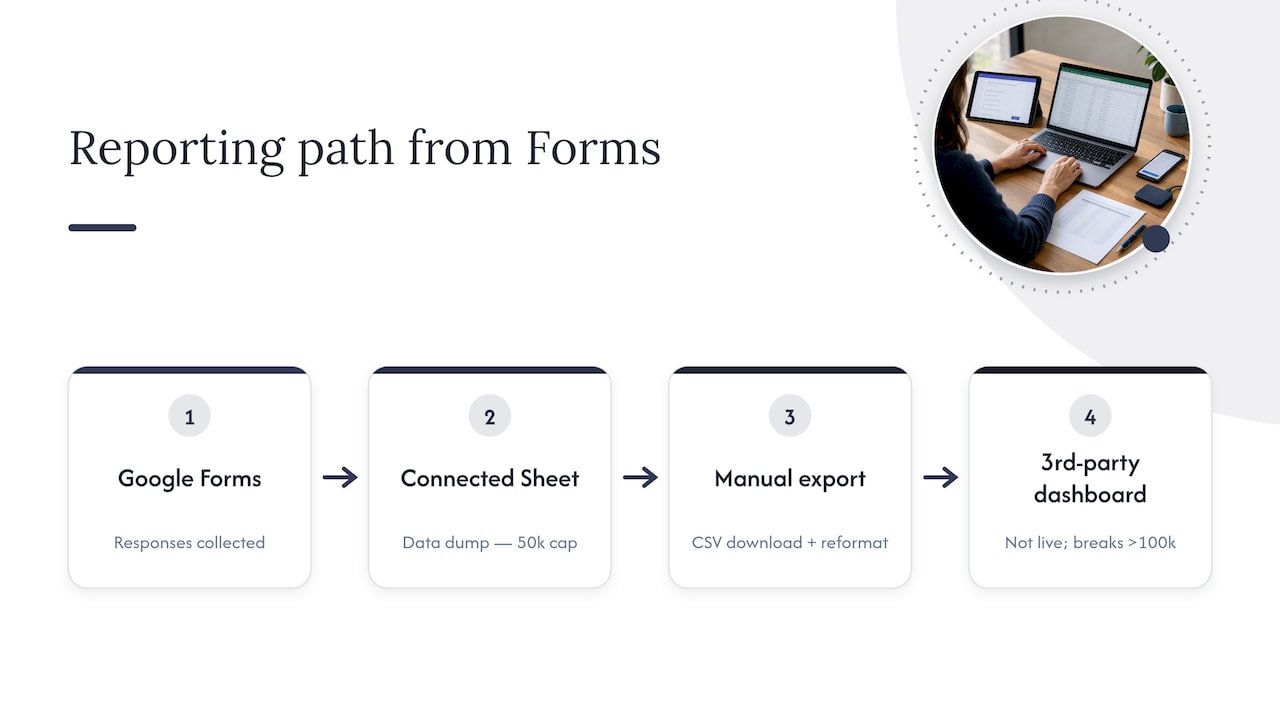
    Once a vote closes, many organizers want more than a raw count. They want engagement trends, vote distribution by category, or a public-facing results page that updates live. Google Forms routes everything into a connected Sheet, which works as a data dump but was not built as a reporting layer.

    Pulling that Sheet data into a dashboard or analytics tool means building your own export and import pipeline, usually a manual CSV download followed by a reformat before anything else can read it cleanly. There is no native live connection to common business intelligence tools, so “real-time” results generally mean refreshing a Sheet and re-running a chart, not an actual live feed.

    Google Forms reporting path and data limits

    At scale, this gets harder. Google’s own documentation notes that very large response sets hit summary and sync limits, including a 50,000 response summary cap and sync issues once a connected Sheet grows past roughly 100,000 rows. For an organizer trying to show a public live leaderboard during an active vote, that is a meaningful ceiling, and it means any third-party dashboard you build on top is only ever as current as your last manual export.

    User experience issues affecting voter turnout

    A voting form that is hard to use loses votes, full stop. Forms was designed as a generic survey tool, and that shows up in small frictions that matter more during a time-limited public vote than they would in an internal team survey.

    Long scrolling lists of nominees with no photos or grouping make it hard for a voter to quickly find their favorite in a crowded category, and that friction tends to show up as abandoned sessions rather than complaints. Mobile responsiveness is generally solid, but required-field errors are easy to miss on a small screen, which ties directly back to the submission failures covered earlier. There is also no progress indicator for multi-category awards forms, so a voter filling in category six of ten has no sense of how much is left, which can prompt them to give up.

    None of these are catastrophic individually, but together they shape turnout more than organizers expect. A form that takes ninety seconds to complete with clear visual cues keeps more voters through to submission than one that takes three minutes of scrolling through plain text options.

    Handling of voter data privacy under relevant regulations

    Collecting voter emails for authentication means you are collecting personal data, and that triggers privacy obligations depending on where your voters are located. Google’s infrastructure handles storage and account security on its end, but the responsibility for how you collect, use, and retain that data as an organizer sits with you, not with Google.

    Under regulations like the EU’s GDPR, collecting email addresses for voter verification generally requires a lawful basis for processing, a clear statement of what the data will be used for, and a defined retention period after which you delete it. Google Forms gives you no built-in consent management, no automatic data retention timer, and no built-in mechanism for honoring a deletion request beyond manually editing the Sheet yourself. If a voter later asks you to remove their data, that is a manual process you have to track and execute.

    For a ten-person office poll this is a minor administrative task. For a public vote collecting emails from voters across multiple countries, it becomes a real compliance obligation that a spreadsheet was never built to manage, and organizers should treat that gap as a planning requirement, not an afterthought.

    Organizer perspective: balancing convenience and trust

    Forms earns its place in a lot of toolkits because it is free and nobody needs onboarding to use it. The tipping point usually arrives the moment a vote has real stakes attached: money, reputation, or a result someone is willing to challenge. That is when organizers start asking for receipts, audit logs, and a tally nobody can quietly edit after the fact, and a general-purpose survey tool was never built to answer that ask.

    The question is never whether Forms works. It’s whether you can defend the result if someone asks you to prove it.

    — Joshua

    A purpose-built alternative to Google Forms voting issues

    When a vote needs to hold up to scrutiny, we built Izivote to close the exact gaps covered above. Identity-based voting ties each ballot to a verified participant without forcing you to manually strip and reconcile a spreadsheet afterward, and our paid voting mode handles payment collection directly.

    Izivote

    Our dashboard shows live results as they come in, without the manual export-and-reformat cycle a connected Sheet requires, and embeddable voting pages let you run the vote directly on your own event site instead of sending voters to a separate link.

    Upgrading makes sense once a vote crosses from informal into binding: elections with real consequences, large public audiences where duplicate detection matters, or fundraising votes where your supporters expect a receipt.

    • Identity-based and paid voting modes built to support authenticated, auditable results.
    • Live public results dashboard instead of a manual Sheet export.
    • Embeddable voting pages for your own site.
    • A free tier for small events, with Pro and Premium plans for larger ones.

    See current plans and pricing to find the right fit for your next vote.

    FAQ

    Can Google Forms be hacked or manipulated during a vote?

    Google Forms has no built-in protection against a single voter submitting multiple times unless you require sign-in, and even sign-in can be bypassed with multiple free accounts. Security community analysis confirms Forms cannot verify an eligible voter list or detect coordinated manipulation, which is why practitioners treat it as unsuitable for binding elections.

    How do I stop bots or duplicate votes in Google Forms?

    Requiring sign-in to collect verified Google Account emails is the main built-in option, letting you manually flag and remove duplicates tied to the same account. It does not stop someone using multiple accounts, so for votes where this risk matters, a platform with identity verification built into the voting step is a more reliable approach.

    Why isn’t my Google Form syncing responses to my spreadsheet?

    The most common cause is linking the wrong file, often an edit link or a duplicate copy instead of the live form’s actual response destination. Google’s troubleshooting documentation recommends verifying the file ID and ownership of the connected Sheet before assuming responses are missing.

    Is Google Forms GDPR compliant for collecting voter data?

    Google Forms gives you no built-in consent management or automatic data retention controls, so compliance with regulations like GDPR depends on how you, as the organizer, collect, store, and delete voter data manually. For public votes collecting personal information across multiple countries, this becomes a real administrative obligation rather than a minor detail.

    What is the response limit for Google Forms?

    Google’s documentation notes a 50,000 response summary limit, along with sync issues that can appear once a connected Sheet grows past roughly 100,000 rows. For smaller polls this rarely matters, but large public votes should test this behavior ahead of time.

    Sources

    Created with BabyLoveGrowth AI

  • Fan Engagement Through Voting: Why Predictions Belong in the Mix

    Fan Engagement Through Voting: Why Predictions Belong in the Mix

    Live voting reliably spikes real-time engagement when the outcome matters to fans, and prediction games keep that energy alive between those peaks. Combine both and you get a continuous participation loop instead of a one-time spike. Track unique voters, votes per user, share rate, and sponsor conversions as your core measures of success, and build your campaign calendar around them from day one.


    TL;DR:

    • Keep ballots focused: fan token polls averaged about seven options, and more choices were associated with lower participation; set one clear result announcement time.
    • Use predictions before major moments and between episodes, then switch to deadline driven voting when outcomes matter; halftime contests suit second half guesses.
    • An analysis of 3,576 fan token polls found roughly 4,000 participants per poll and 50% engagement among eligible holders; treat both as directional benchmarks.
    • Before announcing results, verify anomalies and publish totals for unique voters and votes cast; disclose resolved issues without exposing personal records.
    • Track sponsor click rate and attributable revenue, while setting a baseline across your first two or three events before judging turnout.

    Izivote
    Keep Fans Part of the Outcome
    Run fan voting with clear, secure, transparent processes using a platform built for awards and audience participation.

    Table of Contents

    Live voting versus prediction games: why you need both

    Fan voting asks people to choose an outcome they care about right now: a winner, a finalist, a most valuable player. Prediction games ask people to guess what will happen next, which activates a different motivation: being right, not just being heard. Both matter, and the strongest fan programs layer them across the event cycle instead of picking one.

    This layered engagement model uses prediction contests to build anticipation before a peak moment, then switches to live voting at the moment the outcome actually matters. It then returns to predictions or recaps to extend the conversation afterward. A few examples show the pattern:

    • An elimination round calls for live voting with a hard deadline and a public reveal.
    • A halftime or intermission slot works well for a quick prediction contest about the second half.
    • Between episodes of a series, a “who will win” prediction keeps fans checking back without needing a live event to anchor it.

    Designing a voting campaign: timing, formats, and incentives

    A voting campaign succeeds or fails on three decisions made before launch: what the outcome means, how simple the ballot is, and how it protects its own integrity.

    1. Pick an outcome fans actually care about, and commit to a single, clearly announced reveal time; ambiguity about when results drop kills urgency.
    2. Keep the ballot focused. Research on fan token polls found that polls averaged about seven answer options, and that a higher number of choices was associated with lower participation, while higher token or vote limits were associated with higher participation. Fewer, clearer choices tend to perform better.
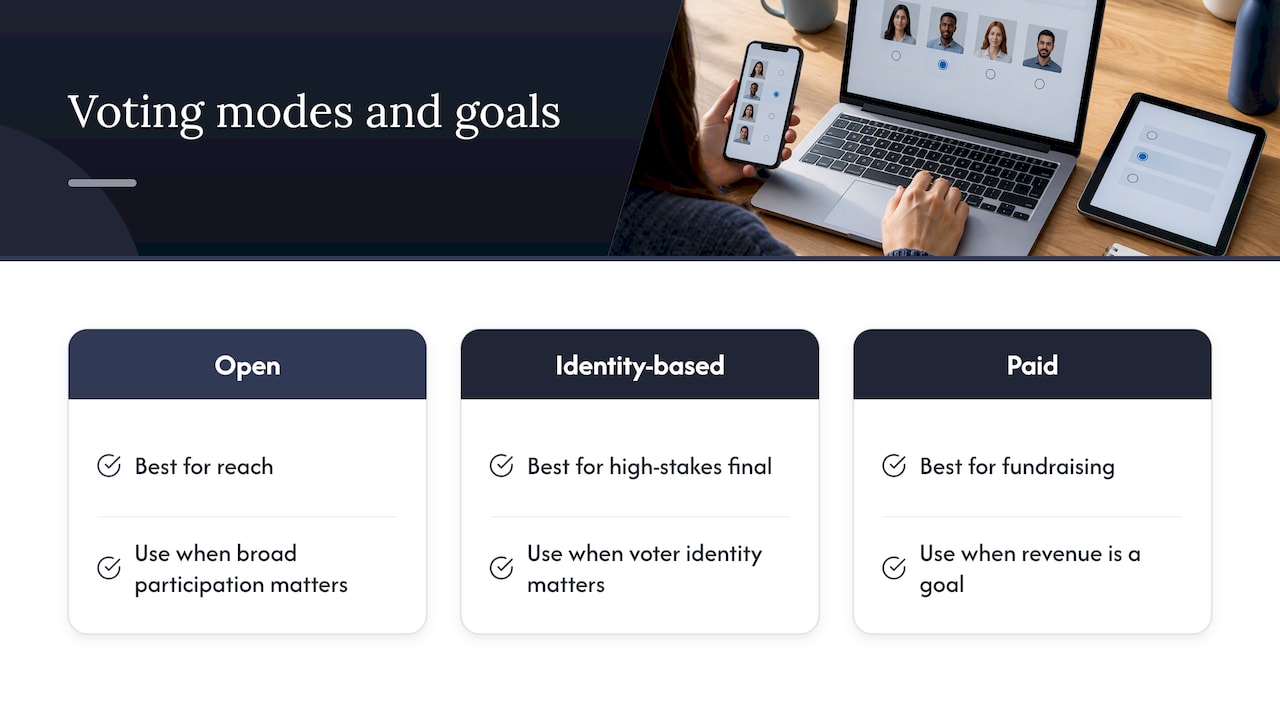
    3. Choose your voting mode deliberately: open voting maximizes reach, identity-based voting protects against manipulation, and paid voting adds a fundraising layer while still requiring clear limits per voter.
    4. Build nominee pages with real photos and short bios, test the entire flow on mobile before launch, and have a fallback plan ready if traffic spikes or a technical issue hits mid-vote.

    Pro Tip: Run your mobile voting flow on a throttled connection before launch. Most drop-off happens in the first ten seconds of a slow-loading ballot.

    Promotion and social sharing: boosting reach and participation

    Turning viewers into voters takes a deliberate push before, during, and after the moment that matters. Each phase has its own job.

    • Before the event: tease nominees, publish short profile reveals, and run a lightweight prediction contest to prime attention ahead of the real vote.
    • During the event: use second-screen prompts, QR codes on screen or in-venue, live result overlays, and push notifications timed to the vote window.
    • After the event: publish shareable result graphics, send personalized recaps to participants, and tie winners to merchandise drops or sponsor shoutouts to extend the moment’s value.

    Event-technology research backs this sequencing: personalization, gamification, and second-screen features such as predictions and recaps measurably increase dwell time and emotional investment, and a large share of fans say they want a single hub for live scores, voting, and exclusive content, pointing to a 67% preference for that kind of unified experience. Treat promotion as a three-act structure, not a single announcement post.

    Security, integrity, and transparency practices for credible results

    A voting campaign only works if people trust the result, and trust has to be built into the mechanics, not added after a controversy.

    • Layer your defenses: behavioral analytics and device fingerprinting catch bulk or automated voting, and passkeys or WebAuthn offer stronger protection than SMS codes alone for high-stakes votes.
    • Publish a post-vote audit summary: total unique voters, total votes cast, and any anomalies flagged and resolved, without exposing individual voter records.
    • Have a signed-off contingency plan before you launch, covering what happens if a technical failure or suspected manipulation requires delaying the announcement.

    Editorial guidance on public voting is direct about this: organizers should treat voting as something that must be robust and fair, with clear published terms and enough time built in to verify results before announcing them, according to audience interactivity guidance. A short, honest audit note does more for credibility than a flawless-looking but unexplained result.

    Measuring success: metrics that matter for organizers and sponsors

    Vanity metrics like total votes cast tell you less than a focused set of participation and conversion measures.

    • Core KPIs: unique voters, votes per user, share rate, dwell time on the voting page, and conversion to tickets or merchandise.
    • Sponsor KPIs: agreement-to-share rate, click-through rate on sponsored placements, and revenue you can directly attribute to the campaign.
    • Benchmarks: an analysis of 3,576 fan token polls found average participation of roughly 4,000 users per poll, with engagement around 50% among eligible token holders; treat these as directional targets rather than guarantees, since turnout varies by poll design and audience size.

    Set your own baseline from your first two or three events, then use these benchmarks to judge whether your format, timing, or promotion needs adjustment.

    How organizers apply these tactics with a purpose-built voting platform

    Putting this playbook into practice is easier with infrastructure built for it. A self-serve setup lets an organizer launch a multi-category vote in hours rather than negotiating a custom build, and a live public dashboard lets fans watch results shift in real time, which is itself a promotion tool.

    Multiple secure voting modes, including open, identity-based, and paid voting, let an organizer match the mechanic to the moment: open for reach, identity-based for a high-stakes final, paid when fundraising is part of the goal. Real-time analytics give organizers and sponsors the same dashboard view, so reporting on share rate or click-through doesn’t require a separate export. Votes have been cast across many events in multiple countries on a voting platform, which reflects how often these mechanics get reused once an organizer has them set up correctly.

    Three voting modes matched to event goals

    Author perspective: pragmatic rules of thumb from an event-voting practitioner

    Author perspective: pragmatic rules of thumb from an event-voting practitioner — overview diagram

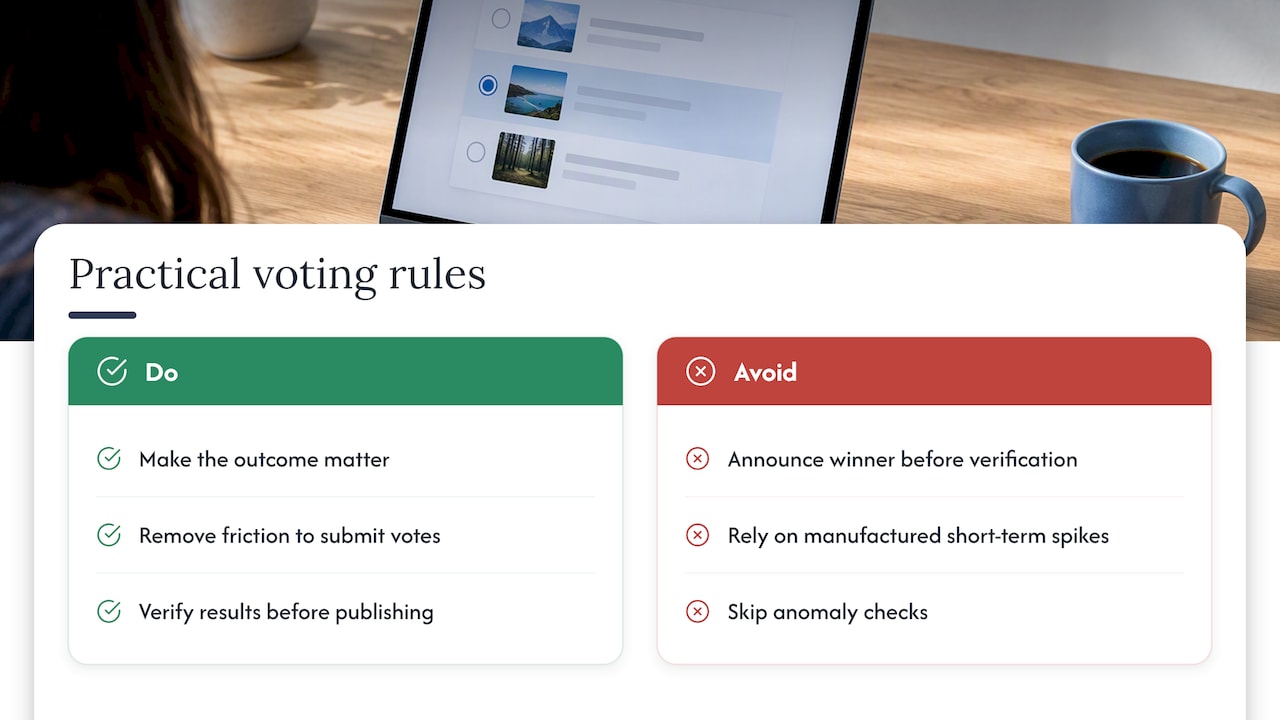
    Three rules hold up across every voting campaign I’ve watched succeed: make the outcome matter, remove every point of friction between intent and submitted vote, and verify your own results before you publish them.

    I’ve seen organizers lose a week of goodwill because they skipped the third rule, announcing a winner before anomalies were checked. The fix is rarely complicated: a short delay for verification costs far less than a retraction. Short-term engagement spikes are easy to manufacture; long-term fan loyalty only comes from campaigns people trust enough to return to.

    — Joshua

    How Izivote helps organizers launch secure, shareable fan-voting campaigns

    We built Izivote around the exact sequence this playbook describes: fast setup, live dashboards, and voting modes that match the moment. Launching an awards campaign takes minutes, not weeks, and your voting page embeds directly into your own site so fans never leave your brand experience.

    Izivote

    • Multiple secure voting modes, including paid voting with handled payments, so you can run a fundraiser alongside your award.
    • Real-time public dashboards that keep fans checking back and give sponsors a live view of their reach.
    • Nominee profile pages with photos built in, so your ballot looks finished on day one.

    If you’re planning a fan-choice or people’s choice award, our peoples choice voting tools are built for exactly that use case, and our pricing page covers the Free plan alongside Pro and Premium options for larger campaigns.

    FAQ

    What is the difference between fan voting and prediction games?

    Fan voting asks people to choose an outcome happening now, such as a winner or finalist, while prediction games ask them to guess a future outcome before it’s decided. Organizers who use both keep fans engaged across the full event cycle instead of only during a single peak moment.

    How do I stop paid or incentivized voting from skewing results?

    Pair any incentive with a clear vote limit per person and a voting mode, such as identity-based or login voting, that ties each vote to a verified participant. Publishing a post-vote audit summary of unique voters and flagged anomalies, as recommended in audience interactivity guidance, also deters and catches manipulation.

    What metrics should I track to prove ROI to sponsors?

    Track unique voters, share rate, click-through rate on sponsored content, and any revenue you can directly attribute to the campaign. Fan token poll research suggests roughly 4,000 participants per poll as a directional benchmark, though your own baseline from prior events is the more reliable target.

    How much does it cost to run a paid voting campaign?

    Izivote offers a Free plan alongside Pro plans at $6 per month or $60 per year, and Premium plans at $14 per month or $140 per year, with a 10% platform fee applied per paid vote processed. Organizers choose the plan based on event size and whether they need paid voting features.

    How many answer options should a voting ballot have?

    Keep the ballot focused. Analysis of fan token polls found that higher numbers of answer options were associated with lower participation, while polls averaged around seven options, so trimming your nominee list to the most meaningful choices tends to improve turnout.

    Sources

    Created with BabyLoveGrowth’s content tools

  • The Blueprint for Better Awards: 6 Features Your Voting Software Needs

    The Blueprint for Better Awards: 6 Features Your Voting Software Needs

    When you launch an online award or competition, you aren’t just collecting data. You are hosting a high-stakes digital event.

    General form builders and survey tools are engineered to quietly collect private feedback. Because they lack the mechanics of a competitive race, using them for public voting usually results in spam, frustrated voters, and an administrative nightmare for your team.

    If you are evaluating software for an upcoming awards show, contest, or election, you need a system built specifically for the dynamics of a race. Here is the blueprint for choosing a dedicated online voting platform that drives engagement and protects your credibility.

    The 6 Must-Haves for a True Voting Platform

    When evaluating a voting solution, grade the software against these six capabilities. If a tool cannot handle these natively, you will end up doing the heavy lifting manually.

    1. Voter Identity Verification: You need a frictionless way to prove every voter is a unique person. Without it, your “winner” is simply the nominee with the best voting bot.
    2. Granular Frequency Caps: Standard tools usually force a binary choice of unlimited voting or one vote per lifetime. A true platform lets you set precise rules, such as “one vote per category” or “one vote per day,” to match your campaign goals.
    3. Visual Nominee Profiles: Displaying a high-quality photo and context for every competitor honors the nominees. A race should feel like a visual showcase instead of a plain-text pop quiz.
    4. Customizable Result Visibility: A live, public tally builds massive excitement and trust. However, not every race should be public. Your software must include a toggle allowing you to display real-time leaderboards to voters or keep results strictly hidden until the official announcement.
    5. Automated Scheduling: The ballot must open and lock automatically at predetermined times. This hardcodes your deadline directly into the voting interface.
    6. Integrated Pay-Per-Vote: If you are monetizing your event, payments must instantly convert into credited votes. Manual spreadsheet reconciliation leads to lost votes and angry fans.

    Matching the Setup to Your Audience

    Identity verification and frequency caps are crucial, but your exact setup depends on who is voting:

    • Media Brands & Radio: You need your audience to return daily. Prioritize: Daily voting caps, seamless native website embeds to retain ad impressions, and live tallies for on-air reads.
    • Creators & Blog Communities: You are dealing with highly motivated fan bases and heavy traffic spikes. Prioritize: Frictionless social sign-ins, daily frequency limits, and visual nominee profiles.
    • Campus & Corporate Elections: Integrity is your only metric. Prioritize: Strict SSO (Single Sign-On) directory integration, rigid one-time voting, and hidden results.

    The Cost of the “Manual Workaround”

    When you force a generic form to act like a voting platform, you pay with your time. You have to manually monitor IP addresses, export data, merge text entries, and build charts in Excel.

    If you charge for votes, the headache worsens. Form builders leave you staring at a list of payment transactions. This forces you to manually match payments to nominees and calculate bulk bundles by hand.

    A dedicated platform automates the administration. For example, if you run paid voting on Izivote, you can set tiered bundles to offer discounted bulk votes, and the system instantly updates the tally the moment a payment clears. Organizers keep 90% of the revenue, which is deposited directly into their own connected processor account. There is no messy reconciliation and no hidden booking fees.

    When Standard Tools Are Actually the Right Choice

    Voting platforms aren’t a universal replacement for forms. Stick with a standard survey builder if:

    • You are gathering internal feedback or conducting market research.
    • Your form requires complex conditional logic or heavy file uploads.
    • You are running a program that relies entirely on a closed panel of expert judges reviewing private scorecards. This requires dedicated awards management software rather than public voting tools.

    Defending the Result

    The true test of your software happens the moment the polls close. In any competitive event, the runner-up’s supporters will demand to know the race was fair.

    If you use a form builder, your only defense is a private spreadsheet and a promise that you cleaned the data properly. A purpose-built voting platform removes human error entirely. When you can point to a system that automatically authenticated users, enforced limits, and managed the clock, the results are bulletproof. This leaves your audience to focus purely on the celebration.

  • Control the Spotlight: Introducing the New “Publish” Feature on Izivote

    Control the Spotlight: Introducing the New “Publish” Feature on Izivote

    At Izivote, we know that building the perfect voting page is an iterative process. You might want to experiment with different categories, tweak your descriptions, or swap out images until everything looks just right.

    Previously, your changes were live the moment you made them. While fast, it didn’t always give you the “breathing room” needed to ensure your page was polished before the public saw it.

    Today, we are excited to announce the Publish Feature – a major update designed to give you total creative control and peace of mind.

    What’s New?

    The core of this update is a shift in how your page becomes visible to the world. Here is the breakdown of the new workflow:

    • Draft Mode by Default: From now on, new voting pages will not be visible to the public until you hit the Publish button for the first time.
    • The “Safety Net” for Edits: Once your page is live, you can continue to make changes in the background. Whether you’re adding a new category or updating a title, these edits remain in a “Draft” state. Your live audience will continue to see the old version until you decide to push the updates.
    • Live Preview: Not sure how that new layout looks? Use the Preview button to see exactly what your voters will see before you commit to the changes.

    Important Note: If you are starting a new project, remember that your voting page will remain hidden from your audience until you perform your first publish.

    Why You’ll Love This Update

    Adding a publishing layer isn’t just about an extra button; it’s about professionalizing your voting experience. Here are the key benefits:

    1. Error Prevention: We’ve all hit “save” too early. Now, you can catch typos or formatting issues in the Preview stage rather than after the link has been shared.
    2. Strategic Timing: You can build your entire voting campaign over several days and wait for the perfect moment —like a live event or a social media launch— to go live.
    3. No More “Under Construction” Vibes: Your voters will always see a finished, polished product. No more half-empty categories or placeholder text visible to the public while you work.
    4. Better Team Collaboration: If you are working with others, you can ensure everyone is happy with the draft before the final version is broadcast to your community.

    How to Use the Publish Feature

    Getting started is simple. Here is a quick guide on how to take advantage of these new tools:

    • Step 1: Create: Add your categories, options, and branding as usual.
    • Step 2: Preview: Click the Preview button at the top of your dashboard. This opens a new tab showing the current draft of your page.
    • Step 3: Refine: If something looks off, head back to manage page and make your adjustments.
    • Step 4: Go Live: Once you’re satisfied, click the Publish button. Your changes are now live and visible to all voters!

    Taking Control of Your Vote

    This update is all about giving you flexibility. By separating the “editing” space from the “voting” space, Izivote ensures that you can manage your campaigns with more confidence and professional flair.

    We can’t wait to see the incredible, polished pages you create!

    Ready to start your next campaign? Head over to your dashboard on Izivote and try the new Publish feature today!

  • How Izivote Helped RENT Create a Live and Engaging Voting Experience

    How Izivote Helped RENT Create a Live and Engaging Voting Experience

    Voting at events should be more than a formality; it should be an experience that brings people together. This came to life at the recent RENT (Real Estate & New Tech) event in Paris, where live voting played a key role in engaging the audience and energizing the room.

    RENT is known for bringing innovation to the real estate ecosystem, and their expectations for audience interaction were high. They wanted a voting experience that felt modern, inclusive, and seamlessly integrated into the live event. Izivote made that happen reliably, and in a way that enhanced the overall experience for both organizers and attendees.

    Supporting Participation at Scale

    One of the biggest successes of the RENT event was how naturally the audience engaged with the voting moments. Attendees didn’t need instructions or explanations; participation felt intuitive. This ease of interaction helped maximize engagement, ensuring that a wide range of voices in the room could take part.

    For RENT, this meant higher participation rates and a stronger sense of inclusion. For us, it meant delivering on our promise: enabling organizers to focus on their event while we handle the complexity of live voting in the background.

    Creating Shared Moments Through Live Results

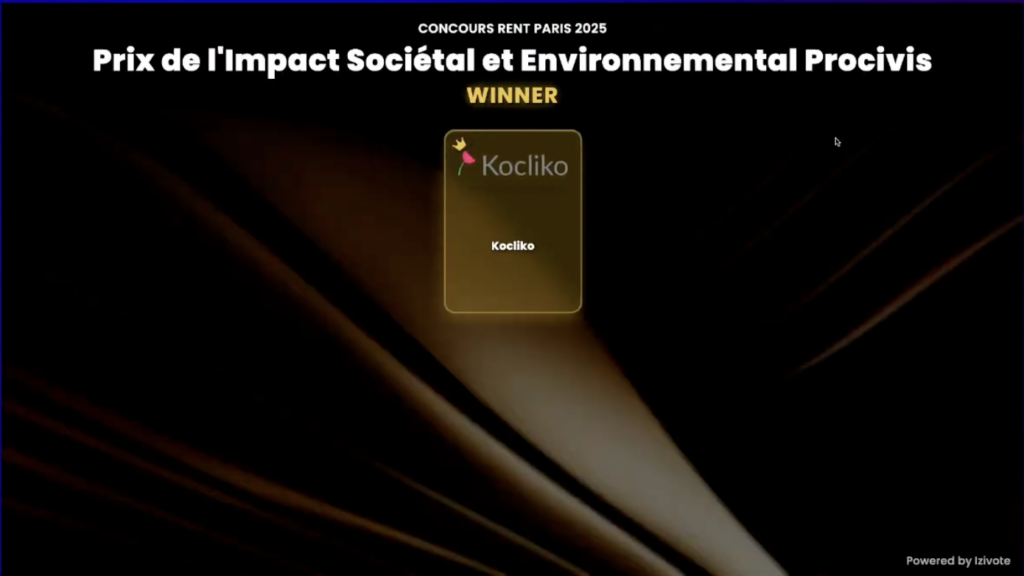
    What truly set the experience apart was the collective reveal of results during the event, as votes were cast and anticipation built among the audience. When results were displayed live using our present feature, turning voting into a shared moment rather than an isolated action.

    This is where live voting has its greatest impact. The immediate visibility of outcomes created excitement, sparked conversations, and reinforced the idea that every vote mattered. For RENT, it transformed voting into a highlight of the program and strengthened audience connection.

    Aligning With RENT’s Vision of Innovation

    RENT sits at the intersection of real estate and new technology, and every touchpoint of the event needed to reflect that identity. The voting experience felt fluid and modern, matching the forward-thinking tone of the event without distracting from its content.

    Our goal was not to draw attention to the technology itself, but to let it support RENT’s vision. By integrating smoothly into the event flow, the voting experience enhanced key moments while preserving the natural rhythm of the program.

    Strengthening Trust Through Transparency

    Live voting also played an important role in building trust. By allowing participants to see results unfold instantly, the process felt transparent and credible. From our perspective, this transparency is essential, especially at professional events where fairness and clarity matter.

    For RENT, this reinforced confidence in the outcomes and contributed to a positive overall perception of the event. For Izivote, it demonstrated how well-designed voting experiences can support trust without adding complexity.

    A Successful Collaboration

    The RENT event was a great example of how live voting can elevate audience engagement when it’s done right. By focusing on participation, shared moments, and transparency, we helped RENT turn voting into a meaningful part of their event experience, not just a technical requirement.

    We’re proud to have supported RENT in delivering a dynamic, interactive voting campaign that resonated with their audience and aligned with their innovative spirit. Events like this continue to inspire us to build tools that empower organizers and bring people together through participation.

    Ready to Create the Same Impact at Your Event?

    If you’re organizing a conference, awards ceremony, meetup, or live event and want to turn audience participation into a highlight, Izivote is here to help. We make it easy to run engaging voting campaigns that feel seamless for attendees and effortless for organizers.

    Whether you want to boost engagement, increase transparency, or create memorable live moments, Izivote helps you bring your audience into the experience, not just observe it.

    Discover how Izivote can support your next event at izivote.com

  • 3 Creative Ways to Use Online Voting for Your Next Event

    Online voting is a versatile tool for engaging audiences and enhancing the energy of any event. While commonly associated with award shows and competitions, its potential goes far beyond these traditional uses. Here are three creative ways to make online voting a standout feature at your next event:

    Product Launch Feedback: Engaging Your Audience with Voting

    Involving your audience in the product launch process can be a game-changer. Online voting enables you to gather their input, transforming them from passive consumers into active collaborators. This interactive approach not only adds excitement to your launch but also validates ideas, increase engagement, create buzz and deliver valuable insights to help shape the product’s success.

    Example: Choosing the Right Packaging

    For products where visual appeal matters, like consumer goods, voting on packaging designs can reveal what catches the eye and communicates your brand effectively. By giving your audience, the opportunity to select from various packaging choices, you ensure that the design aligns with their preferences, increasing the likelihood of engagement and purchases. This audience-driven approach not only deepens your connection with customers but also provides a competitive advantage by ensuring your product’s appearance matches the tastes of your target market.

    Event Theme Selection: Captivate Your Audience with Interactive Voting

    Choosing the perfect theme for an event can set the tone for its success, but narrowing down the best option can be challenging. By involving your audience in the decision-making process through voting, you not only create excitement but also ensure that your event resonates with their preferences. Whether it’s a corporate event, a fundraiser, or a community gathering, letting your audience have a say in the theme fosters a sense of inclusion and connection, buildanticipation, ensure relevance and increase engagement.

    Example: Corporate Events

    For a company anniversary or retreat, you could present themes such as “Future Forward,” “Retro Revival,” or “Innovation Fest” for voting. The winning theme will likely capture the collective enthusiasm and spirit of your team, creating a more engaging and memorable event.

    Team Competitions and Challenges: Elevate Engagement with Audience Voting

    Team competitions and challenges are a fantastic way to bring people together, foster healthy competition, and strengthen bonds. Introducing an audience voting element elevates these events, boosts participation, adds an interactive element, fosters friendly rivalries, creates fair and transparent results, transforming them into interactive experiences that captivate not only participants but also the spectators. Whether it’s a corporate team-building exercise, a school talent show, or a community sports event, audience-driven voting adds excitement and Inclusivity to the mix.

    Example: School and University Events

    Audience voting can be a great addition to talent shows, debates, or sports events, helping to decide winners in categories like “Best Performance” or “Most Spirited Team.” This interactive element encourages students and attendees to actively participate, making them feel more connected to the event.

    Ready to try something new? Start planning your next event with Izivote and turn your audience into active participants!

  • The power of audience-driven decisions: Why voting matters for your brand

    People crave recognition, connection, and inclusion, by incorporating audience-driven decisions through online voting campaigns, and surveys, you give your customers or followers a meaningful way to participate and have their voices heard. This involvement goes beyond simple engagement, it builds loyalty, creates meaningful interactions, and strengthens trust.

    Fostering Stronger Bonds Through Engagement

    Inviting your audience to vote on meaningful decisions such as a product feature, or campaigns gives them a voice in your brand’s journey. This involvement fosters a sense of connection and appreciation, strengthening emotional bonds and building lasting loyalty.

    Enhancing Trust through Transparency

    Well-executed voting campaigns and surveys foster a sense of fairness and openness. Using a secure, user-friendly platform guarantees that every vote or survey response is accurately recorded, and the results are credible. This level of transparency in both voting and feedback collection builds trust, encouraging your audience to engage and stay connected with your brand.

    Expanding Visibility and Audience Reach

    Incorporating voting into your brand’s strategy can greatly boost its visibility. A properly managed voting event not only generates buzz but also encourages people participating in a voting event to share it with their friends and followers on social media, spreading the word about your brand. As votes are counted and milestones are hit, the excitement intensifies, keeping your brand in the spotlight. This attracts more attention and expands your brand’s reach to a broader audience.

    Gaining Valuable Insights

    Audience-driven decisions through voting provide instant feedback on your audience’s preferences and priorities. This valuable data helps you gain deeper insights into your customers, allowing you to align your products or services with their needs and expectations.

    Building Lasting Memories

    Interactive campaigns go beyond just the results, they emphasize the entire experience. By offering customizable features, your audience enjoys an engaging, transparent, and smooth voting process that creates a memorable impact.

    Empower your audience and elevate your brand engagement through audience-driven decisions. Create an interactive, transparent, and memorable voting experience that resonates with your audience. Start your voting journey today and watch your audience connect with your brand like never before.

    Ready to strengthen your brand and engage your audience? Get started with Izivote

  • Creating an unforgettable voting experience: Tips for event organizers

    A well-executed voting process positions your brand as forward-thinking, committed to user experience, and willing to invest in quality. An exhilarating experience can attract more voters to participate through social media shares, word-of-mouth and promotion.

    What does an unforgettable voting experience look like? I’ll tell you!

    Real-time thrill, that begins with poll creation up till voters have an emotional connection with the nominees and then watch their votes impact the results. Every interaction feels natural and seamless, whether you’re on your phone, tablet, or computer. Right from the start, the platform adapts to your device’s screen, so there’s no zooming or resizing, everything just fits perfectly, and it’s clear where to go next. A secure process that ensures double voting is impossible, which reinforces the transparency and legitimacy of the entire process.

    To have this great experience, you need a voting software that allows you upload nominee photos, names, and details, allowing voters to learn about each option and make informed choices. The platform should have a user-friendly dashboard that provides live data on voting results, displayed in various formats like bar charts and leaderboards, creating excitement and transparency. Transparent security measures assure voters their contributions are valued and secure, building confidence in the platform.

    You should also be able to set custom start and end dates, with automated vote closures to streamline the process. This will help you build anticipation leading up to the event and can create a sense of urgency for participants to cast their votes in time.

    Izivote’s blend of dynamic features, ease of use, and thoughtful design makes it a platform that truly prioritizes a memorable experience for all involved, from organizers to participants.

    Ready to elevate your voting event? Start with Izivote today and discover how easy it is to create an unforgettable experience for your participants!

  • Third Edo/Delta Icon and Stars Award Nomination List

    Third Edo/Delta Icon and Stars Award Nomination List

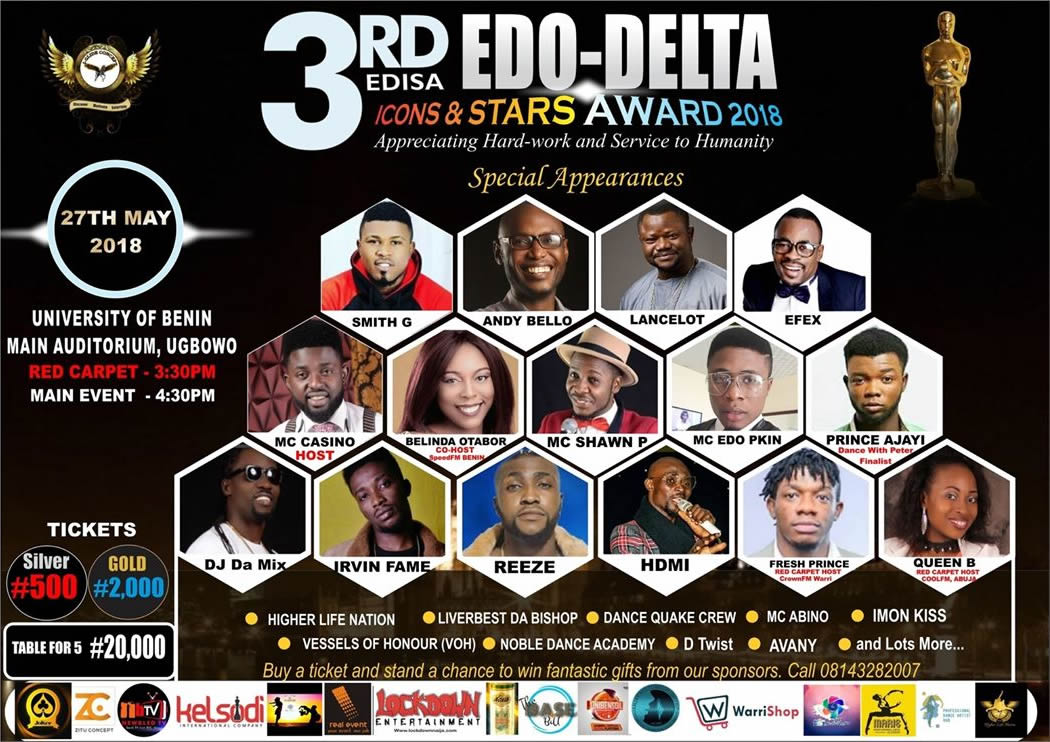
    The Edo/Delta Icons and Stars Award is organized to appreciate hardworking individuals and organizations who in one way or the other contributing towards the growth and development of Edo and Delta States. The third edition of the award is scheduled to hold on the 27th of May 2018. The nomination list for the award has been released which contains 30 categories with well deserving nominees in each category. Voting would commence from the 29th of April 2018 and any one can vote through the Edo/Delta Icon and Stars Award vote page on Izivote. The full nomination list is given below;

    1. Campus Blog Of The Year (Edo)

    • BIU Base
    • Uniben Soil
    • Uniben Buzz
    • Uniben Pulse
    • Uniben Base
    • Only in BIU
    • Campus Pulse

    2. Dance Company Of The Year (Edo)

    • Marie Performing Arts Academy
    • Depths of Motion
    • Bdots Studio
    • De Unique Dance Academy
    • Noble Dance Company

    3. Campus Dance Crew Of The Year (Edo)

    • Generals 4 Christ (BIU)
    • Jmotion (Auchi)
    • Higher Life nation Uniben (the_krazies)
    • Wings Dance Crew (BIU)
    • Epithome of Dance (Uniben)
    • Descendants of David (IUO)
    • Da Realz Dancers (Uniben)
    • Vessels of Honour VOH (Uniben)
    • COLLEGE FYNEST (Ekpoma)

    4. Dance Crew Of The Year (Edo/Delta)

    • Code Red Dance Crew (Edo)
    • Vibxx Dance Crew (Edo)
    • Jmotion (Edo)
    • Knight Africa (Delta)
    • Noble Dance Academy (Edo)
    • Dance Quake (Edo)
    • TFS Dance Crew (Delta)

    5. Solo Dancer Of The Year (Edo/Delta)

    • Onome Umoh a.ka Nomzy (Delta)
    • Prince Ajayi (Edo)
    • Emmanuel Osahor (Delta)
    • Dance Glitch (Edo)
    • Annointed Robot (Edo)
    • Fidelis Troy (Delta)
    • Martin Rock (Delta)

    6. Music Producer Of The Year (Edo/Delta)

    • Deep End Entertainment (Edo)
    • ID Cleff (Delta)
    • Philtown Production (Edo)
    • Zhynobeatz (Delta)
    • Lockdown Entertainment (Edo)

    7. Video Director Of The Year (Edo/Delta)

    • May17mindfilms (Edo)
    • Amen Imasuen (Edo)
    • Director Abd (Edo)
    • Owen Imagery (Delta)
    • A2Films (Delta)

    8. Best Actor Of The Year (Edo)

    • Nosaobaseki
    • Egbon Cyril
    • Sylvester Uwadiae
    • Valiho Osaigbovo
    • Michael Isokpan

    9. Actress Of The Year (Edo)

    • Nuela Ediku
    • Sandra Aigbogun
    • Blessing Iyamu
    • Ehi Buckler Isibor
    • Shine Frances Odigie
    • Sharon Okpamen
    • Ebony Obasuyi

    10. TV Station Of The Year (Edo/Delta)

    • AIT
    • ITV Benin
    • Silverbird TV
    • DBS (Delta)
    • EBS (Edo)
    • Rainbow TV (Delta)
    • Quest Television (Delta)

    11. Radio Station Of The Year (Edo/Delta)

    • ITV Radio (Edo)
    • Kpoko Fm (Delta)
    • KuFM
    • Quest FM (Delta)
    • Rhythm93.7 FM
    • Rizefm Radio (Delta)
    • Speed FM (Edo)
    • VibesFM (Edo)

    12. OAP Of The Year (Edo/Delta)

    • Shockersydney ITVRadio (Edo)
    • Ororo1 of Speedfm (Edo)
    • Mz_Enkaymc Rizefm (Delta)
    • Jennifer Hotgurl Omoko KpokoFM (Delta)
    • Gucciaugustus KuFM (Edo)
    • Jock Fresh Prince Crownfm (Delta)
    • Supersaandie VibesFM (Edo)
    • MC Likilikimouth Questfm (Delta)
    • The joycechuks Rhythmfm (Edo)

    13. Sportsman Of The Year (Edo)

    • Charlse Omokaro
    • Joy Jegede
    • Rosemary Ologbosere

    14. Most Entertaining MC (Edo)

    • Shawn Pee
    • Sydney Shocker
    • MC Edo Pikin
    • King Zina
    • MC Casino
    • D’ Compere

    15. Celebrity Hypeman Of The Year (Edo/Delta)

    • Blackx Panda (Edo)
    • Fresh BLiss (Edo)
    • Emma Passions (Delta)
    • Emperor Mochi (Edo)
    • MC MrPhat (Delta)
    • Phenzy jay (Edo)
    • Mc Sabitalk (Delta)
    • Northboii Muniie

    16. Artist Of The Year (Edo/Delta)

    • Shuunbebe (Delta)
    • Black IQ (Edo)
    • Kevino (Delta)
    • Viktoh YBNL (Edo)
    • Pere Carter (Delta)
    • Dice Soula (Edo)

    17. Next Rated Artist (Edo/Delta)

    • Irvin Fame (Edo)
    • 9Geez (Delta)
    • T-West
    • Keedaxpensiv (Delta)
    • Jeno Base (Edo)
    • Soul Kent (Edo)
    • Imon Kiss (Edo)

    18. Comedian Of The Year (Edo/Delta)

    • MC Casino
    • MC Edo Pikin
    • Annointed Aproko (Edo)
    • MC Likiliki mouth (Delta)
    • MC Obaro (Delta)
    • MC Mikolo (Edo)
    • Young ChiefYic (Delta)
    • Kelvin Sapp (Delta

    19. Next Rated Comedian (Edo/Delta)

    • Liverbest (Edo)
    • MC Paparazzy (Delta)
    • Skb Comedian (Edo)
    • MC Whalemouth (Delta)

    20. Best Use Of Social Media (Edo/Delta)

    • kelsodi_int_company (Delta)
    • Warri Update (Delta)
    • Fresh Media Alert (Delta)
    • New BledTV (Edo)
    • Creed Motions (Edo)
    • Ace Boss007 Clinton (Edo)

    21. Brand Of The Year (Edo/Delta)

    • Vice City (Edo)
    • House of Origin (Edo)
    • Zitu Concept (Delta)
    • Square Head Wine Gallery (Edo)
    • Warri Shop Online (Delta)

    22. Transport Company Of The Year (Edo/Delta)

    • Big Joe Motors
    • Bob Izua Motors
    • Edegbe Line
    • God is Good motors
    • Muyi Line
    • Ohonba Line

    23. Fashion Stylist Of The Year (Edo/Delta)

    • A1 Clothings (Delta)
    • Arrydworld (Edo)
    • Ede Iyamu mb_leeyy (Edo)
    • Emmrald Exclussive (Delta)
    • Lee Clothier01 (Edo)
    • Niahs Stitch_femme (Delta)
    • Paulish Bespoke Clothing (Edo)

    24. Hangout Spot Of The Year (Delta)

    • Temple Grill
    • Rufes Amusement Park
    • Groover Land
    • Carwash Esisi Road

    25. Hangout Spot Of The Year (Edo)

    • Sams Pent Huouse Benin
    • Kada Cinema
    • Nadia Bakery
    • Imperial Bizzo Lounge
    • Filmhouse Cinema

    26. Most Enterprising Youth (Edo/Delta)

    • Alvin CEO Real Event (Edo)
    • Jandy Abikwi CEO House of Origin (Edo)
    • Jeremy Akpomera CEO Depths of Motion (Edo)
    • Marie Idara Bassey CEO MPPA (Edo)
    • Omoshowo Olanrewaju CEO Warrishoponline (Delt
    • Uyi Wise CEO OOMPhatainment (Edo)
    • Zion Oshiobugie The Academic mentor (Delta)

    27. DJ Of The Year (Edo/Delta)

    • DJ Akaba (Delta)
    • DJ Amado (Edo)
    • Dj Osahon (Delta)
    • Dj Clefftunez (Edo)
    • Dj Don Efezeey (Edo)
    • DJ FX (Edo)
    • DJ Orizu (Edo)
    • DJ Oscar (Delta)
    • Dj Salt (Edo)

    28. Most Outstanding Nightlife Outfit (Edo)

    • Club Joker
    • Club Novonia Prive
    • Club Rave
    • Club Terrazo Leurre
    • Empire Underground

    29. Most Outstanding Nightlife Outfit (Delta)

    • Club Edge Warri
    • Club Lax Warri
    • Club54 Warri
    • House99 Lounge Warri
    • Dynasty Lounge
    • Vortex Lounge

    30. Gospel Artist Of The Year (Edo/Delta)

    • Joan Paul
    • Arese Daniels
    • King David
    • Onos Brisibi
    • Uche Monye
    • Wati Ehidiamen (Edo)