Category: General

  • Voting Payment Processing: Why Chargebacks Matter More Than Checkout

    Voting Payment Processing: Why Chargebacks Matter More Than Checkout

    Paid voting runs through standard e-commerce processors, typically Stripe, which can keep card numbers off the voting server when the platform uses a hosted payment page or another outsourced card-handling approach. Organizers set a price per vote, the platform adds its own fee on top of whatever the processor charges, and fees may be deducted before money reaches an organizer’s account. The biggest operational risk isn’t the payment itself: it’s a chargeback, which can put the funds at risk after the fact.


    TL;DR:

    • Before launch, confirm the payout country, connect and verify the processor account, match the payout currency to your bank, and check when funds will arrive.
    • Platform fees commonly range from 10% to 20%, separate from processor charges; calculate both deductions before setting vote prices or projecting net revenue.
    • Organizers typically have 7 to 21 days to submit dispute evidence, so retain transaction records, timestamps, receipts, and the corresponding voting log.
    • Keep payment tokens separate from ballot identifiers, preserving records needed for refunds and disputes without exposing voter identity or compromising election privacy.
    • Successful refunds usually appear on voters’ statements within 5 to 10 business days, although some local payment methods require extra steps and can take longer.

    Izivote
    Make Paid Voting Easier to Manage
    Izivote supports paid voting for fan and people’s choice awards, with real-time analytics and a dashboard to monitor votes.

    Get started with Izivote

    Table of Contents

    Which payment methods do voting pages accept?

    Most voting pages accept a narrow, familiar set of payment methods because that’s what keeps checkout fast and dispute handling predictable. Voters expect to pay the way they pay everywhere else online, and platforms benefit from sticking to rails with well-documented dispute rules.

    • Credit and debit cards, processed through a hosted checkout rather than a custom form when the platform uses an outsourced card-handling approach
    • Digital wallets, where available, which may make mobile checkout more convenient
    • Region-specific local payment methods, where available, though these often carry different dispute timelines than card networks

    The reason most platforms use a hosted payment page, an iFrame, or client-side tokenization instead of building their own card form is simple: it keeps raw card data off the voting server entirely. The PCI Small Merchant Guide recommends exactly this approach, outsourcing card handling to a compliant third party rather than storing or transmitting cardholder data directly. That can matter for a voting platform, since separating payment data from ballot records helps protect voter privacy.

    How does money move from voter to organizer?

    There are two dominant patterns for routing paid-vote revenue, and the difference matters for how quickly organizers see their money and how much setup work falls on them upfront.

    In the first, payments land directly in the organizer’s own payment processor account, with the platform fee deducted at the time of transaction. In the second, the platform collects funds centrally and issues a manual payout later, which adds a step but may simplify onboarding for organizers who prefer not to set up their own merchant account.

    Before opening a paid voting page, organizers typically need to:

    1. Pick a payout country, since this determines available currencies and banking rails.
    2. Connect a Stripe account and complete identity verification.
    3. Choose a payout currency that matches the organizer’s bank account.
    4. Confirm the payout timing for the chosen payment setup.

    Dashboards generally show fees and earnings at the transaction level, so organizers can see exactly what was charged, what was deducted, and what cleared. That transparency is worth checking before launch, not after the first dispute arrives.

    Pro Tip: Verify your payout country and email address before enabling any paid voting page. Mismatches here may delay payouts.

    How much do platform and processor fees cost organizers?

    Platform fees on paid voting commonly fall in a range of roughly 10% to 20% per transaction, and Izivote states a 10% platform fee on its pricing page. That fee is separate from whatever the card processor charges, which is deducted where the payment actually lands rather than by the voting platform itself.

    The math organizers need is straightforward: net payout equals the vote price, minus the platform fee, minus the processor fee. Say a voter pays $1.00 for a single vote. A 10% platform fee removes $0.10, and typical processor fees take another small cut before the remaining balance reaches the organizer’s account.

    • Track the clearing balance, the available balance, and the requested versus paid amounts separately if using a manual payout path.
    • Reconcile per-transaction detail in the dashboard against bank deposits, since timing between the two can differ by several days.

    What happens when a voter disputes a payment?

    Disputes on paid votes follow the same lifecycle as any other card transaction: an initial inquiry or pre-dispute phase, followed by a formal dispute if unresolved. According to Stripe’s dispute documentation, organizers typically have a 7 to 21 day window to respond with evidence, and the full process can take up to three months to resolve. That window is tight, which is why evidence needs to be ready before a dispute ever arrives.
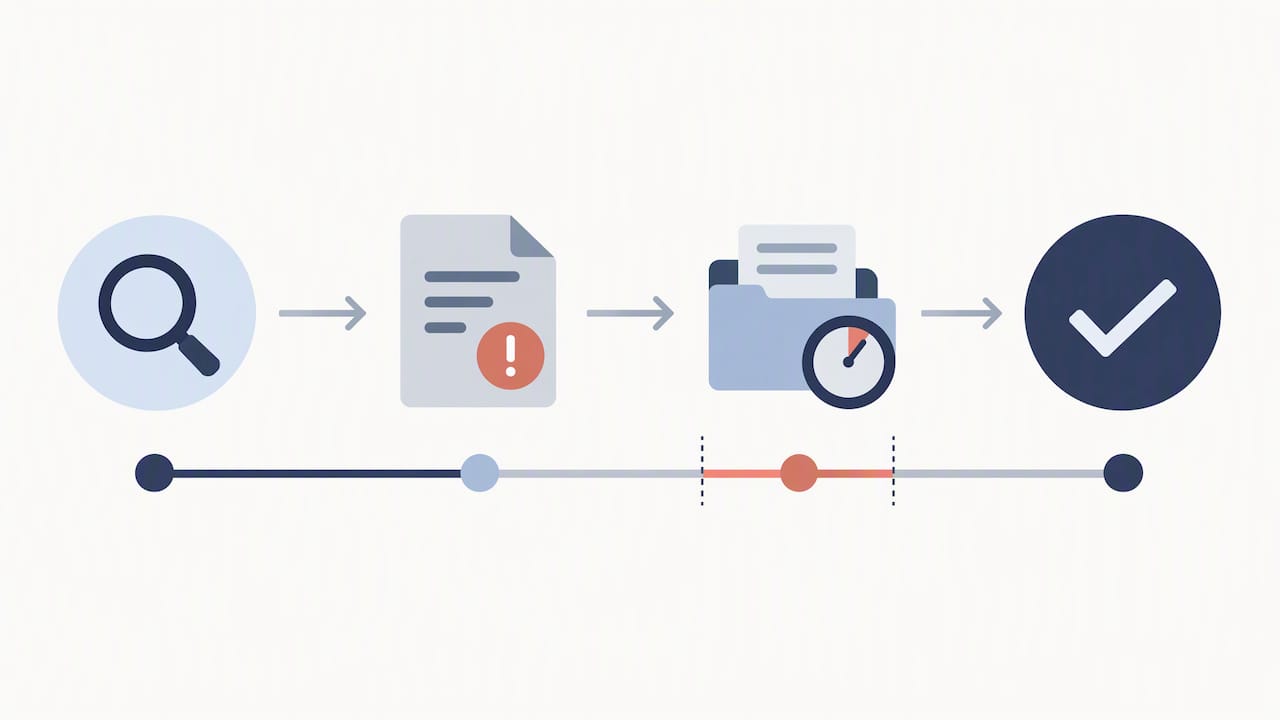
    Stages of a payment dispute and response window

    Disputed funds may be debited from the organizer’s account, and dispute fees may apply. The outcome determines whether the disputed funds are returned and whether any dispute fee applies.

    To defend a contested charge, organizers should keep:

    • The original transaction record, including timestamp and amount
    • The voting log tied to that specific transaction
    • Any voter confirmation data, such as a receipt or confirmation email

    Successful refunds, by contrast, usually post to the voter’s statement within 5 to 10 business days, though some local payment methods require additional steps that can extend that window.

    Why voting payments need different safeguards than normal transactions

    Financial systems are built around recoverability: if something goes wrong, insurance, chargebacks, and legal recourse can usually make the affected party whole again. Voting systems can’t rely on the same safety net. An academic analysis from Harvard’s Civil Rights-Civil Liberties Law Review explains that voting transactions carry different threat models and privacy requirements than financial ones, which is part of why the two domains stay distinct even when they intersect on a single platform.

    Voting demands properties that financial transactions don’t: anonymity, receipt-freeness, and resistance to coercion. A financial remedy, reversing a charge or refunding a fee, does nothing to repair a compromised election result. That’s why platforms that combine payment and voting need to unlink the payment token from the ballot identifier rather than treating a vote as just another purchase record.

    In practice, this means keeping enough payment evidence to handle a refund or dispute, such as a transaction ID and timestamp, while minimizing any link between payment information and ballot identity. Features such as bulletin boards, encrypted ballots, and independently checkable tally proofs can help protect election integrity when payments are part of the process. Payment handling and ballot handling can share an interface without sharing the same privacy rules.

    What operators learn the hard way about paid voting payments

    The organizers who avoid payout surprises are the ones who treat payment setup as a pre-launch checklist, not an afterthought. Connect and verify payout details before the first paid page goes live. Set clear, simple price points per vote rather than a confusing tier structure, and choose a minimum price high enough to cover fixed processor fees so low-priced votes are less likely to leave little after fees.

    Dispute readiness matters just as much as setup. Keep relevant payment records organized so they can be gathered if a dispute arises. If a dispute lands inside that narrow response window, the evidence is already organized rather than assembled under pressure.

    Pro Tip: On manual payout paths, check whether processor fees are deducted before the payout reaches you. That detail changes what price you should set to hit a target net earning.

    — Joshua

    Let payment handling run itself so you can run the event

    Running paid voting shouldn’t mean learning payment plumbing on the fly. We built our platform to support paid voting and apply a transparent 10% platform fee.
    Izivote

    Whether you’re running a people’s choice award or a fan-funded competition, our paid voting setup lets you run paid voting. Check our pricing page or create a free vote before you launch.

    FAQ

    What payment processor do voting platforms typically use?

    Most paid voting platforms route card payments through a third-party processor like Stripe rather than handling card data themselves. Using an outsourced payment setup can keep cardholder information off the voting server, though the platform may still have PCI DSS responsibilities.

    How long do organizers have to respond to a voting payment dispute?

    Organizers typically have a 7 to 21 day window to submit evidence once a dispute is filed, and the full resolution process can take up to three months. Evidence should include the transaction record and the voting log tied to that specific payment.

    How much is the platform fee on paid votes?

    Izivote charges a 10% platform fee on every paid vote, separate from whatever the payment processor charges.

    Can a refunded vote be removed from the results?

    Refund and vote-removal policies depend on the platform’s specific rules, since a refund is a payment event while a cast vote may be handled as a separate record. Successful refunds typically post to the voter’s statement within 5 to 10 business days.

    Why can’t voting platforms just use normal banking security?

    Voting requires properties that banking doesn’t, including anonymity and resistance to coercion, which an academic comparison of voting and financial transactions ties to differing threat models. Financial remedies like chargebacks can fix a billing problem, but they can’t repair a compromised election result.

    Sources

    Recommended

  • Nonprofit Voting Fundraisers: Use $2 Votes to Build Donor Lists

    Nonprofit Voting Fundraisers: Use $2 Votes to Build Donor Lists

    Paid-vote fundraisers can raise real money and deepen supporter engagement when nonprofits run them transparently, price them clearly, and keep the contest framed as a donation, never as influence over a public election. The best next step is a small pilot: pick one contest, set a simple price per vote, run a short voting window, and communicate the rules plainly before launch.


    TL;DR:

    • Use a flat $2 vote price or test 10 votes for $15, and cap the voting window at 2 to 4 weeks to maintain momentum.
    • Give nominees a photo, caption, and voting link; send three email reminders, including a final message 24 to 48 hours before closing.
    • Keep copy focused on the nonprofit’s own contest, never public elections; set device or card limits and pause voting if confirmed vote rates drop sharply.
    • Track net revenue after processing fees, new email signups, and repeat giving; thank every voter within 48 hours and share how funds will be used.

    Izivote
    Turn Supporter Votes Into Engagement
    Run a paid-vote contest with identity-based voting and real-time analytics to engage supporters and monitor participation.

    Table of Contents

    How a donate-to-vote fundraiser actually raises money

    A paid-vote fundraiser lets supporters cast votes for a nominee or entry by making a small payment, often $1 to $5 per vote, with the option to buy vote packages at a discount for larger amounts. The organizer sets up a voting page, nominees recruit their own supporters, and a payment processor handles each transaction as it comes in.

    The math is simple to model: if 400 supporters each buy an average of 3 votes at $2 per vote, that is 1,200 votes and $2,400 in gross contributions before any processing costs. The real value often extends past that number.

    • Nominees recruit their own networks, bringing in people who have never donated before.
    • Every vote purchase is a chance to capture an email address for future appeals.
    • Contests generate organic social sharing that a standard donation ask rarely produces.

    Contest formats nonprofits run most often

    Format choice depends on audience size, season, and how easy it is for nominees to rally a network.

    1. Pet photo contests work well for animal shelters and humane societies, where owners submit photos and ask friends and family to vote.
    2. Calendar contests fit organizations that want a tangible product and a reason to keep fundraising across the full year, since the calendar itself becomes a thank-you gift.
    3. Student and youth awards, like “most spirited” or academic recognition contests, engage school communities and parent networks.
    4. Community “best of” awards suit chambers of commerce and local nonprofits that want to highlight small businesses or volunteers while drawing in civic pride votes.

    Each format succeeds by giving nominees a personal reason to share the voting link, which is what pulls in supporters beyond the organization’s existing donor list.

    Setting up your campaign: nominees, pricing, and payments

    A clean setup process prevents most of the problems that derail paid-vote campaigns. Start with nominee intake: collect a photo, a short bio, and a consent form, and build in an approval step so every entry meets your guidelines before it goes live. Think about accessibility too, including alt text for photos and a mobile-friendly voting page, since most votes will come from phones.

    Pricing works best when you test a simple structure rather than overcomplicate it:

    • A flat per-vote price, such as $2 per vote, is easiest for supporters to understand.
    • Vote packages, like 10 votes for $15, encourage larger single purchases.
    • A capped voting window, typically 2 to 4 weeks, creates urgency without fatiguing supporters.

    Before launch, confirm your payment processor, decide whether purchases qualify for a tax receipt in your jurisdiction, and write a plain-language refund policy since vote purchases are generally treated as nonrefundable donations. Configure your leaderboard to update in near real time so nominees and voters stay motivated to check back.

    Pro Tip: Run a 48-hour internal test with a handful of staff votes before the public launch to confirm pricing, payment flow, and leaderboard display all work as expected.

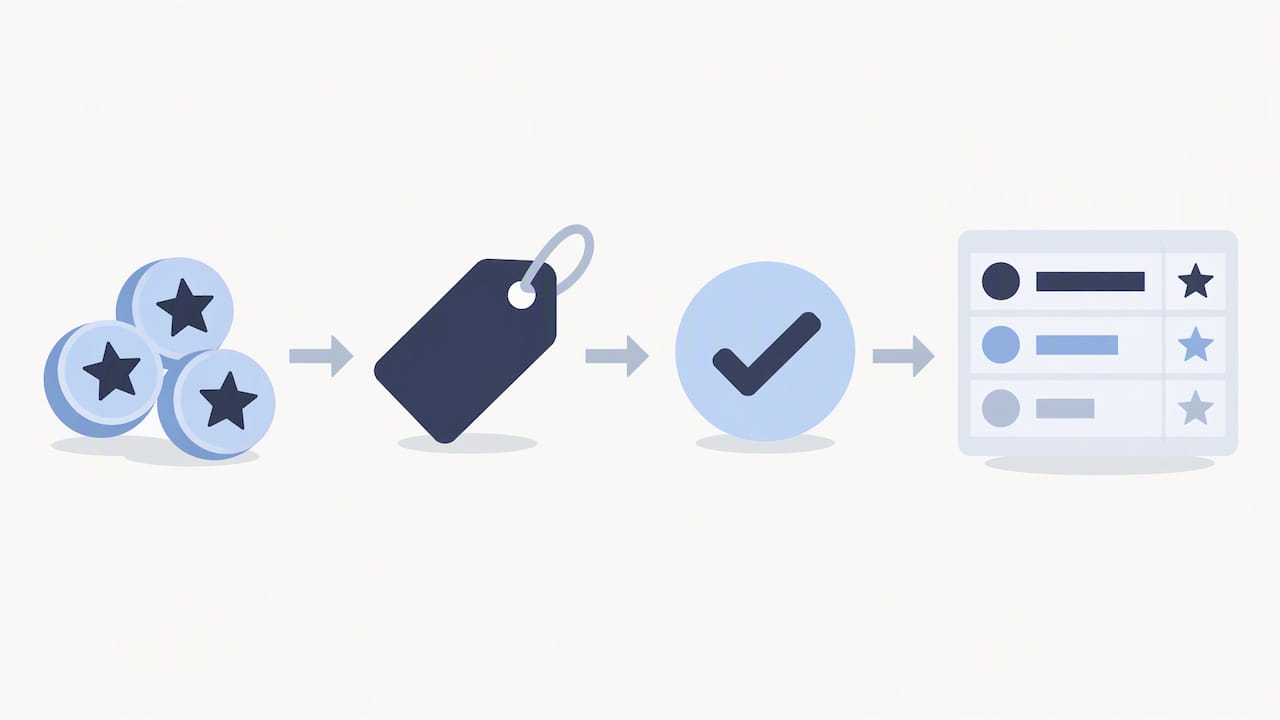
    Test votes pass through three launch checks

    On launch day, monitor the voting page load speed, confirm payment confirmations are arriving, and check that every nominee’s page displays correctly on mobile.

    Getting the word out: email, social, SMS, and partners

    Votes come from channels you already have plus a few you build out for the contest. Email remains the backbone: send an announcement when voting opens, a midpoint reminder highlighting leaderboard standings, and a last-call message in the final 24 to 48 hours.

    • Give each nominee a simple toolkit: a profile photo, a pre-written social caption, and their direct voting link.
    • Post leaderboard updates on social media to create momentum and light competitive pressure among nominees.
    • Use SMS reminders for supporters who have opted in, since text messages tend to get read faster than email during a short voting window.
    • Bring in sponsors or local business partners to match a portion of votes or offer a prize, which widens your promotional reach beyond your own list.
    • Tie the finale to a live event, like an announcement at a gala or community gathering, to convert online momentum into in-person attendance.

    Nominee-driven sharing is usually what separates a contest that raises a modest amount from one that significantly outperforms expectations, since each nominee effectively becomes a volunteer fundraiser for their own entry.

    Staying compliant: legal limits and practical safeguards

    Paid-vote contests for awards, calendars, or community recognition are not the same as voting in a public election, but the line needs to stay clear in how you frame the campaign. Federal law prohibits knowingly and willfully paying or offering to pay someone to vote in a federal election, and willful violations can carry penalties of up to two years in prison. That prohibition applies to public elections, not to a nonprofit’s own fan or award contest, but the safest practice is to keep your messaging unmistakably about your organization’s contest and never reference candidates, ballots, or public office in any way.

    A nonprofit voter engagement toolkit recommends that 501©(3) organizations keep any civic engagement work strictly nonpartisan, a principle worth carrying into your contest naming and promotional copy even though the contest itself is unrelated to public voting.

    • Monitor the ratio of initiated to confirmed votes and pause the campaign if it drops sharply, which can signal fraud or a technical failure.
    • Set a per-device or per-card rate limit to prevent one supporter from flooding the leaderboard.
    • Send a clear payment receipt for every vote purchase that states the amount and the campaign it supports.
    • Define escalation rules in advance, including who reviews flagged activity and when to pause voting.

    Turning vote totals into measurable, lasting support

    Track a short list of numbers during and after the campaign: total votes sold, net revenue after processing costs, new email signups, social share rate, and how many one-time voters convert into recurring donors afterward. These figures tell you whether the contest is working as a fundraiser, an engagement tool, or both.

    • Send a thank-you message within 48 hours of the contest closing, thanking everyone who voted, not just the winner’s supporters.
    • Follow with a short impact story showing what the funds raised will support.
    • Invite new contacts to subscribe to your newsletter or join a recurring giving program while their interest is still fresh.
    • Use this campaign’s analytics, including peak voting times and nominee performance, to set pricing and timing for your next one.

    What organizers get wrong about paid-vote campaigns

    Most organizers underestimate how much of the revenue comes from nominee networks rather than existing donors, and they overestimate how much a longer voting window helps. A tight, well-promoted two-week contest usually outperforms a drawn-out one that loses momentum. The organizations that do well treat the first contest as a pilot: small scope, clear pricing, and a plan to follow up with every new contact afterward.

    — Joshua

    Running your paid-vote fundraiser on Izivote

    Our platform is designed for public, nominee-driven contests nonprofits rely on for this kind of fundraising. Paid voting is handled directly through our paid voting platform, where you set your own price per vote and payment is processed without needing a separate system bolted on. Nominee profiles, embeddable voting pages, and a real-time leaderboard are part of the setup, so results update as votes come in rather than waiting on a batch report.

    Izivote

    • Explore our people’s choice use case for layout and format ideas that fit community and fan-driven contests.
    • Review plan pricing, including a Free plan with no published price, Pro at $6 per month or $60 per year, and Premium at $14 per month or $140 per year, plus a 10% platform fee per paid vote.
    • Check our feature set to see how leaderboards and analytics are configured before you launch.

    If you are ready to test a pilot contest, start on our pricing page to pick the plan that fits your first campaign size.

    FAQ

    Is it legal to charge people to vote in a nonprofit contest?

    Yes, charging for votes in your own award, calendar, or community contest is a common nonprofit fundraising practice distinct from voting in public elections. The federal prohibition applies specifically to paying someone to vote in a federal election, so keep your contest framed clearly around your own cause and avoid any election-related language.

    How much should we charge per vote?

    Most nonprofits start with a simple flat price, such as $2 per vote, then add discounted packages like 10 votes for $15 to encourage larger purchases. Testing one structure in a small pilot before scaling up helps you find what your specific audience responds to.

    What if a vote purchase needs a refund?

    A clear, published refund policy stated before launch, typically noting that vote purchases are nonrefundable donations, prevents most disputes. Sending an immediate payment receipt that states the amount and campaign name also builds trust and reduces refund requests.

    How do we prevent fraud during a paid-vote contest?

    Set rate limits per device or payment method and monitor the ratio of initiated to confirmed votes throughout the campaign, pausing if that ratio drops unexpectedly. Defining escalation rules and who reviews flagged activity before launch keeps your team ready to respond quickly if something looks off.

    How do we turn contest voters into long-term supporters?

    Follow up within 48 hours with a thank-you message, then share a short story about what the funds raised will support. Inviting new contacts to join your newsletter or a recurring giving program while their interest is fresh is one of the more reliable ways to convert a one-time voter into a repeat supporter.

    Sources

    For legal boundaries, review the nonprofit voter engagement toolkit and the AFJ guidance on incentives. For campaign planning tactics that pair well with contest promotion, see this digital campaign planning guide.

    Recommended

  • Paid Voting Can Stay Legal When Event Organizers Get 8 Checks Right

    Paid Voting Can Stay Legal When Event Organizers Get 8 Checks Right

    Paid voting for an audience-choice award is legal in most cases, provided it avoids the legal definition of an unauthorized lottery. The Gambling Commission and the FTC both look at the same trigger: payment combined with pure chance. Keep a free-entry route or a genuine skill element in place, disclose your pricing clearly, and paid voting stays on the right side of the law.


    TL;DR:

    • A vote tally based on audience totals differs from a random prize draw; payment that buys entry or raises draw odds can trigger lottery rules.
    • Put per vote and bundle prices beside the voting button, explain what payment changes, and publish eligibility, vote counting, tie breaking, fraud, and refund rules.
    • EU member states regulate lotteries individually, while some Australian states require permits above local prize thresholds; international campaigns must check each target jurisdiction’s rules.
    • Keep timestamped vote and payment records, document every fraud decision, and investigate suspicious spikes promptly; use identity checks proportionate to the risk.
    • For youth contests, state the minimum age beside pricing and consider age verification or parental consent; minors generally cannot make binding payment transactions.

    Izivote
    Run Paid Voting With Greater Clarity
    Izivote supports paid and identity-based voting, with transparent processes and real-time analytics for audience-choice awards.

    Explore the voting platform

    Table of Contents

    How Regulators Separate Lawful Competitions From Illegal Lotteries

    Most paid promotion law boils down to a three-part test: is there a payment, a prize, and an element of chance? When all three are present without an escape hatch, regulators treat the promotion as a lottery, and in most jurisdictions, unlicensed lotteries are illegal. Audience-choice voting usually avoids this because the outcome depends on who gets more votes, not a random draw, but the moment a paid vote functions as an entry ticket into a randomized prize or materially raises someone’s odds, you cross into lottery territory.

    The UK and US apply this test with different emphasis. In the UK, the Gambling Commission’s guidance on free draws and prize competitions states that prize competitions are lawful when they rely on skill or when a genuine free-entry route exists alongside the paid one. A 2025 government market study on online prize draws found that some instant-win products and prize draws cross into illegal lottery territory when their free-entry routes or skill requirements turn out to be token gestures rather than real alternatives.

    In the US, the FTC’s priority is deception rather than licensing. Promoters must disclose that no purchase is necessary to enter or win, and they cannot imply that paying improves someone’s chances unless a skill-based format makes that explicit. The agency has backed this up with real penalties:

    • Publishers Clearing House paid an $18.5 million settlement with the FTC in 2023 after misleading consumers about sweepstakes entry requirements.
    • UK advertisers have faced ASA adjudications when their voting or prize mechanics lacked clear terms or appeared to disadvantage non-paying entrants.
    • Historical FTC pay-per-call enforcement has penalized organizers for missing required disclosures in paid voting services.

    The pattern across both regulators is consistent: paid voting is fine as a revenue mechanic, but it cannot be the only door into winning, and it cannot hide its own rules.

    How to Structure Paid Voting So It Stays Legal

    Turning paid voting into a compliant mechanic is less about legal theory and more about a handful of concrete build decisions you make before launch.

    1. Offer a free-entry or free-voting route. This is the single most reliable way to avoid the lottery classification. A free daily vote, a social-share-to-vote option, or a mail-in entry satisfies the “no purchase necessary” principle regulators look for.
    2. Or build a genuine skill element instead. If you skip the free route, the contest needs real skill, such as a judged component feeding into the audience score, not a disguised random draw dressed up as a competition.
    3. Write conspicuous pricing and disclosure language. State the cost per vote, any vote packages, and what the payment does and does not affect, right next to the voting button, not buried in a footer link.
    4. Never imply payment improves odds unless your rules say so explicitly. The FTC’s consumer guidance on sweepstakes scams is blunt on this: if paying raises someone’s odds of winning, regulators may treat it as a scam pattern rather than a legitimate promotion.
    5. Draft full terms and conditions. Cover eligibility, how votes are counted, fraud rules, tie-breaker procedures, and refund policy for paid votes before you ever collect a payment.
    6. Avoid premium-rate call mechanics unless you meet disclosure rules. The FTC’s Pay-Per-Call Rule guidance requires specific preamble and cost disclosures, and past enforcement included a $40,000 fine for a voting service that skipped them.
    7. Log every vote and offer identity verification where it matters. An audit trail with timestamps, payment references, and optional identity checks is what regulators and adjudicators ask to see first when a dispute arises.
    8. Plan your dispute process in advance. Decide who reviews flagged votes, how fast you respond, and what evidence you require before a complaint ever lands.

    Pro Tip: Publish your free-entry instructions in the same font size and placement as your paid-vote button. Regulators and adjudicators both read a buried free option as evidence of intent to mislead.

    Transparency and Fairness Practices That Hold Up to Scrutiny

    Legal compliance is the floor. Regulators and advertising watchdogs reward promotions that go further and make fairness visible.

    • State your prize selection method and voting purpose plainly in every piece of promotional material, not just the fine print.
    • Use identity-based or double opt-in voting where it fits your event, and publish an anonymized summary of vote activity once voting closes.
    • Keep paid perks separate from vote weighting if you are fundraising: a $5 donation can unlock a badge or shoutout, but it should never buy extra votes unless your rules say so clearly.
    • Watch for IP clustering and velocity spikes that suggest bot or bulk-vote activity, and document every decision to discount or disqualify votes.
    • Bring in an independent adjudicator for subjective categories where the winner isn’t a pure vote count.

    ASA adjudications against promoters like Co-operative Group Ltd and Twentieth Century Fox repeatedly cite unclear voting mechanics or weak fraud monitoring as grounds for rulings against the organizer. Treat your audit log as your first line of defense if a complaint ever reaches a regulator.

    For a deeper technical breakdown of detection methods, the campaign fraud prevention playbook covers practical steps for spotting manipulated voting patterns on any platform.

    Paid Voting Rules Outside the US and UK

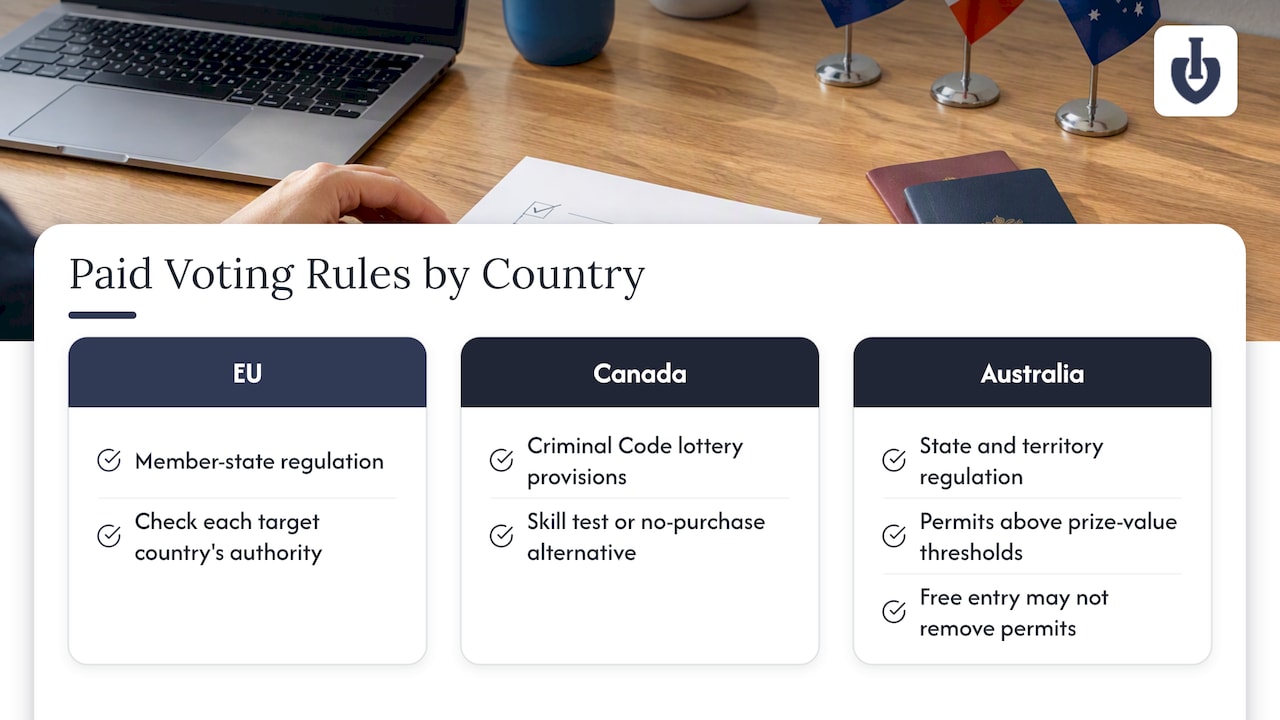
    Outside the US and UK, paid voting law tends to follow the same underlying logic, payment plus pure chance equals a regulated lottery, but the licensing thresholds and enforcement bodies differ by country. In the European Union, gambling and lottery regulation is handled at the member-state level rather than centrally, so a paid voting promotion that’s fine in one EU country can require a license or registration in another. Organizers running pan-European campaigns should check each target country’s consumer protection and gambling authority rather than assuming one EU-wide standard applies.

    Canada treats contests involving payment and chance under its Criminal Code lottery provisions, with a long-standing requirement that promotions include a skill test or a no-purchase alternative to avoid being classified as an illegal lottery scheme. Australia regulates trade promotions and lotteries at the state and territory level, and several states require a permit for promotions above certain prize value thresholds, even when a free-entry route exists.

    The practical takeaway for any organizer running an international audience vote is the same everywhere: build in a free-entry or skill-based alternative by default, since it satisfies the strictest version of nearly every jurisdiction’s test at once, rather than designing separate rules per country.

    Paid Voting Rules Outside the US and UK — overview diagram

    Data Protection and Privacy Rules for Paid Voting

    Paid voting systems collect more personal data than a simple poll: names, email addresses, payment details, and sometimes identity verification records. That data footprint brings privacy law into play alongside gambling and consumer protection rules. In the EU and UK, the GDPR framework requires a lawful basis for processing voter data, clear notice about what’s collected and why, and limits on how long payment and identity records are retained after an event ends.

    Voter identity checks, when used to prevent duplicate or fraudulent votes, should be proportionate to the risk. Collecting a full government ID to verify a $2 vote is harder to justify than requiring email confirmation, and privacy regulators generally expect organizers to use the least invasive verification method that still protects vote integrity.

    Payment processing also triggers its own compliance layer, since card data handling generally falls under PCI DSS standards regardless of the country you operate in. Organizers who route payments through an established platform shift much of this burden to a processor built for it, rather than building compliant payment handling and data retention policies from scratch for a single event.

    Consumer Protection Considerations in Paid Voting

    Consumer protection law treats paid voting as a commercial transaction, which means the same rules that govern any paid product or service apply. Voters need to know exactly what they’re paying for, what it buys them, and what happens if something goes wrong, before they hand over payment details.

    Clear pricing is the baseline: a flat per-vote cost or a bundle price, stated before checkout, with no hidden fees added at the payment step. Refund policy matters too. Most consumer protection regimes expect organizers to state upfront whether paid votes are refundable, since a silent policy tends to be read against the organizer in a dispute.

    Misleading claims about odds, prize value, or vote impact are the most common source of consumer complaints and regulatory action in this space. The FTC’s guidance on fake prize and sweepstakes scams is explicit that implying a payment increases someone’s chances of winning, when it does not, is treated as deceptive. Advertising claims about the award itself, such as “biggest fan vote of the year,” should also be defensible with real numbers if challenged.

    Handling Disputes and Complaints About Paid Voting Results

    Every paid voting campaign eventually gets a complaint, whether it’s a voter who thinks their payment didn’t register or a nominee who suspects bulk voting tipped a category. How you handle that moment determines whether it stays a minor support ticket or becomes a public credibility problem.

    Set a clear complaints process before voting opens: a named contact or inbox, a response time commitment, and a defined escalation path for disputes that can’t be resolved quickly. Keep your audit log detailed enough to answer the two questions every complaint eventually asks: was this vote legitimate, and was it counted correctly?

    When a dispute involves suspected fraud, document your investigation and decision in writing, even for small cases. ASA adjudications consistently reference whether an organizer could show clear records of how a flagged vote was reviewed, not just what the final decision was. A documented, consistent process protects you whether the complaint stays internal or escalates to a regulator or advertising watchdog.

    Age Restrictions and Minors in Paid Voting

    Paid voting campaigns that accept payment from minors carry extra legal exposure, since most jurisdictions limit a minor’s capacity to enter binding payment transactions. If your award category or audience is likely to include voters under 18, such as school competitions or youth talent contests, build age verification or a parental consent step into the paid voting flow rather than assuming it won’t come up.

    The safer default for any campaign with a known youth audience is to offer the free-entry voting route prominently and let paid voting be an optional add-on for voters who are clearly adults, such as parents, family members, or general audience members rather than the contestants themselves. Some jurisdictions also restrict marketing paid promotions directly to children, so review your promotional channels and messaging if minors are part of your expected audience.

    Keep your terms and conditions explicit about minimum age to participate in paid voting, and state it in the same visible location as your pricing disclosure, not buried in a general eligibility clause.

    Tax Implications of Revenue From Paid Voting

    Revenue collected through paid votes is taxable income for the organizing entity in most jurisdictions, whether that organizer is a business, a school, or a nonprofit. The tax treatment depends heavily on your organization’s structure: a registered nonprofit may have different reporting obligations than a for-profit event producer, and rules vary by country, so check with a tax professional or your local tax authority before assuming a blanket exemption applies.

    If you’re using a platform that takes a percentage fee from each paid vote, keep records that separate gross vote revenue from the platform fee and any payment processing costs, since you’ll typically need the gross figure for tax reporting even though your net proceeds are lower. Sales tax or VAT treatment of paid votes also varies by jurisdiction and sometimes by whether the “prize” has a cash value, so this is another area where a local accountant’s input is worth the cost before your campaign launches, not after.

    Balancing Engagement, Fundraising, and Compliance

    The hardest part of running paid voting isn’t the legal test, it’s resisting the urge to let revenue quietly shape the rules. Every organizer eventually faces the same temptation: a vote package that nudges a little too close to buying the outcome. The campaigns that hold up are the ones where the rules were written before anyone calculated how much the paid votes might bring in, not after.

    Clear rules matter more than clever mechanics. A voter who understands exactly what their payment does, and doesn’t do, rarely complains even when their favorite loses. A voter who suspects the rules bent for a paying nominee complains loudly, and that complaint is what draws regulator attention in the first place.

    Having watched paid voting roll out across 500+ events in 20+ countries, the operational lesson that holds up every time is speed: fast analytics and a fast fraud response matter more than any single rule on paper. A spike in votes from one IP range at 2 a.m. needs a same-day answer, not a post-event investigation.

    Treat your voting rules as the product, not the paperwork around it.

    — Joshua

    How Izivote Helps You Run Paid Voting Without the Legal Guesswork

    We built our paid voting platform specifically so organizers don’t have to engineer compliance from scratch for every event. Payment handling, configurable terms and conditions, identity-based voting, and automatic audit logs come built into the setup, which means the free-entry route, pricing disclosures, and fraud monitoring this article covers are controls you configure, not code you write.

    Izivote

    • We process paid votes with built-in payment handling and a platform fee per vote.
    • We give you identity-based voting options for stronger fraud protection where needed.
    • We surface real-time analytics to help catch suspicious voting activity quickly.
    What you needWhere to find it
    Paid voting setupPaid voting platform
    Audience-choice award formatPeople’s choice voting
    Plan and fee detailsPricing

    Pro Tip: Start with our Free plan to test your voting rules and disclosures on a small category before launching paid voting on your full award lineup.

    Our plans run from Free through Pro at $6 a month ($60 a year) and Premium at $14 a month ($140 a year), so you can match the setup to the size of your award. Check our paid voting page and talk to our team about the right configuration for your next audience-choice campaign.

    FAQ

    Is paid voting legal for an online contest or award?

    Paid voting is generally legal when it avoids the legal definition of a lottery, meaning it offers a free-entry route or a genuine skill element alongside the paid option. The Gambling Commission and the FTC both use this same basic test, though specific requirements vary by country.

    Can you pay for votes without it becoming an illegal lottery?

    Yes, as long as payment doesn’t function as the only entry method and doesn’t increase someone’s odds of winning through pure chance. Keeping a free alternative and disclosing pricing clearly is what separates a lawful paid vote from an unlicensed lottery.

    What disclosures does the FTC require for paid voting in the US?

    The FTC requires promoters to disclose that no purchase is necessary to enter or win, and to avoid implying that payment improves someone’s chances unless that’s explicitly part of the rules. Past enforcement, including an $18.5 million settlement against Publishers Clearing House, shows regulators take missing disclosures seriously.

    Do minors need special protections in paid voting campaigns?

    Yes, since minors generally can’t enter binding payment transactions in most jurisdictions, campaigns with a youth audience should offer a prominent free-entry route and consider age verification before accepting payment. Terms and conditions should state the minimum age to participate in paid voting clearly.

    Is revenue from paid voting taxable?

    Revenue from paid votes is generally taxable income for the organizing entity, though the exact treatment depends on your organization’s structure and local tax rules. Keep records separating gross vote revenue from platform fees, and confirm reporting obligations with a tax professional in your jurisdiction.

    Sources

    Recommended

  • Monetize Fan Voting: The 10% Fee, Sponsors, and Fairness

    Monetize Fan Voting: The 10% Fee, Sponsors, and Fairness

    Charge-per-vote pricing and bundled micropayments run on a purpose-built voting platform are the fastest practical way to turn fan engagement into reliable revenue. We built Izivote around this model, pairing paid voting with real-time dashboards so organizers can launch a campaign and start collecting funds within days. The roadmap below covers pricing, formats, setup, and fairness safeguards that keep campaigns both profitable and credible.


    TL;DR:

    • Izivote charges a 10% fee on each paid vote, while payouts follow the processor’s schedule rather than the campaign’s closing date.
    • Ranked voting or point distribution can feel fairer than ballots with one option; add a judges’ save for close calls and publish rules before launch.
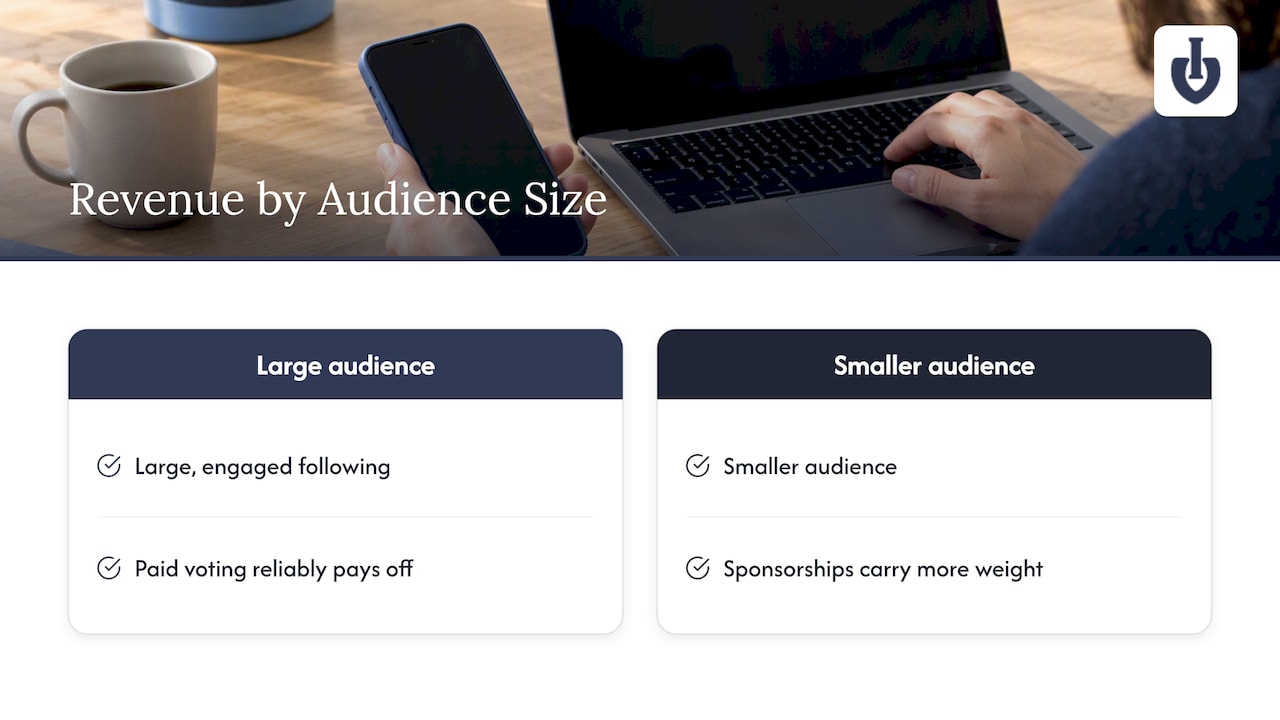
    • Per vote sales work best with an engaged audience; smaller events should weigh sponsorships more heavily, and forecast revenue from conversion, votes, and price.
    • Reserve bundle discounts for the final 48 hours, and use daily leaderboard resets or vote limits to sustain participation and curb runaway spending.

    Izivote
    Turn Fan Votes Into Event Revenue
    Izivote supports paid voting, identity-based methods, and real-time analytics for organizers running fan and people’s choice awards.

    Get started with Izivote

    Table of Contents

    How paid voting works: mechanics, payment flows, and hosting

    Paid voting is straightforward in concept: a fan selects a nominee, pays for one vote or a bundle, and the payment confirmation triggers an immediate tally update. Getting the mechanics right is what separates a campaign that feels trustworthy from one that invites complaints.

    Organizers need to configure a few things before launch:

    • Payment flow: connect a processor that confirms the charge and records the vote in the same transaction, so counts update live rather than after a batch delay.
    • Authentication: decide whether voters log in, verify by email or phone, or vote anonymously, since identity checks reduce duplicate or bot-driven votes.
    • Hosting choice: use a hosted vote page for speed or embed the voting widget directly on an existing event site for brand continuity.
    • Dashboard visibility: give staff and sponsors a live view of totals so results, and revenue, are transparent as the campaign runs.

    A platform fee typically applies per transaction rather than as a flat subscription cost, and settlement usually follows the payment processor’s standard payout schedule rather than the vote closing date. Clarifying these details before launch avoids disputes once voting opens.

    Pricing and revenue models: sample options and simple forecasting math

    Most fan voting campaigns combine a few pricing structures rather than relying on one:

    1. Price-per-vote: a flat charge for a single vote, simplest to explain to fans.
    2. Bundles: discounted packs (five votes, ten votes) that raise average spend per voter.
    3. Donation tiers: a vote tied to a charitable minimum, common in fundraiser formats.
    4. Subscriptions or passes: a flat fee for unlimited voting during a window, useful for long campaigns.

    A simple forecasting model multiplies expected attendance by conversion rate, by average votes per converted voter, by price-per-vote. For example, a campaign with thousands of engaged fans, a low single-digit conversion rate, a few votes per converter, and a $1 price-per-vote can generate several hundred dollars in gross vote revenue before the platform fee.

    Izivote applies a 10% platform fee per paid vote processed through the platform, so organizers can build that cost directly into their forecasts rather than discovering it after settlement. Bundles and short-term surge pricing during finals tend to raise average revenue per voter, and branded category sponsorships (a sponsor underwriting “Best Newcomer,” for example) add a second revenue stream layered on top of direct vote sales.

    Formats and use cases that monetize best

    Fans respond differently depending on how a vote asks them to express a preference. Simple approval voting (one click, one choice) is fast but shallow. Ranking or point-distribution formats let fans signal intensity, and behavioral research on digital voting design finds these expressive formats correlate with higher perceived fairness and stronger ongoing engagement than single-choice approval votes.

    Formats and events that tend to monetize well include:

    • Fan choice awards with multiple nominee categories and photo profiles.
    • Talent shows and creator contests with elimination rounds that reward repeat voting.
    • Pageants where ranked voting adds perceived legitimacy to results.
    • Fundraisers where a vote doubles as a small donation.

    Leaderboards that reset daily, or that apply decaying point values, keep competitions from going stale when one nominee builds an early lead. Pairing votes with exclusive content, backstage passes, or merchandise discounts gives fans a reason to buy more than one vote.

    Pro Tip: Offer a bundle discount only during the final 48 hours of voting, it creates urgency without undercutting early-campaign revenue.

    Implementation checklist: step-by-step setup and launch tasks

    Launching a paid voting campaign is mostly a sequencing problem. A practical order looks like this:

    1. Pick the format and pricing tiers: decide on ranking versus approval voting and set per-vote or bundle prices.
    2. Build nominee pages: add photos, short bios, and category assignments, then choose hosted or embedded voting.
    3. Connect payments and confirm fees: test transactions end to end before opening voting to the public.
    4. Turn on fraud controls: enable identity or login verification where duplicate voting is a risk.
    5. Activate analytics: confirm the real-time dashboard is tracking votes and revenue accurately.
    6. Prepare marketing assets: share-ready graphics, sponsor messaging, and published voting terms should be ready before launch day.

    Running a short pre-launch test with a handful of real transactions catches payment or display issues before they affect paying voters.

    Best practices to protect fairness, sustain engagement, and reduce churn

    Revenue depends on fans trusting the result. A hybrid model, mixing fan votes with a judges’ panel that holds a save or override on close calls, preserves credibility without eliminating the fan-driven appeal. Research on explainable voting audits found that a dual-safeguard system combining rank-based aggregation with a judges’ save substantially reduced unfair eliminations compared to simple percentage-based tallying, while keeping audience engagement intact.

    A few safeguards consistently hold up:

    • Favor ranking or point-distribution inputs over single-choice approval, since expressive formats are tied to higher perceived fairness.
    • Apply daily leaderboard resets or decaying point values to prevent one early leader from discouraging later voters.
    • Cap votes per account or session to limit runaway spending by a single voter.
    • Publish voting rules, windows, and result timelines before the campaign opens, not after.

    Hybrid systems that combine rank-based aggregation with expert intervention substantially reduce historical unfair eliminations while preserving engagement.

    That kind of transparency matters more when money is involved, since fans scrutinize paid results far more closely than free ones.

    Author perspective: quick trade-offs and operational tips

    Paid voting reliably pays off when a nominee pool already has an engaged following, think fan awards or talent contests. When the audience is smaller, sponsorships usually carry more weight than per-vote revenue.

    Audience size compared with paid votes and sponsorship

    Watch for leaderboard fatigue: once a result looks locked in, voting drops off fast. Unclear terms about refunds or vote limits are the other common complaint.

    My practical advice: price for volume, not margin, and spend more effort on fairness perception than on squeezing extra cents per vote.

    — Joshua

    Izivote: implement paid voting, analytics, and embeds

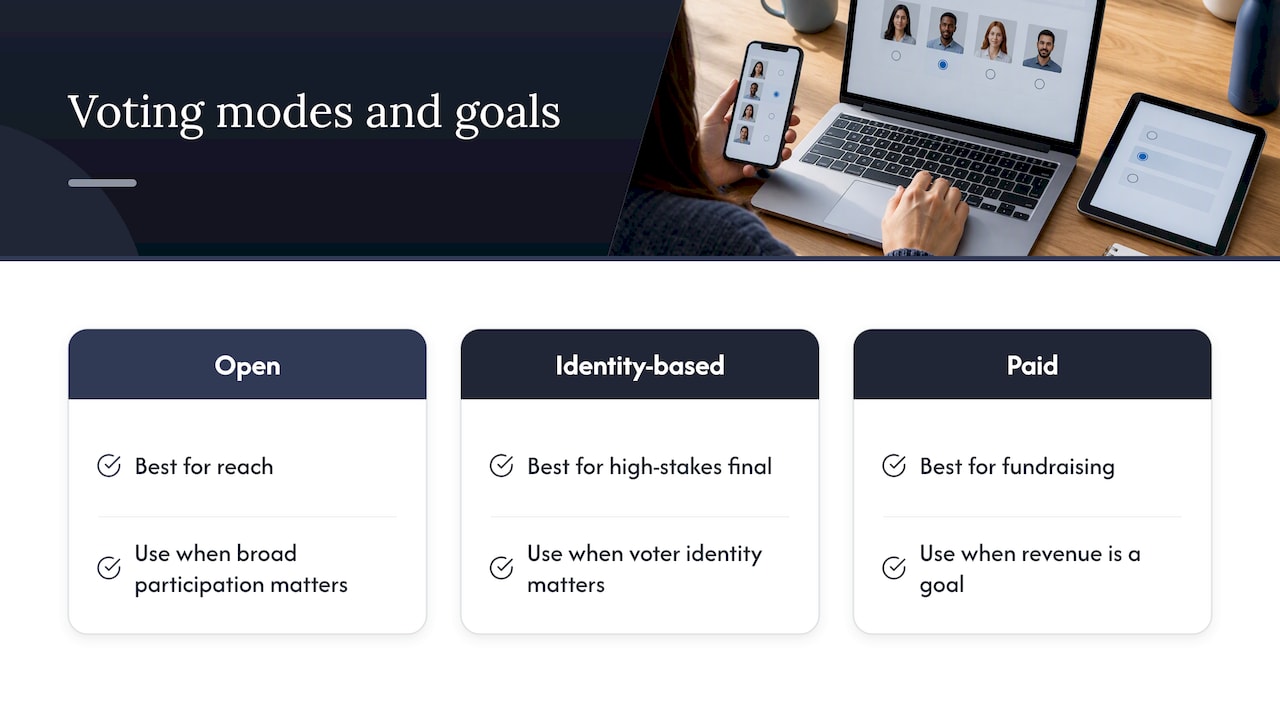
    We built a voting platform specifically for fan and people’s choice awards, which means organizers skip the setup work a generic form tool would require. Paid voting, identity-based voting, and open voting all run on the same dashboard, so switching formats between categories or events takes minutes rather than a rebuild.

    Izivote

    What organizers get with us:

    • Self-serve setup that launches a voting page without a developer.
    • Embeddable voting widgets that keep the experience on an organizer’s own site.
    • Real-time dashboards showing vote counts and revenue as they happen.
    • Multiple voting modes, including paid, login-based, and identity-verified voting, selectable per category.

    Our plans start with a free tier for small events and scale to paid plans for larger campaigns with more categories and features. Check Izivote pricing to compare plans and see the paid voting fee structure before you launch.

    FAQ

    What does paid voting mean for a fan awards campaign?

    Paid voting means fans pay a small fee, either per vote or in a discounted bundle, instead of voting for free. Organizers keep the revenue minus the platform fee, which on Izivote is a flat 10% per vote processed.

    How much can a fan voting campaign realistically earn?

    Earnings depend on audience size, conversion rate, and price-per-vote, so there’s no single figure that applies everywhere. A rough estimate comes from multiplying expected voters by conversion rate, average votes per voter, and price, which gives organizers a conservative revenue band before launch.

    How long does a paid voting campaign typically run?

    Most fan voting campaigns run anywhere from a few days for a single event to several weeks for a multi-round talent contest or awards season. Shorter campaigns tend to use daily leaderboard resets, while longer ones often add bundle discounts near the close to sustain late-stage voting.

    What keeps a paid voting result from feeling unfair to fans?

    Publishing clear rules, voting windows, and result timelines before the campaign opens is the single biggest factor in perceived fairness. Using ranking or point-based voting instead of simple approval, and adding a judges’ save for close calls, also helps preserve credibility.

    What legal or compliance steps matter when monetizing votes?

    Payment processing needs to meet standard card-processing compliance, and voter data should be handled under applicable privacy rules for the regions where fans are voting. Organizers running fundraising-tied votes should also confirm local rules on charitable solicitation before launch.

    Recommended

  • Online Contest Rules for Organizers: Avoid Lottery Trouble Before Launch

    Online Contest Rules for Organizers: Avoid Lottery Trouble Before Launch

    Every online contest needs a published set of official rules covering eligibility, entry instructions, prize details, winner selection, start and end dates, how winners claim prizes, and privacy disclosures. Whether you’re running a sweepstakes, a skill contest, or a public vote, you also need to confirm which state, national, or platform rules apply before launch, since a missing “no purchase necessary” clause or buried disclosure can turn a fun promotion into a legal problem.


    TL;DR:

    • Classify the promotion first: chance based sweepstakes need a free entry route, skill contests need stated judging criteria, and fan votes need transparent mechanics.
    • In the UK, a free route must match the paid option’s convenience and cost, receive equal prominence, and carry no preference in prize allocation.
    • Link full rules from every entry point, covering eligibility, prizes, determinable odds, dates and time zone, winner selection, claim deadlines, privacy, and optional marketing consent.
    • For vote based contests, retain timestamped vote logs, disclose any per vote price, and use identity checks to limit duplicate ballots without excess data collection.
    • Before opening entry across more than two or three countries, check local laws and data rules, review platform policies, and seek jurisdiction specific legal advice.

    Izivote
    Make Fan Voting More Transparent
    Izivote helps organizers run fan and people’s choice awards with clear voting processes, identity-based options, and real-time vote analytics.

    Explore Izivote

    Table of Contents

    What’s the difference between a giveaway, contest, and sweepstakes?

    The words get used interchangeably online, but each term carries a distinct legal meaning that determines which rules apply to your promotion.

    A sweepstakes is chance based: winners are drawn at random, and in the United States, charging an entry fee or requiring a purchase to enter turns a legal sweepstakes into an illegal lottery unless a free entry route exists. A contest or prize competition is skill based: entrants submit something (a photo, an essay, a video) that gets judged against stated criteria, which generally allows an entry fee because the outcome depends on merit rather than luck. A fan vote sits in its own category: the audience picks a winner from a pool of nominees, and the mechanics (open voting, paid voting, login-based voting) shape whether extra legal review is needed.

    • Sweepstakes: winner chosen by chance, no purchase can be required.
    • Contest: winner chosen by skill or judging criteria, entry fees are typically allowed.
    • Prize competition (UK terminology): entry usually requires a modest skill element to stay outside gambling law.
    • Fan vote: winner chosen by audience ballots, which may include free, paid, or identity-verified voting.

    Getting this classification wrong is the single most common mistake organizers make. A “vote for your favorite photo” contest that charges per vote and picks the winner purely by vote count can look a lot like a paid lottery unless it is structured and disclosed correctly.

    The legal checks that protect your contest from day one

    Before you write a single line of official rules, run your promotion through what regulators call the lottery test: a promotion becomes an illegal lottery when it combines chance, a prize, and consideration (something of value paid or given to enter). Remove any one of those three elements and you’re generally in the clear. Skill contests remove chance. Free-entry promotions remove consideration. Non-prize engagement campaigns remove the prize.

    For promotions that keep an element of chance, the fix is a free entry route. In the United States, the FTC’s guidance on sweepstakes and lottery scams makes clear that a legitimate sweepstakes must be free to enter and cannot ask entrants to pay taxes, shipping, or processing fees to claim a prize, since those requests are classic scam indicators. In the United Kingdom, the standard is more specific: the Gambling Commission’s guidance on free draws and prize competitions requires that a free route be no more expensive and no less convenient than the paid route, promoted with equal prominence, and treated without any preference in prize allocation.

    Statistic callout: The FTC’s 2023 enforcement action against Publishers Clearing House documents how buried “no purchase necessary” text and interface sequences that implied a purchase improved odds led to a formal complaint, a reminder that disclosure placement is itself a compliance issue, not just a wording one.

    A few more checks worth running early:

    • Confirm whether your state or country requires registration or bonding for sweepstakes above a certain prize value; some U.S. states, like New York, maintain dedicated registration pages for games of chance.
    • Decide if your promotion needs geographic restrictions, since laws differ sharply between jurisdictions.
    • Check that your “no purchase necessary” or free-route language appears on the entry screen itself, not just in a linked rules document.
    • Review your platform’s own promotion policies (Instagram, Facebook, TikTok) before you build your entry flow.

    A voluntary UK industry code for prize draw operators sets out transparency principles for this exact situation, but it’s worth noting that it is guidance, not legislation. It does not replace a jurisdiction-specific legal review, and organizers running cross-border promotions should treat it as a baseline rather than a safe harbor.

    Every clause your official rules document needs

    Your official rules page is the single source of truth for the promotion. Courts, regulators, and platforms all point back to it when a dispute arises, so it needs to be complete, specific, and easy to find.

    1. Promoter identity and contact information, including the legal entity name running the promotion.
    2. Eligibility and exclusions, covering minimum age, country or state of residence, and whether employees, sponsors, or their household members can enter.
    3. Entry instructions, written step by step, including any technical requirements like account creation or app downloads.
    4. Prize description and retail value, plus a substitution clause if the stated prize becomes unavailable.
    5. Odds of winning, stated when they’re mathematically determinable, along with any maximum number of entries per person.
    6. Start and end dates and times, specified with time zone, and naming the official timekeeping device for disputes.
    7. Winner selection method, described clearly enough that an outside party could verify it was followed.
    8. Notification and claim process, including the deadline a winner has to respond before forfeiting the prize.
    9. Disqualification and reserve-winner procedures, covering fraud, ineligibility, or non-response.
    10. Privacy and marketing disclosures, with marketing opt-in kept as a separate, optional checkbox from entry itself.
    11. Data retention and sharing terms, stating how long entry data is kept and whether it’s shared with third parties.
    12. Governing law, “void where prohibited,” and a limitation of liability clause protecting the promoter from claims tied to prize use.

    Pro Tip: Write your odds-of-winning clause as a formula (“1 in total number of eligible entries received”) rather than a fixed number, since entry counts change until the promotion closes.

    How to turn this checklist into published rules

    Drafting official rules works best as a sequence rather than a single document you write once and forget.

    1. Decide the promotion type and geographic scope before writing anything else, since that choice determines whether you need a free-entry route.
    2. Draft eligibility language and exclusions in plain terms, naming minimum age and any excluded groups explicitly.
    3. Write the entry flow, then walk through it yourself on both desktop and mobile to confirm every step works as described.
    4. Document prize fulfillment, including shipping timelines, tax reporting obligations, and who covers delivery costs.
    5. Specify your winner selection method and backup winner process, and decide what audit trail you’ll keep proving the draw was fair.
    6. Separate marketing consent from entry consent, and test that unchecking the marketing box doesn’t block entry.
    7. Publish the rules where every entry point links to them, including social posts, landing pages, and mobile entry forms.

    Pro Tip: Test your entire entry flow from a phone on mobile data, not just a laptop on office Wi-Fi, since slow load times or hidden links are what actually cause entrants to miss your free-route option.

    What social platforms expect from your contest

    Running a contest through Instagram, Facebook, or TikTok adds a second layer of rules on top of your legal obligations. Most platforms require promotions to carry a line stating the promotion is in no way sponsored, administered, or associated with the platform itself, and all entry mechanics have to comply with the platform’s own promotion guidelines.

    • Avoid entry flows that make tagging, sharing, or purchasing look mandatory when they’re actually optional alternatives to a free route.
    • Link your full official rules from every post or story that promotes the contest, not just the original announcement.
    • Keep the platform disclaimer and the official rules link visible without requiring entrants to click “see more.”
    • Recheck platform terms periodically, since social networks update promotion policies more often than most organizers expect.

    Running a contest across more than one country

    Cross-border promotions multiply the number of rules you need to track. Add “void where prohibited” language and restrict entry by country or state wherever a jurisdiction’s laws conflict with your mechanics.

    • Confirm whether your free-route obligations differ by country. The UK’s free-route standard is stricter than typical U.S. practice.
    • Separate data consent requirements by region, since cross-border data transfer rules affect how you collect and store entrant information.
    • Exclude jurisdictions outright when local law makes compliance impractical, rather than trying to adapt one rules document to every market.
    • Get jurisdiction-specific legal counsel before launching a promotion open to more than two or three countries.

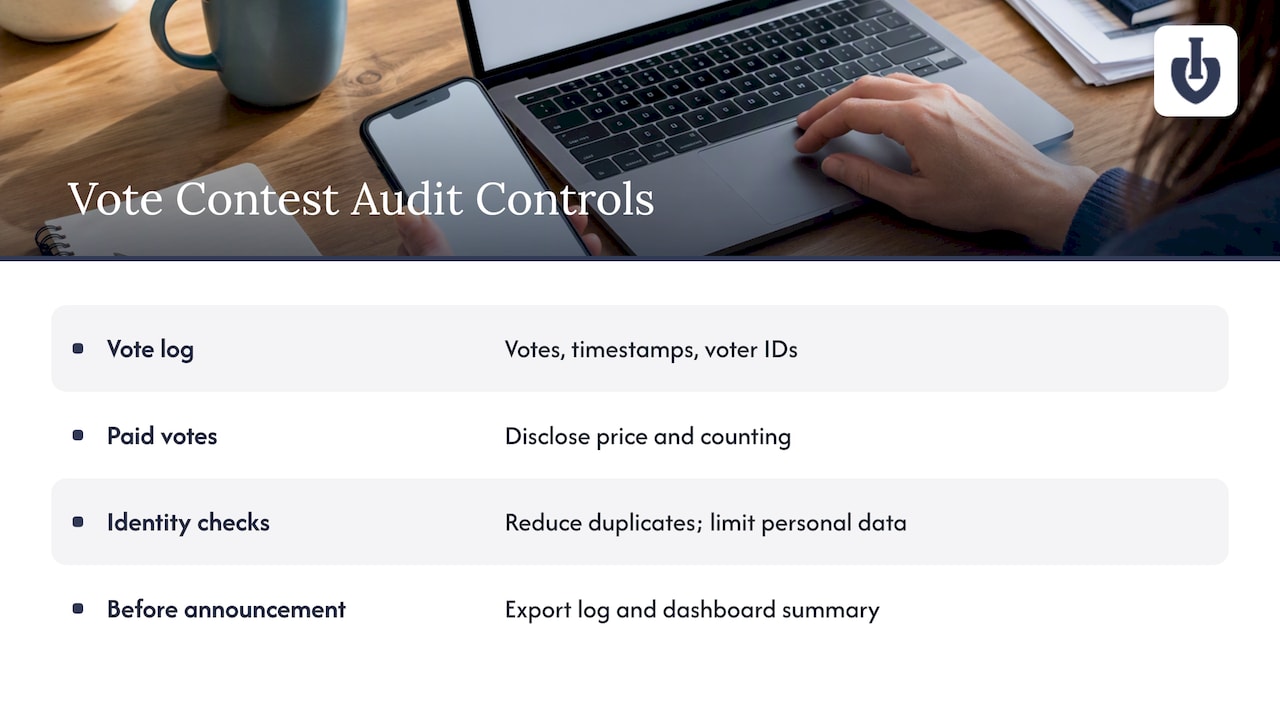
    Running a secure, auditable vote-based contest

    Vote-based contests carry their own transparency burden. Keeping a server-side log of votes, timestamps, and voter identifiers lets organizers reconstruct results if a winner is challenged. Paid votes need their own disclosure, a clear per-vote price, and confirmation that paid and free votes (where both exist) are counted without hidden preference. Identity checks, like requiring a login or verified account, cut down on duplicate voting without exposing unnecessary personal data.

    Pro Tip: Export your vote log and dashboard summary before announcing a winner, so you have a timestamped record ready if anyone disputes the result.

    Running a secure, auditable vote-based contest — overview diagram

    Copy-ready rule snippets you can adapt

    A few short clauses cover most of what a basic promotion needs, though every one should be adjusted to your actual jurisdiction and prize before publishing.

    • Eligibility: “Open to legal residents of [region] who are 18 years of age or older at the time of entry. Employees of [company] and their immediate family members are not eligible.”
    • No purchase necessary: “No purchase is necessary to enter or win. A purchase will not increase your chances of winning.”
    • Prize description: “One winner will receive [prize], with an approximate retail value of [amount]. No cash substitution except at the sole discretion of the promoter.”
    • Winner notification: “The winner will be notified by email within [X] days of the drawing and must respond within [X] days to claim the prize or risk forfeiture.”

    Host the full rules on a dedicated page linked from every entry point, not buried in a footer. For vote-based promotions, add a line disclosing any paid-vote option and confirming that it does not grant special placement in the results. Organizers looking for ready-made clause structures for creative-entry contests can also check photo contest rule templates, which cover common clauses for submission-based competitions.

    Why short, visible rules matter more than organizers think

    Clear rules that entrants can actually find prevent most disputes before they start. The organizers who get burned usually didn’t skip the legal language, they just buried it. A visible free-route link or one extra click to the full rules feels like friction in the moment, but it’s the difference between a smooth prize claim and a public complaint thread.

    — Joshua

    How Izivote supports transparent vote-based contests

    Running a fan vote or people’s choice award means your winner selection needs to hold up to scrutiny, and that’s the part we built around. The platform logs every vote in real time, handles paid-vote collection with transparent per-vote pricing, and offers identity-based voting when needed to confirm each voter is who they claim to be. Organizers running awards and competitions or fan choice awards get a live dashboard to back up their results the moment a winner is announced.

    Izivote

    If paid voting is part of your contest, our paid voting setup keeps pricing and vote counts visible to organizers throughout the campaign. Start with our Free plan to test the mechanics, or check Pro or Premium plans with monthly or yearly billing on the pricing page when you’re ready to launch.

    FAQ

    What are the legal rules for giveaways in the US?

    A legitimate U.S. giveaway must be free to enter or offer an equally convenient free-entry route, since charging for entry or improving odds through payment can turn a sweepstakes into an illegal lottery under the FTC’s guidance. Organizers also need to publish eligibility, prize value, and odds (when determinable) clearly and conspicuously, not buried in fine print.

    How do I set up a contest?

    Start by classifying the promotion as a sweepstakes, skill contest, or vote, since that determines whether a free entry route is legally required. From there, draft your official rules covering eligibility, entry steps, prizes, winner selection, and dates, then test the entire entry flow on both desktop and mobile before publishing it.

    Can you give an example of a contest?

    A skill-based photo contest where entrants submit images judged on criteria like composition and creativity is a classic example, since the outcome depends on judging rather than chance. A fan vote where an audience selects their favorite nominee from a published list is a different example, often run through dedicated voting software to keep results auditable.

    What should organizers avoid when running giveaways?

    Organizers should avoid requiring any payment or purchase to enter a chance-based giveaway without offering an equally visible free route, since that structure can resemble an illegal lottery. They should also avoid burying “no purchase necessary” language, as FTC enforcement history shows that disclosures must be conspicuous, not just technically present.

    Sources

    Recommended

  • Award Nomination Forms Online: 6 Fields, When to Add Voting

    Award Nomination Forms Online: 6 Fields, When to Add Voting

    Use a ready-to-use no-code nomination form template, or a downloadable Word or PDF template, to collect consistent, judge-ready nominations. These options cover most internal, school, and community awards without extra setup. Upgrade to a full platform only when you need reviewer scoring workflows, public voting, or paid-vote fundraising built into the same process.


    TL;DR:

    • Word and PDF forms suit low volume awards collected by email or in person, while builder templates add uploads, conditional questions, and automatic closing.
    • Require nominee and nominator details, a fixed award category, achievement statement, timeframe, and optional evidence; set upload limits and obtain publication consent.
    • Define eligibility rules, scoring criteria, and a retention period before launch, then restrict reviewer exports to evaluation fields and track disqualifications separately.
    • Verify nominator emails, add a bot check, and flag duplicates with a unique nominee identifier; publish only approved nominees for any public vote.
    • Send a reminder about a week before the deadline, since nominations often arrive in the final 48 hours; include examples of strong achievement statements.

    Izivote
    izivote.com
    Move from Nominations to Voting
    When your award is ready for public voting, Izivote helps organizers run secure, transparent votes and monitor results with real-time analytics.

    Explore the voting platform

    Table of Contents

    Where to find ready-to-use nomination form templates

    Three types of templates cover almost every award program, and each one fits a different scale of event.

    Downloadable Word and PDF templates work best for low-volume or internal awards where you collect nominations by email or in person. They print well, require no software setup, and are easy to adapt for a staff recognition program or a small club award.

    No-code form-builder templates handle higher volume and more complex requirements. Pages like Typeform’s awards nomination form template, Jotform’s awards nomination form, and Formpl support file uploads, conditional logic, and automatic form closing at a set deadline. You can publish one of these in under an hour and share it by link, embed, or QR code.

    Template libraries and AI-assisted generators sit between the two. They let you start from a near-finished layout and adjust fields, wording, and branding quickly, which suits organizers running an annual award who want a fresh look without rebuilding the form from scratch.

    • Internal or small-scale awards: a Word or PDF template distributed by email is usually enough.
    • Community, school, or industry awards with many nominators: a no-code builder template handles volume and file uploads better.
    • Public or fan-voted awards: a template still works for intake, but you will need a separate voting step once nominations close.

    The right starting point depends less on how “official” the award feels and more on how many nominations you expect and whether reviewers need to score or compare them side by side.

    What fields belong on a judge-ready nomination form

    A nomination form only works if every submission gives reviewers the same information in the same format. Based on the field sets used across major template providers, a solid form includes:

    1. Nominee details: full name, title or role, organization or department.
    2. Nominator contact information: name, email, and relationship to the nominee.
    3. Award category, selected from a dropdown rather than typed in freely.
    4. A concise achievement statement describing why the nominee qualifies.
    5. The relevant timeframe (the period the achievement or contribution covers).
    6. Optional supporting evidence: a letter of endorsement, a short CV, or images.

    Typeform’s template guidance confirms these fields as standard across employee, student, member, and community award forms. For supporting documents, set clear file-type and size limits upfront. The Zayed Award for Human Fraternity nomination form caps its letter of endorsement at 1,000 words and specifies accepted upload formats, which is a useful benchmark for your own limits.

    Word limits and short hint text under each field push nominators toward focused, comparable answers instead of long, unstructured essays. Add a plain-language checkbox asking for permission to publish the nomination and use any submitted photos if the nominee wins.

    Pro Tip: Cap the achievement statement at a moderate length to ensure succinct and focused entries. Reviewers read faster, and nominators write tighter, more specific entries.

    Customizing and sharing your nomination form

    Once your fields are set, a few configuration choices determine whether the form feels easy or clunky to fill out.

    • Use conditional logic so category-specific questions only appear after the nominator selects a category, keeping the form short for everyone.
    • Match the form’s branding, colors, and header image to your event or organization to build trust and reduce drop-off.
    • Set a visible deadline with a stated time zone, an automatic close date, and a confirmation email sent to each nominator.
    • Share the form through whichever channel reaches your audience fastest: a direct link, an embedded widget on your event page, a QR code on printed materials, or a line in an email newsletter.

    Formpl.us and Cognito Forms both note that templates publish quickly, but larger programs still need reviewer access controls, scheduled notifications, and export options once nominations start arriving. Build those settings in before you share the link, not after submissions begin.

    From nomination to final decision: the typical workflow

    Most award programs, regardless of size, move through the same sequence of stages. The HRSA condition nomination process is a useful public example of how a staged review structure works in practice: intake, eligibility screening, committee evaluation, and a final recommendation.

    For a public or member-voted award, the stages typically look like this:

    • Nomination intake: the form collects entries until the deadline closes.
    • Eligibility and administrative review: staff check for completeness and basic qualification.
    • Committee scoring: reviewers rate nominees against a shared rubric.
    • Shortlist publication: qualifying nominees move forward with public profiles.
    • Voting or ranking: the audience or a judging panel ranks the shortlist.
    • Final approval: results are confirmed and winners are notified.

    A staged review and voting process like this gives large or high-stakes award programs a documented, auditable path from first submission to final decision.

    A template handles the first stage well on its own. You need a platform once reviewer scoring, public voting, paid voting, audit logs, or real-time dashboards become part of the requirement, because stitching those features onto a basic form usually means manual spreadsheet work and lost data.

    A quick pre-launch checklist worth running every time

    Before publishing any nomination form, I run three checks: are categories and evaluation criteria clearly defined, are file and word limits set so submissions stay comparable, and is the close date locked to a stated time zone with a notification flow in place for nominators and reviewers.

    A platform with built-in reviewer controls and live dashboards removes most of the manual tracking that makes nomination season stressful for organizers.

    — Joshua

    Verifying eligibility and catching duplicate nominations

    Eligibility problems and duplicate entries cause most of the late-stage headaches in award programs, so it pays to design the form to catch them early.

    Ask nominators to confirm eligibility criteria directly on the form, such as tenure, membership status, or geographic region, rather than assuming they have checked the rules elsewhere. A required checkbox or short eligibility question filters out a share of ineligible entries before they ever reach a reviewer.

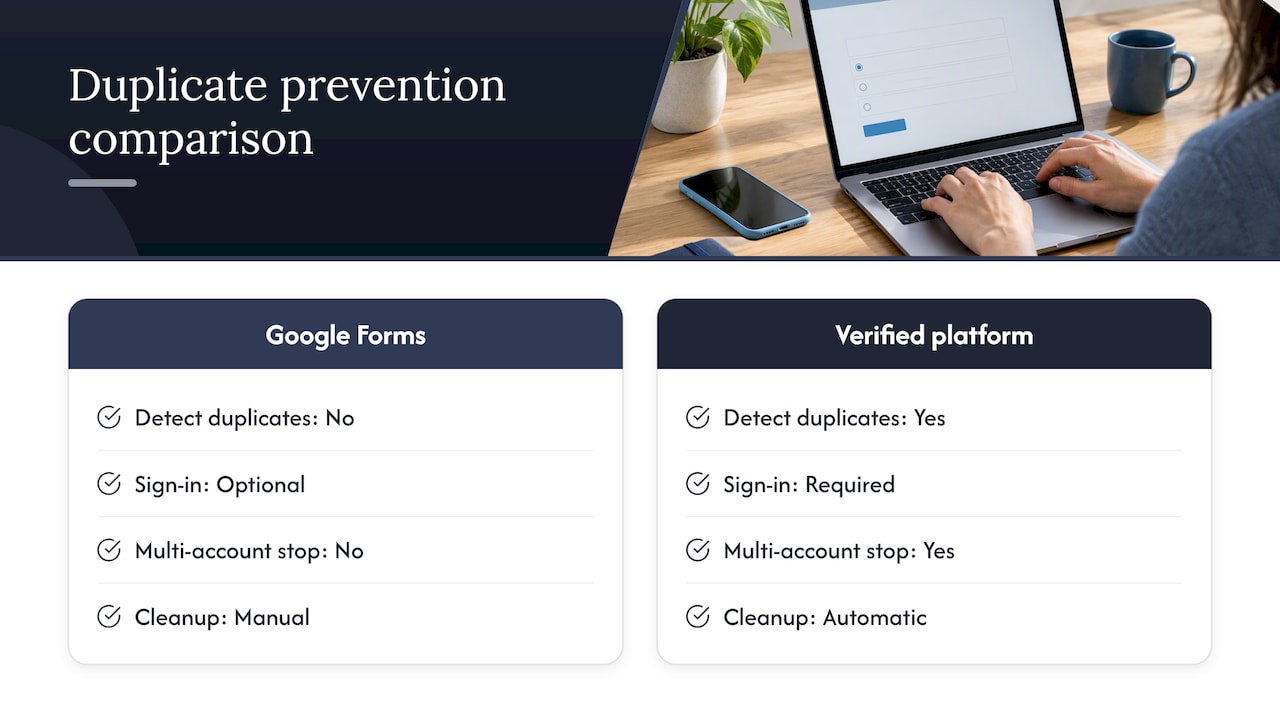
    For duplicates, require a unique identifier for each nominee, such as an employee ID, member number, or email address, so your form or spreadsheet can flag repeat entries automatically. Many no-code builders support a duplicate-detection rule based on a specific field; set this up before the form goes live rather than cleaning duplicates manually afterward.

    Keep a running list of nominees as submissions arrive, and cross-check new entries against that list weekly rather than waiting until the deadline. This catches both duplicate nominations for the same person and nominations submitted under slightly different name spellings. For larger programs, assign one reviewer to eligibility screening specifically, separate from the committee members scoring the content of each nomination, so eligibility checks don’t bottleneck the scoring process.

    Keeping your nomination form secure from fraudulent entries

    A nomination form that collects names, contact details, and sometimes photos needs basic safeguards against spam and manipulated submissions.

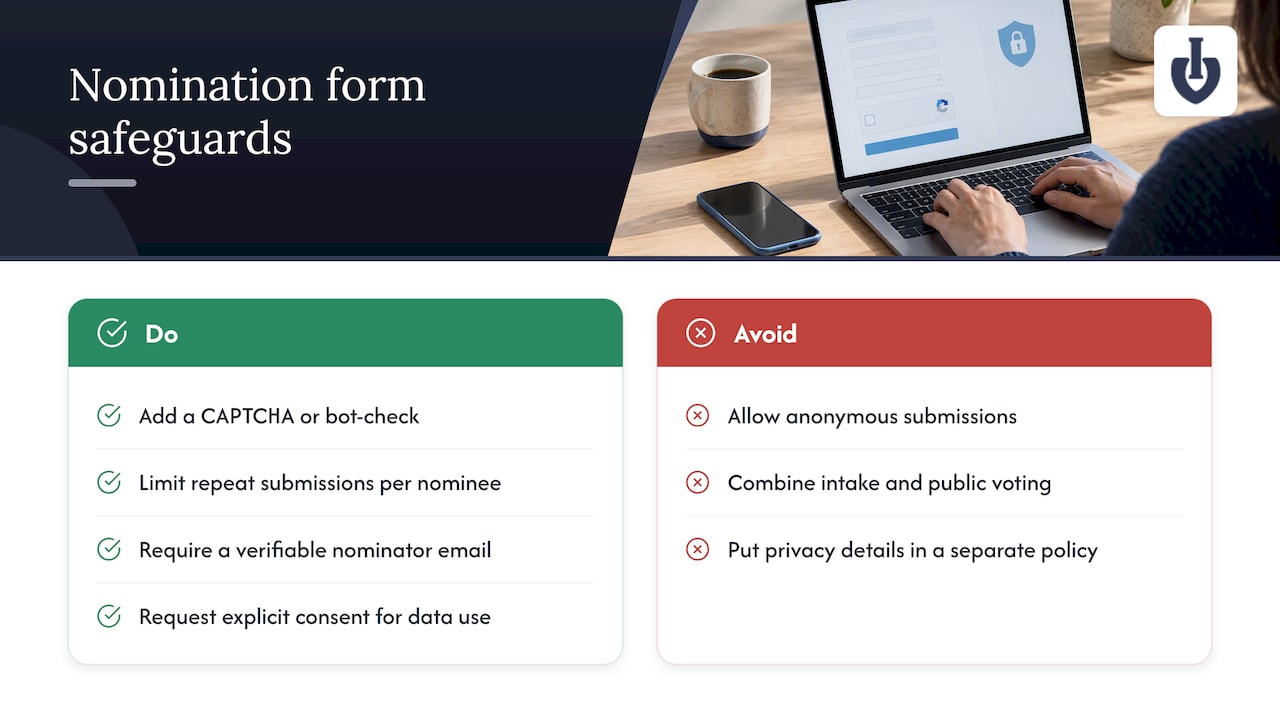
    Add a CAPTCHA or similar bot-check to block automated spam submissions, which is standard on most no-code form builders without extra cost. Limit one submission per nominator per nominee where your form tool supports it, which cuts down on repeat or coordinated entries meant to inflate a single nominee’s visibility.

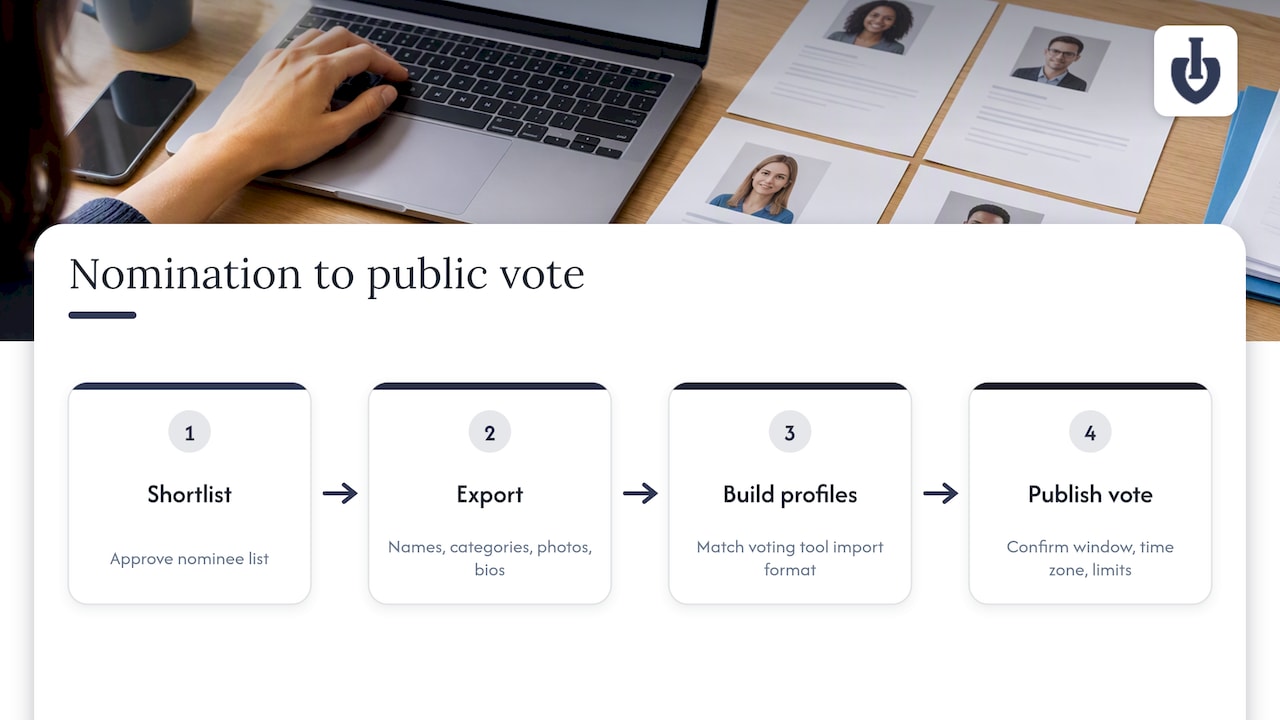
    Require a verifiable nominator email address rather than allowing anonymous submissions. This single step discourages most fraudulent entries, since nominators know their submission is traceable. For public or fan-facing awards, keep nomination intake and any public voting completely separate: verify and shortlist nominees first, then publish only the approved shortlist for voting. Cognito Forms’ guidance on award nomination workflows recommends this separation specifically to prevent unverified or low-quality entries from appearing in a public ballot.

    Finally, request explicit consent for data use and publication at the point of submission. The National Privacy Commission’s nomination form guidance notes that a clear privacy statement, stated retention period, and contact point for data correction all belong on the form itself, not in a separate policy document nominators have to go looking for.

    Keeping your nomination form secure from fraudulent entries — overview diagram

    Moving from nomination intake to the voting phase

    Once your shortlist is finalized, the transition to voting works best as a distinct second step rather than an extension of the same form. Export your approved nominee list, including names, categories, and any photos or profile text you plan to display publicly.

    A spreadsheet export from your nomination form typically includes everything you need to build voting profiles: nominee name, category, submitted bio or achievement statement, and any uploaded image. Match this data against your voting tool’s import format before the shortlist goes live, since reformatting after voting opens creates delays.

    If your award includes a public or fan vote, this is the point where a dedicated voting setup, rather than a second form, becomes worth considering. A platform built for online voting for awards and competitions can take an approved shortlist directly into a branded voting page with photos, categories, and live results, without requiring a second round of manual data entry. Confirm your voting window, time zone, and any vote-limit rules before publishing the shortlist publicly, since changing these mid-vote undermines trust in the result.

    Award nominations moving into public voting

    Promoting your nomination form to get enough entries

    A well-built form still needs visibility, and most award programs underestimate how much reminder communication nominations actually require.

    Share the form link across every channel your audience already uses: email newsletters, social posts, and any event or organization website where you can embed the form directly rather than linking out. A QR code on printed flyers or at in-person events works well for awards tied to a physical venue or conference.

    Send at least one reminder email roughly a week before the deadline, since a meaningful share of nominations typically arrive in the final 48 hours of any open call. Give nominators a short list of example achievement statements or past winners (where privacy allows) so they understand what a strong nomination looks like before they start writing. Clear, specific hint text on the form itself does some of this work automatically, as Typeform’s design guidance notes: shorter prompts and category-specific questions tend to increase both completion rates and the usability of what gets submitted.

    If your award program runs annually, keep a short list of past promotion channels that worked and skip the ones that didn’t, so each cycle gets faster to launch than the last.

    Managing nomination data after submissions close

    Once the deadline passes, how you handle the incoming data determines how smoothly the review stage goes.

    Export all submissions into a single spreadsheet or dashboard view as soon as the form closes, rather than letting entries sit scattered across email and form-tool exports. Most no-code builders support a direct CSV or Excel export, which should include every field plus a timestamp and submission ID for tracking.

    Build a simple reviewer-facing version of this export with only the fields judges need to see: nominee name, category, achievement statement, and any supporting files. Strip out nominator contact details from the reviewer copy unless your process specifically calls for reviewers to know who submitted each entry.

    Keep a separate record of eligibility decisions and duplicate flags, so you can explain any disqualification later if a nominator asks. Set a clear data retention period for nomination records, consistent with the privacy statement on your form, and delete or archive entries once that period ends. This keeps your records manageable for next year’s cycle and avoids holding onto personal data longer than your stated policy allows.

    What most nomination-form advice gets wrong

    Most guidance on award nominations spends its energy on form design: field order, button colors, how many questions is too many. That matters, but it is not where programs actually run into trouble. The real failure point is the gap between intake and decision: nominations arrive, pile up in a spreadsheet, and nobody has a clear rule for scoring, eligibility, or what happens to the data afterward.

    A good template solves the first problem. It does nothing for the second. If you only remember one thing from this guide, make it this: decide your scoring rubric and your data retention rule before you publish the form, not after nominations start arriving. Everything else, branding, word limits, file formats, is secondary to having a reviewer process that can actually handle what the form collects.

    Organizers who skip this step usually end up rebuilding their process midway through, after the first batch of nominations exposes a rule nobody agreed on.

    — Joshua

    When a voting platform makes more sense than a form alone

    A template covers nomination intake well. Once your award includes public or fan voting, especially with paid votes or multiple voting rounds, a dedicated platform removes a lot of the manual work that a form and spreadsheet combination can’t handle on its own.

    Izivote

    We built a platform specifically for public and people’s choice awards, where nomination intake needs to flow directly into secure, branded voting. The platform supports:

    • Embeddable nominee profiles with photos, pulled straight from your approved shortlist.
    • Multiple voting modes, including open voting, login-based voting, and paid voting with payment handling built in.
    • Live result dashboards so organizers and audiences can watch standings update in real time.
    • Automatic vote closing and real-time analytics, so you are not manually tracking a deadline across spreadsheets.

    This setup fits fan awards, school and student election voting, and community or club awards where public engagement matters as much as the final result. Our pricing page lists our Free plan alongside Pro at $6 per month ($60 per year) and Premium at $14 per month ($140 per year), plus a 10% platform fee on paid votes. If your award is ready to move from nominations into a public vote, check our people’s choice awards use case to see how the setup works end to end.

    FAQ

    What should you write when nominating someone for an award?

    Focus on a specific, concise achievement statement that explains what the nominee did, who it affected, and when it happened, rather than a general description of their character. Reference the exact award category criteria so reviewers can match your statement to what they’re scoring, and keep it within any stated word limit.

    How do you get nominated for an award?

    Nominations typically come from colleagues, members, or community contacts who submit a form on your behalf, so visibility and a track record in your category matter more than directly requesting a nomination. Some programs also allow self-nomination, which is worth checking in the award’s stated eligibility rules.

    Is it okay to nominate yourself for an award?

    Self-nomination is allowed by many award programs and is explicitly permitted on some nomination forms, so check the specific program’s rules rather than assuming it’s off-limits. When self-nomination is allowed, the same evidence standards apply: a clear achievement statement and any required supporting documents.

    Can you share an example of how to write an award nomination?

    A strong nomination opens with a one-sentence summary of the achievement, follows with two or three specific examples or outcomes, and closes with why the contribution fits the award category. Template pages like Typeform’s awards nomination form include hint text and category prompts that model this structure directly on the form.

    What is the difference between a nomination form and a voting platform?

    A nomination form collects and organizes entries for review, while a voting platform takes an approved shortlist and runs public or member voting on top of it, often with live results and payment handling for paid votes. Programs that only need to collect and score nominations can use a form alone; programs adding a public vote typically need both.

    Sources

    Recommended

  • Google Forms Voting: 6 Checks Before a Formal Election

    Google Forms Voting: 6 Checks Before a Formal Election

    Google Forms work fine for informal polls and casual team votes, but it falls short for formal elections where results need to hold up to scrutiny. The core problem is structural: Forms gives you no end-to-end verifiability and no cryptographic audit trail, so nobody can independently confirm that every vote was counted as cast. If your vote has real stakes, test thoroughly first or move to a system built for it.


    TL;DR:

    • Collecting verified Google Account emails helps flag duplicate submissions, but it removes anonymity and still cannot stop voters from using multiple accounts.
    • Before launch, test the public link on a phone and laptop, verify the connected Sheet’s file ID, and submit from separate accounts and an incognito window.
    • Keep Forms to informal, nonbinding polls; binding elections, board or union votes, and decisions with legal consequences need verifiable audit trails Forms cannot provide.
    • Large votes should account for a 50,000 response summary cap and Sheet sync issues above roughly 100,000 rows; voter emails also create manual privacy duties.

    Izivote
    Choose Voting Built for Awards
    Izivote offers fan and people’s choice awards clear, secure voting, with identity-based options and real-time analytics for organizers.

    Explore Izivote

    Table of Contents

    Why Google Forms lacks the security guarantees elections need

    End-to-end verifiability means a voter can confirm their own ballot was recorded correctly, and any observer can confirm the final tally matches every submitted ballot, without exposing who voted for what. It is the standard that separates a casual poll from a system you can defend if someone challenges the result.

    Google Forms was not built with this standard in mind. Academic research on election security consistently draws a line between general-purpose survey tools and dedicated voting systems: specialist platforms implement verifiability and audit mechanisms that general-purpose tools lack, and organizers should not assume Forms provides election-grade guarantees just because it collects structured responses. There is no confirmation code a voter can check, no published proof a third party can audit, and no independent tally verification.

    Toolkits built specifically for this purpose show what the gap looks like in practice. ElectionGuard and similar cryptographic toolkits generate confirmation codes and verifiable tallies that let voters confirm their ballot was cast as intended and let auditors confirm the count without seeing individual choices. Forms exposes none of this.

    There is also a hard trade-off built into how Forms handles identity:

    • Collect email addresses and you get authentication, but you lose anonymity because responses are tied to Google Accounts.
    • Skip email collection and you get anonymity, but you lose any way to verify who actually voted or whether someone voted twice.

    One structural gap drives most of the risk: Forms offers no cryptographic receipt or independent audit log, so a disputed result has no technical way to be resolved beyond trusting the raw spreadsheet.

    Common technical issues that break voting forms

    Most vote-day problems are mundane, not malicious. They still cost you results if you do not catch them early.

    1. A voter leaves a required field blank on mobile because the field was hidden below the fold, and the submission silently fails.
    2. A browser extension (ad blocker, privacy tool, or script blocker) interferes with the submission script and the vote never reaches Google’s servers.
    3. A weak or dropped connection cuts off submission mid-transfer, and the voter assumes it went through.
    4. The linked response Sheet does not match the live form because an admin edited a copy or linked the wrong file ID, so votes land somewhere nobody is watching.
    5. The account hosting the form hits a storage limit and stops accepting new responses without an obvious warning to voters.
    6. A burst of simultaneous submissions during a close vote creates response-limit edge cases that behave unpredictably.

    Practitioner support threads confirm this pattern: most failed submissions trace back to mobile UI issues, connectivity, or browser extensions rather than anything exotic. Separately, a frequent admin mistake is linking an edit view instead of the live form, which makes real responses appear to vanish.

    Pro Tip: Test the exact public link voters will use, not the edit link in your browser tab, on at least one phone and one laptop before you announce the vote.

    What Google Forms can be used for: safe, limited voting scenarios

    Forms earns its popularity honestly: it is free, familiar, and fast to set up. That makes it a reasonable fit for low-stakes situations where a disputed result would not carry real consequences.

    • Informal team polls, like choosing a meeting time or a lunch spot.
    • Small private club votes where the group already trusts each other and a tie just gets discussed.
    • Non-binding popularity votes that feed into a larger decision rather than deciding it outright.

    If you want to add a light layer of authentication without destroying anonymity entirely, one workable pattern is to require sign-in through Google Account email collection, then export the raw responses and manually strip identifying columns before anyone sees the tally. Google’s own documentation confirms Forms can require verified sign-in or allow anonymous responses, but not both at once without manual work on your part.

    What Forms should never carry: binding governance decisions, board elections, union votes, or any public election with legal consequences. These need verifiable audit trails that a spreadsheet export cannot produce.

    Pro Tip: Keep the voting window short (hours, not days) and spot-check a sample of responses manually. Shorter windows reduce the time available for coordinated manipulation.

    Pre-vote checklist: how to test a Google Form voting flow before launch

    Run this sequence before you send the link to a single voter:

    1. Confirm you are sharing the live published form URL, not an edit link.
    2. Open the linked response Sheet and confirm its file ID matches what you expect, not a duplicate or an old copy.
    3. Submit a test response from an incognito window, a phone, and a second Google Account to confirm the full path works end to end.
    4. Simulate a weak connection (airplane mode toggled mid-submission, or a throttled network) to see how the form fails.
    5. If you expect a surge of simultaneous votes, have several test accounts submit at nearly the same moment and check whether the Sheet records every one of them.
    6. Export the responses to CSV and confirm the format matches what you plan to use for counting or reporting.

    Before announcing results, document what you will keep and for how long:

    • A timestamped export of raw responses immediately after closing the form.
    • A written note of who had edit access during the voting window.
    • A backup copy of the response Sheet stored separately from the live file.

    Google’s documentation on managing responses confirms Forms can stop accepting submissions once you close it, but closing does not retroactively fix a sync mismatch you missed during testing.

    Impact of multiple or duplicate submissions and prevention strategies

    Duplicate submissions are one of the most common ways a Google Forms vote gets challenged after the fact. Without an authenticated voter roster, Forms cannot natively tell whether the same person submitted twice from two devices, two browsers, or a shared link passed around a group chat.

    The practical impact scales with the size of the vote. In a ten-person team poll, a duplicate is a minor annoyance you can spot by eye. In a public awards vote with thousands of entries, duplicates can shift a close result and you have no reliable way to detect them after the fact, since anonymous responses carry no identifying marker to deduplicate against.

    The only partial fix within Forms itself is requiring sign-in to collect verified Google Account emails, which lets you flag and remove duplicate submissions tied to the same account during your post-vote review. This does not stop someone from using multiple accounts, and it reintroduces the authentication-versus-anonymity trade-off covered earlier. Response limits can cap total submissions, but a response limit stops the count, not the duplication within it.

    For votes where duplicate prevention actually matters, a platform with built-in identity verification at the point of voting, rather than a manual post-hoc cleanup, removes this failure mode by design rather than by spreadsheet triage.

    Impact of multiple or duplicate submissions and prevention strategies — overview diagram

    Addressing and managing ballot stuffing and vote manipulation risks

    Ballot stuffing is the more deliberate cousin of duplicate submissions: one person or a coordinated group submitting many votes to push a result. Google Forms has no native rate limiting per device or per network, so a determined voter can refresh and resubmit from the same browser repeatedly unless you require account sign-in.

    Even sign-in requirements have a ceiling. Someone can create multiple free Google Accounts in minutes, and nothing in Forms flags that pattern for you. Security community discussions on this exact question conclude that Forms cannot verify an eligible voter list or detect coordinated manipulation, which is precisely why practitioners warn against using it for anything resembling a real election.

    Research into coercion-resistant voting protocols goes further, showing that even verified sign-in does not address vote-buying or coercion, since someone can watch over a voter’s shoulder or demand proof of how they voted. Mitigating this in Forms requires manual vigilance: watching submission timestamps for suspicious clustering, cross-referencing IP-adjacent timing where visible, and manually disqualifying accounts created the same day as the vote. None of this scales past a small, low-stakes audience.

    Limitations in customizing voting options and question types relevant to awards

    Awards voting has specific needs that generic survey question types were not designed for: nominee photos next to each choice, grouped categories with a single winner per group, write-in options that do not break the tally, and a visual layout that makes browsing twenty nominees easy on a phone.

    Forms gives you multiple choice, checkboxes, and dropdowns, which cover the basics but flatten everything into plain text options. There is no native way to attach a nominee’s photo directly beside their name in a multiple choice question, so organizers resort to workarounds like numbered lists referencing a separate image gallery, which adds friction exactly where you want voting to feel effortless.

    Multi-category awards compound the problem. Each category needs its own question block, and voters scrolling through a long form for ten award categories are more likely to abandon partway through or miss a required field, which loops back into the submission failures covered earlier. There is also no built-in way to prevent a voter from selecting the same nominee across categories where that would be considered a conflict, since Forms has no cross-question validation logic for that use case.

    Integration challenges with third-party analytics and reporting tools

    Once a vote closes, many organizers want more than a raw count. They want engagement trends, vote distribution by category, or a public-facing results page that updates live. Google Forms routes everything into a connected Sheet, which works as a data dump but was not built as a reporting layer.

    Pulling that Sheet data into a dashboard or analytics tool means building your own export and import pipeline, usually a manual CSV download followed by a reformat before anything else can read it cleanly. There is no native live connection to common business intelligence tools, so “real-time” results generally mean refreshing a Sheet and re-running a chart, not an actual live feed.

    Google Forms reporting path and data limits

    At scale, this gets harder. Google’s own documentation notes that very large response sets hit summary and sync limits, including a 50,000 response summary cap and sync issues once a connected Sheet grows past roughly 100,000 rows. For an organizer trying to show a public live leaderboard during an active vote, that is a meaningful ceiling, and it means any third-party dashboard you build on top is only ever as current as your last manual export.

    User experience issues affecting voter turnout

    A voting form that is hard to use loses votes, full stop. Forms was designed as a generic survey tool, and that shows up in small frictions that matter more during a time-limited public vote than they would in an internal team survey.

    Long scrolling lists of nominees with no photos or grouping make it hard for a voter to quickly find their favorite in a crowded category, and that friction tends to show up as abandoned sessions rather than complaints. Mobile responsiveness is generally solid, but required-field errors are easy to miss on a small screen, which ties directly back to the submission failures covered earlier. There is also no progress indicator for multi-category awards forms, so a voter filling in category six of ten has no sense of how much is left, which can prompt them to give up.

    None of these are catastrophic individually, but together they shape turnout more than organizers expect. A form that takes ninety seconds to complete with clear visual cues keeps more voters through to submission than one that takes three minutes of scrolling through plain text options.

    Handling of voter data privacy under relevant regulations

    Collecting voter emails for authentication means you are collecting personal data, and that triggers privacy obligations depending on where your voters are located. Google’s infrastructure handles storage and account security on its end, but the responsibility for how you collect, use, and retain that data as an organizer sits with you, not with Google.

    Under regulations like the EU’s GDPR, collecting email addresses for voter verification generally requires a lawful basis for processing, a clear statement of what the data will be used for, and a defined retention period after which you delete it. Google Forms gives you no built-in consent management, no automatic data retention timer, and no built-in mechanism for honoring a deletion request beyond manually editing the Sheet yourself. If a voter later asks you to remove their data, that is a manual process you have to track and execute.

    For a ten-person office poll this is a minor administrative task. For a public vote collecting emails from voters across multiple countries, it becomes a real compliance obligation that a spreadsheet was never built to manage, and organizers should treat that gap as a planning requirement, not an afterthought.

    Organizer perspective: balancing convenience and trust

    Forms earns its place in a lot of toolkits because it is free and nobody needs onboarding to use it. The tipping point usually arrives the moment a vote has real stakes attached: money, reputation, or a result someone is willing to challenge. That is when organizers start asking for receipts, audit logs, and a tally nobody can quietly edit after the fact, and a general-purpose survey tool was never built to answer that ask.

    The question is never whether Forms works. It’s whether you can defend the result if someone asks you to prove it.

    — Joshua

    A purpose-built alternative to Google Forms voting issues

    When a vote needs to hold up to scrutiny, we built Izivote to close the exact gaps covered above. Identity-based voting ties each ballot to a verified participant without forcing you to manually strip and reconcile a spreadsheet afterward, and our paid voting mode handles payment collection directly.

    Izivote

    Our dashboard shows live results as they come in, without the manual export-and-reformat cycle a connected Sheet requires, and embeddable voting pages let you run the vote directly on your own event site instead of sending voters to a separate link.

    Upgrading makes sense once a vote crosses from informal into binding: elections with real consequences, large public audiences where duplicate detection matters, or fundraising votes where your supporters expect a receipt.

    • Identity-based and paid voting modes built to support authenticated, auditable results.
    • Live public results dashboard instead of a manual Sheet export.
    • Embeddable voting pages for your own site.
    • A free tier for small events, with Pro and Premium plans for larger ones.

    See current plans and pricing to find the right fit for your next vote.

    FAQ

    Can Google Forms be hacked or manipulated during a vote?

    Google Forms has no built-in protection against a single voter submitting multiple times unless you require sign-in, and even sign-in can be bypassed with multiple free accounts. Security community analysis confirms Forms cannot verify an eligible voter list or detect coordinated manipulation, which is why practitioners treat it as unsuitable for binding elections.

    How do I stop bots or duplicate votes in Google Forms?

    Requiring sign-in to collect verified Google Account emails is the main built-in option, letting you manually flag and remove duplicates tied to the same account. It does not stop someone using multiple accounts, so for votes where this risk matters, a platform with identity verification built into the voting step is a more reliable approach.

    Why isn’t my Google Form syncing responses to my spreadsheet?

    The most common cause is linking the wrong file, often an edit link or a duplicate copy instead of the live form’s actual response destination. Google’s troubleshooting documentation recommends verifying the file ID and ownership of the connected Sheet before assuming responses are missing.

    Is Google Forms GDPR compliant for collecting voter data?

    Google Forms gives you no built-in consent management or automatic data retention controls, so compliance with regulations like GDPR depends on how you, as the organizer, collect, store, and delete voter data manually. For public votes collecting personal information across multiple countries, this becomes a real administrative obligation rather than a minor detail.

    What is the response limit for Google Forms?

    Google’s documentation notes a 50,000 response summary limit, along with sync issues that can appear once a connected Sheet grows past roughly 100,000 rows. For smaller polls this rarely matters, but large public votes should test this behavior ahead of time.

    Sources

    Recommended

  • Fan Engagement Through Voting: Why Predictions Belong in the Mix

    Fan Engagement Through Voting: Why Predictions Belong in the Mix

    Live voting reliably spikes real-time engagement when the outcome matters to fans, and prediction games keep that energy alive between those peaks. Combine both and you get a continuous participation loop instead of a one-time spike. Track unique voters, votes per user, share rate, and sponsor conversions as your core measures of success, and build your campaign calendar around them from day one.


    TL;DR:

    • Keep ballots focused: fan token polls averaged about seven options, and more choices were associated with lower participation; set one clear result announcement time.
    • Use predictions before major moments and between episodes, then switch to deadline driven voting when outcomes matter; halftime contests suit second half guesses.
    • An analysis of 3,576 fan token polls found roughly 4,000 participants per poll and 50% engagement among eligible holders; treat both as directional benchmarks.
    • Before announcing results, verify anomalies and publish totals for unique voters and votes cast; disclose resolved issues without exposing personal records.
    • Track sponsor click rate and attributable revenue, while setting a baseline across your first two or three events before judging turnout.

    Izivote
    Keep Fans Part of the Outcome
    Run fan voting with clear, secure, transparent processes using a platform built for awards and audience participation.

    Table of Contents

    Live voting versus prediction games: why you need both

    Fan voting asks people to choose an outcome they care about right now: a winner, a finalist, a most valuable player. Prediction games ask people to guess what will happen next, which activates a different motivation: being right, not just being heard. Both matter, and the strongest fan programs layer them across the event cycle instead of picking one.

    This layered engagement model uses prediction contests to build anticipation before a peak moment, then switches to live voting at the moment the outcome actually matters. It then returns to predictions or recaps to extend the conversation afterward. A few examples show the pattern:

    • An elimination round calls for live voting with a hard deadline and a public reveal.
    • A halftime or intermission slot works well for a quick prediction contest about the second half.
    • Between episodes of a series, a “who will win” prediction keeps fans checking back without needing a live event to anchor it.

    Designing a voting campaign: timing, formats, and incentives

    A voting campaign succeeds or fails on three decisions made before launch: what the outcome means, how simple the ballot is, and how it protects its own integrity.

    1. Pick an outcome fans actually care about, and commit to a single, clearly announced reveal time; ambiguity about when results drop kills urgency.
    2. Keep the ballot focused. Research on fan token polls found that polls averaged about seven answer options, and that a higher number of choices was associated with lower participation, while higher token or vote limits were associated with higher participation. Fewer, clearer choices tend to perform better.
    3. Choose your voting mode deliberately: open voting maximizes reach, identity-based voting protects against manipulation, and paid voting adds a fundraising layer while still requiring clear limits per voter.
    4. Build nominee pages with real photos and short bios, test the entire flow on mobile before launch, and have a fallback plan ready if traffic spikes or a technical issue hits mid-vote.

    Pro Tip: Run your mobile voting flow on a throttled connection before launch. Most drop-off happens in the first ten seconds of a slow-loading ballot.

    Promotion and social sharing: boosting reach and participation

    Turning viewers into voters takes a deliberate push before, during, and after the moment that matters. Each phase has its own job.

    • Before the event: tease nominees, publish short profile reveals, and run a lightweight prediction contest to prime attention ahead of the real vote.
    • During the event: use second-screen prompts, QR codes on screen or in-venue, live result overlays, and push notifications timed to the vote window.
    • After the event: publish shareable result graphics, send personalized recaps to participants, and tie winners to merchandise drops or sponsor shoutouts to extend the moment’s value.

    Event-technology research backs this sequencing: personalization, gamification, and second-screen features such as predictions and recaps measurably increase dwell time and emotional investment, and a large share of fans say they want a single hub for live scores, voting, and exclusive content, pointing to a 67% preference for that kind of unified experience. Treat promotion as a three-act structure, not a single announcement post.

    Security, integrity, and transparency practices for credible results

    A voting campaign only works if people trust the result, and trust has to be built into the mechanics, not added after a controversy.

    • Layer your defenses: behavioral analytics and device fingerprinting catch bulk or automated voting, and passkeys or WebAuthn offer stronger protection than SMS codes alone for high-stakes votes.
    • Publish a post-vote audit summary: total unique voters, total votes cast, and any anomalies flagged and resolved, without exposing individual voter records.
    • Have a signed-off contingency plan before you launch, covering what happens if a technical failure or suspected manipulation requires delaying the announcement.

    Editorial guidance on public voting is direct about this: organizers should treat voting as something that must be robust and fair, with clear published terms and enough time built in to verify results before announcing them, according to audience interactivity guidance. A short, honest audit note does more for credibility than a flawless-looking but unexplained result.

    Measuring success: metrics that matter for organizers and sponsors

    Vanity metrics like total votes cast tell you less than a focused set of participation and conversion measures.

    • Core KPIs: unique voters, votes per user, share rate, dwell time on the voting page, and conversion to tickets or merchandise.
    • Sponsor KPIs: agreement-to-share rate, click-through rate on sponsored placements, and revenue you can directly attribute to the campaign.
    • Benchmarks: an analysis of 3,576 fan token polls found average participation of roughly 4,000 users per poll, with engagement around 50% among eligible token holders; treat these as directional targets rather than guarantees, since turnout varies by poll design and audience size.

    Set your own baseline from your first two or three events, then use these benchmarks to judge whether your format, timing, or promotion needs adjustment.

    How organizers apply these tactics with a purpose-built voting platform

    Putting this playbook into practice is easier with infrastructure built for it. A self-serve setup lets an organizer launch a multi-category vote in hours rather than negotiating a custom build, and a live public dashboard lets fans watch results shift in real time, which is itself a promotion tool.

    Multiple secure voting modes, including open, identity-based, and paid voting, let an organizer match the mechanic to the moment: open for reach, identity-based for a high-stakes final, paid when fundraising is part of the goal. Real-time analytics give organizers and sponsors the same dashboard view, so reporting on share rate or click-through doesn’t require a separate export. Votes have been cast across many events in multiple countries on a voting platform, which reflects how often these mechanics get reused once an organizer has them set up correctly.

    Three voting modes matched to event goals

    Author perspective: pragmatic rules of thumb from an event-voting practitioner

    Author perspective: pragmatic rules of thumb from an event-voting practitioner — overview diagram

    Three rules hold up across every voting campaign I’ve watched succeed: make the outcome matter, remove every point of friction between intent and submitted vote, and verify your own results before you publish them.

    I’ve seen organizers lose a week of goodwill because they skipped the third rule, announcing a winner before anomalies were checked. The fix is rarely complicated: a short delay for verification costs far less than a retraction. Short-term engagement spikes are easy to manufacture; long-term fan loyalty only comes from campaigns people trust enough to return to.

    — Joshua

    How Izivote helps organizers launch secure, shareable fan-voting campaigns

    We built Izivote around the exact sequence this playbook describes: fast setup, live dashboards, and voting modes that match the moment. Launching an awards campaign takes minutes, not weeks, and your voting page embeds directly into your own site so fans never leave your brand experience.

    Izivote

    • Multiple secure voting modes, including paid voting with handled payments, so you can run a fundraiser alongside your award.
    • Real-time public dashboards that keep fans checking back and give sponsors a live view of their reach.
    • Nominee profile pages with photos built in, so your ballot looks finished on day one.

    If you’re planning a fan-choice or people’s choice award, our peoples choice voting tools are built for exactly that use case, and our pricing page covers the Free plan alongside Pro and Premium options for larger campaigns.

    FAQ

    What is the difference between fan voting and prediction games?

    Fan voting asks people to choose an outcome happening now, such as a winner or finalist, while prediction games ask them to guess a future outcome before it’s decided. Organizers who use both keep fans engaged across the full event cycle instead of only during a single peak moment.

    How do I stop paid or incentivized voting from skewing results?

    Pair any incentive with a clear vote limit per person and a voting mode, such as identity-based or login voting, that ties each vote to a verified participant. Publishing a post-vote audit summary of unique voters and flagged anomalies, as recommended in audience interactivity guidance, also deters and catches manipulation.

    What metrics should I track to prove ROI to sponsors?

    Track unique voters, share rate, click-through rate on sponsored content, and any revenue you can directly attribute to the campaign. Fan token poll research suggests roughly 4,000 participants per poll as a directional benchmark, though your own baseline from prior events is the more reliable target.

    How much does it cost to run a paid voting campaign?

    Izivote offers a Free plan alongside Pro plans at $6 per month or $60 per year, and Premium plans at $14 per month or $140 per year, with a 10% platform fee applied per paid vote processed. Organizers choose the plan based on event size and whether they need paid voting features.

    How many answer options should a voting ballot have?

    Keep the ballot focused. Analysis of fan token polls found that higher numbers of answer options were associated with lower participation, while polls averaged around seven options, so trimming your nominee list to the most meaningful choices tends to improve turnout.

    Sources

    Recommended

  • The Blueprint for Better Awards: 6 Features Your Voting Software Needs

    The Blueprint for Better Awards: 6 Features Your Voting Software Needs

    When you launch an online award or competition, you aren’t just collecting data. You are hosting a high-stakes digital event.

    General form builders and survey tools are engineered to quietly collect private feedback. Because they lack the mechanics of a competitive race, using them for public voting usually results in spam, frustrated voters, and an administrative nightmare for your team.

    If you are evaluating software for an upcoming awards show, contest, or election, you need a system built specifically for the dynamics of a race. Here is the blueprint for choosing a dedicated online voting platform that drives engagement and protects your credibility.

    The 6 Must-Haves for a True Voting Platform

    When evaluating a voting solution, grade the software against these six capabilities. If a tool cannot handle these natively, you will end up doing the heavy lifting manually.

    1. Voter Identity Verification: You need a frictionless way to prove every voter is a unique person. Without it, your “winner” is simply the nominee with the best voting bot.
    2. Granular Frequency Caps: Standard tools usually force a binary choice of unlimited voting or one vote per lifetime. A true platform lets you set precise rules, such as “one vote per category” or “one vote per day,” to match your campaign goals.
    3. Visual Nominee Profiles: Displaying a high-quality photo and context for every competitor honors the nominees. A race should feel like a visual showcase instead of a plain-text pop quiz.
    4. Customizable Result Visibility: A live, public tally builds massive excitement and trust. However, not every race should be public. Your software must include a toggle allowing you to display real-time leaderboards to voters or keep results strictly hidden until the official announcement.
    5. Automated Scheduling: The ballot must open and lock automatically at predetermined times. This hardcodes your deadline directly into the voting interface.
    6. Integrated Pay-Per-Vote: If you are monetizing your event, payments must instantly convert into credited votes. Manual spreadsheet reconciliation leads to lost votes and angry fans.

    Matching the Setup to Your Audience

    Identity verification and frequency caps are crucial, but your exact setup depends on who is voting:

    • Media Brands & Radio: You need your audience to return daily. Prioritize: Daily voting caps, seamless native website embeds to retain ad impressions, and live tallies for on-air reads.
    • Creators & Blog Communities: You are dealing with highly motivated fan bases and heavy traffic spikes. Prioritize: Frictionless social sign-ins, daily frequency limits, and visual nominee profiles.
    • Campus & Corporate Elections: Integrity is your only metric. Prioritize: Strict SSO (Single Sign-On) directory integration, rigid one-time voting, and hidden results.

    The Cost of the “Manual Workaround”

    When you force a generic form to act like a voting platform, you pay with your time. You have to manually monitor IP addresses, export data, merge text entries, and build charts in Excel.

    If you charge for votes, the headache worsens. Form builders leave you staring at a list of payment transactions. This forces you to manually match payments to nominees and calculate bulk bundles by hand.

    A dedicated platform automates the administration. For example, if you run paid voting on Izivote, you can set tiered bundles to offer discounted bulk votes, and the system instantly updates the tally the moment a payment clears. Organizers keep 90% of the revenue, which is deposited directly into their own connected processor account. There is no messy reconciliation and no hidden booking fees.

    When Standard Tools Are Actually the Right Choice

    Voting platforms aren’t a universal replacement for forms. Stick with a standard survey builder if:

    • You are gathering internal feedback or conducting market research.
    • Your form requires complex conditional logic or heavy file uploads.
    • You are running a program that relies entirely on a closed panel of expert judges reviewing private scorecards. This requires dedicated awards management software rather than public voting tools.

    Defending the Result

    The true test of your software happens the moment the polls close. In any competitive event, the runner-up’s supporters will demand to know the race was fair.

    If you use a form builder, your only defense is a private spreadsheet and a promise that you cleaned the data properly. A purpose-built voting platform removes human error entirely. When you can point to a system that automatically authenticated users, enforced limits, and managed the clock, the results are bulletproof. This leaves your audience to focus purely on the celebration.

  • Control the Spotlight: Introducing the New “Publish” Feature on Izivote

    Control the Spotlight: Introducing the New “Publish” Feature on Izivote

    At Izivote, we know that building the perfect voting page is an iterative process. You might want to experiment with different categories, tweak your descriptions, or swap out images until everything looks just right.

    Previously, your changes were live the moment you made them. While fast, it didn’t always give you the “breathing room” needed to ensure your page was polished before the public saw it.

    Today, we are excited to announce the Publish Feature – a major update designed to give you total creative control and peace of mind.

    What’s New?

    The core of this update is a shift in how your page becomes visible to the world. Here is the breakdown of the new workflow:

    • Draft Mode by Default: From now on, new voting pages will not be visible to the public until you hit the Publish button for the first time.
    • The “Safety Net” for Edits: Once your page is live, you can continue to make changes in the background. Whether you’re adding a new category or updating a title, these edits remain in a “Draft” state. Your live audience will continue to see the old version until you decide to push the updates.
    • Live Preview: Not sure how that new layout looks? Use the Preview button to see exactly what your voters will see before you commit to the changes.

    Important Note: If you are starting a new project, remember that your voting page will remain hidden from your audience until you perform your first publish.

    Why You’ll Love This Update

    Adding a publishing layer isn’t just about an extra button; it’s about professionalizing your voting experience. Here are the key benefits:

    1. Error Prevention: We’ve all hit “save” too early. Now, you can catch typos or formatting issues in the Preview stage rather than after the link has been shared.
    2. Strategic Timing: You can build your entire voting campaign over several days and wait for the perfect moment —like a live event or a social media launch— to go live.
    3. No More “Under Construction” Vibes: Your voters will always see a finished, polished product. No more half-empty categories or placeholder text visible to the public while you work.
    4. Better Team Collaboration: If you are working with others, you can ensure everyone is happy with the draft before the final version is broadcast to your community.

    How to Use the Publish Feature

    Getting started is simple. Here is a quick guide on how to take advantage of these new tools:

    • Step 1: Create: Add your categories, options, and branding as usual.
    • Step 2: Preview: Click the Preview button at the top of your dashboard. This opens a new tab showing the current draft of your page.
    • Step 3: Refine: If something looks off, head back to manage page and make your adjustments.
    • Step 4: Go Live: Once you’re satisfied, click the Publish button. Your changes are now live and visible to all voters!

    Taking Control of Your Vote

    This update is all about giving you flexibility. By separating the “editing” space from the “voting” space, Izivote ensures that you can manage your campaigns with more confidence and professional flair.

    We can’t wait to see the incredible, polished pages you create!

    Ready to start your next campaign? Head over to your dashboard on Izivote and try the new Publish feature today!