Category: Features

  • Data Privacy in Online Voting: What Organizers Must Protect

    Data Privacy in Online Voting: What Organizers Must Protect

    For an awards show, fan contest or school election, data privacy in online voting comes down to four decisions: what you collect from each voter, how you verify that voter, who can see the data, and how long you keep it. Collect only what the vote needs, tell voters plainly what happens to it, and delete it when the contest is over. Izivote is built for public audience awards and offers open, paid, login and identity-based voting, so you can match the amount of voter data to the stakes of your event instead of collecting everything by default.

    This guide is for organizers of people’s choice awards, pageants, nonprofit contests, community polls and student elections. It is not about government elections, which follow separate legal rules.

    Izivote
    Match Voting Methods to Your Privacy Needs
    Izivote offers open, paid, login and identity-based voting for audience awards, helping organizers match verification to their event.

    Get started

    Key Takeaways

    • Privacy in an awards vote means two things: protecting the data voters give you, and not letting anyone link a named person to a specific choice unless you have a clear reason and have said so.
    • Collect the minimum. An open vote needs almost nothing, an email or SMS check needs one contact detail, and a paid vote needs payment handling.
    • Tell voters in plain words who you are, what you collect, who processes it, how long you keep it and how to ask for deletion.
    • Match verification to the stakes: the stronger the check, the more personal data you hold and the more you must protect it.
    • Set a deletion date before voting opens, not after the winners are announced.

    Table of Contents

    Why election-grade standards are the right yardstick for privacy

    A fan award is not a public election, and nobody expects you to meet government election law. But the privacy principles written for official elections are a useful yardstick because they are clear, tested and easy to scale down.

    The U.S. National Institute of Standards and Technology (NIST) publishes principles for voting systems that say ballot secrecy should be maintained throughout the voting process. They also say a system should not produce records that can associate a voter’s identity with their choices. The Council of Europe’s guidelines on processing personal data in elections list lawfulness, fairness, transparency, purpose limitation, data minimisation, accuracy and security as the core principles for voter data.

    You do not need to read either document. Translate them into five habits for your own contest:

    1. Collect only what you need to count a vote fairly.
    2. Use the data only for running that contest.
    3. Keep names and choices apart wherever you can.
    4. Limit who can see voter details.
    5. Delete the data when the purpose ends.

    The rest of this article shows how to apply each habit.

    What personal data an online vote can involve

    Most voters worry about one thing: “Will someone know I voted for them?” In practice, an online vote touches several kinds of data, and it helps to list them before you build your page.

    Data typeExampleWhy you might need it
    Identity detailsName, email, phone numberTo confirm one person, one vote
    Technical dataIP address, browser type, access timeTo spot repeated or automated voting
    Payment dataCard details, receipt emailOnly for paid voting
    The vote itselfNominee and category chosenTo produce results
    Nominee dataPhoto, bio, social linksTo publish the ballot

    Official voting services publish what they collect, and the lists are a good model. Wisconsin’s public voter portal says it collects details such as name, date of birth, address, email and phone number, plus technical data like IP address and browser type, and that it does not collect sensitive data such as race, religion or political affiliation. Estonia’s voting application explains that it processes an IP address and the country of location to detect attacks or fraud, which is a stated purpose rather than a vague “improving our service.”

    Two lessons carry over to your contest. Each item has a stated reason, and sensitive categories that the vote does not need are simply not collected. If you cannot name the reason for a field on your voting form, remove the field.

    Choose a verification method that fits the stakes

    Verification is where privacy and integrity pull against each other. Asking for more proof of identity makes it harder to stuff the ballot box, but it means you hold more personal data. The right answer depends on what the contest is worth.

    Izivote supports open voting, paid voting, login-based voting and identity-based voting, and you can read how each works in the voting types and voter identity guide. Here is a practical way to choose.

    Low stakes: open voting

    A staff-favorite poll or a club’s “best bake sale item” needs no personal data at all. Open voting keeps the information you hold to a minimum, which is itself a privacy benefit. If the prize is bragging rights, this is usually enough.

    Medium stakes: email or SMS checks

    When a prize, sponsorship or public reputation depends on the result, a light check helps keep the count honest. Email verification asks for an address, and SMS verification with a one-time code asks for a phone number. Each adds one piece of contact data. Phone numbers are more personal than email addresses for most people, so pick the lighter option when it does the job. For a wider look at stopping repeat votes without over-collecting, see how to prevent duplicate votes in online contests and awards.

    Higher stakes: login or identity-based voting

    For member-only votes, employee polls or student elections, where only eligible people may vote, login-based or identity-based voting ties each ballot to an eligible person. That is appropriate when eligibility is the point. It also raises your duty to say how identity data is used and kept, which the next sections cover.

    Paid voting

    When votes are sold to raise funds, voters hand over payment details. Izivote’s paid voting handles payments through the platform and charges a 10% platform fee per vote. Tell voters clearly that their payment is processed through the platform and what receipt information you will see. Our paid voting use case explains the setup.

    Keep identity and choice apart

    The strongest privacy principle in election standards is separation: whoever confirms that you are eligible should not be able to see how you voted. NIST puts it as a system that does not contain or produce records linking voter identity to the voter’s intent or selections. Canada’s national standard for municipal online voting goes further and says a vote should be stored without any reference to the voter.

    For an awards contest you do not have to meet those formal tests, but the idea gives you a sensible house rule. Treat the question “who voted?” and the question “what did they vote for?” as separate. Here is how that plays out in common events:

    • People’s choice awards: publish totals and rankings, never lists of who voted for whom.
    • School elections: students should know that classmates and teachers will not see individual choices, only results.
    • Pageants and fan awards: nominees and their fans can be intense. Do not share voter lists with nominees, sponsors or social media partners.
    • Paid voting: a supporter who buys 50 votes for a nominee has a reason to expect discretion. Show leaderboard totals, not purchaser names, unless a buyer opts in to recognition.

    If you want recognition features, such as showing supporters’ names, make them an explicit choice by the voter rather than a default.

    Who sees what: limit organizer and team access

    Privacy problems rarely start with a dramatic attack. More often a spreadsheet of voter emails is shared with a sponsor, forwarded to a volunteer or left in a shared drive. Election standards treat this as a core control: NIST says systems should authenticate users before granting access to sensitive functions, log and periodically review access, and apply least privilege and separation of duties.

    Scaled down, that means:

    • Decide in advance who on your team needs to see voter-level data. Often it is one or two people.
    • Give everyone else access to results only. Izivote’s organizer dashboard shows real-time analytics and live results, so most of your team can work from totals.
    • Never email an export of voter details around. Keep one copy and delete it on schedule.
    • Remove access for volunteers and partners when their work is done.

    The dashboard features for organizers and real-time vote monitoring pages show what you can follow without handling raw voter data.

    What to tell voters

    Transparency is the cheapest privacy control and the one organizers skip most often. The Council of Europe guidelines say voters should be told the organization’s legal name and address, the legal basis and categories of data, who receives it (including third-party processors) and how to exercise their rights.

    For a contest, a short notice linked from your voting page can cover that. Put these answers in plain language:

    1. Who runs the contest? Your organization’s name and a contact email.
    2. What do you collect? Name, email, phone, payment details, whatever applies. Nothing more.
    3. Why? To confirm eligibility, prevent duplicate votes, process payments, announce results.
    4. Who else handles the data? Name the types of providers involved, such as the voting platform and payment processing.
    5. How long do you keep it? Give a date or an event, for example “30 days after results are announced.”
    6. How can a voter ask for deletion or a copy? Give an email address and a response time you can actually meet.
    7. Is the vote public? Say whether voters’ names are ever shown beside their choices. The default answer should be no.

    Put the notice where voters will see it before they vote, not only in a footer. Izivote lets you embed a voting page on your own site, so the notice can sit on the same page as the ballot.

    Know which rules apply to you

    Rules differ by place and by who votes, so you need to check your own situation. Global events can involve several at once. Three points matter most for the audience of this article.

    Students and children. If voters are under 13 in the United States, the FTC’s Children’s Online Privacy Protection Rule applies to online services that collect personal information from children. It requires operators to keep children’s personal information only as long as reasonably necessary for the purpose it was collected. School elections should collect as little as possible about younger students and run through the school’s own policies. Check them with your school or district administrator.

    State privacy laws. Several U.S. states have comprehensive privacy laws, many with size or data-volume thresholds. California’s CCPA, for example, covers a business that meets one of three thresholds: over $25 million in annual revenue, handling data of 100,000 or more consumers or households, or earning half its revenue from selling or sharing personal data. A small community contest often falls below those lines, but thresholds and rules change, so confirm with a lawyer if you hold data on many people.
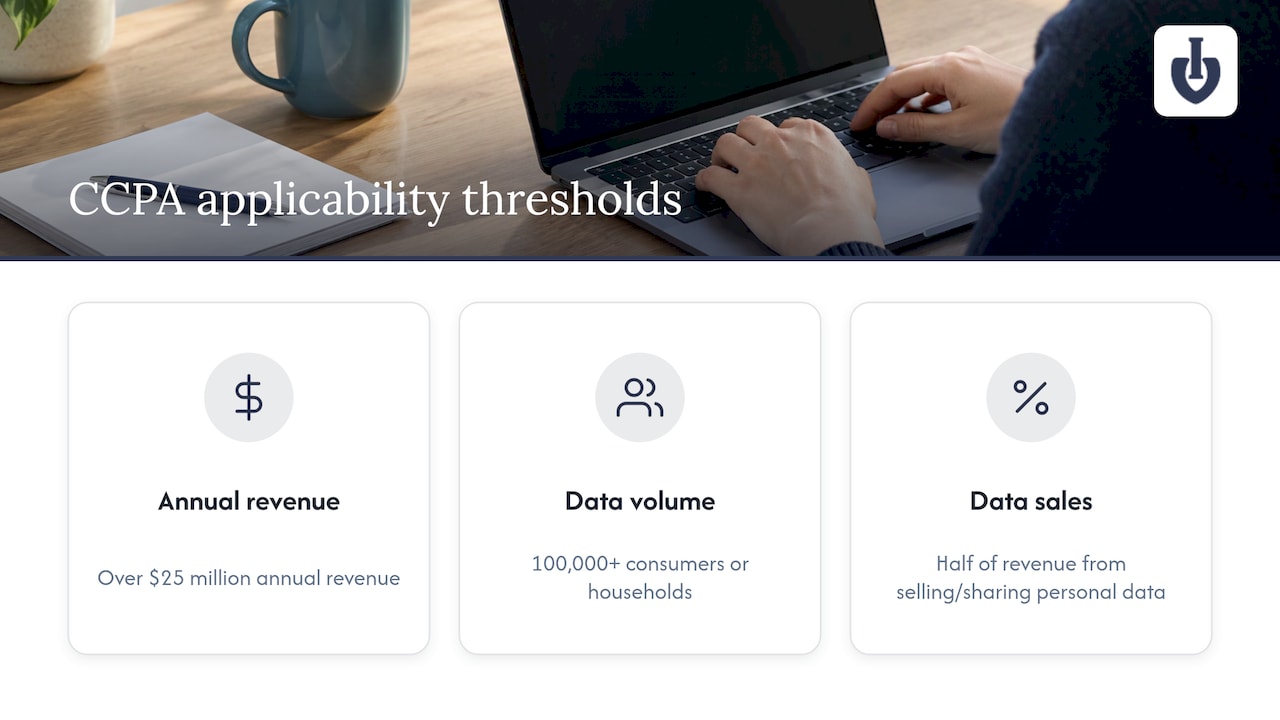
    Three CCPA business applicability thresholds

    Voters abroad. If your fan awards draw voters from Europe, the GDPR and similar laws may apply to you regardless of where you are based. The Council of Europe principles above are consistent with that approach: minimize, state your purpose, and be transparent. If your contest is large or collects identity documents, speak to a privacy lawyer in the places your voters live.

    None of this means a school bake-off needs a legal team. It means the size of your data footprint should set the size of your preparation.

    Retention: plan the deletion before the voting

    An old voter list is a liability with no upside. Once results are announced and any dispute window has closed, the personal data has done its job.

    Build a simple retention schedule:

    EventSuggested handling
    Voting openCollect only the fields in your notice
    Voting closedLock results; stop collecting
    Dispute or audit windowKeep what you need to resolve challenges, and tell voters how long
    After windowDelete voter-level data; keep aggregate results
    Next seasonAsk voters to opt in again; do not reuse lists for unrelated marketing

    Aggregate results such as total votes per nominee carry far less privacy risk than a record of who voted. The Council of Europe guidelines treat statistical use of voting data as acceptable when safeguards such as anonymization or pseudonymization are in place and the secrecy of the ballot is respected. That supports a clean rule: keep the totals, drop the identities.

    Izivote includes automatic vote closing, which makes the “voting closed” step happen on schedule. Put your deletion date in the same calendar entry.

    A privacy checklist before you launch

    Use this before you publish your voting link:

    • [ ] I can name the purpose of every field on the voting form.
    • [ ] I chose the lightest verification method that protects the result.
    • [ ] Voter-level data is visible to as few people as possible.
    • [ ] Nobody outside the organizing team receives voter lists.
    • [ ] A plain-language notice is on the voting page.
    • [ ] The notice names the platform and payment processing.
    • [ ] A deletion date is set and written down.
    • [ ] I know whether minors are voting and have school or guardian rules covered.
    • [ ] Voters are told whether their names are ever shown next to choices.
    • [ ] A named person answers voter questions and deletion requests.

    Where Izivote fits

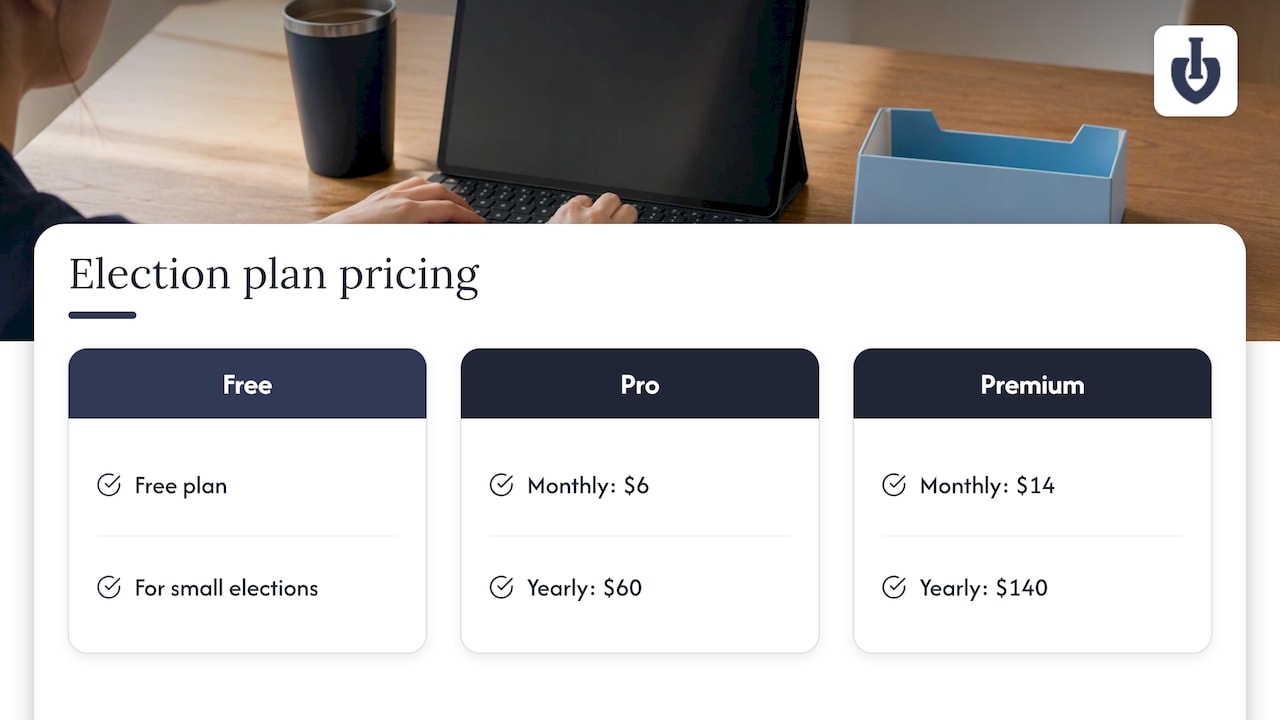
    Izivote is a voting platform for audience and people’s choice awards. You can launch a self-serve voting page quickly, pick the voting mode your event needs, and follow results from a live dashboard. You can start on the Free plan, with no published price, and move up when the event calls for it: Pro is $6 per month or $60 per year, and Premium is $14 per month or $140 per year. Paid voting carries a 10% platform fee per vote. See the pricing page for what each plan includes, or the features overview for the full tool list.
    Izivote

    If you run awards, the people’s choice awards page shows how a typical event is set up, and the student elections page covers school votes.

    FAQ

    Is an online contest vote private by default?

    It depends on the voting mode and on what you publish. An open vote collects almost nothing about the voter. Verified modes hold a contact detail or login, so you decide whether names ever appear next to choices. The safe default is to publish only totals and rankings.

    Should I collect phone numbers to stop fake votes?

    Only if the prize or reputation at stake justifies it. A phone number is more personal than an email address, so use email verification or a login first when they are enough. If you do use SMS codes, say so in your notice and delete the numbers after the dispute window.

    Do I need a privacy policy for a small community contest?

    A short notice on the voting page is good practice for any contest and may be legally required depending on where your voters live. It should say who you are, what you collect, why, who processes it, how long you keep it and how to request deletion. If you are unsure which laws apply, ask a privacy lawyer.

    Can nominees or sponsors see who voted for them?

    They should not, unless voters have clearly agreed to be recognized. Share results, not voter lists. This protects supporters and keeps nominees from pressuring fans.

    How long should I keep voter data?

    Keep it only as long as you need it to confirm results and handle disputes, then delete voter-level data and keep the totals. Tell voters the retention period in your notice. For children’s data in the U.S., COPPA requires keeping it only as long as reasonably necessary.

    Sources

    Recommended

  • Live Event Voting Display: How to Show Votes on Screen

    Live Event Voting Display: How to Show Votes on Screen

    A live event voting display is a screen that shows votes as they come in, so the room sees results move in real time. It has three parts: a way for people to vote, a system that counts and protects those votes, and a view of the tally that you put on a projector, LED wall or stream. Get all three right and the vote becomes part of the show instead of a form people fill in on the side.

    This guide explains how each part works, the participation methods available, what to put on screen, and what to test and tell your audience before you start. It is written for people running awards, fan contests, pageants, school elections and live shows.

    Izivote
    Bring Audience Voting Into the Show
    Izivote helps organizers run fan and people’s choice awards with secure, transparent voting and real-time analytics.

    Get started

    Key Takeaways

    • A live voting display needs three things: an easy way to join, controls that stop duplicate or fake votes, and a results view that is readable from the back of the room.
    • Phones, web links and QR codes suit large or remote audiences. Handheld keypads suit a seated room where everyone is on site.
    • Decide in advance what the screen shows (live totals, rankings, or a reveal) and when voting opens and closes.
    • Test the full path, from scanning the code to seeing the number change on the big screen, on the venue’s own network and projector before the event.
    • Tell the audience how to vote, how long they have and whether results are live. Most confusion comes from unclear instructions, not from technology.

    Table of Contents

    What a live event voting display is

    The term covers any setup where votes are collected during or around an event and the running result is visible to the audience. Some versions are on-site and hardware based. Others are fully online, with the audience voting on their own devices and a public results page doing the work of the display.

    The display itself is simple: a bar chart, a ranked list of nominees with photos, or a counter. The hard part is everything behind it: who can vote, how many times, and how quickly the number updates. A good display is only as trustworthy as the voting method feeding it.

    There are two broad models:

    • Audience response in the room. Everyone is present, the question is shown on a slide, and people answer in a short window. Think of a live quiz, a quick poll in a keynote or a town hall.
    • Awards and contest voting. Voting runs for days or weeks across many categories, often with public nominee profiles. The live display appears at the event itself, or the public results page stays open for fans to follow.

    The second model is where live event voting and audience polls overlap with fan awards, and it is the one we build for at Izivote.

    How the audience joins and votes

    The method you choose decides who can take part, how fast they can do it and how much you need to set up. Here are the main options.

    Handheld keypads

    Keypad polling uses handheld wireless devices that connect to a main laptop during a presentation. According to a Community Heart & Soul guide, each keypad has 10 buttons to press in response to questions or statements, and it takes little or no training to operate. That makes keypads a fit for seated rooms such as town halls, boardrooms and workshops, where you can hand a device to every attendee.

    Attendee pressing a button on a voting keypad

    The tradeoff is logistics: devices must be handed out, collected and counted, and they only work for people physically in the room.

    Phones, QR codes and web links

    Most modern events let people vote on the phone they already carry. You show a QR code or short link on screen, the audience opens the voting page in a browser, and they vote. No hardware needs to be shipped or collected, and the same page works for people watching at home.

    Academic work supports the general idea. One classroom study on audience response describes web, SMS and social-network response methods and reports that live polling through mobile phones and social networks can enhance student learning and satisfaction. The same logic carries to events: people already know how to use their phones, so the barrier to taking part is low.

    Embedded voting pages

    If your event has a website or a stream page, you can place the voting page directly on it. Visitors vote without leaving your site, and the on-screen display can pull from the same live tally. With Izivote you can embed a voting page on your own site, which helps when the vote is one part of a larger event page.

    Which method fits which event

    Event typeBest fitWhy
    Seated meeting or town hallKeypads or phonesEveryone is present and answers are quick
    Conference with a large audiencePhones and QR codeNo hardware to distribute
    Fan or people’s choice awardsOnline voting page with public resultsVoting runs over days, fans vote from anywhere
    Pageant or live showPhones plus on-stage screenThe audience can vote during the show and see the ranking change
    School electionLogin or identity-based votingEach eligible student gets one vote

    What to show on the screen

    The display should answer one question at a glance: who is ahead? Everything else is decoration. Some choices that work well:

    • Ranked list with nominee photos. Best for awards. People recognize faces faster than names, and photos make the screen feel like part of the show. Visual nominee profiles are a core part of the Izivote voting page.
    • Bar chart for a single question. Best for polls with a few answer options. Keep labels short and fonts large.
    • Vote counter. A single large number works for fundraising-style contests where the total itself is the story.
    • Hidden results until the reveal. For award shows, you may want to keep voting open but hide the standings, then show the winner on stage. Decide this before launch, because it changes what you tell voters.

    A few design rules hold in every case. Use high contrast, large type and no more than five to eight items on screen at once. Put the voting instructions (QR code, link, deadline) in a corner of the display for as long as voting is open, so latecomers can join.

    There is also a psychological reason to show results live. The Community Heart & Soul guide notes that seeing responses together in real time keeps the audience engaged and lets people see how their response fits with those of others, which can reveal common cause or majority opinion. For a fan contest, the same effect pushes people to share the page and rally support for their favorite.

    How votes appear in real time

    Behind the screen, each vote is recorded as it is submitted and the tally is recalculated. The display then reads that tally and redraws. Two details matter to organizers:

    1. Refresh behavior. Some displays update the moment a vote arrives, others refresh every few seconds. Either is fine for a room, but test it so you know what the audience will see.
    2. A single source of truth. The big screen, the public results page and your own dashboard should show the same numbers. Separate tallies in different places cause arguments on the night.

    Izivote gives organizers a live results dashboard and real-time analytics, plus public live results that voters can follow. You can watch the count from the dashboard while the audience watches the public view. For more on watching a vote as it runs, see this guide to real-time vote monitoring.

    Keeping the vote honest

    A live display makes manipulation visible. When a number jumps suddenly, the whole room sees it. That is a good reason to set up integrity controls before voting opens.

    Common controls include:

    • One-time voting codes. Each voter gets a code that works once. One booth-based voting system, Right2Vote, describes one-time codes, private-poll access, IP restrictions, optional voter selfies, code cancellation and code-use tracking for on-site voting.
    • Login-based voting. Voters sign in, which ties each vote to an account. See how login-based voting works.
    • Identity-based voting. Useful when only a defined group may vote, such as students, members or employees.
    • Open voting. Anyone with the link can vote. It is the simplest option and fits casual polls and early rounds.
    • Paid voting. Voters buy votes, which suits fundraising. Read how open and paid voting compare.

    Izivote supports open, paid, login and identity-based voting modes. You can read how each one works in the voting types help page. Pick the mode that matches the stakes: a casual audience poll can be open, while a scholarship contest or a student council election should tie votes to verified voters.

    Anonymity can matter too. The Community Heart & Soul guide observes that anonymity lets people be candid when sharing opinions could be contentious or personally threatening. If your topic is sensitive, say clearly whether votes are anonymous.

    Choosing a voting display setup: a checklist

    When you compare options for an awards night, contest or election, run through these questions.

    1. Who votes, and where are they? In the room only, or also online?
    2. How long does voting run? Seconds for a poll, weeks for an award.
    3. Do votes need to be verified? If yes, pick login or identity-based modes.
    4. Do you want to raise money? If yes, you need payment handling built in.
    5. Can you show nominee photos and profiles? For awards, this makes the display and the voting page far more appealing.
    6. Can it close automatically? Automatic vote closing keeps the deadline fair and removes a manual step in a busy moment.
    7. How fast can you launch? A tool you can set up yourself in an afternoon beats one that needs a long onboarding.
    8. Can multiple categories run at once? Awards usually have several, and voters should move between them easily.

    Izivote covers each of these: self-serve setup, multi-category voting, nominee profiles, embedding, automatic closing, paid voting with payment handling and live analytics. If your event is a people’s choice award, the people’s choice voting page shows how it fits that format.

    Making voting easy and reliable for everyone

    Even a good system fails when voters cannot figure it out. These habits help.

    • One action to start. A QR code and a short link, both on screen. Some people cannot scan, so offer the link as a backup.
    • Mobile first. Assume most voters are on a phone with a modest connection. Keep the voting page light.
    • Readable instructions. Say what to do in a sentence: scan, pick, confirm.
    • Accessible display. Use large fonts and strong contrast. Read the options aloud on stage so people who cannot see the screen are included.
    • A fallback. Have a backup connection or a hotspot, and a person at a help desk for anyone who struggles.

    If your audience engagement goes beyond the vote itself, these audience engagement strategies offer further ideas for keeping people involved before and after the event.

    What to test and announce before you start

    Treat the vote like any other live production element: rehearse it.

    Test the full path

    1. Open the voting page on a phone on the venue’s own Wi-Fi and on mobile data.
    2. Cast a test vote and confirm the number changes on the display.
    3. Check that the QR code scans from the back of the room at the size it appears on screen.
    4. Confirm the display looks right on the actual projector or LED wall, not just on your laptop. Colors and small text often change.
    5. Test the close: confirm that voting stops at the set time and that late votes do not count.
    6. Clear test votes before going live.

    Tell the audience what to expect

    Announce four things, on screen and out loud:

    • How to vote (scan the code or open the link).
    • When voting opens and closes.
    • Whether results are live or revealed later.
    • The rules: one vote per person, or multiple, or paid.

    If voting is paid, state the price per vote and where the money goes. That builds trust and avoids complaints after the event.

    Assign roles

    Name one person to watch the dashboard, one to run the screen and one to answer voter questions. When the vote is live, nobody should be improvising.

    Running a live vote with Izivote

    Izivote is a voting platform built for public audience awards and events. You can create a vote on the web, add categories and nominee profiles, choose a voting mode, embed the page on your site and follow results as they arrive. Votes have been cast across 500+ events in 20+ countries.

    Pricing is published on the pricing page:

    PlanMonthlyYearly
    FreeNo published priceNo published price
    Pro$6 per month$60 per year
    Premium$14 per month$140 per year

    Paid voting carries a platform fee of 10% per vote. The free plan is meant for small events, so you can try a vote before committing to anything.

    Izivote

    Ready to put a live vote in front of your audience? Create a vote for free and have a voting page ready to share and display.

    FAQ

    Do I need special hardware for a live voting display?

    Not necessarily. Keypad systems use handheld devices connected to a laptop, but most events now let the audience vote on their own phones. You only need a screen or projector to show results, plus a reliable connection.

    Can people vote from home while the event is live?

    Yes, if you use an online voting page. Remote viewers open the same link as the people in the room, and their votes count toward the same live tally. You can also embed the page on your stream or event site.

    How do I stop people from voting more than once?

    Choose a voting mode that fits the stakes. Login-based and identity-based voting tie each vote to a verified voter, while one-time codes limit each code to a single use. Open voting is simpler but suits casual polls better.

    Should results be visible while voting is open?

    It depends on the format. Live results keep the audience engaged and encourage sharing, which suits fan contests. For award shows with a stage reveal, you can keep the standings private and show the winner at the end. Tell voters which approach you are using.

    Sources

    Recommended

  • Voting Dashboard Features: What Organizers Need

    Voting Dashboard Features: What Organizers Need

    A good voting dashboard shows you, in one screen, how many votes each nominee has, where those votes come from and whether the count can be trusted. It also lets you change the vote while it runs: open or close categories, set the voting mode and track money if votes are paid. This guide covers the features that matter for awards, fan contests, pageants and school elections, and how to judge them before you commit.

    We built Izivote for public audience awards, so the examples lean toward people’s choice events. The checklist applies to any online vote.

    Izivote
    izivote.com
    Run Audience Awards With Clear Results
    Izivote gives organizers a dashboard for monitoring votes in real time, with voting methods designed for fan and people’s choice awards.

    Get started

    Key Takeaways

    • The core of a voting dashboard is live visibility: current standings per category, vote totals and participation, updated as votes arrive.
    • Control matters as much as reporting. Look for voting modes, nominee management, scheduling and automatic closing in the same place.
    • Trust comes from design: identity checks, a clear tally and results that voters and the public can understand.
    • Paid voting adds a second job to the dashboard: showing revenue, fees and payment handling next to the votes.
    • Match the dashboard to your event type and size before you compare prices.

    Table of Contents

    What a voting dashboard actually does

    The word “dashboard” covers two different things, and mixing them up leads to the wrong tool.

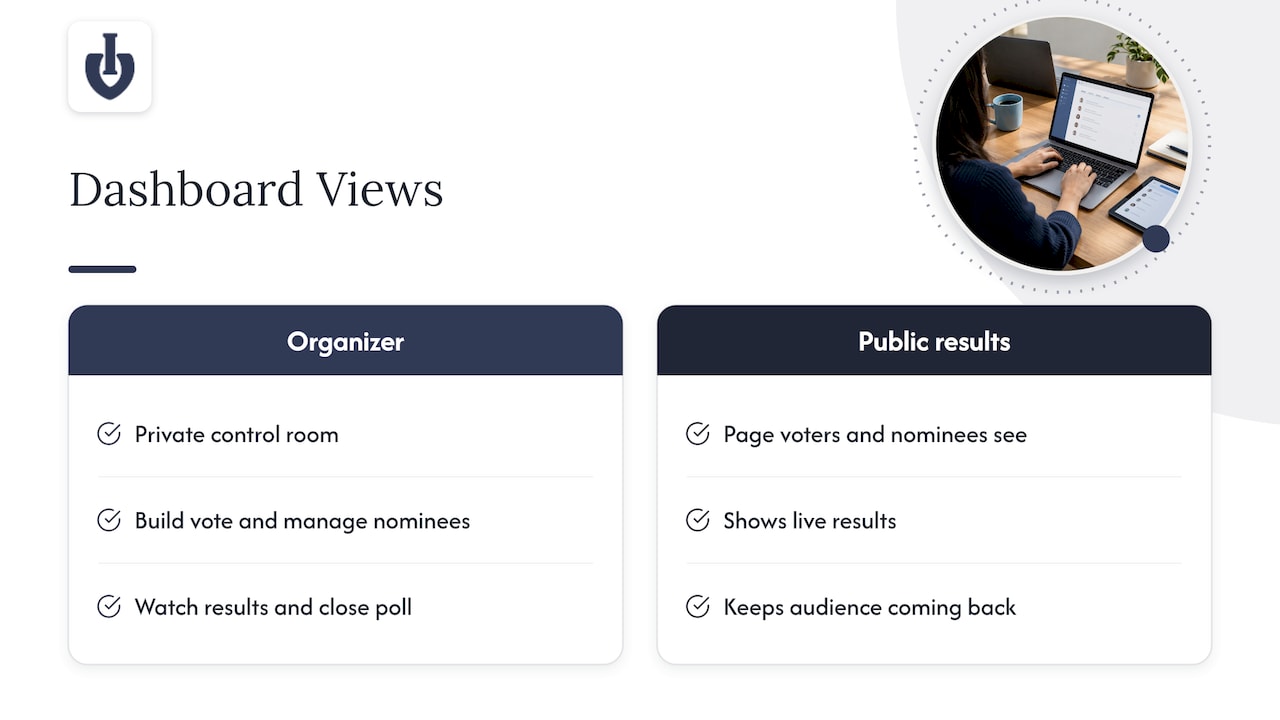
    The first is the organizer dashboard. It is the private control room where you build the vote, manage nominees, watch results and close the poll. The second is the public results view, the page voters and nominees see. Many events use both: a private panel for the team and a live public page that keeps the audience coming back.

    Search results for this topic are full of government election dashboards that map turnout and registration data. Those are built for officials and analysts. An awards or contest dashboard has a different job: it runs a single event, usually for a few weeks, with a small team and an audience that wants to see who is winning. The features below are written for that job.

    What a voting dashboard actually does

    Core features every voting dashboard should have

    Live vote counts and standings

    This is the feature people picture first. You should see the current count for every nominee in every category without refreshing a spreadsheet or waiting for an export. For a fan award, the same live standings often appear on a public page, which turns the vote into content: nominees share their position, fans push to close a gap, and the audience checks back.

    Izivote’s live result dashboards work this way. Organizers watch votes as they come in, and a public results view can show the standings to everyone. You can see how a results page looks on a sample vote with results and nominees.

    Multi-category support

    Most awards are not one question. You may have Best Newcomer, Best Venue and Fan Favorite in the same event. The dashboard should let you manage all categories in one place, with separate totals for each, instead of forcing you to launch a new poll for every award. Check that you can switch between categories quickly and compare them.

    Nominee profiles and media

    Voters decide faster, and more fairly, when each nominee has a photo and a short description. The dashboard is where you add, edit and reorder those profiles. Izivote supports nominee photos and profiles, and it also supports self-nomination, which lets nominees put themselves forward so you are not collecting entries by email.

    Scheduling and automatic closing

    Disputes often start with the end time: “I voted at 11:58, why didn’t it count?” A dashboard with automatic vote closing removes that argument. You set the end time, the vote closes on its own and the final results are fixed. Izivote includes automatic closing, so nobody has to be online at midnight to stop the count.

    Embedding and sharing

    Votes happen where your audience already is: your website, a ticketing page, a school portal, a social bio. Look for a voting page you can embed on your own site, plus a clean public link for sharing. Izivote offers voting page embedding, so the vote can live on your site instead of sending people somewhere unfamiliar.

    Tracking votes and participation in real time

    A live count answers “who is winning?” Participation tracking answers a better question: “is this vote healthy?”

    What to watch while the vote runs:

    1. Total votes over time. A steady curve usually means organic interest. A sudden spike at 3 a.m. deserves a look.
    2. Votes per nominee. If one nominee jumps far ahead in an hour, find out why. It may be a good social post or a problem.
    3. Votes per category. Low participation in one category tells you where to promote.
    4. Traffic and conversion. If many people open the vote page but few vote, the page is too complicated or the voting method asks for too much.

    Real-time analytics let you act during the vote, not after it. If a category is lagging, you can send a reminder. If a nominee is surging, you can congratulate them publicly and use it for promotion. Our guide to real-time vote monitoring for events and awards goes deeper on what to look at and when.

    The same idea shows up in other live-scoring tools. A live digital scorecards and leaderboards setup updates standings the moment a score is entered, and audiences now expect voting results to feel just as immediate.

    Voting modes: the settings that shape your results

    The dashboard is also where you decide who can vote and how often. This choice affects the credibility of your results more than any chart does. Izivote offers four modes: open, paid, login-based and identity-based. The full detail is in the voting types and voter identity help page.

    ModeBest forWhat to consider
    Open votingCasual community polls, quick fan favoritesEasiest for voters, but gives the least protection against repeat voting
    Paid votingFundraisers, fan awards that raise moneyEach vote has a cost, so you need payment handling and clear fee rules
    Login-based votingClubs, schools, member groupsTies votes to an account; see our guide to login-based voting
    Identity-based votingEvents where one person, one vote mattersVerifies the voter, for example by email; read about email verification voting

    A dashboard that lets you change modes per vote, rather than locking you into one approach, saves you from outgrowing the tool. A school election and a public fan award have different needs, and the same account should handle both.

    Trust and transparency features

    People accept a result they can understand. They reject one that feels like a black box. The dashboard should support trust in two directions.

    Research on election verification describes this as end-to-end verifiability: voters should be able to check that their selection was recorded correctly, and the public should be able to check that recorded votes were included correctly in the tally. That framework was written for formal elections, and an awards vote does not need that level of cryptography. The principle still translates into practical questions for any contest:

    • Can a voter see confirmation that their vote was recorded?
    • Can the audience see the standings, so the final result does not come as a surprise?
    • Can you explain, in one sentence, how duplicate votes are limited?
    • Is the tally something the organizer cannot quietly adjust?

    Public live results are a simple transparency tool. When everyone watches the same numbers rise, there is less room for suspicion at the end. Identity-based and login-based modes add another layer, because each vote is connected to a verified person or account. Izivote is designed around clear, secure and transparent voting, and its voting modes give you the controls to match the level of protection to your event.

    Features that make voting easy for participants

    A dashboard is only as good as the voting page it controls. If voters struggle, your numbers will be small and your results will be thin. Check these participant-side features, which you configure from the dashboard:

    • Mobile-friendly pages. Most fans vote from a phone, often after seeing a social post.
    • Few clicks. Pick a nominee, confirm, done. Every extra step costs votes.
    • Clear visual nominees. Photos and short profiles help people choose without leaving the page.
    • Obvious rules. Show how many votes each person gets and when voting closes.
    • Familiar placement. An embedded vote on your own site feels safer than an unfamiliar link.

    If you run a school election, the needs shift toward simplicity and verification. Our page on online voting for student elections shows how those features apply in a school setting.

    Paid voting: what the dashboard must handle

    Paid voting turns an awards vote into a fundraiser, and it changes what you need from the dashboard. You are no longer just counting votes; you are handling money and expectations.

    Look for:

    • Built-in payment handling, so you are not collecting cash or bank transfers by hand.
    • A clear statement of the platform fee. Izivote’s fee on paid voting is 10% per vote, as listed on the pricing page.
    • Visibility of votes bought alongside votes cast, so you can reconcile money with results.
    • The ability to run free and paid rounds, or separate categories, if you want a mix.

    Fairness is the other half. Paid votes can feel unfair to nominees with smaller audiences unless the rules are stated up front. Many organizers pair paid votes with a free daily vote, or cap paid voting to a defined window. Two guides cover this in detail: open voting versus paid voting and how to monetize fan voting, including sponsors and fairness. For the product itself, see our paid voting platform.

    Reports, filters and results you will want

    When the vote closes, you need to turn numbers into decisions and announcements. Whatever tool you use, think about what you will do with the data:

    • Winner announcement. You need final standings per category, with a clear tie-break rule decided in advance.
    • Sponsor reporting. Sponsors want to know how many people took part and how long the vote ran.
    • Nominee feedback. Nominees often ask how they did; a results page answers that.
    • Next year’s planning. Compare categories by participation to decide what to keep, rename or drop.

    Before you commit to any platform, ask yourself which of these outputs you actually need and confirm the tool supports them. Izivote’s real-time analytics and user-friendly dashboard are built so organizers can monitor votes throughout and see the standings at any point in the event.

    How to choose a voting dashboard

    Use this checklist to compare options by type: form builders, judged-only award software, mobile app-based voting and purpose-built public voting platforms.

    1. Is it built for public voting? A general form tool collects answers. It does not show live standings, handle nominee profiles or manage paid votes.
    2. How fast can you launch? Self-serve setup means you can start the same day, not after a sales call.
    3. Which voting modes are available? Make sure open, login, identity and paid options match your event.
    4. Can it live on your site? Embedding keeps your audience in your own space.
    5. Does it close automatically? This protects the integrity of the final result.
    6. What does it cost? Count subscription fees plus any per-vote fee, and check that the free tier is enough for a trial run.
    7. Can voters use it easily on a phone? Test the voter journey yourself, start to finish.

    Our positioning is simple: Izivote is purpose-built for public audience awards and events, with instant self-serve setup, embeddable voting, visual nominee profiles and live public results. It is designed to be easier to launch and more transparent than form builders, judged-only solutions or app-based alternatives. You can see how organizers use it on our customers page and browse the full features overview.

    Matching features to your event

    Different events lean on different parts of the dashboard.

    Start with a free vote

    If you want to see a voting dashboard working before you decide, Izivote has a Free plan for small events. When you need more, Pro costs $6 per month or $60 per year, and Premium costs $14 per month or $140 per year. Paid voting carries a 10% platform fee per vote. You can build your first vote in minutes: add categories, upload nominee photos, choose a voting mode and share the link.

    Izivote

    Ready to try it? Create a fan award or online vote for free, or compare plans on the pricing page.

    FAQ

    What is the most important voting dashboard feature?

    Live visibility of votes per nominee and category is the foundation, because every other decision depends on it. Right behind it is control over voting modes, so you can limit repeat voting and match the vote to your event. Without both, you have a counter, not a dashboard.

    Can I run a voting dashboard on my own website?

    Yes, if the platform supports embedding. Izivote lets you embed the voting page on your own site, so voters stay in your environment while the dashboard tracks the results behind the scenes.

    How do I stop people from voting many times?

    Choose a voting mode that fits the stakes. Open voting is easiest for voters but gives the least protection. Login-based and identity-based modes tie votes to an account or verified person. Whichever you choose, state the rules clearly on the voting page.

    Is a free voting dashboard enough for a small event?

    Often, yes. Izivote has a Free plan aimed at small events, and you can move to Pro or Premium later if you need more. Check the pricing page for what each plan includes.

    Sources

    Recommended

  • How to Collect Nominations Online: A Step-by-Step Guide

    How to Collect Nominations Online: A Step-by-Step Guide

    To collect nominations online, publish one clear entry page, ask only for the details you need to judge a nominee, keep the window open for about two weeks, and review every entry before anything goes to a vote. Whether you run a fan award, a school election or a community contest, the same five decisions decide how clean your shortlist is: the timeline, the form, the anti-duplicate rules, the review step and the handoff to voting.

    This guide walks through each one with examples from real award and election programs, then shows how nominations feed a public vote.

    Izivote
    Turn nominations into a trusted vote
    Izivote helps organizers move from online nominations to voting, with options including paid, login and identity-based voting.

    Get started

    Key Takeaways

    • Run nominations first and voting second. Open nominations early, keep them open for roughly two weeks, and start voting only after they close.
    • Ask for the minimum: nominator, nominee, category and a short reason. Every extra required field costs you entries.
    • Cap duplicates and bots with one entry per person per category, verified email and a review step before publishing.
    • Clean the list before voting: check completeness, merge duplicates and get each nominee to confirm.
    • With Izivote you can allow self-nomination, show nominees with photos and profiles, and move straight into open, paid, login or identity-based voting.

    Table of Contents

    Nominations and voting are two different jobs

    A nomination answers “who should be in the running?” A vote answers “who wins?” Mixing them is the most common reason award pages feel chaotic: voters see half-checked names, nominees pile up under spelling variations, and the winner is questioned afterward.

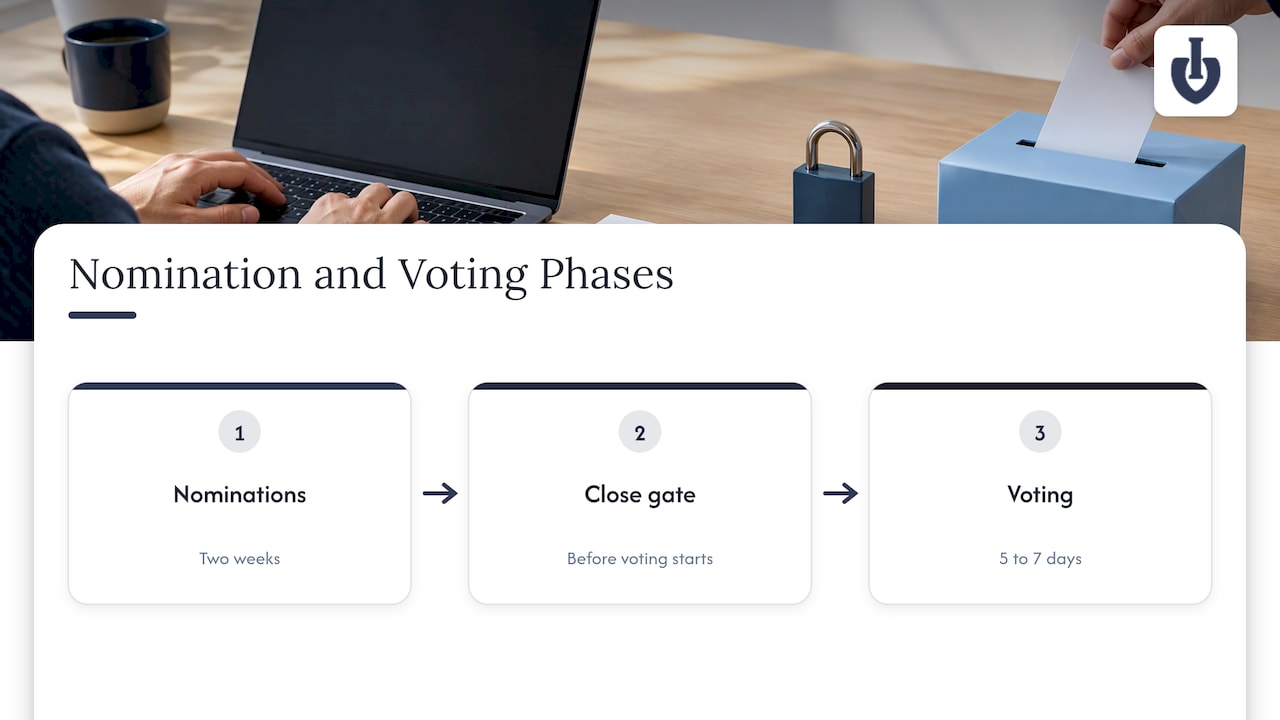
    Treat them as two phases with a gate between them. Student election guidance from Cardiff Students states that the voting period should start after the nominations period closes, not at the same time, and suggests leaving nominations open for two weeks and keeping voting open for 5 to 7 days. That is written for campus elections, but the logic carries over to fan awards: a short, focused nomination window, then a short, focused vote.

    Timeline separating nominations from voting

    The Jenkins project’s board election walkthrough shows the same sequence in a different setting: an announcement, a nominations phase, a registration phase, then voting and results, each with its own dates.

    Step 1: Set the timeline before you build anything

    Write down five dates before you touch a form:

    1. Announcement: when the public hears about the award.
    2. Nominations open and close.
    3. Review and nominee confirmation.
    4. Voting open and close.
    5. Results announcement.

    A workable pattern for a community or fan award looks like this:

    PhaseTypical lengthWhat happens
    NominationsAbout 2 weeksPublic or members submit names and reasons
    Review3 to 5 daysYou check, merge and confirm nominees
    Voting5 to 7 daysThe public votes on the shortlist
    ResultsSame day voting closesWinners announced

    These lengths follow the Cardiff Students guidance above; shrink or stretch them to fit your audience. Give the review phase real time. If you skip it, the cleanup lands in the middle of voting, when it is hardest to fix.

    Don’t copy a calendar from another event. Pick dates that fit your own audience’s rhythm, and announce them everywhere you promote the award so nobody is surprised when the window closes.

    Step 2: Decide who can nominate

    There are three common models, and the choice shapes your form:

    • Open public nominations. Anyone can suggest a name. Best for fan awards and people’s choice awards where reach matters. Expect the most duplicates.
    • Member or login-only nominations. Only people with an account or membership can nominate. Best for associations, schools and employee programs.
    • Self-nomination. Nominees put themselves forward. Best for creators, local businesses, pageants and contests where nominees want the exposure.

    You can mix them. A pageant might allow self-nomination for contestants, while a “best local business” award might let the public nominate and then ask each business to confirm. Izivote supports self-nomination, so contestants can submit their own entries, and you can pair it with the voting mode that matches your audience.

    Step 3: Build a short, clear nomination form

    A nomination form should feel like a two-minute task. Real programs show a wide range, though, and the right length depends on how formal the award is.

    At the heavy end, the UK government’s page on nominating someone for an honour or award asks for the nominee’s details, a detailed description of why they are being nominated, relevant work or volunteering, and two supporting letters. The Wisconsin Library Association’s Library of the Year form asks for nominator and nominee information, three letters of support and five narrative answers of 250 words or fewer. The 2025 UN SDG Action Awards changemaker guidance asks for a bio of up to 200 words, a headshot of at least 1000 by 1000 pixels and short answers on impact and scalability.

    Those are juried honors. For a fan or people’s choice award, where the public decides the winner, you need far less.

    The core fields

    • Nominator name and email (so you can verify and follow up).
    • Nominee name, spelled as it should appear on the ballot.
    • Category.
    • One to three sentences on why they deserve it.
    • Nominee contact, if the nominator knows it, so you can ask for acceptance.

    Fields worth adding for a ballot

    • A photo upload, since voters respond to faces and logos.
    • A short bio or description for the nominee profile.
    • A link to the nominee’s website or social page.

    If you use narrative fields, state the word limit directly above the box. LegalClarity’s nomination form guidance suggests a limit around 500 words for formal programs and limiting uploads to common formats such as PDF or DOCX with a sensible size cap. For a public award, 50 to 100 words is plenty.

    One more field matters when judges or committees are involved: a conflict-of-interest question. The same guidance recommends asking nominators to disclose family ties, shared financial interests or overlapping memberships with the nominee. For a pure fan vote you can skip it. For an industry award with a panel, it protects your credibility.

    Write the form like a person

    Use plain labels (“Who are you nominating?”), show an example under the category field, and tell people what happens next: “We’ll review nominations, then open voting on the shortlist.” A short confirmation message after submission reduces repeat entries from people who weren’t sure it went through.

    Step 4: Make it work on a phone

    Most people will nominate from a phone, usually after seeing your post on social media. A form that needs pinching and zooming loses them.

    Government design guidance for mobile services recommends touch targets of at least 48 by 48 pixels, with space between tappable elements and the main action placed in the lower part of the screen where a thumb reaches it. Apply that to your submit button and dropdowns.

    A few practical checks:

    • One column, no side-by-side fields.
    • Large submit button, fixed label like “Submit nomination”.
    • Photo upload that works from the camera roll.
    • Page loads quickly on mobile data.
    • Readable contrast and labels that stay visible while typing.

    If you also embed the page on your own site, why responsive design matters applies to your hosting page as well: the form can be perfect and still frustrate people if the page around it isn’t built for small screens. For the voting side, our guide on award voting page design covers layout, trust and mobile tips.

    Step 5: Stop duplicates and fake entries

    Open nominations attract two kinds of noise: honest duplicates (ten people nominate the same bakery, spelled four ways) and dishonest entries (a nominee’s friends or a script flooding the form).

    Real award rules show what organizers do about it. The SXMA Awards terms, for example, require verified accounts and allow one nomination per user per category, prohibit bots, scripts and VPN identity manipulation, and permit automated and manual fraud checks. The same notice explains what data they process for anti-fraud purposes, such as email, verification status and IP address, and how long raw voting data is kept.

    You can borrow the approach:

    1. Limit entries. One nomination per person per category is the simplest rule.
    2. Verify the nominator. Email confirmation or a login filters out most throwaway submissions.
    3. Add bot protection. A CAPTCHA or hidden honeypot field on the form is enough for most community awards.
    4. Review before publishing. Don’t let raw submissions go straight onto the public ballot.
    5. Tell people what you collect. Add a short note on the form saying what personal information you gather, why, who sees it and how long you keep it. LegalClarity’s form guidance recommends this, and it matters most when your audience includes people in regions with privacy laws. If you handle sensitive data, ask a qualified privacy lawyer which rules apply to you.

    For the voting phase, Izivote offers several voting types and voter identity options, and a walkthrough of login-based voting shows how to require an account when the stakes are higher.

    Step 6: Review, merge and confirm the shortlist

    Raw nominations are not a ballot. Before voting opens, do a pass that covers four things:

    • Completeness. Does each entry have a name, category and reason?
    • Eligibility. Does the nominee fit the category and your rules?
    • Duplicates. Merge variations of the same name into one entry, and count them as a signal of popularity.
    • Acceptance. Ask nominees to confirm they want to be listed.

    The CMX Community Industry Awards team describes a similar routine: they check that nominations are complete and fit the category, combine nominations for the same person or community, and require nominees to accept by the due date to advance to voting.

    A simple way to work: export submissions into a spreadsheet, add a status column (approved, merged, rejected, awaiting confirmation) and a column for the final display name. Keep a note of why anything was rejected in case someone asks.

    How many finalists per category?

    Five to ten is a comfortable range for a public ballot. Fewer than three feels uncompetitive, and a list of thirty makes people leave without voting. If you receive far more worthy names than that, use nomination counts to cut the list, or run a quick judge pass for the final slots.

    Step 7: Turn nominations into a public vote

    Once the shortlist is confirmed, build the ballot. This is where nominee photos and short profiles do their work: voters rarely read long descriptions, but they will notice a clear image and a one-line story.

    With Izivote, you set up categories, add nominees with photos and profiles, choose how people may vote, and publish a voting page you can share or embed on your own site. Voting can close automatically at the time you set, and you can watch results as they arrive through real-time vote monitoring.

    Choose the voting mode based on your goals:

    GoalFits best
    Maximum reach and quick participationOpen voting
    Fundraising for the event or a causePaid voting
    Members, students or staff onlyLogin-based voting
    Tighter control over who countsIdentity-based voting

    If you’re deciding between the first two, our comparison of open voting versus paid voting goes into the trade-offs, and the full process is laid out in how to run award show voting.

    Choosing a tool for the whole process

    Tools for this job fall into a few types, and each suits a different event.

    • General form builders. Good for collecting entries quickly, but voting and public results usually need a separate solution.
    • Judged awards-management software. Built for panels, scoring and corporate or association programs, often with heavier setup.
    • Dedicated audience voting platforms. Built for public votes, live results and nominee pages.

    Before choosing, ask:

    1. Can the public see nominee profiles with photos?
    2. Can you choose between open, paid, login and identity-based voting?
    3. Does it close voting automatically?
    4. Can you embed the page on your own site?
    5. Do you get live analytics, not only a final tally?
    6. Is there a free tier so you can set up a small event without a budget?

    For public fan and people’s choice awards, a dedicated voting platform keeps nominees and votes in one place. Our pages on people’s choice awards and fan awards show how that works for each kind of event.

    Run nominations and voting on Izivote

    Izivote is built for public audience awards: you can launch a voting page fast from the web, allow self-nomination, present nominees with photos and profiles, and choose open, paid, login or identity-based voting. Results show live on a dashboard, and voting can close automatically.

    Izivote

    The Free plan covers small events. Pro costs $6 per month or $60 per year, and Premium costs $14 per month or $140 per year. If you run paid voting, the platform fee is 10% per vote. See the pricing page for what each plan includes, or create a vote for free and set up your categories today.

    A sample two-week nomination plan

    Here is how the pieces fit for a local “best of the year” fan award:

    • Day 1: Announce the award, categories and dates on social media and your site. Open the form.
    • Days 2 to 7: Share a category spotlight each day. Post a running reminder that anyone can nominate.
    • Day 8: Midpoint push, tagging businesses or creators who already have several nominations.
    • Days 9 to 13: Final reminders. Tell nominees you will contact them for confirmation.
    • Day 14: Close the form.
    • Days 15 to 18: Review, merge duplicates, confirm nominees and gather photos and short bios.
    • Day 19: Publish the ballot and open voting for a week.

    When nominees are told early that they are in the running, many share the voting link with their own followers, which brings in voters you could not reach alone.

    Common mistakes to avoid

    • Opening voting while nominations are still coming in. Late entrants start behind, and people complain.
    • Asking for too much. Long forms suit juried honors, not public awards.
    • Skipping the review. Typos and duplicates make the ballot look careless.
    • No confirmation from nominees. You may list someone who doesn’t want to take part.
    • Unclear rules. Say who can nominate, how many times and what disqualifies an entry.

    FAQ

    How long should nominations stay open?

    Two weeks is a good default for most public awards and campus-style elections, based on student election guidance. Shorter windows can work for small communities that respond quickly. Longer ones tend to lose momentum.

    Can nominees nominate themselves?

    Yes, if you decide to allow it. Self-nomination suits creators, pageant contestants and small businesses, and Izivote supports it. Add an eligibility rule and a review step so you can check each entry before it appears on the ballot.

    What information should a nomination form ask for?

    At minimum: nominator name and email, nominee name, category and a short reason. Add a photo and short bio if the nominee will appear on a public ballot. Formal honors ask for much more, such as letters of support, but a fan award does not need them.

    How do I stop one person from nominating the same entry many times?

    Limit each person to one nomination per category, verify the nominator by email or login, and add basic bot protection to the form. Then merge variations of the same name during review, so repeat suggestions strengthen one entry instead of creating several.

    Can I move from nominations straight to voting?

    Yes. Once you have approved and confirmed the shortlist, add the finalists to your voting page with photos and profiles, choose the voting mode, and set the closing time. The voting phase should start after nominations close.

    Sources

    Recommended

  • Login-Based Voting: How It Works and How to Set It Up

    Login-Based Voting: How It Works and How to Set It Up

    Login-based voting means a person has to sign in, with an email, a username and password, a school or company account, or a code you send them, before they can cast a ballot. The login is what lets you check eligibility, allow one vote per person and keep a record you can audit. This guide explains how a login-to-vote system works, which login methods suit which events, and how to set one up without making voting a chore.

    Izivote
    Make Every Vote Count
    Izivote supports identity-based voting and real-time analytics, helping organizers run fan and people’s choice awards with clear, transparent results.

    Get started

    Key Takeaways

    • A login-based system verifies who is voting first, then records the vote. That is how organizers enforce one ballot per eligible person.
    • The login method should match the stakes: a verified email suits a community contest, while a school or company account suits a formal election.
    • Identity and ballot can be kept separate. Well-designed systems confirm who you are, then store the vote without linking it back to you.
    • Most risks come from stolen credentials, compromised devices and weak servers. Strong authentication, encryption and monitoring reduce them.
    • Pick the lightest login that still protects your results, because every extra step costs you voters.

    Table of Contents

    What login-based voting is

    In an open poll, anyone with the link can click a choice, and the same person can click again and again. In a login-based vote, the voter first proves they are someone the system recognizes. Only then does the ballot open.

    That proof can be light or heavy. At the light end, a voter enters an email address and confirms it with a link or code. At the heavy end, voters sign in through a single sign-on account from a school, employer or association, or use a unique credential you issued from a voter list.

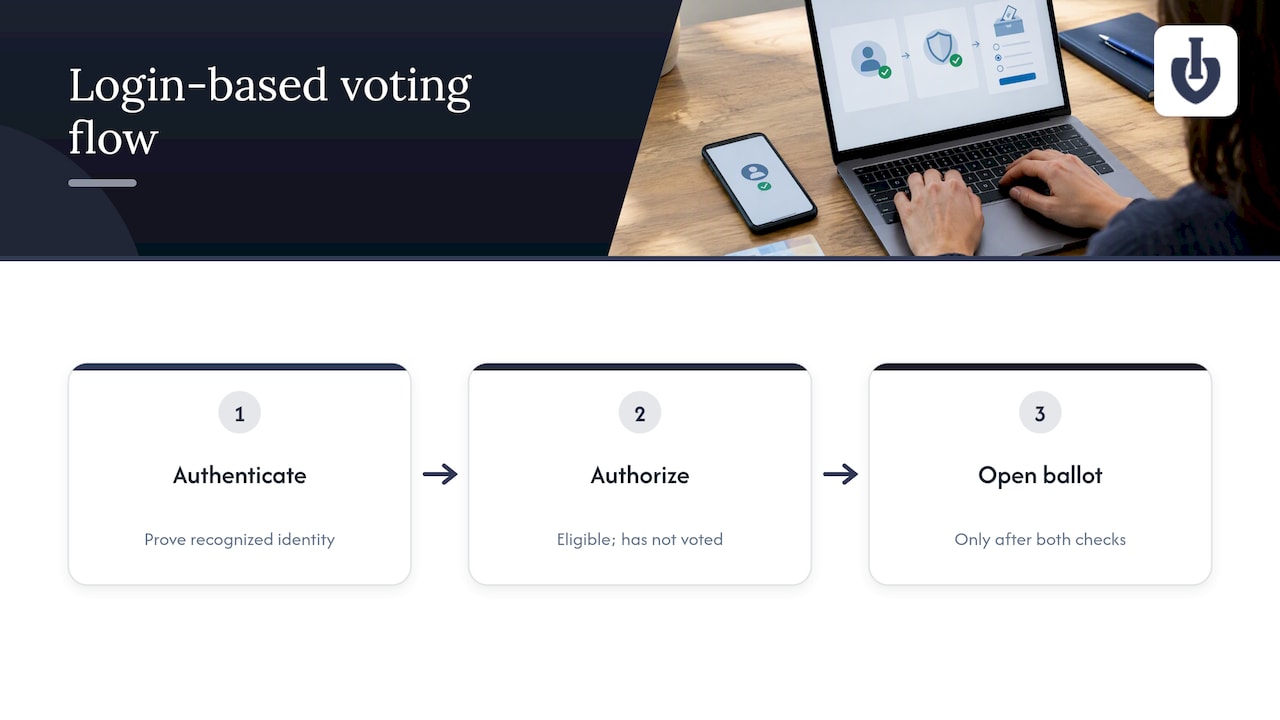
    The idea is the same in each case. Voting is split into two steps: authentication (who are you?) and authorization (are you allowed to vote, and have you already?). Splitting them is what makes results defensible.

    Authentication and authorization before the ballot

    It is also what people mean when they search for a “login to vote system.” They want a way to let the right people vote, once, from any device, without handing out paper ballots or trusting an honor system.

    How a login-to-vote system works

    The flow is nearly identical across platforms:

    1. The organizer defines who may vote. This might be anyone with a confirmed email, members on a list, students at a school, or fans who sign in with a social account.
    2. The voter arrives at the voting page. It could be a standalone page or a voting widget embedded on your own site.
    3. The voter signs in. They use a code, a link, a password or an account you accept.
    4. The system checks eligibility and history. Is this person on the list, and have they used their vote already?
    5. The voter makes their selections and confirms.
    6. The ballot is recorded and the login is marked as used. A second attempt is blocked or limited by your rules.
    7. The organizer sees results and logs. Totals update, and the record shows what happened.

    The credential is the gate and the counter at once: it decides who gets in and how many votes that person has left.

    Choosing a login method

    No single method is best. A 2010 Council of Europe e-voting handbook notes that, without a physical token, remote voters could use a username and password with a control question such as date of birth. The same handbook also warns that remote authentication without a physical token is less reliable. So match the method to what you are protecting.

    Login methodHow it worksBest forMain trade-off
    Email verificationVoter confirms an email with a link or codeFan awards, community contests, pollsEasy to create extra addresses, so pair with limits
    Username and passwordCredentials you issue from a voter listMember organizations, boardsYou must handle resets and lost credentials
    Single sign-on (school or work account)Voter signs in with an existing organizational accountStudent elections, internal company votesNeeds the organization’s identity setup
    Social loginVoter signs in with a social accountAudience and influencer contestsSome voters will not link a social profile
    Unique code or linkOne-time code sent to each voterClosed ballots, small electoratesDistribution takes planning

    If you run a public awards program, a verified email is usually the right balance. Our guide to email verification voting covers when it is enough and when to step up. For formal elections inside a school or association, an account the organization already controls is stronger.

    As a rule of thumb: the more the result matters and the smaller the eligible group, the stronger the login should be. The more public and casual the contest, the lighter it should be.

    How the system verifies eligibility and blocks repeat votes

    Two checks do the work.

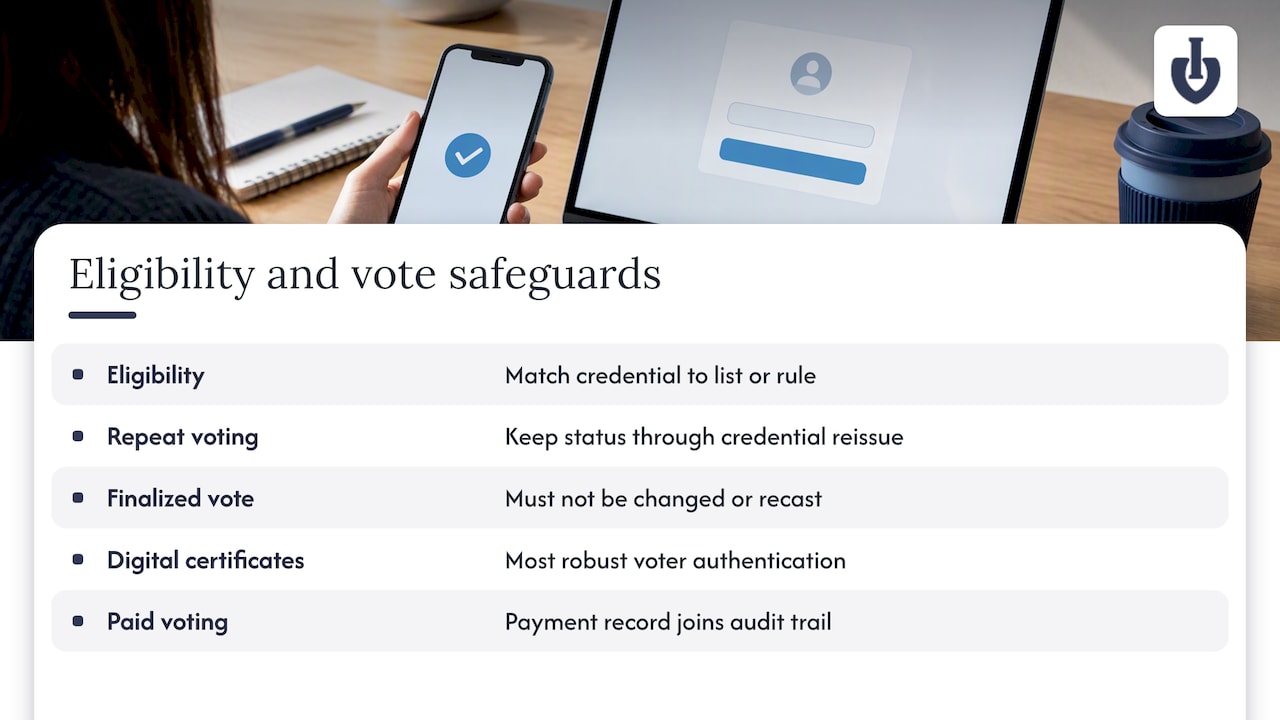
    Eligibility. Either the voter is on a list you provided, or they meet a rule you set, such as owning a verified email or an organizational account. The credential is matched against that list or rule before any ballot appears.

    One vote per voter. The system has to guarantee each voter votes only once, and the Council of Europe handbook also says a system needs to issue replacement usernames or passwords at short notice when someone loses theirs. That detail matters in practice: if a replacement credential creates a second vote, your count is wrong. A good platform reissues access but keeps the voting status attached to the voter record.

    An Indian government e-voting checklist makes the same two points in plain terms. It calls for safeguards against unauthorized votes being added and says voters must not change or recast a vote once it is finalized.

    At the strongest end, a position paper presented at a NIST workshop describes digital certificates as the most robust voter-authentication method, because voters can digitally sign their encrypted votes. That level suits government-grade elections. Most awards, schools and nonprofits do not need it, but it shows the direction: stronger proof of identity, stronger proof the vote is genuine.

    If your votes carry a price, one more point applies. With paid voting, supporters may buy many votes by design, so the login still identifies the buyer and the payment record becomes part of your audit trail.

    How the system verifies eligibility and blocks repeat votes

    Keeping identity and ballot separate

    A common worry: if voters log in, can you see how they voted? It depends on the design, and in a well-built system the answer is no.

    The NIST workshop paper describes anonymizing votes before decryption to break the links between votes and voters, and it recommends data-level encryption to protect vote secrecy if a server is compromised. The archived U.S. voting system guidelines go the same way, stating that system records must not associate voter identity with ballot selections. An academic paper on a Peruvian e-voting design adds that once identity is verified, the system no longer needs information about the user, and votes are encrypted after submission.

    For your event, that means a clear split:

    • The login record shows that a person was eligible and has voted.
    • The ballot record shows what was chosen.
    • Nothing in the reports you see joins the two, unless your event is deliberately public, such as a contest where voters opt in to being shown.

    Tell voters which type you run. A short sentence on the voting page (“We confirm your email to prevent duplicate votes. We do not publish who voted for whom”) answers the question before anyone asks it.

    Security risks and how to reduce them

    The risks are well understood. The e-voting handbook lists intercepted credentials, malware that changes vote choices, and server compromise, and recommends strong authentication, vote encryption, and individual and universal verification. Translated into organizer actions:

    • Intercepted or shared credentials. Use one-time links or codes, expire them after use and limit how long a session stays open. The handbook also notes that disclosed credentials make vote-selling easier, so do not make credentials transferable.
    • Malware on a voter’s device. You cannot control it, but you can show voters a confirmation of their choices before submission, which is the idea behind individual verification.
    • Server compromise. The NIST workshop paper points out that SSL still leaves votes in clear text at the voting server, so an attacker with server access could expose voter privacy. Ask any vendor whether votes are encrypted at the data level, not only in transit.
    • Undetected fraud. A 2026 French cybersecurity agency guide for non-political elections recommends detecting and alerting administrators to events, including malfunctions or fraud, that could alter the sincerity of the vote. In practice: watch for sudden spikes, repeated attempts from one source and unusual patterns, and keep the logs.
    • Too much exposed surface. Archived U.S. guidance says voting systems should use multiple layers of controls and limit attack surfaces by cutting unnecessary code and data paths. For you, that means choosing a purpose-built tool over a patchwork of forms and spreadsheets. A Google Forms voting checklist shows where improvised setups fall short.

    Keep perspective, too. An EU compendium on election cybersecurity says digital election solutions are no more or less secure than paper-based solutions, but should be introduced prudently and meet the same legal requirements. Online voting is not riskier by nature. It needs deliberate controls, as paper does. For a broader view of why these controls matter on any website that handles user accounts, see why cybersecurity matters online.

    Setting up login-based voting step by step

    A U.S. Center for Internet Security guide to election security describes the same sequence: organizers define eligibility requirements, select an authentication method such as SSO or unique credentials, and choose a platform with secure, encrypted and auditable processes. Management then means directing voters to a specific portal, watching for anomalies and auditing the results afterward.

    Here is that process as a working checklist.

    1. Decide who may vote

    Write one sentence: “Eligible voters are ___.” Members on this list, students enrolled this term, anyone with a confirmed email. If you cannot say it in one sentence, your login rule will not work either.

    2. Pick the lightest login that protects the result

    Use the table above. Public fan vote: email verification. Closed election: accounts or issued credentials. Review the voting types and voter identity options your platform supports before you commit.

    3. Set vote limits and timing

    Decide how many votes each voter gets, per category or overall, and when voting opens and closes. Automatic closing removes the risk of someone forgetting to end the vote and keeps results clean.

    4. Send voters to one official page

    One portal, one link, announced everywhere. Embedding the voting page on your own site helps voters trust it, since they are not asked to sign in on an unfamiliar address.

    5. Test with a few people

    Have three people vote: one on a phone, one on a laptop, one who has forgotten their login. Fix what confuses them before launch.

    6. Monitor while it runs

    Watch the live totals and the voting pattern. Sudden jumps or many attempts from one source are the cue to look closer.

    7. Audit and publish

    When voting closes, check counts against your logs, then share results openly. Public contests earn more trust when people can see how the count was done. Our guide to transparent voting results shows how.

    Making login easy for voters

    Every step between the link and the ballot loses some voters. Accessibility is part of security, because a login people cannot complete pushes them to workarounds.

    • Ask for as little as possible. An email and a code is usually enough for an audience vote.
    • Work on any device. Voters should be able to use a phone, tablet or computer, with no app to install.
    • Explain failure in plain words. “This email already voted” beats “Error 403.”
    • Offer a recovery path. Lost codes should be easy to reissue without allowing a second vote.
    • Keep the language simple. Short instructions, readable type, good contrast and labels that work with screen readers.
    • Think about your audience. Students may already have a school account, while fans of a pageant or a local award may only have an email address.

    For schools, an account the school already issues is the natural fit, and our page on student election voting shows how that works. For public contests, see online voting for awards and competitions.

    Running login-based voting with Izivote

    If you run a fan award, a people’s choice contest, a pageant or a school vote, we built Izivote for this job. You can choose among open, paid, login and identity-based voting modes, add nominee photos and profiles, embed the voting page on your site, and watch results on a live dashboard. Voting closes automatically when you set it to.

    Izivote

    The Free plan lets you start a small event without paying. Pro is $6 per month or $60 per year, and Premium is $14 per month or $140 per year. If you run paid voting, a 10% platform fee applies per vote, with payment handling included. You can see everything on the pricing page, or go straight to create your vote and set up a login-protected ballot in one sitting.

    FAQ

    Is login-based voting the same as identity-based voting?

    They overlap but are not identical. Login-based voting means voters sign in before voting. Identity-based voting means the sign-in confirms who the voter is, for example through a verified email or an organizational account. Different login methods give different levels of identity assurance.

    Can organizers see who voted for whom?

    Not in a well-designed system. The login proves eligibility, and the ballot is stored without being linked to the voter. Research on secure e-voting recommends separating the two and encrypting votes. Tell your voters up front what your event does and does not record.

    What if a voter forgets their login?

    Reissue access to the same voter record, so the replacement does not create a second vote. Good systems let organizers replace usernames or passwords quickly while still enforcing one vote per voter. Plan this in advance for closed elections with issued credentials.

    Do I need a login for a small community contest?

    Often a verified email is enough. It blocks casual repeat voting without making people create accounts. If the contest has prizes or serious stakes, or if you are raising money with paid votes, use a stronger login and monitor results during voting.

    Sources

    Recommended

  • Real-Time Vote Monitoring for Events and Awards

    Real-Time Vote Monitoring for Events and Awards

    Real-time vote monitoring means watching votes arrive as they are cast, through a dashboard that shows totals, trends and unusual activity while voting is still open. For an awards show, a fan contest or a live event, it does two jobs: it keeps the audience engaged, and it lets you catch problems such as duplicate or bot votes before they decide the outcome. The setup that works best is simple: a private view for you with full detail, a public view you control, and a clear rule for when the final count becomes official.

    Izivote
    izivote.com
    Monitor Event Votes in Real Time
    Izivote gives organizers real-time analytics and a user-friendly dashboard to monitor votes for awards, fan contests, and events.

    Get started

    Key Takeaways

    • Treat the live number as a fast snapshot and the final tally as the official record, confirmed after voting closes.
    • Track a short list of metrics: votes over time, votes per category, unique voters, vote sources and, for paid voting, revenue.
    • Decide in advance whether the public sees live totals, because partial counts can shape how people judge the result.
    • Choose a dashboard for transparency, duplicate-vote controls, testing and an audit trail, not just for how fast the numbers move.
    • Izivote gives organizers live result dashboards and real-time analytics, with a free plan for small events.

    Table of Contents

    What real-time vote monitoring actually means

    In a live poll, the audience watches a tally move in near real time. Engineers who write about this describe the number on screen as an approximate snapshot, with the final tally reconciled once the poll closes. The same source describes a common design: votes are submitted over HTTP or WebSocket connections, validated at the entry point, and tally snapshots are pushed to viewers (Build a Live Poll and Real-Time Vote Tally System).

    You do not need to build any of that, but the idea matters for how you run an event. There are really two numbers:

    • The live count, optimized for speed. It is what people see while voting is open.
    • The final record, optimized for accuracy. It is what you announce and archive after close.

    When those two are clearly separated in your communication (“live totals are updating, final results are confirmed after voting closes”), nobody feels cheated if a number shifts slightly at the end.

    Monitoring also differs by event type. An election night reporting system for government races pulls counts from many local sources and passes them on. As one example, the Associated Press describes collecting votes through local stringers, state or county websites and state electronic data feeds. A fan award is simpler: every vote goes through one platform, so monitoring is about watching one system closely rather than reconciling many.

    What to track while voting is open

    Most organizers open a dashboard, see a leaderboard and stop there. The leaderboard is the least useful part during the event. These are the numbers worth watching.

    Votes over time

    A line of votes per hour tells you whether your promotion is working. Voting usually spikes after an email, a social post or an on-stage mention, then decays. If you see a spike that no campaign explains, look at it before you celebrate it.

    Votes per category and per nominee

    In a multi-category awards program, some categories draw ten times the traffic of others. A thin category is a signal to feature it in your next message. A category where one nominee jumps far ahead in minutes deserves a closer look at where those votes came from.

    Unique voters versus total votes

    If your rules allow several votes per person, compare the two. A healthy event has a ratio that matches the rules you published. A ratio far outside that pattern suggests either a very enthusiastic fan base or something automated.

    Vote source and timing patterns

    Where votes come from (your embedded page, a social link, an email) shows which channel earns its keep. Bursts of votes arriving at a perfectly regular pace, or in the same second, are the classic mark of a script.

    Paid voting revenue

    If you run paid votes to raise funds, watch revenue next to vote counts. Izivote charges a 10% platform fee on paid votes, so the figures on your dashboard let you see what the campaign is bringing in. For the fairness side of charging for votes, our guide to monetizing fan voting walks through sponsors and the fee.

    A simple example

    Imagine a community awards night with eight categories and a two-week voting window. On day three, the dashboard shows 70% of votes landing in one category after a nominee shares the link. That is good news for engagement and a prompt to push the other seven categories. On day nine, one nominee in a quiet category gains 400 votes in ten minutes from a single source. You pause, review, and decide whether to require logins for that category. That sequence only works if you can see the data while voting is still open.

    Should the public see live results?

    This is the decision that matters most, and it is a choice, not a default.

    Reasons to show live results. Visible totals create excitement, give nominees something to share, and make the process feel honest. Our piece on transparent voting results covers how to run public votes people trust.

    The risk to plan for. Research on the 2020 U.S. election found that people tend to favor early leaders in partial counts and become suspicious of fraud when the eventual winner takes a late lead. The authors suggest rethinking how partial results are communicated (“Stop the Count!” study). That was an election, but the psychology carries over: if your live leader is not your final winner, people will ask why.

    Practical ways to manage it:

    1. Say what the numbers are. Label the public page as live and unofficial until close.
    2. Pick a visibility mode that fits the event. Full live totals suit fan contests and fundraisers. Hidden totals with a reveal at the ceremony suit formal awards.
    3. Hide totals for the last stretch. Some organizers show standings until the final day, then freeze the public view and reveal at the show.
    4. Close automatically. A fixed end time, enforced by the platform, removes any suspicion that the window was extended for a favorite.

    If the vote affects something that matters to people, match the safeguards to the stakes. The BBC’s editorial guidelines say a voting mechanism’s robustness should match the editorial significance of the vote, and that results must be properly collated and verified between the close and the announcement (BBC guidance on audience interactivity). A school spirit poll and a scholarship award are not the same level of risk.

    Catching duplicate and fraudulent votes

    Monitoring is not just a scoreboard. It is your early warning system. Technical guidance for live polls lists the basic checks a voting system should run on each submission: verify the user ID, validate the poll period and the chosen option, check user permissions, and handle simultaneous votes so they are not miscounted (PubNub’s live polls documentation).

    In practice, you choose how strict to be through the voting mode:

    Voting modeHow it worksBest for
    Open votingAnyone with the link can voteLow-stakes community fun
    Login-basedVoters sign in before votingContests where you want one account per person
    Identity-basedVoters are tied to a verified identityStudent elections, member votes, higher-stakes awards
    Paid votingVoters buy votes, payments are handled by the platformFundraising and fan awards

    Izivote supports all four modes, so you can match the control level to the event rather than forcing every vote through the same gate. Our comparison of open vs. paid voting helps you decide.

    What to watch on the dashboard for signs of trouble:

    • A nominee’s count growing faster than their promotion could explain
    • Many votes in the same minute with no matching campaign
    • A big gap between unique voters and total votes in a one-vote-per-person category
    • A sudden stop in votes for everyone else while one nominee keeps climbing

    A flag is not proof. Look first for a benign explanation, such as a newsletter going out or a nominee’s school sharing the link, before you act. Then apply a documented rule, and tell nominees what the rules are before voting opens, not after.

    Verification, audit and privacy: what to expect from a system

    High-stakes voting research is a useful benchmark even for small events, because it shows what goes wrong. An academic analysis of the Neovote system found it lacked end-to-end verification, that its verification process did not guarantee integrity, and that this allowed errors and attacks, including the temporary publication of an erroneous tally. The researchers argue that voting systems should be scrutinized and audited by independent actors (Springer analysis of Neovote).

    The lesson for an organizer is modest and practical: do not rely on a number you cannot check. The National Democratic Institute’s 2024 model checklist says election bodies should audit software and hardware performance in real time or after an election, and that audit methods depend on the system’s function, for instance parallel manual counts of paper audit trails in random samples (NDI Model Checklist). You will not run a paper audit for a fan award, but you can export results and compare them with what you saw on the dashboard before announcing a winner.

    A light-weight audit routine for events:

    1. Before launch, cast test votes in every category and confirm they appear correctly, then clear them.
    2. During voting, screenshot or export totals at set times, such as daily.
    3. At close, export the final results and compare with your last snapshot. Explain any differences, such as flagged votes removed.
    4. Keep the export and your written rules for the record.

    How to evaluate a live results dashboard

    The same NDI checklist gives a useful frame: voting technology should be transparent, protect ballot secrecy and data privacy, be tested, and allow audits, recounts and a paper trail (NDI). Translated to events and awards, here is a checklist you can use when you compare tools of any type, whether form builders, judge-only scoring tools or app-based systems.

    Question to askWhy it matters
    Do totals update live without a page refresh?Engagement drops when numbers look stale
    Can I show results to the public and keep a more detailed private view?You need detail, voters need simplicity
    Which duplicate-vote controls exist?Determines how much you can trust the counts
    Can I export results?Needed for your audit and record
    Does voting close automatically?Prevents disputes about extended windows
    Can it handle payments if I want fundraising?Paid voting needs clean handling and reporting
    Can I embed voting on my own site?Keeps voters in your brand and your traffic
    Is there a free tier to test it?Lets you run a rehearsal before the real event

    Form builders typically collect responses but are not designed to show a public live leaderboard. Judged-only tools suit panels, not audience votes. App-based systems often ask voters to download something first, which costs participation. Those are the gaps a purpose-built audience voting platform is meant to close.

    Showing live results on stage or on a stream

    Audience watches live results at awards

    At a live show, a results screen is part of the production. Keep the display simple: category name, top few nominees, a clear “voting closes at” time. If you are broadcasting the ceremony, your display and your streaming production need to work together, and a good video streaming setup helps you put a live results view on screen without a lag that makes the numbers look wrong.

    A few production habits help:

    • Test the results page on the venue network and on a mobile hotspot as a backup.
    • Use a large, high-contrast layout for the room, since it is read from far away.
    • Have one person own the dashboard, and decide in advance who calls “voting is closed.”
    • If you hold the reveal for the ceremony, confirm the final export before you walk on stage.

    How Izivote handles live monitoring

    Izivote is built for public audience awards and events. Organizers get a dashboard that shows votes as they come in, real-time analytics, and live public result pages that you can choose to share. Voting can be open, paid, login-based or identity-based, and it closes automatically at the time you set. You can embed the voting page on your own site, add nominee photos and profiles, and allow self-nomination.

    Pricing is published on the pricing page: a Free plan, Pro at $6 per month or $60 per year, and Premium at $14 per month or $140 per year. Paid voting carries a 10% platform fee per vote.

    Izivote

    If you want to see your own dashboard before committing, create a free vote, run a few test ballots and watch how the numbers move. For a look at what events like yours have done, see our customer stories, or read how people’s choice awards and live event voting are typically set up.

    A monitoring plan you can copy

    One week before voting opens

    • Write your rules: who can vote, how many times, when voting closes, how disputes are handled.
    • Choose the voting mode for each category.
    • Run test votes and a dry run of the results page.

    While voting is open

    • Check the dashboard at set times, for example morning and evening.
    • Note spikes and match them to your campaigns.
    • Investigate odd patterns before taking any action, and record what you did.

    At close

    • Let the platform close voting automatically.
    • Export results and compare with your last snapshot.
    • Announce the winners, and publish how the count was checked.

    After the event

    • Review which channels drove votes and which categories lagged.
    • Keep the export for next year’s planning and for any questions from nominees.

    This plan scales down to a school poll and up to a multi-category awards program. The only thing that changes is how strict the voting mode is and how formal your audit step becomes. For school-specific setups, the student elections page and the school election setup guide cover the details.

    FAQ

    What is the difference between live results and final results?

    Live results are a fast snapshot of the count while voting is open. Final results are the confirmed count after voting closes and any flagged votes are reviewed. Tell your audience which one they are looking at.

    Should I show live vote totals to the public?

    It depends on the event. Public totals boost engagement and suit fan contests and fundraisers. Hidden totals with a reveal suit formal awards, partly because research shows early leaders in partial counts can shape perceptions of the final outcome.

    Which metrics matter most during an awards vote?

    Start with votes over time, votes per category, unique voters versus total votes, and the source of votes. If you run paid voting, add revenue. These tell you whether your promotion works and whether anything looks unusual.

    How do I stop duplicate or fake votes?

    Choose a voting mode that fits the stakes: login-based or identity-based voting for events where each person should count once. Then watch for unexplained spikes and mismatches between unique voters and total votes, and publish your rules before voting opens.

    Can I try real-time monitoring before a real event?

    Yes. Izivote has a free plan, so you can set up a test vote, cast sample ballots and see the dashboard before you launch.

    Sources

    Recommended

  • School Election Voting Setup: A Step-by-Step Guide

    School Election Voting Setup: A Step-by-Step Guide

    A good school election setup comes down to six decisions: who can vote, who can run, how long the campaign lasts, how students cast a ballot, how votes are counted, and how you show the result was fair. Make those choices before you build anything, then pick the tool (paper box, online ballot or both) that fits them. This guide walks through each decision in order, with a checklist you can adapt for a class, student council, homecoming court or prom vote.

    Izivote
    Run a More Transparent Student Election
    Izivote helps organizers run online voting with clear, secure processes, identity-based voting, and real-time analytics for results monitoring.

    Get started

    Key takeaways

    • Plan for two to four weeks, though a school election can run in as little as one week, according to the Australian Electoral Commission’s school election guidance.
    • Decide the rules (voters, candidates, timeline, tie-breaks) in writing before nominations open, and publish them.
    • Keep voting private and randomize the order of candidates on the ballot.
    • Online voting is fine for low-stakes school contests, but keep a record of results and a way to audit them for several weeks afterward.
    • Show the count. Transparency is what makes students accept a result they did not vote for.

    Table of Contents

    Start with the rules, not the tool

    Most problems in school elections are not technical. They come from rules that were vague or invented halfway through: a candidate who was not eligible, a tie with no tie-break, a recount nobody knew how to run.

    Write a one-page election charter and share it with students, families and candidates before nominations open. It should answer:

    1. Who votes? Everyone in a grade, the whole school, or one homeroom per ballot.
    2. Who can run? Official guidance on school governance, such as this UK government document on school governing bodies, suggests that clear, public expectations work better than restrictive eligibility criteria. The goal is to inform voters so they can choose for themselves. If your school requires a GPA or a number of petition signatures, state it up front.
    3. How many votes does each student get? One vote per office is standard. Say so, and say what happens to a ballot with extra marks.
    4. What breaks a tie? A runoff, a coin toss witnessed by an adviser, or a vote by the council. Choose before you need it.
    5. Who is in charge? Name a teacher adviser and a small student election committee. Students who help run the process tend to trust it more.

    Build a realistic timeline

    The Australian Electoral Commission lists one week as the minimum and two to four weeks as the recommended span for a school election. That is a useful benchmark even in the US, where student council calendars vary. A four-week plan looks like this:

    WeekWhat happens
    1Publish the rules, open nominations, recruit the election committee
    2Close nominations, verify candidates, collect photos and short bios
    3Campaign period: posters, speeches, Q&A or debate
    4Voting window, count, announcement

    If you only have a week, compress the campaign, not the verification step. Checking that every name is spelled correctly and every candidate is eligible takes little time and prevents the most embarrassing mistakes.

    Choose how students will vote

    You have three realistic options. None is wrong. The right one depends on school size, device access and how much is at stake.

    MethodBest forWatch out for
    Paper ballots and a ballot boxSmall schools, younger grades, civics lessonsStaffing, counting time, spoiled ballots
    Online votingLarger schools, remote or hybrid students, quick resultsDevice access, duplicate voting, privacy on shared screens
    HybridSchools that want both access and a paper trailMore coordination

    If you vote on paper

    Election guides for classroom simulations, like the Elections BC activity booklet, recommend about one polling station per 20 to 30 students. Each station has a voting screen facing away from the crowd, a ballot box, a voters list to cross-reference, and two officials: one to issue ballots and one to check names. Schools often set up in a common area such as the library, cafeteria or auditorium.

    The Get Voting program also shows how far a physical kit can go, with sealed ballot boxes and posters, which makes the vote feel real to students.

    If you vote online

    Online ballots remove most of the logistics. Students vote on a phone, tablet or school laptop during a set window, and the count is automatic. That speed is why many schools move online. A study of the student council election at the University of Namibia looked at what an online election system does to turnout and participation, a reminder that convenience can change who takes part.

    Two cautions belong here. First, security experts are blunt about high-stakes public elections: the Council on Foreign Relations summarizes that the National Academies, NIST and the FBI regard fully secure internet voting as not yet achievable, and they favor voter-marked paper ballots with audit trails. A student council vote is not a governmental election, but the lesson applies: use verification and keep records. Second, convenience is not the only goal. A user study from TU Darmstadt found that voters will give up some ease of use for a system they know is more secure, so do not assume students want the lowest-friction option at any cost.

    A generic form builder is the shortcut many schools try first. It is quick, but it usually lacks voter verification and a clean way to stop repeat votes, and students are good at finding that out. If you go online, choose a tool built for voting.

    Hybrid: a good middle path

    A hybrid approach lets students vote online during homeroom while a paper option stays available for anyone without a device or who prefers it. It also gives you a fallback if the wifi fails on election day. Researchers who studied an early student union election in Sweden, where internet voting was one of three ways to vote, documented how providing several channels works in practice. Offer more than one and your election covers more students.

    Set up the ballot itself

    Whether the ballot is paper or digital, three details matter most.

    Randomize the order of names. It is tempting to list candidates alphabetically or by sign-up time. The AEC’s Get Voting FAQ treats random ordering as a vital practice, because it prevents “donkey voting,” where voters just pick the first name. On paper, draw names from a hat to set the order. Online, use a tool that shuffles automatically.

    Give every candidate the same space. Same photo size, same word limit for the bio, same font. Visual profiles help students put a face to a name, but only if every profile looks alike.

    Keep the ballot short and clear. List the office, the number of choices allowed and the deadline. If you are voting on several offices (president, vice president, treasurer), group each office as its own category so nobody votes for the wrong one by accident.

    Three checks for a fair school ballot

    Protect privacy and prevent double voting

    Privacy is the part schools underestimate. Research on classroom voting from the International Society of the Learning Sciences repository found that students who vote publicly are less likely to change their views and more likely to follow the class majority. In a popularity-driven election, that pressure is real. Even a casual vote should happen behind a screen, or on a device nobody else can see.

    Practical steps:

    • On paper, use a voting screen or a corner of the room facing the wall.
    • Online, tell students to vote on their own device, not on a friend’s screen.
    • Never display who voted for whom, even to the adviser, unless the rules say so.

    To prevent repeat voting, tie each vote to something checkable. On paper, that is a voters list that officials mark off. Online, it is a login, a unique code, or an identity-based voting mode. Izivote’s voting types guide explains the open, login and identity-based options, so you can match the strictness to the stakes. An open link might be fine for choosing the school mascot. A class president race deserves a verified method.

    If your school already runs online registrations for clubs and extracurriculars, the same thinking applies: collect only what you need and check each participant once. This practical guide to digitizing after-school activity sign-ups (in Spanish) shows how one school-focused tool handles participant control and family communication, and the habits carry over to voter lists.

    Run the campaign period fairly

    A fair vote needs informed voters. The same guidance that discourages tight eligibility rules says the point of the process is to inform the electorate. Build that in:

    • A short speech day or recorded video for each candidate, with the same time limit.
    • A Q&A or debate moderated by an adviser.
    • A simple campaign rulebook: where posters can go, what can be spent, and a ban on negative claims about other students.
    • Candidate profiles on the voting page, so students see the same information when they vote.

    Count and announce the result

    The Western Australian Electoral Commission’s guide to student elections emphasizes transparency as the foundation of legitimacy. Their recommended habits include formal counting procedures, independent observers and a recap of the results that builds students’ trust. Here is a version that fits any school:

    1. Close the voting at the announced time. Automatic closing in an online tool removes the temptation to extend it for a friend.
    2. Count in front of witnesses. For paper, invite two students and one adult who is not the adviser. For online, have the committee review the results dashboard together.
    3. Check totals against the voters list. The number of ballots should not exceed the number of eligible voters who signed in.
    4. Announce winners with vote counts, or at least percentages, at a school assembly or on the morning announcements.
    5. Explain the process in a short recap, especially if the margin was narrow.

    Keep your records

    Experienced organizers recommend keeping paper ballots or logs for several weeks after the vote. The Umeå student union case study notes that improvised fixes to technical problems can increase dependence on the provider and add risk. Export the final results from your online tool, save them with your election charter, and keep any paper ballots sealed until the challenge window has closed.

    Where Izivote fits

    If you want to run the online part without building it yourself, our student elections page shows how schools set up a vote. You create categories for each office, add candidates with photos and profiles, choose a voting mode (open, login or identity-based), and watch live results on a dashboard. Voting can close automatically at the time you set, and you can embed the voting page on your school’s own website.

    There is a free plan for small elections. Paid plans are Pro at $6 per month or $60 per year, and Premium at $14 per month or $140 per year, and the full details are on our pricing page. The 10% platform fee only applies to paid voting, which most school elections never use. When you are ready, you can create your vote in a few minutes and run a test ballot with your election committee first.

    Where Izivote fits — overview diagram

    A one-page setup checklist

    Four weeks out

    • Write and publish the election charter
    • Name the adviser and the student committee
    • Open nominations

    Two weeks out

    • Verify candidates and collect photos and bios
    • Build the ballot, randomize the order, and test it
    • Decide the voting method and book the room or devices

    Voting week

    • Confirm the voters list or login method
    • Set up private voting spaces
    • Brief poll officials or the committee

    After the vote

    • Count with witnesses and compare totals to the voters list
    • Announce the results and the process
    • Archive results and keep any paper ballots for several weeks

    FAQ

    How long does it take to set up a school election?

    Plan for two to four weeks if you can. The AEC’s school guidance lists one week as the minimum. The ballot itself takes under an hour to build in an online tool, but nominations, verification and campaigning are what need the time.

    Is online voting secure enough for student council?

    For a school contest, yes, if you use verified voting and keep a record of results. Security authorities say fully secure internet voting is not yet achievable for high-stakes government elections, so do not treat a school tool as a substitute for those. Match the verification level to the stakes and archive your results.

    Can I run a school election with a free tool?

    Yes. A free plan can cover a small election, such as a single class or club. Check the plan limits before the vote, and test the ballot with your committee. Larger elections with several offices may need a paid plan.

    Should candidates be listed alphabetically?

    It is better to randomize. Official guidance warns that fixed order gives an advantage to the first names listed. Draw names from a hat for paper ballots, or use a tool that shuffles the order for each voter.

    Sources

    Recommended

  • Nonprofit Voting Fundraisers: Use $2 Votes to Build Donor Lists

    Nonprofit Voting Fundraisers: Use $2 Votes to Build Donor Lists

    Paid-vote fundraisers can raise real money and deepen supporter engagement when nonprofits run them transparently, price them clearly, and keep the contest framed as a donation, never as influence over a public election. The best next step is a small pilot: pick one contest, set a simple price per vote, run a short voting window, and communicate the rules plainly before launch.


    TL;DR:

    • Use a flat $2 vote price or test 10 votes for $15, and cap the voting window at 2 to 4 weeks to maintain momentum.
    • Give nominees a photo, caption, and voting link; send three email reminders, including a final message 24 to 48 hours before closing.
    • Keep copy focused on the nonprofit’s own contest, never public elections; set device or card limits and pause voting if confirmed vote rates drop sharply.
    • Track net revenue after processing fees, new email signups, and repeat giving; thank every voter within 48 hours and share how funds will be used.

    Izivote
    Turn Supporter Votes Into Engagement
    Run a paid-vote contest with identity-based voting and real-time analytics to engage supporters and monitor participation.

    Table of Contents

    How a donate-to-vote fundraiser actually raises money

    A paid-vote fundraiser lets supporters cast votes for a nominee or entry by making a small payment, often $1 to $5 per vote, with the option to buy vote packages at a discount for larger amounts. The organizer sets up a voting page, nominees recruit their own supporters, and a payment processor handles each transaction as it comes in.

    The math is simple to model: if 400 supporters each buy an average of 3 votes at $2 per vote, that is 1,200 votes and $2,400 in gross contributions before any processing costs. The real value often extends past that number.

    • Nominees recruit their own networks, bringing in people who have never donated before.
    • Every vote purchase is a chance to capture an email address for future appeals.
    • Contests generate organic social sharing that a standard donation ask rarely produces.

    Contest formats nonprofits run most often

    Format choice depends on audience size, season, and how easy it is for nominees to rally a network.

    1. Pet photo contests work well for animal shelters and humane societies, where owners submit photos and ask friends and family to vote.
    2. Calendar contests fit organizations that want a tangible product and a reason to keep fundraising across the full year, since the calendar itself becomes a thank-you gift.
    3. Student and youth awards, like “most spirited” or academic recognition contests, engage school communities and parent networks.
    4. Community “best of” awards suit chambers of commerce and local nonprofits that want to highlight small businesses or volunteers while drawing in civic pride votes.

    Each format succeeds by giving nominees a personal reason to share the voting link, which is what pulls in supporters beyond the organization’s existing donor list.

    Setting up your campaign: nominees, pricing, and payments

    A clean setup process prevents most of the problems that derail paid-vote campaigns. Start with nominee intake: collect a photo, a short bio, and a consent form, and build in an approval step so every entry meets your guidelines before it goes live. Think about accessibility too, including alt text for photos and a mobile-friendly voting page, since most votes will come from phones.

    Pricing works best when you test a simple structure rather than overcomplicate it:

    • A flat per-vote price, such as $2 per vote, is easiest for supporters to understand.
    • Vote packages, like 10 votes for $15, encourage larger single purchases.
    • A capped voting window, typically 2 to 4 weeks, creates urgency without fatiguing supporters.

    Before launch, confirm your payment processor, decide whether purchases qualify for a tax receipt in your jurisdiction, and write a plain-language refund policy since vote purchases are generally treated as nonrefundable donations. Configure your leaderboard to update in near real time so nominees and voters stay motivated to check back.

    Pro Tip: Run a 48-hour internal test with a handful of staff votes before the public launch to confirm pricing, payment flow, and leaderboard display all work as expected.

    Test votes pass through three launch checks

    On launch day, monitor the voting page load speed, confirm payment confirmations are arriving, and check that every nominee’s page displays correctly on mobile.

    Getting the word out: email, social, SMS, and partners

    Votes come from channels you already have plus a few you build out for the contest. Email remains the backbone: send an announcement when voting opens, a midpoint reminder highlighting leaderboard standings, and a last-call message in the final 24 to 48 hours.

    • Give each nominee a simple toolkit: a profile photo, a pre-written social caption, and their direct voting link.
    • Post leaderboard updates on social media to create momentum and light competitive pressure among nominees.
    • Use SMS reminders for supporters who have opted in, since text messages tend to get read faster than email during a short voting window.
    • Bring in sponsors or local business partners to match a portion of votes or offer a prize, which widens your promotional reach beyond your own list.
    • Tie the finale to a live event, like an announcement at a gala or community gathering, to convert online momentum into in-person attendance.

    Nominee-driven sharing is usually what separates a contest that raises a modest amount from one that significantly outperforms expectations, since each nominee effectively becomes a volunteer fundraiser for their own entry.

    Staying compliant: legal limits and practical safeguards

    Paid-vote contests for awards, calendars, or community recognition are not the same as voting in a public election, but the line needs to stay clear in how you frame the campaign. Federal law prohibits knowingly and willfully paying or offering to pay someone to vote in a federal election, and willful violations can carry penalties of up to two years in prison. That prohibition applies to public elections, not to a nonprofit’s own fan or award contest, but the safest practice is to keep your messaging unmistakably about your organization’s contest and never reference candidates, ballots, or public office in any way.

    A nonprofit voter engagement toolkit recommends that 501©(3) organizations keep any civic engagement work strictly nonpartisan, a principle worth carrying into your contest naming and promotional copy even though the contest itself is unrelated to public voting.

    • Monitor the ratio of initiated to confirmed votes and pause the campaign if it drops sharply, which can signal fraud or a technical failure.
    • Set a per-device or per-card rate limit to prevent one supporter from flooding the leaderboard.
    • Send a clear payment receipt for every vote purchase that states the amount and the campaign it supports.
    • Define escalation rules in advance, including who reviews flagged activity and when to pause voting.

    Turning vote totals into measurable, lasting support

    Track a short list of numbers during and after the campaign: total votes sold, net revenue after processing costs, new email signups, social share rate, and how many one-time voters convert into recurring donors afterward. These figures tell you whether the contest is working as a fundraiser, an engagement tool, or both.

    • Send a thank-you message within 48 hours of the contest closing, thanking everyone who voted, not just the winner’s supporters.
    • Follow with a short impact story showing what the funds raised will support.
    • Invite new contacts to subscribe to your newsletter or join a recurring giving program while their interest is still fresh.
    • Use this campaign’s analytics, including peak voting times and nominee performance, to set pricing and timing for your next one.

    What organizers get wrong about paid-vote campaigns

    Most organizers underestimate how much of the revenue comes from nominee networks rather than existing donors, and they overestimate how much a longer voting window helps. A tight, well-promoted two-week contest usually outperforms a drawn-out one that loses momentum. The organizations that do well treat the first contest as a pilot: small scope, clear pricing, and a plan to follow up with every new contact afterward.

    — Joshua

    Running your paid-vote fundraiser on Izivote

    Our platform is designed for public, nominee-driven contests nonprofits rely on for this kind of fundraising. Paid voting is handled directly through our paid voting platform, where you set your own price per vote and payment is processed without needing a separate system bolted on. Nominee profiles, embeddable voting pages, and a real-time leaderboard are part of the setup, so results update as votes come in rather than waiting on a batch report.

    Izivote

    • Explore our people’s choice use case for layout and format ideas that fit community and fan-driven contests.
    • Review plan pricing, including a Free plan with no published price, Pro at $6 per month or $60 per year, and Premium at $14 per month or $140 per year, plus a 10% platform fee per paid vote.
    • Check our feature set to see how leaderboards and analytics are configured before you launch.

    If you are ready to test a pilot contest, start on our pricing page to pick the plan that fits your first campaign size.

    FAQ

    Is it legal to charge people to vote in a nonprofit contest?

    Yes, charging for votes in your own award, calendar, or community contest is a common nonprofit fundraising practice distinct from voting in public elections. The federal prohibition applies specifically to paying someone to vote in a federal election, so keep your contest framed clearly around your own cause and avoid any election-related language.

    How much should we charge per vote?

    Most nonprofits start with a simple flat price, such as $2 per vote, then add discounted packages like 10 votes for $15 to encourage larger purchases. Testing one structure in a small pilot before scaling up helps you find what your specific audience responds to.

    What if a vote purchase needs a refund?

    A clear, published refund policy stated before launch, typically noting that vote purchases are nonrefundable donations, prevents most disputes. Sending an immediate payment receipt that states the amount and campaign name also builds trust and reduces refund requests.

    How do we prevent fraud during a paid-vote contest?

    Set rate limits per device or payment method and monitor the ratio of initiated to confirmed votes throughout the campaign, pausing if that ratio drops unexpectedly. Defining escalation rules and who reviews flagged activity before launch keeps your team ready to respond quickly if something looks off.

    How do we turn contest voters into long-term supporters?

    Follow up within 48 hours with a thank-you message, then share a short story about what the funds raised will support. Inviting new contacts to join your newsletter or a recurring giving program while their interest is fresh is one of the more reliable ways to convert a one-time voter into a repeat supporter.

    Sources

    For legal boundaries, review the nonprofit voter engagement toolkit and the AFJ guidance on incentives. For campaign planning tactics that pair well with contest promotion, see this digital campaign planning guide.

    Recommended

  • Secure & Monetize Your Competitions and Fan Awards with Izivote’s Redesigned Paid Voting

    Secure & Monetize Your Competitions and Fan Awards with Izivote’s Redesigned Paid Voting

    Organizing a fan award, talent competition, or public poll is a true labor of love. It takes immense time, energy, and resources to bring communities together and celebrate the talent that matters most.

    At Izivote, we provide the online voting platform you need to run secure, beautiful, and highly engaging campaigns so you can focus on what you do best: hosting a spectacular event. We also understand that sustaining these competitions requires capital. That is why we thoughtfully redesigned our paid voting system to help you protect the integrity of your poll while seamlessly funding your future events.

    Here is how our upgraded platform helps organizers run fair competitions and monetize online polls effortlessly:

    Protect Poll Integrity: A Powerful Shield Against Spam

    For many event organizers, the primary benefit of paid voting isn’t just fundraising. It is about guaranteeing a fair, transparent competition.

    Paid voting is one of the most effective anti-spam measures available for public polls. While bad actors can easily generate fake email addresses, faking a credit card transaction is incredibly difficult.

    By applying a micro-fee per vote, you introduce an ultimate security measure that ensures a level playing field for all participants. As a bonus, the revenue generated helps cover your event costs.

    Frictionless Operations: Direct Payouts with Stripe Integration

    You have enough on your plate without having to chase down your funds. In the past, we required manual payout requests and approval wait times. We have removed the middleman entirely.

    By connecting your Stripe account directly to Izivote, every single vote payment flows straight to you:

    • No manual requests: Payments move automatically.
    • No wait times: Stripe deposits earnings directly into your bank on your schedule.
    • Total control: Track transactions, payouts, and transparent fee breakdowns securely in your organizer dashboard.

    Note: Organizers in select regions without Stripe support may still access paid voting via manual payouts. Please review our list of supported regions.

    A Global Voting Platform: Accept Payments Anywhere

    Your audience shouldn’t be limited by geography. With Izivote, you can set a specific currency for each individual vote page directly from your dashboard.

    Supporters from anywhere in the world can vote for their favorites using their local credit card, and the payment is processed at the exact amount and currency you set. Furthermore, if a payment is ever refunded or disputed, our automated system instantly removes the tied votes to keep your leaderboard accurate without requiring any manual cleanup.

    A Seamless, Trustworthy Experience for Voters

    A successful campaign relies on happy supporters, so we optimized our checkout for a fast and confident voting experience. Voters can quickly back their favorites using Apple Pay, Google Pay, or localized credit cards. Because there are zero hidden fees, voters never experience surprise charges at checkout, keeping drop-off rates incredibly low.

    Once a payment clears, votes are registered instantly and the leaderboard updates in real time, giving your community immediate confirmation of their impact.

    Keep More Revenue: Transparent Pricing & Low Fees

    We fundamentally believe that the financial support generated by your community belongs to you. To maximize your event’s take-home revenue, we simplified our pricing structure to just 10% of each vote payment.

    Because you process payments through your own connected Stripe account, you simply pay Stripe’s standard processing fees directly. There are no hidden platform transaction costs. Your voters will always pay exactly the price you set, with zero surprise checkout fees to deter them from participating.

    Ready to Launch Your Next Fan Award or Public Poll?

    Funding and sustaining your online competition has never been easier or more secure.

    1. Connect to stripe: Create your free Izivote account and follow the steps on the payments page in your dashboard.
    2. Set your price: Build a vote page and set your custom price per vote.
    3. Launch your campaign: Publish voting, share it with your audience, and watch the support roll in.

    Visit the complete Paid Voting setup guide in our Help Center to launch your secure campaign today!

  • Introducing Discover: Every Live Vote on Izivote, One Click Away

    Introducing Discover: Every Live Vote on Izivote, One Click Away

    The best fan votes have always had one small catch: you could only find them if someone handed you the link. A creator dropped it in a story, an organizer pinned it to a group chat, a hashtag did the rounds, and if you missed it, you missed it. Great campaigns were happening all over Izivote, but there was no front door to walk through and see them.

    Today that changes. Say hello to Discover, a single page where you can browse every fan award, contest, and poll happening on Izivote right now, and jump straight into the ones you care about.

    What is Discover?

    Discover is your live map of everything worth voting on. Head to the new Discover tab in the top menu and you’ll land on a page showing fan awards and contests as they happen: the ongoing races you can still swing, plus recent ones that have just wrapped.

    Each campaign gets its own card with everything you need to decide in a glance. You’ll see the name, a status indicator that tells you whether voting is Ongoing or Closed, and the vote type, so you know exactly how to take part before you even click in. Looking for something specific? The search bar up top finds any campaign by name in a second.

    No accounts to dig through, no links to hunt for. Just open Discover and see what’s live.

    For fans and voters

    If you love backing your favourite, Discover is built for you.

    Instead of waiting for a link to find you, you can go looking. Browse what’s open right now, spot a contest that catches your eye, and cast your vote in a couple of taps, with the same fast, mobile-first experience Izivote is known for. And because recent votes stick around for a moment after they close, you can circle back to see how a race you followed ended up.

    It turns Izivote from a place you visit for one specific vote into a place you visit to find your next one.

    For organizers

    Here’s the part that matters if you’re the one running the show: Discover is free exposure.

    Until now, your campaign rose or fell on the reach of your own link. Now, every eligible vote you run can also be found by people browsing Discover, an audience that’s already on Izivote and already in the mood to vote. That’s more eyes, more participation, and more of the momentum that makes a fan vote feel alive. If you’re running paid voting, more discovery can mean more support flowing to your event, too.

    You don’t have to do anything differently. Keep sharing your link and embedding your vote on your own site like always. Discover simply adds another way for the right people to find you.

    Where to find it

    Discover is live now. You’ll see it in the main navigation, or you can go straight to izivote.com/discover. Give it a look, find a contest that speaks to you, and join in.

    And if browsing the action gives you an itch to run your own? That’s rather the point. Create your first vote free; it takes under five minutes, no credit card required, and before long, your campaign could be the one everyone’s discovering.

    Happy voting. Because on Izivote, voting is izi.