Author: Joshua

  • Award Voting Page Design: Layout, Trust and Mobile Tips

    Award Voting Page Design: Layout, Trust and Mobile Tips

    A good award voting page does four things in the first few seconds: it shows who is nominated, makes the vote button unmistakable, tells voters the result will be fair, and works with one thumb on a phone. Everything else is polish. This guide walks through the layout, copy, verification and accessibility choices that matter, with examples for photo and video contests too.

    Izivote
    izivote.com
    Build Trust Into Every Vote
    Izivote helps award organizers run clear, secure voting with identity-based options and real-time analytics to monitor participation.

    Get started

    Key takeaways

    • Lead with images. Nominee photos should dominate each card, with a short name, category and one clear vote button.
    • Break long ballots into categories or steps. Options below the fold get missed, and research on long ballots links that to voting errors.
    • Pick the lightest voter verification that still protects your results, because every extra step costs you some voters.
    • Design for phones first, then check keyboard and screen-reader use. Accessibility is part of the design, not a final audit.
    • Show your rules, deadline and live results on the page. Transparency is what makes fans trust a public vote.

    Table of Contents

    Start with the voter’s one job

    A voter arrives with a single goal: pick a favorite and be done. Most voting pages fail because they ask the voter to do other things first, such as read a long rules block, create an account, or decode a cluttered grid.

    Write down the shortest path before you open a design tool: land, see nominees, choose, confirm, see a thank-you with the next action (share, vote in another category, view results). Each screen you add to that path needs a reason.

    A simple hierarchy works for nearly every award:

    1. Header: award name, a one-line promise (“Vote for your favorite local business”) and the closing date.
    2. Nominee area: the visual core of the page.
    3. Vote action: a labeled button on every nominee.
    4. Trust strip: how voting works, who can vote, how many votes per person.
    5. Footer details: full rules, sponsors, contact.

    Make nominees the centerpiece

    People identify nominees by faces, covers and thumbnails before they read a word. A usability case study for an awards ballot built for a major magazine group reports that users prioritize images over text, and it uses a roughly 7:3 image-to-text proportion on its nominee cards. Treat that as a sensible starting point, not a law.

    A strong nominee card has:

    • A large, consistently cropped image (pick one ratio, such as 4:3 or square, and crop every nominee to it).
    • The nominee’s name in readable type, plus the category if the page mixes several.
    • One line of context: a project title, a hometown, a tagline.
    • A button that says what it does, such as “Vote for Maria Lopez”.
    • An optional “View profile” link for voters who want more.

    Keep the profile deeper than the card. The card is for deciding, the profile is for the nominee’s story, video or links. With Izivote’s nominee photos and profiles, each nominee gets that visual page without you building it by hand.

    Let the page reflect the work being honored

    The best-looking voting pages borrow from the nominees themselves. The team behind the Awwwards annual voting site built the voting background from patterns pulled out of the nominees’ own work, so the act of voting felt like part of the celebration. You can do a lighter version: use a color from the winning-year poster, crop nominee photos into a branded frame, or echo the trophy shape in your buttons. If your awards honor design or school achievement, the same idea applies, and this guide to senior awards ideas shows how visual presentation can carry an awards program.

    Lay out the ballot so nothing gets missed

    Long ballots cause mistakes. A Rice University thesis on long ballot content across paper, electronic and mobile systems found that voters are more likely to err on candidates who sit below the fold, where they cannot be seen without scrolling.

    Your awards are lower stakes than an election, but the lesson holds: a voter who misses a nominee cannot vote for them, and the nominee’s fans will notice.

    Choose a structure by size

    Event sizeBest structureWhy
    One category, under 12 nomineesSingle gridEveryone is visible at once
    One category, 12+ nomineesGrid with pagination or a search boxKeeps cards large enough to see
    3 to 8 categoriesCategory tabs or a card per categoryVoter finishes one decision at a time
    9+ categoriesStep-by-step ballot with a progress barShows how much is left and reduces abandonment

    If you randomize nominee order for each visitor, say so in the rules. It removes the advantage of being listed first, which is a common complaint in fan awards.

    Show progress and live results with care

    Progress indicators tell voters how many categories remain. Live standings can raise participation, since voters like seeing how their pick compares with the crowd. The Vanity Fair ballot case study above lets users compare their picks with other voters and with final winners, which is a good model for engagement after the vote.

    There is a design decision here, though. Live percentages encourage a final-hours rush and can discourage fans of trailing nominees. Many organizers show live results during the contest for transparency, others hide counts until the close. Decide on purpose, and state it on the page. Izivote offers real-time public results and organizer analytics so you can follow votes as they arrive.
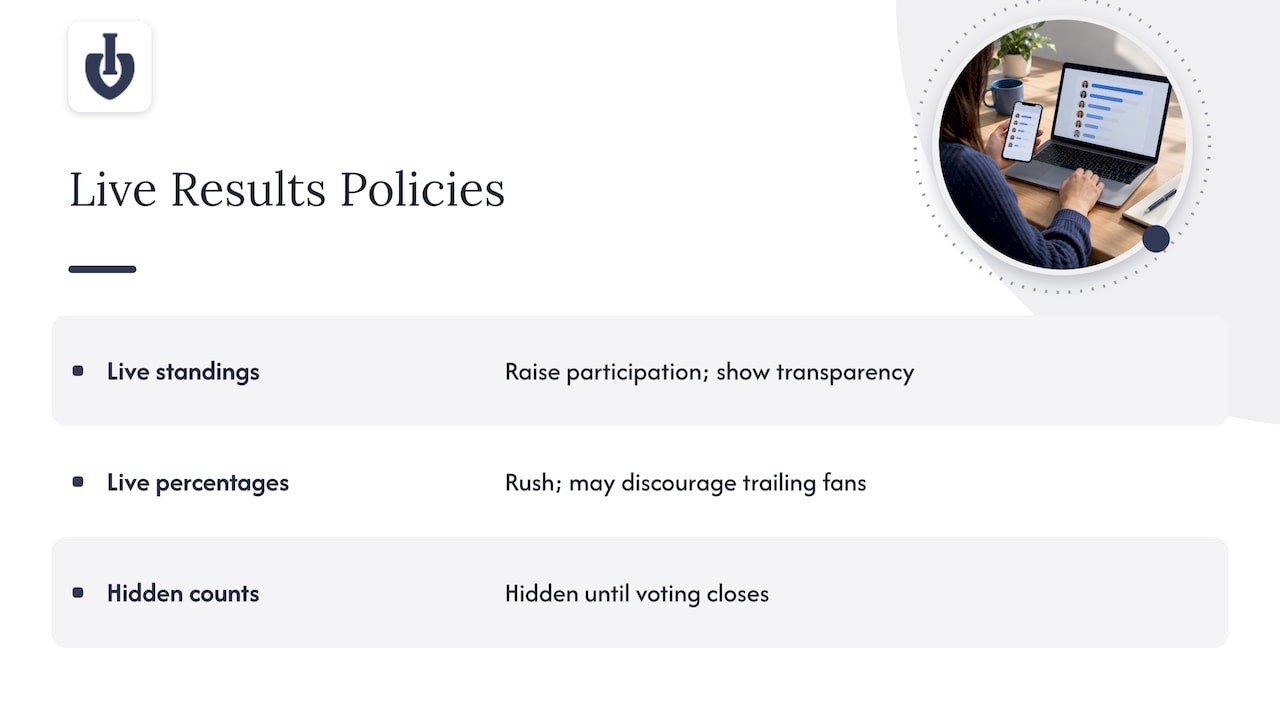
    Tradeoffs between live and hidden vote results

    Write button labels and microcopy that cannot be misread

    Icons alone are risky. A project from the Junction 2024 digital democracy challenge notes that a thumbs-up can be read as agreement with a statement rather than a choice. On an awards page, a heart or thumb on its own might mean “favorite”, “like” or “vote”.

    Use words:

    • Good: “Vote”, “Vote for this nominee”, “Confirm your vote”.
    • Avoid: a bare heart, a star, “Support”, or “Like”.

    Add short helper text near the button: “You can vote once per category” or “Each vote costs $1”. After the vote, confirm exactly what happened: “Your vote for Maria Lopez in Best Photo was recorded.”

    Decide how voters prove they are real

    Verification is the main trade-off in voting page design. Common models range from anonymous voting, to identity checks by phone or email, to login through an account. Requiring an email or phone number helps enforce one vote per person, but it adds friction and can lose voters when a code is slow to arrive. That is the general pattern described in one contest tool’s documentation on voter verification.

    A practical way to choose:

    • Low stakes, big reach (a school spirit poll): open voting with rate limits may be enough.
    • Prizes or sponsor money attached: require email or phone verification.
    • Closed community (members, employees): require login.
    • Fundraising: use paid votes, where payment itself is a barrier to ballot stuffing, and be open about the price per vote.

    Whatever you pick, explain it in one sentence at the top of the ballot: “Verify your email to vote once per category.” Voters accept friction they understand. For deeper background on spotting manipulation, this campaign fraud prevention playbook covers patterns that apply to any online campaign. Izivote supports open, paid, login and identity-based modes, explained in its help article on voting types and voter identity.

    Design for the phone first

    Most fans will vote from a link in a social post or text, so the phone is your main canvas. Practical rules:

    • Use a single-column flow. Cards stack, buttons span the width.
    • Keep the vote button within thumb reach, ideally sticky at the bottom after a nominee is chosen.
    • Make tap targets generous. The WCAG 2.2 standard requires targets of at least 24 by 24 CSS pixels at Level AA and recommends 44 by 44 at the stricter AAA level. For a vote button, aim for 44 or more.
    • Compress images so a grid of 30 nominees loads quickly on mobile data.
    • If you collect an email or phone number, ask for nothing else. Name, address and birthday do not belong on a fan vote.
    • Show errors where they happen and phrase them as fixes: “That code has expired. Send a new one.”

    Test on a real mid-range phone over a weak connection. Many voting pages look great in a desktop preview and stall in a crowded venue.

    Build in accessibility from the start

    An award page that some fans cannot use is a bad page, and a fair vote should be open to everyone. The usual benchmark is WCAG at Level AA, and the W3C’s WCAG 2.2 specification is the source to work from.

    The checks that matter most on a voting page:

    1. Keyboard use: every nominee, button and form field reachable with the Tab key in a logical order.
    2. Visible focus: a clear outline showing where the keyboard is.
    3. Contrast: body text at 4.5:1 against its background, including text over nominee photos. Put text on a solid or darkened panel rather than directly on an image.
    4. Alt text: every nominee image described by name, not “photo1.jpg”.
    5. Error handling: when a vote fails, send focus to the error message or first problem field, not back to the submit button, so screen-reader users learn something went wrong. This is covered in an accessible form design guide.

    Automated scanners catch only part of the problems, so also tab through the page yourself and try it with a screen reader. For a broader look at why this matters beyond compliance, see this overview of web accessibility and its SEO impact.

    Photo and video contests: extra design choices

    Contests built around photos or video need a few adjustments beyond a standard award ballot.

    Photo contests

    • Use a uniform crop in the gallery, with a lightbox to view the full image.
    • Show the entrant’s name and a title, not only the image.
    • Let voters vote from the gallery without opening each photo, but keep the vote button visible inside the lightbox as well.
    • Decide whether to show vote counts. Photographers with large followings can dominate an open count, so some organizers pair public voting with a judged round.

    Video contests

    • Use a thumbnail that is chosen on purpose, not an auto-captured frame.
    • Never autoplay with sound. Let voters press play.
    • Give each entry a short description and length, such as “1:42”, so voters know the commitment.
    • Keep the vote button beside the player so a viewer can act the moment the video ends.

    Setup checklist for either format

    1. Define categories and the rules for who can enter, including whether entrants may nominate themselves.
    2. Collect entries with a name, title and image or video link.
    3. Choose a verification mode.
    4. Set opening and closing times so voting stops automatically.
    5. Embed the voting page on your own site or share its link.
    6. Preview on a phone, then test one vote end to end.

    The complete guide to running award show voting goes deeper on timeline and promotion.

    Build trust with the details around the vote

    Fans accept a result when the process looks honest. Put these on the page, not buried in a PDF:

    • The closing date and time with a time zone.
    • The number of votes allowed per person and per category.
    • How duplicate or suspicious votes are handled.
    • How winners are chosen, including any judged component.
    • Who runs the award and how to contact them.
    • For paid votes, the price per vote and where the money goes.

    If you raise funds, say so plainly. Fans are happy to pay for a cause they believe in when the terms are clear, and they get annoyed when they discover a fee at checkout.

    Launch the page with Izivote

    If you would rather not build a ballot from scratch, Izivote is a voting platform made for audience and people’s choice awards. You set up categories, add nominee photos and profiles, choose a voting mode, and share or embed the page on your site. Voting can close automatically, and a live dashboard shows results as they come in.

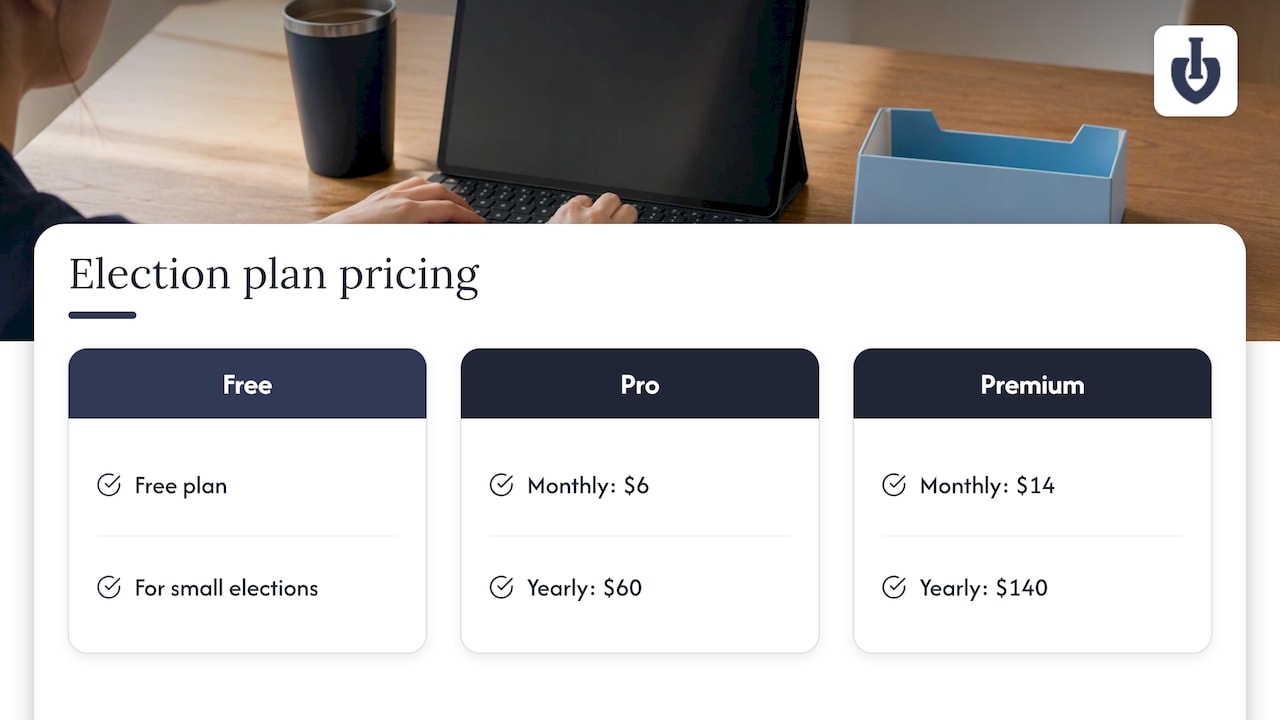
    Pricing is published on the pricing page: a Free plan, Pro at $6 per month or $60 per year, and Premium at $14 per month or $140 per year. If you run paid voting, a platform fee of 10% per vote applies. You can create a vote for free and preview how your nominees look before you share anything.

    FAQ

    What should an award voting page include?

    At minimum: the award name, a closing date, nominee cards with images, a labeled vote button, a short explanation of who can vote and how many times, and a confirmation after the vote. Add live results, sponsor logos and full rules if they fit your event.

    How many nominees should I show per screen?

    Show as many as can stay large enough to recognize on a phone, usually a single column of cards or a two-column grid. For bigger fields, split by category or paginate rather than building a long scroll, since options below the fold are easier to miss.

    Should I require email or phone verification?

    It depends on the stakes. Verification reduces duplicate votes but adds a step that some voters will not complete. For prize-backed awards it is usually worth it, while a casual community poll can often use lighter checks.

    How do I make a photo or video contest page work on mobile?

    Use uniform thumbnails, a single-column layout, compressed media and a vote button that stays visible next to each entry. Do not autoplay video with sound, and test the page on a real phone before launch.

    Sources

    Recommended

  • Email Verification Voting: How It Works and When to Use It

    Email Verification Voting: How It Works and When to Use It

    Email verification voting asks each voter to prove they can open a given inbox before their ballot counts. The voter enters an email address, receives a one-time code or confirmation link, confirms it, votes, and cannot vote again with that address. It is a practical duplicate-vote control for fan awards, people’s choice contests, school elections and community polls. It is not government-grade identity proof, and treating it as one is the most common mistake organizers make.

    This guide explains the mechanics, the real limits, the settings that matter, and a pre-launch checklist you can use whether you run a ten-nominee club poll or a public awards show.

    Izivote
    izivote.com
    Run More Trustworthy Fan Voting
    Izivote supports clear, secure voting for fan awards, with identity-based voting and real-time analytics in a user-friendly dashboard.

    Get started

    Key takeaways

    • Email verification proves access to an inbox, not that a voter is a unique person. It cuts casual repeat voting but does not stop someone who owns many addresses.
    • Match the control to the stakes: open email verification for public contests, a preloaded voter list with unique links for restricted elections.
    • Deliverability is the failure most organizers miss. Test Gmail, Outlook, school and corporate inboxes before launch and publish a recovery path.
    • Secure your sending domain with SPF, DKIM and DMARC so your verification emails are trusted and hard to imitate.
    • Decide in advance what you store, who can see it, and whether any voter can be linked to a choice.

    Table of Contents

    How email verification voting works

    The flow is simple, and the same on most systems:

    1. The voter opens your voting page.
    2. They enter an email address.
    3. The system sends a one-time code or a confirmation link to that address.
    4. The voter enters the code or clicks the link.
    5. The ballot is accepted and the verified address is marked as used.
    6. A second attempt with the same address is blocked, or limited to the number of votes your rules allow.

    Codes are usually short, expire after a few minutes and work once. A representative setup uses a 6-digit code that expires after 15 minutes, but expiry time, resend limits and how often a returning voter must re-verify are settings on each platform, not universal standards. Choose them deliberately.

    There is a stronger variant for restricted votes. Instead of letting anyone type any address, you upload the eligible voter list first and send each person a unique, single-use voting link. That checks two things at once: the person is on your roster, and they can read mail sent to the address you have on file. If you are running a board vote, a membership election or a class-president race, this is the version to use.

    Roster checked before unique voting links are issued

    What email verification does and does not prove

    Be precise about the claim you make to your audience. An email check proves that someone controlled an inbox at the moment of voting. That is all.

    The National Institute of Standards and Technology notes in its election security guidance on trustworthy email that email was not designed with security in mind and remains vulnerable to forgery, interception and manipulation. The U.S. Election Assistance Commission’s survey of internet voting similarly treats internet voting security as an ongoing technical and policy risk. Those documents concern public elections, which is a far higher bar than a fan award. Still, the lesson carries over: do not describe email verification as fraud-proof.

    In practice, here is what it does well and badly.

    ThreatDoes email verification help?
    Someone clicking vote repeatedly from one browserYes, strongly
    A fan voting twice with the same addressYes
    Typo or throwaway addressesPartly: the code must be received
    One person with dozens of free addressesNo, unless you add other controls
    Bots creating addresses at scaleOnly with rate limits and review
    Someone outside your eligible group votingNo, unless you use a roster or approved domains

    The fix for the weak rows is layering, not abandoning the method. For higher-integrity events, combine email verification with a roster, approved email domains, unique single-use links, audit logs, rate limits, anomaly review and, where proportionate, identity or phone verification.

    Choosing the right level of verification

    Start with two questions: who is allowed to vote, and what happens if the result is disputed?

    Public awards and fan contests

    When anyone may vote and the goal is one practical vote per reachable person, open email verification is a reasonable default. It is light for the voter, which matters because every extra step costs you participation. Fan awards, pageants, live shows and community contests fit here. If you also raise money through paid votes, a login or identity-based mode gives you a cleaner record of who bought what.

    Schools, clubs and member groups

    Here eligibility matters more than reach. Upload the roster, restrict by approved domain (for example a school’s student email domain), and send unique links. A student election is a good example: the question is not “did someone vote” but “was that someone a student.” Our student elections page shows how schools run these votes.

    Corporate and employee polls

    Company polls usually combine a work-domain restriction with one vote per address. Because corporate mail systems filter aggressively, deliverability testing is essential. See how this works on our corporate and employee polls page.

    High-stakes votes

    If the outcome carries legal or financial weight, such as bylaws, board seats or anything a regulator could ask about, email verification alone is not enough. Use a roster, unique links, audit trails and stronger identity checks, and check your organization’s governing documents and counsel about what method is permitted.

    Secure the sending domain before launch

    A verification system is only as trustworthy as the email that carries it. Attackers impersonate election-related organizations, and voters who receive a code from an unfamiliar or spoofed sender may either distrust it or fall for a fake one.

    The Cybersecurity and Infrastructure Security Agency recommends SPF, DKIM and DMARC for election-related organizations, with DMARC set to reject where possible or at minimum to a monitoring policy of p=none. NIST adds that organizers should use TLS, strong authentication and access control on email accounts, monitoring, malware scanning and official sender addresses.

    Translated for an event organizer:

    • SPF lists which servers may send mail for your domain.
    • DKIM signs messages so recipients can check they were not altered.
    • DMARC tells receiving servers what to do with mail that fails those checks.
    • An official sender address on your own domain looks more credible than a generic free-mail address.

    One limit to remember: these controls authenticate your mail domain. They reduce spoofing and phishing, but they do not prove a voter is a unique human or that the address belongs to an eligible voter. NIST’s guidance on UOCAVA-supporting systems separates authentication, authorization and transport security for exactly this reason: a secure channel and an eligibility model are two different jobs.

    If your organization also sends newsletters or donor appeals from the same domain, it is worth reviewing your wider setup. This overview of email marketing platforms for nonprofits is a useful starting point for pre-launch checks on sending practices.

    Deliverability: the problem most organizers miss

    The most common operational failure is not fraud. It is voters who never receive their code.

    Common causes:

    • The message lands in spam, junk, promotions or social folders.
    • A voter requests several codes and an earlier code is invalidated by a later one.
    • Corporate or school filters quarantine the message.
    • The voter mistyped their address and never knows.

    CISA’s guidance stresses that the verification email must look authentic and be deliverable before the experience can be trusted. Do these things:

    1. Send test codes to Gmail, Outlook, a school account, a corporate account and a mobile mail app.
    2. Tell voters on the voting page to check spam, junk and promotions folders.
    3. Say plainly that requesting a new code cancels the old one.
    4. Publish a support address or form for voters who are stuck.
    5. Watch for a spike in requests with no matching votes. It usually signals a delivery problem.

    A voter who gives up at the code screen is a lost vote, and in a paid contest it is lost revenue too.

    Privacy and ballot secrecy are separate decisions

    Many organizers assume that verifying an email means knowing who voted for whom. It does not have to. A system can keep an eligibility record showing that an address has voted while storing the ballot separately. NIST’s UOCAVA guidance treats these as distinct design choices.

    For a fan award, linking voters to choices is rarely needed, and voters care about how their address is used. Write down, and publish in plain language:

    • What you collect (the address, the timestamp, the choice).
    • Whether the address can be connected to the choice by anyone, including you.
    • How long you keep the data and who has access.
    • Whether you send any follow-up mail, and how a voter opts out.

    If you have voters in jurisdictions with privacy laws, such as the EU or California, check with a qualified privacy adviser about notice and retention requirements for your event.

    A pre-launch checklist

    Use this list before you open voting:

    1. Define eligibility. Who may vote, and may they vote more than once (once per category, once per day, or once overall)?
    2. Pick the method. Open email verification, or a preloaded roster with unique links.
    3. Configure the sender. Official address, SPF, DKIM and DMARC in place.
    4. Set the limits. Code expiry, resend limits and rate limits per address and per network.
    5. Test delivery. Consumer, school, corporate and mobile inboxes.
    6. Write the help text. Spam-folder advice, a support contact, and what to do if a code fails.
    7. Plan monitoring. Who watches for duplicate or abnormal activity, and how often?
    8. Preserve records. Keep an audit trail and a final results report.

    When comparing voting software, Capterra’s voting software guidance suggests also checking voter-capacity limits, automated reminders, candidate profiles, real-time dashboards and exportable reports. Those are sensible questions to put to any vendor, including us.

    Watching results: analytics that matter

    Verification only protects you if you look at the data while voting runs. Whatever tool you use, you want a live dashboard that shows:

    • Votes over time, so a sudden surge at 3 a.m. stands out.
    • Votes per nominee and per category.
    • Verified versus unverified attempts.
    • Repeated attempts from one address or network.
    • An export you can keep after voting closes.

    A sharp jump for one nominee is not proof of cheating, since a nominee may simply have shared the link with a big audience. It is a prompt to look closer, and to decide beforehand what you will do about it, for example reviewing suspicious votes before results are published. Writing that rule down before launch protects you from accusations of bias afterward.

    How Izivote fits

    Izivote is built for public audience awards and events. You can set up a voting page yourself on the web, run multi-category votes with photo nominee profiles, embed the voting page on your own site, allow self-nomination and close voting automatically. Voting modes include open, paid, login-based and identity-based, so you can match the control to the event, and the dashboard shows votes in real time so you can spot odd patterns while voting is still open. See the full list on our features page, or how organizers run people’s choice awards and fan awards.

    Pricing is published on our pricing page: a Free plan for small events, Pro at $6 per month or $60 per year, and Premium at $14 per month or $140 per year. Paid voting carries a platform fee of 10% per vote. If you are not sure which voting mode suits your contest, start on the Free plan and test the voter experience yourself before you announce anything.

    Frequently asked questions

    Is email verification enough to stop fake votes?

    It stops casual repeat voting, but not a determined person with many inboxes. For public contests that trade-off is usually acceptable. Where it is not, add a voter roster, approved domains, rate limits and review of unusual activity, and consider identity or phone checks.

    Should voters need an account to vote?

    Not necessarily. An email code with no account keeps the process quick and gets higher participation. Use login or identity-based voting when you need a clearer record, for example in paid voting or restricted member votes.

    What should I do when voters say they never got the code?

    First ask them to check spam, junk and promotions folders, and to request only one code at a time, because a new code can invalidate the earlier one. Then check your sender authentication and test with the same mail provider. Keep a support contact visible on the voting page.

    Can I run an email-verified vote for a school or workplace?

    Yes. Restrict voting to an approved domain or upload a roster and send unique links, so only people on your list can vote. Test the messages against the school’s or company’s mail filters before opening the ballot.

    Sources

    Recommended

  • People’s Choice Voting Setup: A Step-by-Step Guide

    People’s Choice Voting Setup: A Step-by-Step Guide

    To set up people’s choice voting, you need six decisions made in order: what you are awarding, who may vote and how, what a vote costs (if anything), how you will stop cheating, when voting opens and closes, and how you will announce the result. Do those well and the software part takes an afternoon. This guide walks through each decision, with the settings we see organizers get wrong most often.

    Izivote
    Set Up Your People’s Choice Vote
    Izivote helps organizers run fan and people’s choice awards with clear voting, identity-based options, paid votes, and real-time analytics.
    1Choose a voting method
    2Set identity-based or paid voting
    3Monitor votes with real-time analytics

    Get started

    Key takeaways

    • Decide the voting rules before you touch any tool: categories, one vote or many, free or paid, and whether voters must identify themselves.
    • Match the voting mode to the risk. A office-snack poll can be open; a cash-prize award needs login, identity checks or paid votes.
    • Publish your anti-fraud rules on the voting page itself, and watch results live while voting runs.
    • Treat a public vote as a popularity contest, not a measure of quality, and say so.
    • A free plan covers small events. Paid voting carries a 10% platform fee per vote on Izivote, so price your votes with that in mind.

    Table of Contents

    Start with what the vote is for

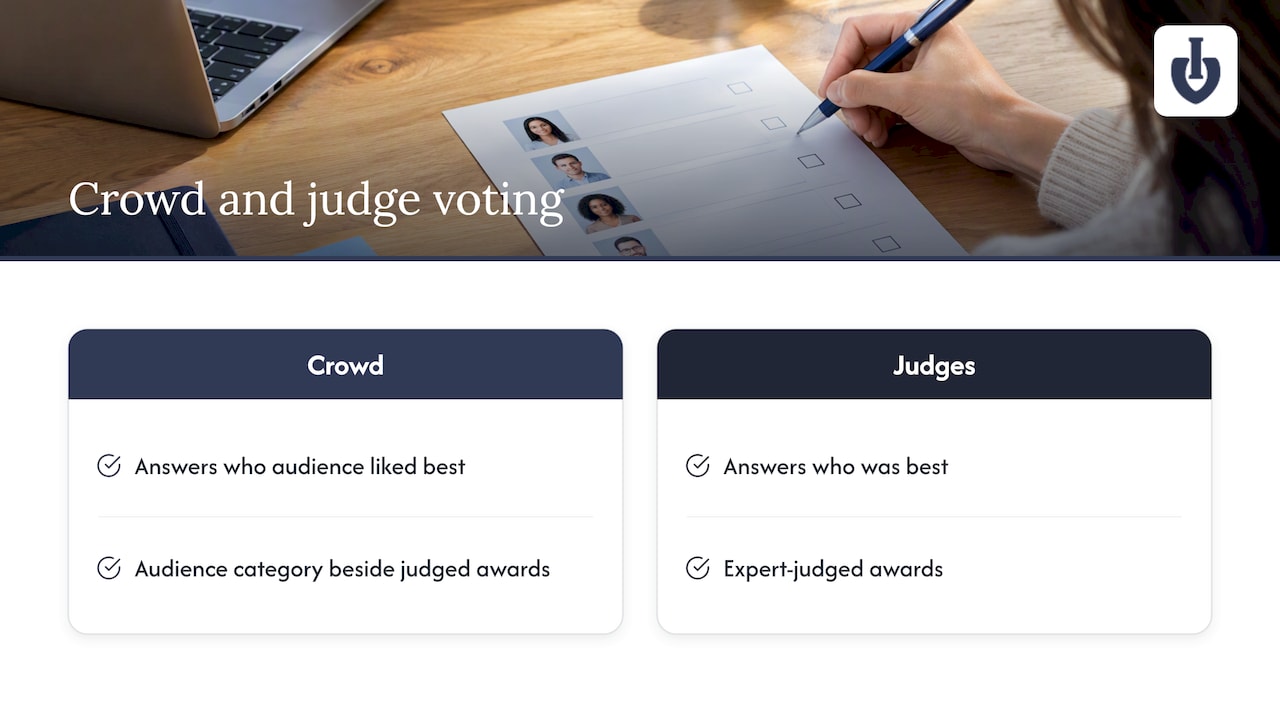
    A people’s choice award answers one question: who did our audience like best? That is a different question from “who was best?” Judges answer the second. The crowd answers the first.

    This matters for setup because it shapes every later choice. Public voting tends to work best as an audience category that sits alongside expert-judged awards, so the crowd gets a say without putting your main categories at risk, as Zealous notes in its practical guide to public voting. The same article lists the usual failure modes: bot fraud, repeat voting through VPNs and coordinated group voting.

    The BBC takes a similar view. Its editorial guidance on voting says the robustness of the voting mechanism should match the editorial significance of the vote. In plain terms: the more your result matters, the tighter your rules should be.

    Write one sentence before you go further, for example: “Fans choose their favorite food truck at the Riverside Festival, and the winner gets a feature on our website.” If you cannot write that sentence, you are not ready to build the ballot.

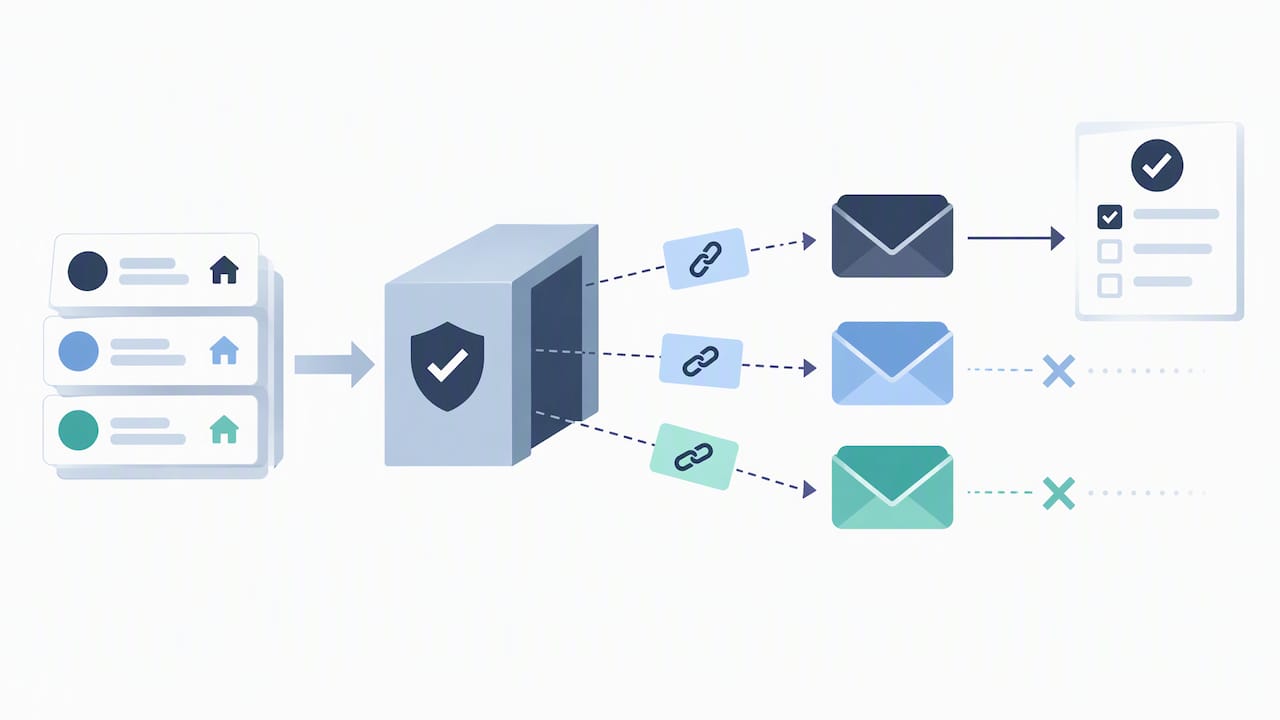
    Start with what the vote is for — overview diagram

    Design the ballot: categories and nominees

    Keep categories few and clear

    Every category is a separate decision for the voter and a separate thing for you to promote. Five to ten categories is a comfortable range for most community awards. Past that, voters skip categories and your promotion gets diluted.

    Name categories so a stranger understands them without a rulebook: “Best Local Coffee Shop” beats “Excellence in Hospitality (Beverage).” If a nominee could fit two categories, decide now whether it may appear in both.

    Decide how nominees get on the ballot

    You have three common routes:

    1. You pick them. Fastest, and the best for small, curated events such as a talent show or a pageant.
    2. The public nominates. Good for community awards where you do not know every candidate. Collect nominations first, then screen them, then open voting.
    3. Self-nomination. Entrants put themselves forward. This works well for contests and creator awards, but you should review entries before they go live.

    Whichever route you choose, collect the same things for each nominee: name, a clear photo, a one- or two-line description, and a link if relevant. Voters respond to faces and short stories. A ballot of bare names favors whoever is already famous.

    Set the voting rules for nominees too

    Tell nominees in writing what they may and may not do. Can they ask friends to vote? Can they offer prizes for votes? Can they run ads? Decide now, because you will be asked in week one.

    Choose a voting mode

    This is the decision with the biggest effect on integrity. The main options are:

    ModeHow it worksBest forMain risk
    OpenAnyone with the link can voteLow-stakes polls, classroom or office funEasy to repeat-vote
    LoginVoters sign in before votingCommunity awards, fan clubsFake accounts
    Identity-basedVotes are tied to a verified identityHigher-stakes awardsMore friction for voters
    PaidEach vote is boughtFundraisers, fan awardsPerceived pay-to-win

    Izivote supports all four modes, and its help page on voting types and voter identity explains how each one behaves. You can mix approaches across events, but keep one mode per category so the rules stay easy to explain.

    When paid voting makes sense

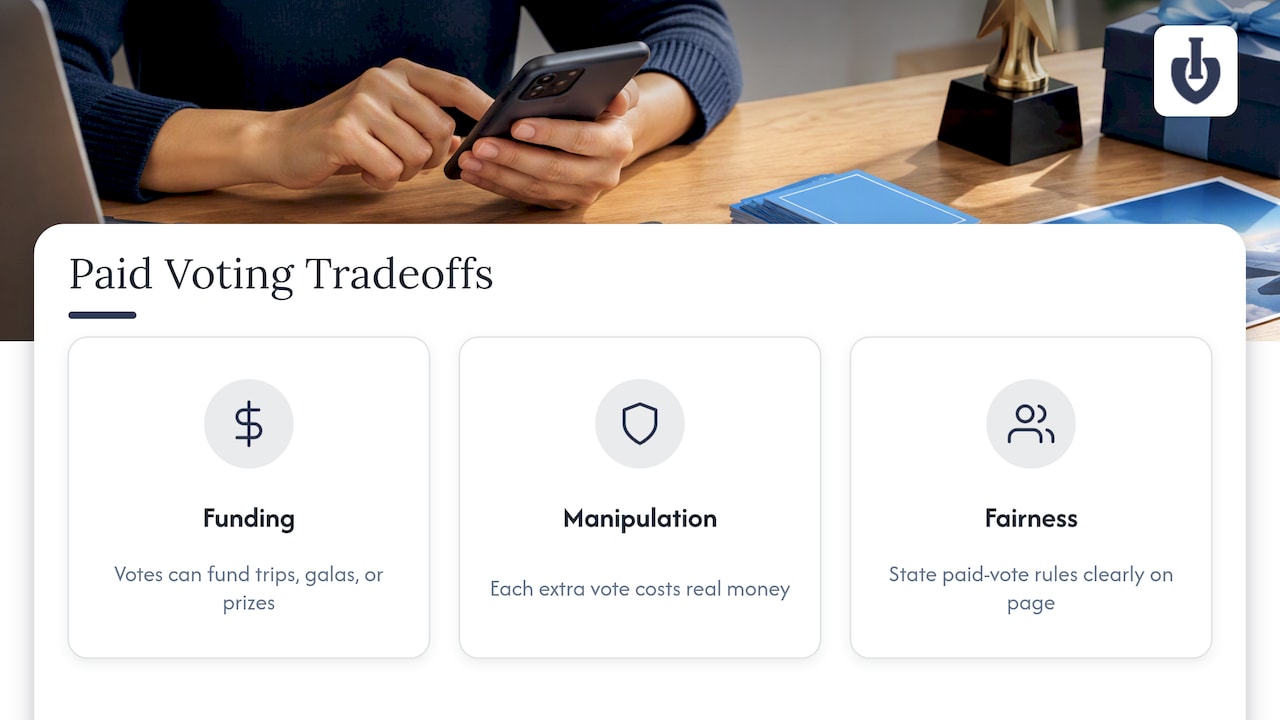
    Paid votes turn enthusiasm into funds. A school can raise money for a trip, a nonprofit can fund a gala, a fan community can cover prizes. They also make casual manipulation expensive, because every extra vote costs real money.

    The tradeoff is perception. If the highest spender always wins, the award loses meaning for people who cannot pay. Many organizers handle this by running a free vote and a paid vote side by side, or by making paid votes a bonus on top of one free vote per voter. If you go this route, state it clearly on the voting page. We go deeper on the money side in our piece on monetizing fan voting, sponsors and fairness.

    When paid voting makes sense — overview diagram

    Set up the vote in Izivote, step by step

    Here is the practical sequence on our platform. It takes most organizers well under an hour for a first event.

    1. Create the vote. Start from the create-a-vote page. Give it a plain title and a short description of who can vote and why.
    2. Add categories. One per award. Order them the way you want voters to see them.
    3. Add nominees. Upload a photo and a short profile for each. If you allow self-nomination, turn it on here.
    4. Pick the voting mode. Open, paid, login or identity-based, as above.
    5. Set the schedule. Choose the opening time and the automatic closing time so voting ends exactly when you said it would.
    6. Preview as a voter. Open the page on your phone, not just your laptop. Most votes come from phones.
    7. Publish and share the link, or embed the voting page on your own website so people never leave your brand.

    Once voting is live, the organizer dashboard shows votes in real time, so you can see which categories are moving and spot odd spikes. For more on this kind of event, see our page on people’s choice voting tools.

    Block fraud before it starts

    Fraud prevention is mostly design, not detective work. Four habits help.

    Say the rules out loud

    Award Force advises declaring a zero-tolerance policy and publishing it in bold on the voting page, with the penalties spelled out: fraudulent votes removed, or entrants disqualified. A visible rule deters casual cheating and gives you cover if you need to enforce it.

    A short version works. For example: “Votes obtained through bots, vote-buying outside the official process or multiple accounts will be removed. Entrants who benefit may be disqualified.”

    Match friction to stakes

    A vote for the best pumpkin at a church fair does not need identity checks. A vote that decides a sponsored prize does. Add friction only where the stakes justify it, because every extra step costs you voters.

    Watch the live numbers

    The same Award Force guide suggests tracking the vote in real time to catch unusual patterns, and auditing votes afterward if something looks wrong. Check the dashboard at least daily. Red flags include a nominee gaining thousands of votes overnight while others are flat, or a cluster of votes arriving within seconds.

    Keep the right to remove votes

    Put in your terms that you may void suspicious votes and that your decision is final. Then, if you act, act the same way for everyone.

    Decide on a timeline

    Voting windows are a balance. Too short and you miss people. Too long and attention fades.

    • Small community or school vote: one to two weeks.
    • Public award with promotion: two to four weeks, with a clear countdown.
    • Live event vote: a window that opens at the start of the show and closes at a set moment on stage.

    For reference, one large, established fan award runs a 21-day official window, according to its published voting FAQ, though we recommend sizing yours to your audience, not copying a national event. Whatever you pick, announce the close time with a time zone, and let automatic closing do the work so nobody has to be awake at midnight.

    For live events specifically, our guide to live event voting and audience polls covers how to run the vote on screens in the room.

    Promote the vote

    A vote nobody hears about produces a result nobody trusts. Plan promotion as part of setup:

    • Give nominees a shareable link and a ready-made message. They will do most of your marketing.
    • Embed the ballot on your site and send newsletters with the direct link.
    • Post progress updates, but think about what you show. Live public results build transparency and excitement, though they can also encourage ballot-stuffing toward the end. If your event is sensitive, consider showing standings only for the final day or hiding exact counts until the close.
    • Use reminders. A message two days before closing typically brings a second wave of votes.

    If you run sports or team awards, keep in mind that fans and experts often disagree about who was best. This explainer on why match awards and live stats diverge is a useful reminder of why a fan vote deserves its own category, separate from any judged award.

    Be honest about what the result means

    An online public vote is a self-selecting sample. People who vote are the ones who care, or the ones whose friends asked them to. The BBC’s guidance says producers should treat such votes this way and report the limitation, rather than presenting the result as representative of the public.

    You do not need to hedge every announcement. A simple line is enough: “The winner was chosen by votes cast by our community between these dates.” That is accurate, and it protects your credibility.

    What it costs

    Izivote’s pricing is published on the pricing page. As of today, the plans are:

    PlanMonthlyYearly
    FreeNo published priceNo published price
    Pro$6 per month$60 per year
    Premium$14 per month$140 per year

    Paid voting adds a 10% platform fee per vote. Do the math before you set a vote price. If you charge $1 per vote, the platform fee is $0.10 on each, so you keep the rest of the amount before any other processing costs. Decide whether that is acceptable, or whether your vote price should be higher. A small event can start on the free plan and move up only if it needs more.

    Start your people’s choice vote

    If you want a ballot with nominee photos, several voting modes, live results and automatic closing, you can create your vote on Izivote without paying anything up front. Fan awards, pageants, school contests and community polls are all common uses; the fan awards page shows how they look in practice, and the awards and competitions page covers programs that mix public and judged elements.

    Announce the result

    Close on time, check the final counts, and review any flagged votes before announcing. Then publish:

    • the winner and the final standings, if you showed them during voting;
    • the voting period and the method;
    • a thank-you to every nominee, not just the winner.

    Keep the results page live. Winners will share it, and it becomes the best advertisement for next year’s edition.

    FAQ

    How long does it take to set up a people’s choice vote?

    For a small event with a handful of categories, you can have a working ballot in under an hour if you already have nominee names and photos. The slow part is almost always gathering those photos and writing short profiles. Start there.

    Should voters be allowed to vote more than once?

    It depends on your goal. One vote per person is the cleanest for fairness. Multiple votes, especially paid ones, suit fundraisers. Whichever you choose, state the rule on the voting page and set the voting mode to enforce it.

    Is paid voting fair?

    It can be, if you are open about it. Many organizers pair a free vote with optional paid votes so that everyone has a voice, and then explain where the money goes. Hiding the rule is what damages trust, not the payment itself.

    Can I run a people’s choice vote alongside judges?

    Yes, and that is a common format. Keep the two results separate, with different award names, so nobody confuses a popularity result with a judged one.

    Sources

    Recommended

  • School Election Voting Setup: A Step-by-Step Guide

    School Election Voting Setup: A Step-by-Step Guide

    A good school election setup comes down to six decisions: who can vote, who can run, how long the campaign lasts, how students cast a ballot, how votes are counted, and how you show the result was fair. Make those choices before you build anything, then pick the tool (paper box, online ballot or both) that fits them. This guide walks through each decision in order, with a checklist you can adapt for a class, student council, homecoming court or prom vote.

    Izivote
    Run a More Transparent Student Election
    Izivote helps organizers run online voting with clear, secure processes, identity-based voting, and real-time analytics for results monitoring.

    Get started

    Key takeaways

    • Plan for two to four weeks, though a school election can run in as little as one week, according to the Australian Electoral Commission’s school election guidance.
    • Decide the rules (voters, candidates, timeline, tie-breaks) in writing before nominations open, and publish them.
    • Keep voting private and randomize the order of candidates on the ballot.
    • Online voting is fine for low-stakes school contests, but keep a record of results and a way to audit them for several weeks afterward.
    • Show the count. Transparency is what makes students accept a result they did not vote for.

    Table of Contents

    Start with the rules, not the tool

    Most problems in school elections are not technical. They come from rules that were vague or invented halfway through: a candidate who was not eligible, a tie with no tie-break, a recount nobody knew how to run.

    Write a one-page election charter and share it with students, families and candidates before nominations open. It should answer:

    1. Who votes? Everyone in a grade, the whole school, or one homeroom per ballot.
    2. Who can run? Official guidance on school governance, such as this UK government document on school governing bodies, suggests that clear, public expectations work better than restrictive eligibility criteria. The goal is to inform voters so they can choose for themselves. If your school requires a GPA or a number of petition signatures, state it up front.
    3. How many votes does each student get? One vote per office is standard. Say so, and say what happens to a ballot with extra marks.
    4. What breaks a tie? A runoff, a coin toss witnessed by an adviser, or a vote by the council. Choose before you need it.
    5. Who is in charge? Name a teacher adviser and a small student election committee. Students who help run the process tend to trust it more.

    Build a realistic timeline

    The Australian Electoral Commission lists one week as the minimum and two to four weeks as the recommended span for a school election. That is a useful benchmark even in the US, where student council calendars vary. A four-week plan looks like this:

    WeekWhat happens
    1Publish the rules, open nominations, recruit the election committee
    2Close nominations, verify candidates, collect photos and short bios
    3Campaign period: posters, speeches, Q&A or debate
    4Voting window, count, announcement

    If you only have a week, compress the campaign, not the verification step. Checking that every name is spelled correctly and every candidate is eligible takes little time and prevents the most embarrassing mistakes.

    Choose how students will vote

    You have three realistic options. None is wrong. The right one depends on school size, device access and how much is at stake.

    MethodBest forWatch out for
    Paper ballots and a ballot boxSmall schools, younger grades, civics lessonsStaffing, counting time, spoiled ballots
    Online votingLarger schools, remote or hybrid students, quick resultsDevice access, duplicate voting, privacy on shared screens
    HybridSchools that want both access and a paper trailMore coordination

    If you vote on paper

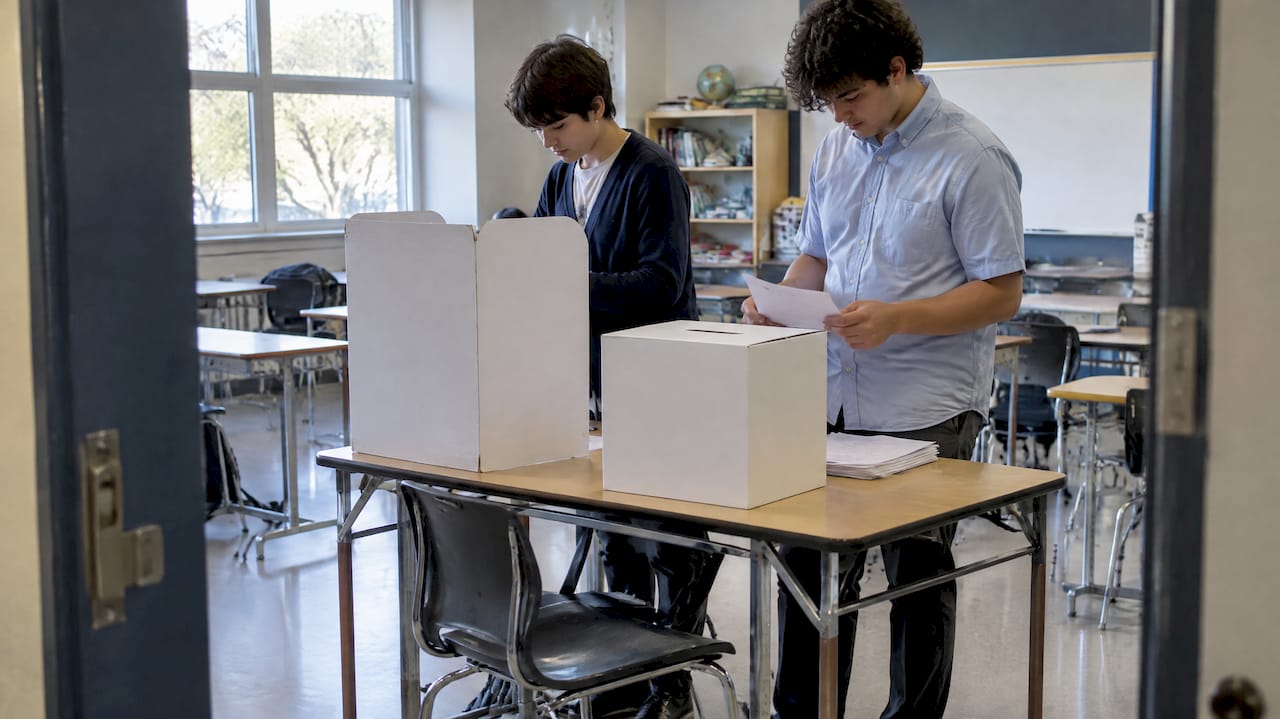
    Election guides for classroom simulations, like the Elections BC activity booklet, recommend about one polling station per 20 to 30 students. Each station has a voting screen facing away from the crowd, a ballot box, a voters list to cross-reference, and two officials: one to issue ballots and one to check names. Schools often set up in a common area such as the library, cafeteria or auditorium.

    The Get Voting program also shows how far a physical kit can go, with sealed ballot boxes and posters, which makes the vote feel real to students.

    If you vote online

    Online ballots remove most of the logistics. Students vote on a phone, tablet or school laptop during a set window, and the count is automatic. That speed is why many schools move online. A study of the student council election at the University of Namibia looked at what an online election system does to turnout and participation, a reminder that convenience can change who takes part.

    Two cautions belong here. First, security experts are blunt about high-stakes public elections: the Council on Foreign Relations summarizes that the National Academies, NIST and the FBI regard fully secure internet voting as not yet achievable, and they favor voter-marked paper ballots with audit trails. A student council vote is not a governmental election, but the lesson applies: use verification and keep records. Second, convenience is not the only goal. A user study from TU Darmstadt found that voters will give up some ease of use for a system they know is more secure, so do not assume students want the lowest-friction option at any cost.

    A generic form builder is the shortcut many schools try first. It is quick, but it usually lacks voter verification and a clean way to stop repeat votes, and students are good at finding that out. If you go online, choose a tool built for voting.

    Hybrid: a good middle path

    A hybrid approach lets students vote online during homeroom while a paper option stays available for anyone without a device or who prefers it. It also gives you a fallback if the wifi fails on election day. Researchers who studied an early student union election in Sweden, where internet voting was one of three ways to vote, documented how providing several channels works in practice. Offer more than one and your election covers more students.

    Set up the ballot itself

    Whether the ballot is paper or digital, three details matter most.

    Randomize the order of names. It is tempting to list candidates alphabetically or by sign-up time. The AEC’s Get Voting FAQ treats random ordering as a vital practice, because it prevents “donkey voting,” where voters just pick the first name. On paper, draw names from a hat to set the order. Online, use a tool that shuffles automatically.

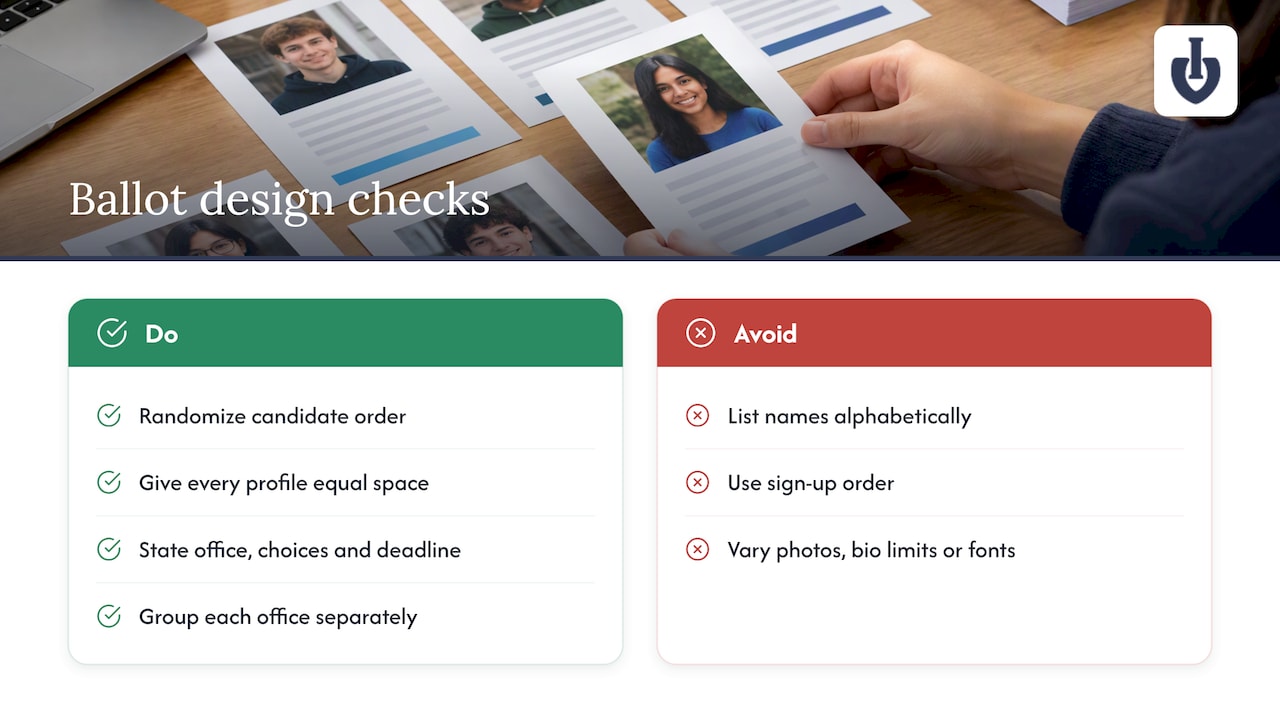
    Give every candidate the same space. Same photo size, same word limit for the bio, same font. Visual profiles help students put a face to a name, but only if every profile looks alike.

    Keep the ballot short and clear. List the office, the number of choices allowed and the deadline. If you are voting on several offices (president, vice president, treasurer), group each office as its own category so nobody votes for the wrong one by accident.

    Three checks for a fair school ballot

    Protect privacy and prevent double voting

    Privacy is the part schools underestimate. Research on classroom voting from the International Society of the Learning Sciences repository found that students who vote publicly are less likely to change their views and more likely to follow the class majority. In a popularity-driven election, that pressure is real. Even a casual vote should happen behind a screen, or on a device nobody else can see.

    Practical steps:

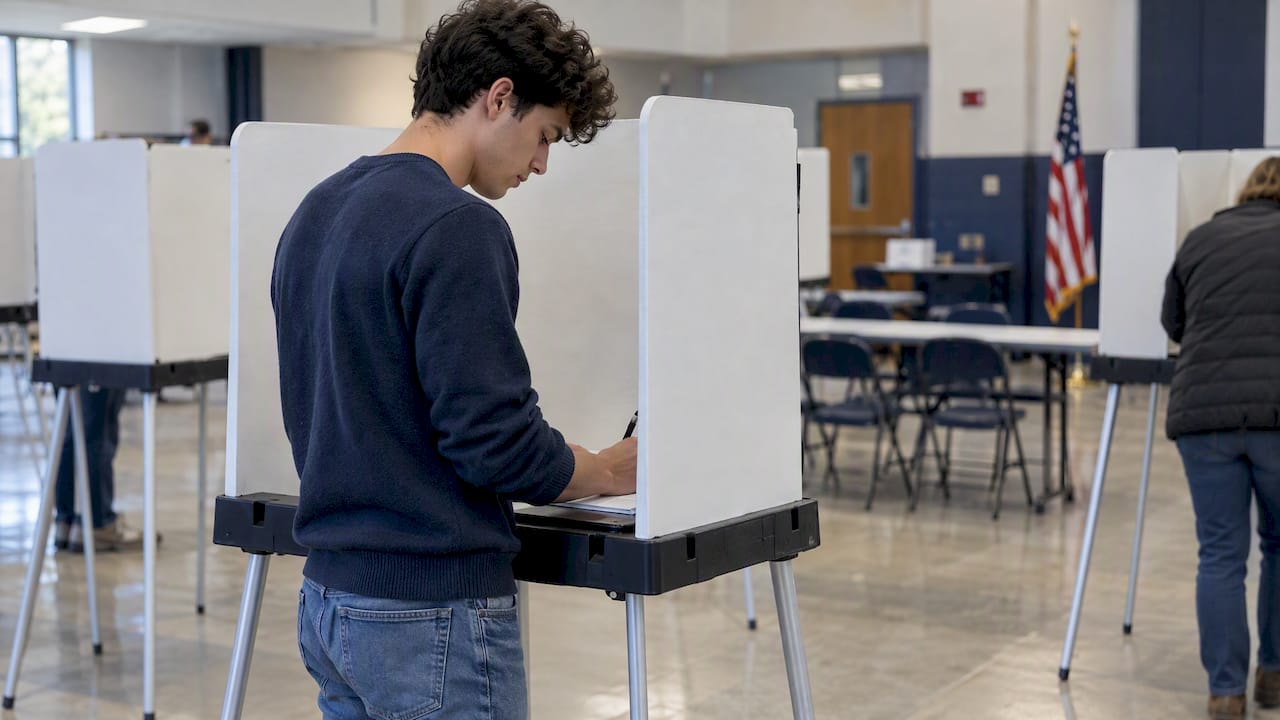
    • On paper, use a voting screen or a corner of the room facing the wall.
    • Online, tell students to vote on their own device, not on a friend’s screen.
    • Never display who voted for whom, even to the adviser, unless the rules say so.

    To prevent repeat voting, tie each vote to something checkable. On paper, that is a voters list that officials mark off. Online, it is a login, a unique code, or an identity-based voting mode. Izivote’s voting types guide explains the open, login and identity-based options, so you can match the strictness to the stakes. An open link might be fine for choosing the school mascot. A class president race deserves a verified method.

    If your school already runs online registrations for clubs and extracurriculars, the same thinking applies: collect only what you need and check each participant once. This practical guide to digitizing after-school activity sign-ups (in Spanish) shows how one school-focused tool handles participant control and family communication, and the habits carry over to voter lists.

    Run the campaign period fairly

    A fair vote needs informed voters. The same guidance that discourages tight eligibility rules says the point of the process is to inform the electorate. Build that in:

    • A short speech day or recorded video for each candidate, with the same time limit.
    • A Q&A or debate moderated by an adviser.
    • A simple campaign rulebook: where posters can go, what can be spent, and a ban on negative claims about other students.
    • Candidate profiles on the voting page, so students see the same information when they vote.

    Count and announce the result

    The Western Australian Electoral Commission’s guide to student elections emphasizes transparency as the foundation of legitimacy. Their recommended habits include formal counting procedures, independent observers and a recap of the results that builds students’ trust. Here is a version that fits any school:

    1. Close the voting at the announced time. Automatic closing in an online tool removes the temptation to extend it for a friend.
    2. Count in front of witnesses. For paper, invite two students and one adult who is not the adviser. For online, have the committee review the results dashboard together.
    3. Check totals against the voters list. The number of ballots should not exceed the number of eligible voters who signed in.
    4. Announce winners with vote counts, or at least percentages, at a school assembly or on the morning announcements.
    5. Explain the process in a short recap, especially if the margin was narrow.

    Keep your records

    Experienced organizers recommend keeping paper ballots or logs for several weeks after the vote. The Umeå student union case study notes that improvised fixes to technical problems can increase dependence on the provider and add risk. Export the final results from your online tool, save them with your election charter, and keep any paper ballots sealed until the challenge window has closed.

    Where Izivote fits

    If you want to run the online part without building it yourself, our student elections page shows how schools set up a vote. You create categories for each office, add candidates with photos and profiles, choose a voting mode (open, login or identity-based), and watch live results on a dashboard. Voting can close automatically at the time you set, and you can embed the voting page on your school’s own website.

    There is a free plan for small elections. Paid plans are Pro at $6 per month or $60 per year, and Premium at $14 per month or $140 per year, and the full details are on our pricing page. The 10% platform fee only applies to paid voting, which most school elections never use. When you are ready, you can create your vote in a few minutes and run a test ballot with your election committee first.

    Where Izivote fits — overview diagram

    A one-page setup checklist

    Four weeks out

    • Write and publish the election charter
    • Name the adviser and the student committee
    • Open nominations

    Two weeks out

    • Verify candidates and collect photos and bios
    • Build the ballot, randomize the order, and test it
    • Decide the voting method and book the room or devices

    Voting week

    • Confirm the voters list or login method
    • Set up private voting spaces
    • Brief poll officials or the committee

    After the vote

    • Count with witnesses and compare totals to the voters list
    • Announce the results and the process
    • Archive results and keep any paper ballots for several weeks

    FAQ

    How long does it take to set up a school election?

    Plan for two to four weeks if you can. The AEC’s school guidance lists one week as the minimum. The ballot itself takes under an hour to build in an online tool, but nominations, verification and campaigning are what need the time.

    Is online voting secure enough for student council?

    For a school contest, yes, if you use verified voting and keep a record of results. Security authorities say fully secure internet voting is not yet achievable for high-stakes government elections, so do not treat a school tool as a substitute for those. Match the verification level to the stakes and archive your results.

    Can I run a school election with a free tool?

    Yes. A free plan can cover a small election, such as a single class or club. Check the plan limits before the vote, and test the ballot with your committee. Larger elections with several offices may need a paid plan.

    Should candidates be listed alphabetically?

    It is better to randomize. Official guidance warns that fixed order gives an advantage to the first names listed. Draw names from a hat for paper ballots, or use a tool that shuffles the order for each voter.

    Sources

    Recommended

  • Donation-Based Voting: How to Run It Fairly and Legally

    Donation-Based Voting: How to Run It Fairly and Legally

    Donation-based voting is a contest format where supporters cast votes by giving money, and the money goes to a cause. The nominee with the most votes wins recognition, and the cause receives the funds. It works well for people’s choice awards, school contests, pageants and charity galas. It also carries obligations: you must tell donors exactly where their money goes, keep the vote honest, and stay clear of anything that looks like paying for votes in an election.

    This guide covers how the model works, the rules a US organizer should know, how to protect the integrity of results, and how to set one up on Izivote.

    Izivote
    Run Fan Voting With Confidence
    Izivote supports paid votes and identity-based voting, with real-time analytics to help organizers monitor results and engage their audience.

    Explore Izivote

    Key takeaways

    • Donation-based voting links each vote to a gift, so you raise money and engagement in the same campaign.
    • Be explicit about who receives the money, what fees are deducted, and whether gifts are tax-deductible. The FTC treats unclear claims here as deceptive.
    • Keep fan and charity contests clearly separate from political elections, where paying for votes is a crime.
    • Verify every beneficiary charity yourself with IRS records before you promote it.
    • Protect results with identity checks, separate voter records from ballots, and publish your rules before voting opens.

    Table of Contents

    What donation-based voting actually is

    The format has a few common variations:

    • Donate to vote for a nominee. Each nominee represents a person, team or class. Supporters buy votes, and the funds go to one shared cause. The nominee with the most votes wins a title, a trophy or bragging rights.
    • Donate to vote for a cause. The nominees are charities. Each vote directs money to the charity the voter picks, and the top vote-getters receive a bonus or a larger share.
    • Paid votes with a fundraising share. The organizer sells votes at set prices and commits a stated portion of the proceeds to a named beneficiary.

    In all three, the vote is a way of showing support, and the payment is voluntary. That is what separates the format from a ballot in a government election, and it is why wording matters so much.

    It is also worth knowing why organizers like it. Free voting rewards whoever has the biggest reach for the least effort. Paid voting makes each vote cost something, so fans who care show it, and the organizer gets a revenue line. When that revenue is pledged to a cause, the contest becomes a fundraiser with a built-in audience.

    Where donation-based voting fits

    This format suits events where the audience is already invested in the outcome:

    • Fan and people’s choice awards. Audiences rally behind favorites. See how online voting for people’s choice awards is typically set up.
    • School and student contests. A spirit week, a talent show or a teacher-of-the-year vote can fund a class trip or a school program. For formal student government races, a free, identity-checked ballot is usually the better choice, and our page on student elections and schools explains why.
    • Community groups and clubs. Best garden, best food truck, best local business: neighborhood contests where votes support a local cause. Our community groups and clubs page covers this.
    • Pageants and live shows. Audience votes during or after a performance can fund the event or a partner charity.
    • Influencer and creator campaigns. A creator lets followers vote for the next project or charity partner, with votes funding the pick.

    It is a poor fit for anything with real governance consequences: board seats, union officer elections, public office. Those votes need their own rules, and in some cases the law dictates the method. The US Department of Labor, for example, notes in its guidance on electronic voting for union officer elections that labor organizations may choose their own systems only within the requirements of the law.

    The legal line: paid votes versus paying for votes

    The first question organizers ask is whether it is legal to charge for votes. For a fan award or a charity contest, selling votes is a widespread practice. The risk comes from blurring the line with political voting.

    Federal law makes it a crime to make or accept an expenditure in exchange for voting, or for voting for or against a candidate, in the context of an election. The text of 18 U.S. Code § 597 is short and worth reading once. A people’s choice award, a school spirit contest or a charity gala vote is not a political election, but the safest practice is to keep the distinction obvious to everyone involved:

    1. Never use donation-based voting for elections of public office, party positions, ballot measures or anything that resembles them. Do not run a contest on a political question and attach a price to votes.
    2. Call a paid vote a paid vote, and a donation a donation. If supporters are buying votes in a fan contest, say so. If they are giving to a charity and the vote is a thank-you, say that. Do not mix the two in the same sentence.
    3. Do not pay people to vote a particular way. Offering a prize for choosing nominee A is vote buying, even in a small contest, and it ruins credibility.
    4. State your rules publicly. Price per vote, caps, deadline, how ties are decided, where the money goes.

    Prize drawings tied to voting, such as entering everyone who votes into a raffle, can trigger state lottery and sweepstakes rules. If you plan one, check with a lawyer who knows your state’s law before you launch. That is a question for counsel, not for a platform guide.

    Donor protection: what the FTC expects

    When money is raised in the name of a cause, you are making claims to the public, and those claims must be true. The FTC’s consumer guidance on crowdfunding and fundraising platforms is aimed at donors, but organizers should read it as a checklist of what donors will look for. In practice it points to disclosing:

    • Who receives the money. Name the charity or program, not just “a local cause.”
    • What is deducted before it arrives. Platform fees, payment processing costs and your own expenses, if any.
    • Whether a gift is tax-deductible. Many contest payments are not, and implying that they are can be a deceptive claim.
    • How long funds take to reach the beneficiary, and what happens if money cannot be delivered.

    A good rule is to put this information on the voting page itself, above the pay button, in plain sentences. For example: “Each vote costs $1. After payment processing and the platform fee, 100% of the remaining amount goes to Riverside Food Pantry within 30 days of the contest closing. Votes are not tax-deductible donations.” Adapt the wording to your actual arrangement, and if you promise any share, deliver exactly that share.

    Tax deductibility is not automatic

    The deductibility of a payment depends on facts: whether the recipient is a qualifying organization, whether the payer receives something of value in return, and how the money is routed. A vote that comes with entertainment, a prize chance or a ranking benefit may not be a pure gift. Do not tell voters their purchase is deductible unless your accountant or the charity has confirmed it. If in doubt, say it is not, or say nothing about taxes and let the charity issue its own acknowledgments for direct gifts.

    Vet every charity before you promote it

    The FTC warns professional fundraisers in its business guidance on due diligence and truthfulness that you are responsible for the truth of what you tell donors, and that checking the charity’s real records beats relying on promotional material. An awards organizer who names a beneficiary effectively vouches for it.

    A quick vetting routine takes under an hour per charity:

    1. Confirm tax-exempt status. The IRS Tax Exempt Organization Search lets you check whether an organization is eligible to receive tax-deductible contributions and view its Form 990 filings.
    2. Read the latest Form 990. Look at program spending versus administrative and fundraising costs, and at whether the mission matches what the charity says publicly.
    3. Match names exactly. Scam organizations often use names that sound like well-known charities. Compare the legal name and employer identification number on your page to the IRS record.
    4. Get written agreement. Ask the charity to confirm in writing that it will accept the funds and that you may use its name and logo.
    5. Record the arrangement. Keep a one-page memo of who gets what, when, and how the transfer is made.

    If you are managing several beneficiaries, a donor and relationship tool helps keep records straight. One reference worth a look is this comparison of nonprofit CRM tools (in Italian), which also touches on how technology supports checks of charities’ financial records and tax filings.

    Keep the vote honest

    A contest that raises money can also attract gaming. Money and prizes raise the stakes, and a result that looks manipulated can sink both the award and the fundraiser.

    Verify who is voting

    Security guidance for voting systems consistently stresses authentication. NIST’s implementation guidance for the VVSG 2.0 covers multi-factor authentication in voting systems. A fan award is not a government election, so you do not need that level of rigor, but the principle carries over: confirm eligibility before the vote, and do not leave a voting page open to anyone with the link, especially when money or prizes are involved.

    On Izivote, you choose among voting types: open, paid, login-based and identity-based. Our help page on voting types and voter identity explains each. For paid voting, voters enter an email, choose one of your vote prices and a quantity, then pay by card, with payments powered by Stripe.

    Separate identity from the choice

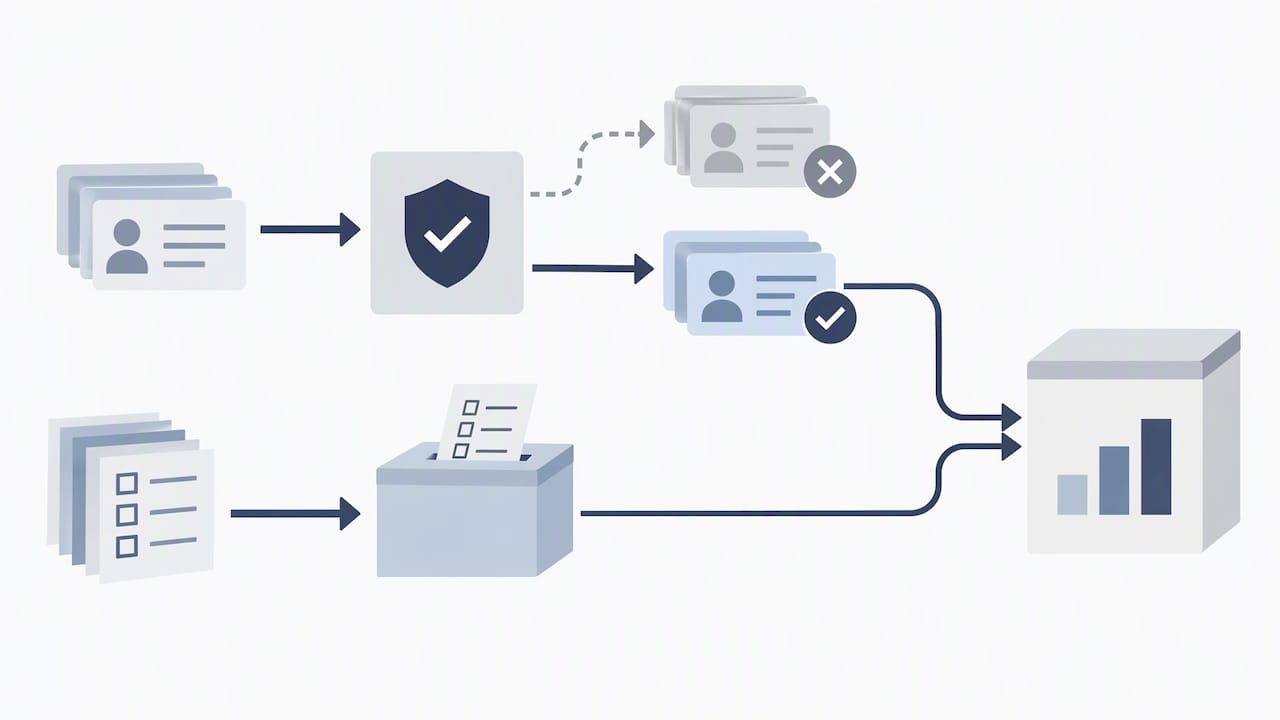
    The Unitarian Universalist Association’s technical guidance on online voting recommends collecting unique identifiers such as email or member ID separately from the ballot, so duplicates and unauthorized entries can be caught before results are final. The same logic works for contests: you want to know that a voter is legitimate without displaying who voted for whom.

    Voter identity checked apart from the ballot

    Be transparent about the money

    Researchers studying incentives in voting find that the effect of payment on behavior depends on how openly it is handled. A working paper on vote-buying in controlled settings suggests that when participants feel a vote was bought, they may hold organizers less accountable. The practical lesson for a contest is to make every rule visible. Show live results, publish the vote price and publish the beneficiary split.

    Watch the moral hazard

    The BBC reported on US cities experimenting with cash prizes to lure people to the polls, and quoted experts who worry that incentives can crowd out the value of voting itself. In a fan award, that concern translates into a design question: are voters choosing the nominee they admire, or the one with the richest friends? Consider a few safeguards:

    • Cap the number of votes one person can buy per day or in total.
    • Run a free voting round alongside the paid round, so reach alone does not decide everything.
    • Let a judging panel score a share of the result, and say so up front.
    • Announce the winner’s margin and total raised, not just the name.

    A worked example

    Imagine a community theater running a “Best Local Hero” award for a spring fundraiser. It nominates twelve people, such as a crossing guard, a pharmacist and a youth coach. Votes cost $1 each, and the theater commits to give the proceeds, after fees, to a youth literacy nonprofit it has vetted in the IRS database.

    • Weeks 1 to 2: nominations open, including self-nomination, and photos and short profiles are added.
    • Weeks 3 to 5: voting is open. Each voter confirms an email address. The page shows live totals and a notice describing where the money goes.
    • Final day: voting closes automatically. The theater announces the winner at its gala and shares the total raised.
    • Within 30 days: the theater transfers the funds and posts a short confirmation with the amount.

    The numbers are illustrative only, but the pattern holds: a clear disclosure, a vetted beneficiary, a defined window, and a public wrap-up.

    Setting it up on Izivote

    Izivote is built for public audience awards and events, and the pieces a donation-based contest needs are already there:

    • Paid voting with payment handling. You set prices, and voters pay by card. Our paid voting page shows how charging per vote works.
    • Voting modes. Open, paid, login and identity-based voting, so you can match the level of verification to the stakes.
    • Nominee profiles with photos, multi-category voting and self-nomination.
    • Embeddable voting pages you can place on your own website.
    • Live results and analytics in an organizer dashboard, plus automatic vote closing.

    Our site lists several plans. The Free plan has no published price, which suits a small event. Pro costs $6 per month or $60 per year, and Premium costs $14 per month or $140 per year. Paid voting carries a platform fee of 10% per vote, which you should include when you calculate what the beneficiary will receive and what you disclose to voters. Check the pricing page for the current terms, and use our features overview to see what each plan includes.

    If you are launching a fan contest, the fan awards page and the awards and competitions page show typical setups. When you are ready, create your account and build your first voting page.

    A launch checklist

    1. Decide the model: vote for a nominee, vote for a cause, or paid votes with a stated share.
    2. Pick and vet the beneficiary using IRS records.
    3. Do the math, including payment processing, platform fees and any costs you will cover, and write the beneficiary share as a clear statement.
    4. Write public rules: price, caps, dates, tie-breaks, prizes, refund policy.
    5. Choose the voter verification level that matches the stakes.
    6. Add the disclosure text above the pay button.
    7. Test the full flow with a small purchase before opening to the public.
    8. Monitor the dashboard for unusual spikes, and respond to them according to your published rules.
    9. Close voting automatically, announce results, and pay the beneficiary on schedule.
    10. Publish a short wrap-up with the total raised and the amount sent.

    FAQ

    Is donation-based voting legal in the United States?

    For fan awards, school contests and charity events, charging for votes is a common practice. It is not acceptable in political elections, where federal law prohibits payments connected to voting, as set out in 18 U.S. Code § 597. If you plan prizes or raffles linked to voting, ask a lawyer about your state’s rules first.

    Are votes tax-deductible?

    Not automatically, and you should not suggest they are unless a tax professional or the charity has confirmed it. The FTC treats misleading claims about deductibility as a problem, so state clearly whether a payment is deductible. When in doubt, say that votes are not tax-deductible.

    How much of the money should go to the cause?

    That is your decision, but it must be stated clearly and honored. Include payment processing and platform fees in your calculation. On Izivote, paid voting has a 10% platform fee per vote, so build that into the figure you show voters.

    How do I stop one person from buying the whole contest?

    Set per-person caps, require identity verification, add a free voting round or blend in judges’ scores. Then publish those rules before voting starts. Transparent rules matter more than any single control.

    Sources

    Recommended

  • College Student Voting: Six Weeks to Avoid Ballot Mistakes

    College Student Voting: Six Weeks to Avoid Ballot Mistakes

    You can vote at your home address or your college address, but only in one place, and the rules differ by state. Do two things now: check your registration status online, and decide whether you need an absentee ballot or a plan for early or in-person voting. Tufts’ student voting research and the EAC voter guide show why early action matters, and we support school voting use cases at Izivote.

    Izivote
    Make Student Elections Easier to Run
    Izivote helps organizers run student elections with online voting, identity-based voting options, and a dashboard for monitoring votes.

    Explore Izivote

    Key Takeaways

    Register and vote early by understanding your options, deadlines, and technology to ensure your vote counts in student elections and beyond.

    PointDetails
    Choose your voting addressDecide whether to register at your home or college, as you can only vote in one location.
    Verify registration earlyCheck your registration status with your state’s official lookup and update it if necessary before voting.
    Use secure voting methodsUse in-person, early, absentee, or online voting systems that match your situation and follow security guidelines.
    Follow deadlines and rulesBe aware of registration, ID, and ballot return deadlines specific to your state to prevent disqualification.
    Promote digital voting participationIncrease voter engagement through reminders, candidate information, and easy-to-access online platforms.

    Table of Contents

    How do you register to vote as a student?

    You have two cross-state options. Many states let you register online, and the National Mail Voter Registration Form is another option. Both lead to the same place: a spot on the rolls for the address you choose.

    The choice of address matters. Vote that you may only vote in one jurisdiction, and registering in two states is a federal crime. Your pick also shapes which local races and ballot measures you see. The guidance for college students adds that you can usually register at home or where you attend school, depending on state residency rules.

    Have these ready:

    • Your full legal name and date of birth
    • A street address, not a campus mailbox, for your residence
    • Your driver’s license or state ID number, or the last four digits of your Social Security number where required
    • A mailing address if your mail goes somewhere different

    After you submit, look for a confirmation message or a card in the mail. If nothing arrives, call your local election office and ask them to verify.

    Which voting method fits your situation?

    Voting options include Election Day voting at an assigned polling place or vote center during set hours. Many states also offer early in-person voting, often with extended hours at central locations. The EAC voter guide covers hours, polling place services and absentee procedures.

    Absentee or mail voting works when you will be away. Eligibility rules vary by state, so confirm yours, then request your ballot through your state or local election office.

    Mail ballots are easy to get wrong. NSLVE’s national data notes that ballots can be rejected for these reasons:

    • A missing signature
    • Missing ID details where a state requires them
    • Incorrect postage
    • Missing witness or notary information in states that require it

    Mail ballots can be rejected over a missing signature, bad postage or missing witness details. Read every line of the instructions before you seal the envelope.

    A provisional ballot is a fallback. Poll workers offer one when your name is not on the rolls or your eligibility is in question. Election officials later check your registration, and your ballot counts if they verify it. Ask how to track its status.

    What deadlines and residency rules apply to you?

    There is no national registration deadline. NCSL’s deadline tracker shows that some states allow same-day registration through Election Day, while others close registration up to 30 days before the election. That gap can catch students, especially those who move between a campus and a hometown.

    Use this rule of thumb for residency:

    • If you will be physically on campus when voting happens, registering at your college address usually makes sense.
    • If you will be home, or you want your hometown ballot, register there and vote in person or by mail.
    • If you are unsure, look up your college state’s residency rules before you switch. Some states set time requirements.
    • Never register in two places.

    Where do you find the exact rules? Start with your state election office. The EAC state summaries link to each office and list tools for registration lookup, absentee and early voting information, and polling place search. Check these pages early, because options after a missed cutoff vary by state.

    How do you check your registration and prepare your ID?

    Verify your status before you rely on it. Use your state’s official lookup, which the EAC state pages link to. Check the lookup for your registration status and any details it provides, such as your address or polling place. A missing or outdated record is something you can still fix if you act early.

    1. Open your state lookup and enter your name and date of birth.
    2. Confirm your address matches where you want to vote.
    3. Note your polling place and early voting sites.
    4. Check your state’s ID rules in the EAC voter guide.
    5. Set aside an accepted ID.

    Acceptable ID differs by state, and some states do not accept a student ID. If your name or address does not match the rolls, update your registration, ask for a provisional ballot at the polls, and follow up with the local election office.

    Pro Tip: Take a photo of your registration confirmation and your ID so you can fix mismatches quickly.

    What should you do if you’re away from home?

    You have three main options, as Vote.gov’s student guidance describes them:

    • Register in your college state if you qualify.
    • Vote absentee from your home state.
    • Travel home to vote in person.

    Check your college state’s rules before switching registration, since some states set residency time requirements. The EAC voter guide is a good reference for absentee procedures.

    If you choose absentee, treat the mail as the weak link. Request your ballot early and confirm when it should arrive. Use a mailing address that reliably receives your mail, return it with time to spare and track it if your state offers that feature. Study abroad students face the same steps, with longer mail times, so they should start earliest.

    Where can you find campus help?

    Look to your student government, your civic engagement office and campus toolkits. The All In Campus Democracy Challenge reports that campuses with formal, nonpartisan voting plans and coalitions see turnout at least 5 percentage points higher than campuses without them. Institutionalized programs work because they remove barriers instead of relying on individual effort.

    Simple actions help:

    • Pledge to vote and ask friends to do the same.
    • Find a ride to the polls or organize a group trip.
    • Volunteer as a poll worker.
    • Use your campus voter toolkit for deadlines and reminders.

    Why does student turnout matter?

    Students already show up in meaningful numbers, yet a gap remains. In 2024, 76% of eligible college students were registered and 53% voted, a 70% yield among registered students. That means some registered students still did not vote, often because of logistics like ID, transportation or ballot submission.

    Campus structure matters, as All In’s impact data suggests. The habit starts earlier too. Research on internal campus elections reports that turnout is often under 20% and sometimes under 10% for student government contests. Voting in the races closest to you builds the routine that carries into national elections.

    What is the six-week checklist before an election?

    Work backward from Election Day. The sooner you verify, the more options you keep.

    1. Verify your registration and address well before Election Day, using your state lookup.
    2. Decide where you will vote, home or college, and register or update if needed.
    3. Request an absentee ballot now if you will be away.
    4. Confirm your ID matches your state’s rules.
    5. Locate your polling place and early voting hours, then arrange transportation.
    6. Return a mail ballot early, or vote in person, and track your ballot where possible.

    Pro Tip: Put each step in your phone calendar with a reminder, working backward from your state’s deadline.

    How do electronic and online voting systems work?

    Online voting for campus elections follows a simple flow. An organizer builds a ballot, eligible voters receive a link or sign in, each voter marks choices, and the system records one vote per eligible person before closing at a set time. Results then appear in an administrator’s dashboard.

    Five stages of an online campus election

    Security rests on several layers. Encrypted connections protect data in transit, so choices cannot be read between your device and the server. Authentication controls who gets in, which might be a school login, a unique code or a verified identity. Limits on repeat submissions guard against duplicate votes, and activity logs help administrators spot unusual patterns.

    Different elections need different safeguards. A high-stakes student government race should require sign-in tied to enrollment. A casual poll, like picking a mascot, can use lighter checks. We offer several voting modes at Izivote, including open, login-based and identity-based voting, so organizers can match the control level to the stakes. See our feature list for what each mode supports.

    Ask a few questions before choosing any system. Who can see raw responses? How is eligibility checked? What happens if a voter loses connection mid-ballot? Clear answers to these three questions tell you most of what you need.

    How do you protect voter privacy and ballot secrecy?

    Ballot secrecy means nobody can link your name to your choices. In student elections, that promise is easy to break by accident, for instance when a shared spreadsheet pairs email addresses with responses. A trustworthy setup separates the identity check from the ballot itself.

    Practical protections include:

    • Collecting only the data needed to confirm eligibility
    • Showing candidates and administrators aggregate results, never individual ballots
    • Limiting who can open the administrator dashboard
    • Setting a retention period and deleting voter data after certification
    • Telling voters in plain words what is recorded

    Candidates and their friends should never see how any individual voted. Leaders who run the election should avoid pressuring peers to vote in front of them, since public pressure undermines the secret ballot as much as any technical flaw.

    Transparency and secrecy can coexist. Publishing totals, vote counts per category and the election’s rules lets everyone trust the outcome without exposing anyone’s choices. If a platform offers an audit trail, confirm that it logs events like ballot submissions and closing times, not the content of each voter’s selections.

    When you evaluate a tool, read its privacy statement before launching. A short, specific statement beats a long, vague one every time.

    What role do mobile and online platforms play in student elections?

    Students live on their phones, so a ballot that works well on a small screen removes a major barrier. A mobile-friendly platform lets someone vote between classes, from a dorm or on a commute, rather than hunting for a polling table. That convenience can matter for commuter students, night students and those on remote placements, who may not regularly cross the quad.

    Purpose-built platforms also save organizers effort. Instead of printing ballots and counting by hand, leaders set up categories, add candidate photos and profiles, and share a link. Live dashboards show participation as it grows, so a club president can see whether a reminder is needed before voting closes.

    We built Izivote for this kind of work. Organizers can launch a vote quickly, embed the voting page on a school site, use multiple categories and rely on automatic closing at a set time. Our student elections page shows how schools and student government use it, and you can try it by creating a vote on our free create page.

    Platforms do not replace outreach. A clear ballot only helps if students know the vote exists, so pair the tool with announcements, posters and reminders.

    What challenges come up in online student voting, and how do you solve them?

    Three problems show up most often: proving who is voting, stopping repeat votes and keeping everyone informed.

    Authentication is the first. If anyone with a link can vote, results are easy to distort. The fix is to match the check to the stakes. Use school sign-in or identity-based voting for official elections, and keep open voting for informal polls.

    Multiple voting comes next. One person can submit many ballots from different devices or accounts. Solutions include one-ballot-per-account rules, limits per device or connection, and review of unusual spikes in activity. Always decide your rules before voting opens and publish them, so nobody argues about fairness afterward.

    Access is the third. Students without reliable internet, or with disabilities, may struggle with a digital ballot. Offer a campus computer lab or an in-person alternative, and test your ballot on small screens.

    Other pitfalls are easy to avoid:

    • Confusing ballot wording that splits votes between similar options
    • Unclear deadlines that cause last-minute complaints
    • No plan for disputes or recounts

    Write a one-page election plan that covers eligibility, authentication, timing and what happens if something goes wrong. Having that plan ready is often the difference between a smooth election and a messy one.

    How can student organizations boost digital voting participation?

    Participation grows when voting feels easy, visible and social. Start with timing: announce the election well ahead, repeat the date, and send a reminder on the day. Short messages with a direct link can be easier to act on than long explanations.

    Make the candidates easy to know. Post short profiles with photos and a sentence on what each person will do. Hold a quick Q&A or livestream so students can ask questions. People vote for someone they recognize.

    Use the channels students already read. Class group chats, club newsletters, campus social accounts and a spot on the student portal each reach a different audience. Ask professors to mention the vote in class, which may reach people who do not see a poster.

    Build momentum with a few simple tactics:

    • Set a participation goal and share progress
    • Run friendly competition between residence halls or clubs
    • Consider a fair incentive, such as a campus event raffle, if school rules allow
    • Thank voters afterward and share the results

    Links to our blog on online voting guides offer more ideas for running engaging votes. Above all, report the outcome and what leaders will do with it. Students vote again when they see that their ballots led to something.

    What legal considerations apply to digital student voting platforms?

    Student elections are not governed by the same laws as public elections, but they still carry rules. Your school’s student government constitution and election code usually set who may vote, who may run and how disputes get resolved. Start there, and follow it precisely, since a technical breach can invalidate a result.

    Data protection is the other major area. Student information can be sensitive, and many schools restrict how it is shared. Before importing a roster or linking a student login, check with your administration about what is allowed. Collect only what you need and be clear about how it will be used.

    If a vote involves payments, such as a fundraiser with paid votes, extra rules may apply. Our paid voting adds a 10% platform fee per vote, as listed on our pricing page. Confirm with your school whether paid voting is permitted for official elections, since many institutions treat official student government races differently from charity contests.

    Accessibility matters too. A ballot should work with screen readers and keyboard navigation so every eligible student can take part. Ask any provider about accessibility before you commit.

    None of this replaces advice from your school. Speak to your student affairs office or an advisor if you are unsure, and keep written records of your election rules and decisions.

    What legal considerations apply to digital student voting platforms? — overview diagram

    FAQ

    What is the deadline to register to vote as a student?

    There is no national deadline. Some states allow same-day registration, while others require registration up to 30 days before the election. Check your state election office early.

    Can I vote at my college address or my home address?

    You can usually choose either, depending on state residency rules, but you may vote in only one place. Registering in two states is a federal crime. Pick the location where you will be present, or vote absentee from the other.

    How do I vote if I’m away at school?

    Register in your college state if you qualify, request an absentee ballot from your home state, or travel home to vote in person. Request mail ballots early. Read the instructions closely, since missing signatures or witness details can lead to rejection.

    Does my student ID count as voter ID?

    It depends on the state. Some states accept a student ID and some do not, so check your state’s rules in the EAC voter guide. Bring a second accepted ID if you are unsure.

    What if my name is not on the voter list at the polls?

    Ask for a provisional ballot. Election officials check your registration afterward and count the ballot if they verify it. Follow up with your local election office.

    Sources

    Recommended

  • People’s Choice Awards Setup for Organizers: Match Checks to Stakes

    People’s Choice Awards Setup for Organizers: Match Checks to Stakes

    To run people’s choice awards setup quickly and safely, use a purpose-built, self-serve online voting platform such as Izivote, then work through the checklist below. Build your process around the usability and transparency principles in NIST’s VVSG guidance, and plan to publish a short verification summary after the vote closes. That one habit does a lot for your legitimacy.

    Izivote
    Run a More Transparent Awards Vote
    Izivote helps organizers run people’s choice awards with clear, secure voting, real-time analytics, and a user-friendly dashboard.

    Get started

    Key Takeaways

    Using a purpose-built online voting platform like Izivote ensures transparency, security, and ease in managing people’s choice awards effectively.

    PointDetails
    Define rules earlyEstablish nomination categories, eligibility, and voting rules before collecting nominees to avoid confusion later.
    Match voting method to stakesChoose a voting process that aligns with your event’s importance, balancing ease of use and security.
    Design clear ballotsCreate simple, mobile-friendly ballots with consistent nominee presentation and limits on choices to boost participation.
    Layer anti-fraud controlsImplement multiple defenses such as rate limits, device fingerprinting, and verification to prevent gaming the vote.
    Use Izivote for streamline managementIzivote offers customizable voting options, live result tracking, and proven reliability for events worldwide.

    Table of Contents

    What should you finish before building the vote?

    Scan this list before you touch any software:

    • Define categories, eligibility and nomination rules before you collect a single nominee.
    • Pick a voting method that fits your stakes: open, login-gated, identity-verified or paid.
    • Gather nominee photos and short bios, and decide between single-choice and ranked ballots.
    • Set anti-fraud guardrails and write down who decides when to pause voting.
    • Schedule a load test and a dry run, and plan to publish audit logs after close.

    Each item gets its own section below.

    How do you plan categories, rules and a timeline?

    Start with the structure, because every later decision depends on it. Choose between open nominations, where anyone can suggest a nominee, and a curated shortlist your team assembles. Whichever you pick, write the process down and publish it.

    Then work through these steps in order:

    1. Write eligibility rules that say who can nominate and who can vote.
    2. Set a tie-break policy now, such as a runoff round or a shared win, so you never improvise under pressure.
    3. Build the timeline: nomination window, verification window, voting window, then an audit and appeal period.
    4. Add lead time for assets. Photos and bios arrive late more often than not.
    5. If you plan paid voting, budget for fees. On Izivote, paid voting carries a 10% platform fee per vote, so factor that into any fundraising target.

    A realistic timeline gives you room to promote the vote and still leave a few days to check results before the ceremony.

    Which voting method fits your event?

    Match the method to what is at stake. A local fan favorite poll and a nationally watched industry award need very different protection, and the Financial Conduct Authority’s speech on calibrating controls makes the same point: simple browser-based duplicate prevention may be enough for low-stakes polls, while high-stakes awards call for stronger checks such as single sign-on or phone-based authentication.

    • Open voting: lowest friction and the highest turnout, but the easiest to game.
    • Login gating: email and password add a speed bump for repeat voters without much effort for real ones.
    • SSO or phone verification: the strongest one-person-one-vote protection, at the cost of more steps.
    • Paid votes: good for raising money, but you take on payment handling and platform fees.

    Keep the voter’s effort in mind. Research on voting design cautions that over-complicating the flow suppresses participation, for example by forcing email confirmation on every vote.

    Pro Tip: Use device fingerprinting or single sign-on to enforce one vote per person while keeping the ballot to one or two taps.

    Our features page lists the verification modes we support.

    How should you design ballots and nominee pages?

    A ballot should be obvious at a glance. Voters on a phone, in a hurry, will abandon anything confusing.

    • Use one clear call to action and a consistent nominee order within each category.
    • Set sensible limits on how many choices a voter can make.
    • Specify nominee assets up front: one image size and aspect ratio for everyone, plus a bio of a couple of sentences.
    • Design mobile first, with readable labels and full keyboard navigation.
    • Offer audio or other alternatives where you can. VVSG 2.0 describes accessibility modes including visual, audio, touch and limited dexterity.
    • For multi-category ballots, group categories on one scrolling page or one step per category, and use ranked layouts only when the format truly needs them.

    Before launch, run your ballot past a few people who have never seen it. The NIST usability handbook recommends prototype testing early and complete voting-session testing before deployment.

    Which anti-fraud controls and tests do you need?

    Layer your defenses, adding more as the stakes rise.

    • Rate limits and IP throttling to slow bulk voting.
    • Device fingerprinting to catch repeat voters.
    • SMS or phone verification for sensitive categories.
    • SSO where your audience already has accounts.

    Watch for vote spikes, odd geographic patterns and repeated identical behavior. Decide your escalation steps in advance: pause the window, investigate, then communicate. Prepare a short message for nominees whose votes are disqualified, stating what happened and how to appeal.

    Venue Wi-Fi often cannot handle high concurrency, so test simultaneous connections before your event. If you plan to show live voting on site, simulate the crowd or batch requests rather than trusting the room’s network.

    Run a full rehearsal at least a few days before launch, with test votes, a simulated spike and a practice pause.

    What does a live voting runbook look like?

    Write your runbook so anyone on the team can follow it:

    1. Confirm start and stop controls and the countdown timer.
    2. Open voting and check the first votes arrive correctly.
    3. Monitor your dashboard at a fixed cadence.
    4. Close voting at the announced time and freeze results.
    5. Finalize and verify winners before announcing them.

    If you show live results at the ceremony, decide the refresh rate, which screen displays them and whether nominees see counts before the reveal. Our results and presenting guide covers the display options. Prepare fallbacks: freeze results, announce winners manually, or name provisional winners if something looks wrong. Tell voters and nominees plainly how progress will be shared.

    How do you audit results and report transparently?

    After close, check the results before you celebrate them.

    • Review timestamped logs and anonymized records for unusual patterns.
    • Publish a short summary of your verification steps, any disqualified votes and your methodology. Deloitte’s research on transparency notes that explaining how results were verified reduces skepticism and raises perceived legitimacy.
    • Encrypt personal data, delete what you no longer need and state your retention policy. The Cratos principles recommend encryption, deletion of personal data and auditability of processes.
    • For high-stakes awards, invite an independent party to verify the count.

    Why do we recommend Izivote for people’s choice awards?

    Izivote

    We built Izivote for exactly this job. You can set up a vote yourself, choose from open, paid, login-based or identity-based voting, show nominee photos and profiles, and watch live results on a real-time dashboard. Votes have been cast across events in multiple countries, and our customer stories show how organizers use it.

    Start with a free vote, run your rehearsal, then compare plans on our pricing page. For more detail on awards workflows, see our people’s choice use case. When you are ready, create your free vote and send the link to your team for a dry run today.

    Why do we recommend Izivote for people's choice awards? — overview diagram

    FAQ

    How long should a people’s choice vote stay open?

    Long enough to promote and short enough to keep energy high. Many organizers run a nomination window, a verification window and then a voting window, with an audit period at the end. Set the dates before you announce anything.

    Do I need voter verification for a people’s choice award?

    It depends on the stakes. For a casual fan poll, simple duplicate prevention may be enough, but high-stakes awards need stronger checks such as single sign-on or phone verification.

    Can I show live results at the ceremony?

    Yes, if you plan for it. Test your connection first, because venue Wi-Fi often struggles with many devices at once. Keep a fallback ready, such as freezing results and announcing winners manually.

    How do I prove the results are legitimate?

    Publish a short verification summary that describes your checks, any disqualified votes and your method. Keeping timestamped logs makes that summary easy to write.

    Sources

    Recommended

  • Voting Payment Processing: Why Chargebacks Matter More Than Checkout

    Voting Payment Processing: Why Chargebacks Matter More Than Checkout

    Paid voting runs through standard e-commerce processors, typically Stripe, which can keep card numbers off the voting server when the platform uses a hosted payment page or another outsourced card-handling approach. Organizers set a price per vote, the platform adds its own fee on top of whatever the processor charges, and fees may be deducted before money reaches an organizer’s account. The biggest operational risk isn’t the payment itself: it’s a chargeback, which can put the funds at risk after the fact.


    TL;DR:

    • Before launch, confirm the payout country, connect and verify the processor account, match the payout currency to your bank, and check when funds will arrive.
    • Platform fees commonly range from 10% to 20%, separate from processor charges; calculate both deductions before setting vote prices or projecting net revenue.
    • Organizers typically have 7 to 21 days to submit dispute evidence, so retain transaction records, timestamps, receipts, and the corresponding voting log.
    • Keep payment tokens separate from ballot identifiers, preserving records needed for refunds and disputes without exposing voter identity or compromising election privacy.
    • Successful refunds usually appear on voters’ statements within 5 to 10 business days, although some local payment methods require extra steps and can take longer.

    Izivote
    Make Paid Voting Easier to Manage
    Izivote supports paid voting for fan and people’s choice awards, with real-time analytics and a dashboard to monitor votes.

    Get started with Izivote

    Table of Contents

    Which payment methods do voting pages accept?

    Most voting pages accept a narrow, familiar set of payment methods because that’s what keeps checkout fast and dispute handling predictable. Voters expect to pay the way they pay everywhere else online, and platforms benefit from sticking to rails with well-documented dispute rules.

    • Credit and debit cards, processed through a hosted checkout rather than a custom form when the platform uses an outsourced card-handling approach
    • Digital wallets, where available, which may make mobile checkout more convenient
    • Region-specific local payment methods, where available, though these often carry different dispute timelines than card networks

    The reason most platforms use a hosted payment page, an iFrame, or client-side tokenization instead of building their own card form is simple: it keeps raw card data off the voting server entirely. The PCI Small Merchant Guide recommends exactly this approach, outsourcing card handling to a compliant third party rather than storing or transmitting cardholder data directly. That can matter for a voting platform, since separating payment data from ballot records helps protect voter privacy.

    How does money move from voter to organizer?

    There are two dominant patterns for routing paid-vote revenue, and the difference matters for how quickly organizers see their money and how much setup work falls on them upfront.

    In the first, payments land directly in the organizer’s own payment processor account, with the platform fee deducted at the time of transaction. In the second, the platform collects funds centrally and issues a manual payout later, which adds a step but may simplify onboarding for organizers who prefer not to set up their own merchant account.

    Before opening a paid voting page, organizers typically need to:

    1. Pick a payout country, since this determines available currencies and banking rails.
    2. Connect a Stripe account and complete identity verification.
    3. Choose a payout currency that matches the organizer’s bank account.
    4. Confirm the payout timing for the chosen payment setup.

    Dashboards generally show fees and earnings at the transaction level, so organizers can see exactly what was charged, what was deducted, and what cleared. That transparency is worth checking before launch, not after the first dispute arrives.

    Pro Tip: Verify your payout country and email address before enabling any paid voting page. Mismatches here may delay payouts.

    How much do platform and processor fees cost organizers?

    Platform fees on paid voting commonly fall in a range of roughly 10% to 20% per transaction, and Izivote states a 10% platform fee on its pricing page. That fee is separate from whatever the card processor charges, which is deducted where the payment actually lands rather than by the voting platform itself.

    The math organizers need is straightforward: net payout equals the vote price, minus the platform fee, minus the processor fee. Say a voter pays $1.00 for a single vote. A 10% platform fee removes $0.10, and typical processor fees take another small cut before the remaining balance reaches the organizer’s account.

    • Track the clearing balance, the available balance, and the requested versus paid amounts separately if using a manual payout path.
    • Reconcile per-transaction detail in the dashboard against bank deposits, since timing between the two can differ by several days.

    What happens when a voter disputes a payment?

    Disputes on paid votes follow the same lifecycle as any other card transaction: an initial inquiry or pre-dispute phase, followed by a formal dispute if unresolved. According to Stripe’s dispute documentation, organizers typically have a 7 to 21 day window to respond with evidence, and the full process can take up to three months to resolve. That window is tight, which is why evidence needs to be ready before a dispute ever arrives.

    Stages of a payment dispute and response window

    Disputed funds may be debited from the organizer’s account, and dispute fees may apply. The outcome determines whether the disputed funds are returned and whether any dispute fee applies.

    To defend a contested charge, organizers should keep:

    • The original transaction record, including timestamp and amount
    • The voting log tied to that specific transaction
    • Any voter confirmation data, such as a receipt or confirmation email

    Successful refunds, by contrast, usually post to the voter’s statement within 5 to 10 business days, though some local payment methods require additional steps that can extend that window.

    Why voting payments need different safeguards than normal transactions

    Financial systems are built around recoverability: if something goes wrong, insurance, chargebacks, and legal recourse can usually make the affected party whole again. Voting systems can’t rely on the same safety net. An academic analysis from Harvard’s Civil Rights-Civil Liberties Law Review explains that voting transactions carry different threat models and privacy requirements than financial ones, which is part of why the two domains stay distinct even when they intersect on a single platform.

    Voting demands properties that financial transactions don’t: anonymity, receipt-freeness, and resistance to coercion. A financial remedy, reversing a charge or refunding a fee, does nothing to repair a compromised election result. That’s why platforms that combine payment and voting need to unlink the payment token from the ballot identifier rather than treating a vote as just another purchase record.

    In practice, this means keeping enough payment evidence to handle a refund or dispute, such as a transaction ID and timestamp, while minimizing any link between payment information and ballot identity. Features such as bulletin boards, encrypted ballots, and independently checkable tally proofs can help protect election integrity when payments are part of the process. Payment handling and ballot handling can share an interface without sharing the same privacy rules.

    What operators learn the hard way about paid voting payments

    The organizers who avoid payout surprises are the ones who treat payment setup as a pre-launch checklist, not an afterthought. Connect and verify payout details before the first paid page goes live. Set clear, simple price points per vote rather than a confusing tier structure, and choose a minimum price high enough to cover fixed processor fees so low-priced votes are less likely to leave little after fees.

    Dispute readiness matters just as much as setup. Keep relevant payment records organized so they can be gathered if a dispute arises. If a dispute lands inside that narrow response window, the evidence is already organized rather than assembled under pressure.

    Pro Tip: On manual payout paths, check whether processor fees are deducted before the payout reaches you. That detail changes what price you should set to hit a target net earning.

    — Joshua

    Let payment handling run itself so you can run the event

    Running paid voting shouldn’t mean learning payment plumbing on the fly. We built our platform to support paid voting and apply a transparent 10% platform fee.

    Izivote

    Whether you’re running a people’s choice award or a fan-funded competition, our paid voting setup lets you run paid voting. Check our pricing page or create a free vote before you launch.

    FAQ

    What payment processor do voting platforms typically use?

    Most paid voting platforms route card payments through a third-party processor like Stripe rather than handling card data themselves. Using an outsourced payment setup can keep cardholder information off the voting server, though the platform may still have PCI DSS responsibilities.

    How long do organizers have to respond to a voting payment dispute?

    Organizers typically have a 7 to 21 day window to submit evidence once a dispute is filed, and the full resolution process can take up to three months. Evidence should include the transaction record and the voting log tied to that specific payment.

    How much is the platform fee on paid votes?

    Izivote charges a 10% platform fee on every paid vote, separate from whatever the payment processor charges.

    Can a refunded vote be removed from the results?

    Refund and vote-removal policies depend on the platform’s specific rules, since a refund is a payment event while a cast vote may be handled as a separate record. Successful refunds typically post to the voter’s statement within 5 to 10 business days.

    Why can’t voting platforms just use normal banking security?

    Voting requires properties that banking doesn’t, including anonymity and resistance to coercion, which an academic comparison of voting and financial transactions ties to differing threat models. Financial remedies like chargebacks can fix a billing problem, but they can’t repair a compromised election result.

    Sources

    Recommended

  • Nonprofit Voting Fundraisers: Use $2 Votes to Build Donor Lists

    Nonprofit Voting Fundraisers: Use $2 Votes to Build Donor Lists

    Paid-vote fundraisers can raise real money and deepen supporter engagement when nonprofits run them transparently, price them clearly, and keep the contest framed as a donation, never as influence over a public election. The best next step is a small pilot: pick one contest, set a simple price per vote, run a short voting window, and communicate the rules plainly before launch.


    TL;DR:

    • Use a flat $2 vote price or test 10 votes for $15, and cap the voting window at 2 to 4 weeks to maintain momentum.
    • Give nominees a photo, caption, and voting link; send three email reminders, including a final message 24 to 48 hours before closing.
    • Keep copy focused on the nonprofit’s own contest, never public elections; set device or card limits and pause voting if confirmed vote rates drop sharply.
    • Track net revenue after processing fees, new email signups, and repeat giving; thank every voter within 48 hours and share how funds will be used.

    Izivote
    Turn Supporter Votes Into Engagement
    Run a paid-vote contest with identity-based voting and real-time analytics to engage supporters and monitor participation.

    Table of Contents

    How a donate-to-vote fundraiser actually raises money

    A paid-vote fundraiser lets supporters cast votes for a nominee or entry by making a small payment, often $1 to $5 per vote, with the option to buy vote packages at a discount for larger amounts. The organizer sets up a voting page, nominees recruit their own supporters, and a payment processor handles each transaction as it comes in.

    The math is simple to model: if 400 supporters each buy an average of 3 votes at $2 per vote, that is 1,200 votes and $2,400 in gross contributions before any processing costs. The real value often extends past that number.

    • Nominees recruit their own networks, bringing in people who have never donated before.
    • Every vote purchase is a chance to capture an email address for future appeals.
    • Contests generate organic social sharing that a standard donation ask rarely produces.

    Contest formats nonprofits run most often

    Format choice depends on audience size, season, and how easy it is for nominees to rally a network.

    1. Pet photo contests work well for animal shelters and humane societies, where owners submit photos and ask friends and family to vote.
    2. Calendar contests fit organizations that want a tangible product and a reason to keep fundraising across the full year, since the calendar itself becomes a thank-you gift.
    3. Student and youth awards, like “most spirited” or academic recognition contests, engage school communities and parent networks.
    4. Community “best of” awards suit chambers of commerce and local nonprofits that want to highlight small businesses or volunteers while drawing in civic pride votes.

    Each format succeeds by giving nominees a personal reason to share the voting link, which is what pulls in supporters beyond the organization’s existing donor list.

    Setting up your campaign: nominees, pricing, and payments

    A clean setup process prevents most of the problems that derail paid-vote campaigns. Start with nominee intake: collect a photo, a short bio, and a consent form, and build in an approval step so every entry meets your guidelines before it goes live. Think about accessibility too, including alt text for photos and a mobile-friendly voting page, since most votes will come from phones.

    Pricing works best when you test a simple structure rather than overcomplicate it:

    • A flat per-vote price, such as $2 per vote, is easiest for supporters to understand.
    • Vote packages, like 10 votes for $15, encourage larger single purchases.
    • A capped voting window, typically 2 to 4 weeks, creates urgency without fatiguing supporters.

    Before launch, confirm your payment processor, decide whether purchases qualify for a tax receipt in your jurisdiction, and write a plain-language refund policy since vote purchases are generally treated as nonrefundable donations. Configure your leaderboard to update in near real time so nominees and voters stay motivated to check back.

    Pro Tip: Run a 48-hour internal test with a handful of staff votes before the public launch to confirm pricing, payment flow, and leaderboard display all work as expected.

    Test votes pass through three launch checks

    On launch day, monitor the voting page load speed, confirm payment confirmations are arriving, and check that every nominee’s page displays correctly on mobile.

    Getting the word out: email, social, SMS, and partners

    Votes come from channels you already have plus a few you build out for the contest. Email remains the backbone: send an announcement when voting opens, a midpoint reminder highlighting leaderboard standings, and a last-call message in the final 24 to 48 hours.

    • Give each nominee a simple toolkit: a profile photo, a pre-written social caption, and their direct voting link.
    • Post leaderboard updates on social media to create momentum and light competitive pressure among nominees.
    • Use SMS reminders for supporters who have opted in, since text messages tend to get read faster than email during a short voting window.
    • Bring in sponsors or local business partners to match a portion of votes or offer a prize, which widens your promotional reach beyond your own list.
    • Tie the finale to a live event, like an announcement at a gala or community gathering, to convert online momentum into in-person attendance.

    Nominee-driven sharing is usually what separates a contest that raises a modest amount from one that significantly outperforms expectations, since each nominee effectively becomes a volunteer fundraiser for their own entry.

    Staying compliant: legal limits and practical safeguards

    Paid-vote contests for awards, calendars, or community recognition are not the same as voting in a public election, but the line needs to stay clear in how you frame the campaign. Federal law prohibits knowingly and willfully paying or offering to pay someone to vote in a federal election, and willful violations can carry penalties of up to two years in prison. That prohibition applies to public elections, not to a nonprofit’s own fan or award contest, but the safest practice is to keep your messaging unmistakably about your organization’s contest and never reference candidates, ballots, or public office in any way.

    A nonprofit voter engagement toolkit recommends that 501©(3) organizations keep any civic engagement work strictly nonpartisan, a principle worth carrying into your contest naming and promotional copy even though the contest itself is unrelated to public voting.

    • Monitor the ratio of initiated to confirmed votes and pause the campaign if it drops sharply, which can signal fraud or a technical failure.
    • Set a per-device or per-card rate limit to prevent one supporter from flooding the leaderboard.
    • Send a clear payment receipt for every vote purchase that states the amount and the campaign it supports.
    • Define escalation rules in advance, including who reviews flagged activity and when to pause voting.

    Turning vote totals into measurable, lasting support

    Track a short list of numbers during and after the campaign: total votes sold, net revenue after processing costs, new email signups, social share rate, and how many one-time voters convert into recurring donors afterward. These figures tell you whether the contest is working as a fundraiser, an engagement tool, or both.

    • Send a thank-you message within 48 hours of the contest closing, thanking everyone who voted, not just the winner’s supporters.
    • Follow with a short impact story showing what the funds raised will support.
    • Invite new contacts to subscribe to your newsletter or join a recurring giving program while their interest is still fresh.
    • Use this campaign’s analytics, including peak voting times and nominee performance, to set pricing and timing for your next one.

    What organizers get wrong about paid-vote campaigns

    Most organizers underestimate how much of the revenue comes from nominee networks rather than existing donors, and they overestimate how much a longer voting window helps. A tight, well-promoted two-week contest usually outperforms a drawn-out one that loses momentum. The organizations that do well treat the first contest as a pilot: small scope, clear pricing, and a plan to follow up with every new contact afterward.

    — Joshua

    Running your paid-vote fundraiser on Izivote

    Our platform is designed for public, nominee-driven contests nonprofits rely on for this kind of fundraising. Paid voting is handled directly through our paid voting platform, where you set your own price per vote and payment is processed without needing a separate system bolted on. Nominee profiles, embeddable voting pages, and a real-time leaderboard are part of the setup, so results update as votes come in rather than waiting on a batch report.

    Izivote

    • Explore our people’s choice use case for layout and format ideas that fit community and fan-driven contests.
    • Review plan pricing, including a Free plan with no published price, Pro at $6 per month or $60 per year, and Premium at $14 per month or $140 per year, plus a 10% platform fee per paid vote.
    • Check our feature set to see how leaderboards and analytics are configured before you launch.

    If you are ready to test a pilot contest, start on our pricing page to pick the plan that fits your first campaign size.

    FAQ

    Is it legal to charge people to vote in a nonprofit contest?

    Yes, charging for votes in your own award, calendar, or community contest is a common nonprofit fundraising practice distinct from voting in public elections. The federal prohibition applies specifically to paying someone to vote in a federal election, so keep your contest framed clearly around your own cause and avoid any election-related language.

    How much should we charge per vote?

    Most nonprofits start with a simple flat price, such as $2 per vote, then add discounted packages like 10 votes for $15 to encourage larger purchases. Testing one structure in a small pilot before scaling up helps you find what your specific audience responds to.

    What if a vote purchase needs a refund?

    A clear, published refund policy stated before launch, typically noting that vote purchases are nonrefundable donations, prevents most disputes. Sending an immediate payment receipt that states the amount and campaign name also builds trust and reduces refund requests.

    How do we prevent fraud during a paid-vote contest?

    Set rate limits per device or payment method and monitor the ratio of initiated to confirmed votes throughout the campaign, pausing if that ratio drops unexpectedly. Defining escalation rules and who reviews flagged activity before launch keeps your team ready to respond quickly if something looks off.

    How do we turn contest voters into long-term supporters?

    Follow up within 48 hours with a thank-you message, then share a short story about what the funds raised will support. Inviting new contacts to join your newsletter or a recurring giving program while their interest is fresh is one of the more reliable ways to convert a one-time voter into a repeat supporter.

    Sources

    For legal boundaries, review the nonprofit voter engagement toolkit and the AFJ guidance on incentives. For campaign planning tactics that pair well with contest promotion, see this digital campaign planning guide.

    Recommended

  • Paid Voting Can Stay Legal When Event Organizers Get 8 Checks Right

    Paid Voting Can Stay Legal When Event Organizers Get 8 Checks Right

    Paid voting for an audience-choice award is legal in most cases, provided it avoids the legal definition of an unauthorized lottery. The Gambling Commission and the FTC both look at the same trigger: payment combined with pure chance. Keep a free-entry route or a genuine skill element in place, disclose your pricing clearly, and paid voting stays on the right side of the law.


    TL;DR:

    • A vote tally based on audience totals differs from a random prize draw; payment that buys entry or raises draw odds can trigger lottery rules.
    • Put per vote and bundle prices beside the voting button, explain what payment changes, and publish eligibility, vote counting, tie breaking, fraud, and refund rules.
    • EU member states regulate lotteries individually, while some Australian states require permits above local prize thresholds; international campaigns must check each target jurisdiction’s rules.
    • Keep timestamped vote and payment records, document every fraud decision, and investigate suspicious spikes promptly; use identity checks proportionate to the risk.
    • For youth contests, state the minimum age beside pricing and consider age verification or parental consent; minors generally cannot make binding payment transactions.

    Izivote
    Run Paid Voting With Greater Clarity
    Izivote supports paid and identity-based voting, with transparent processes and real-time analytics for audience-choice awards.

    Explore the voting platform

    Table of Contents

    How Regulators Separate Lawful Competitions From Illegal Lotteries

    Most paid promotion law boils down to a three-part test: is there a payment, a prize, and an element of chance? When all three are present without an escape hatch, regulators treat the promotion as a lottery, and in most jurisdictions, unlicensed lotteries are illegal. Audience-choice voting usually avoids this because the outcome depends on who gets more votes, not a random draw, but the moment a paid vote functions as an entry ticket into a randomized prize or materially raises someone’s odds, you cross into lottery territory.

    The UK and US apply this test with different emphasis. In the UK, the Gambling Commission’s guidance on free draws and prize competitions states that prize competitions are lawful when they rely on skill or when a genuine free-entry route exists alongside the paid one. A 2025 government market study on online prize draws found that some instant-win products and prize draws cross into illegal lottery territory when their free-entry routes or skill requirements turn out to be token gestures rather than real alternatives.

    In the US, the FTC’s priority is deception rather than licensing. Promoters must disclose that no purchase is necessary to enter or win, and they cannot imply that paying improves someone’s chances unless a skill-based format makes that explicit. The agency has backed this up with real penalties:

    • Publishers Clearing House paid an $18.5 million settlement with the FTC in 2023 after misleading consumers about sweepstakes entry requirements.
    • UK advertisers have faced ASA adjudications when their voting or prize mechanics lacked clear terms or appeared to disadvantage non-paying entrants.
    • Historical FTC pay-per-call enforcement has penalized organizers for missing required disclosures in paid voting services.

    The pattern across both regulators is consistent: paid voting is fine as a revenue mechanic, but it cannot be the only door into winning, and it cannot hide its own rules.

    How to Structure Paid Voting So It Stays Legal

    Turning paid voting into a compliant mechanic is less about legal theory and more about a handful of concrete build decisions you make before launch.

    1. Offer a free-entry or free-voting route. This is the single most reliable way to avoid the lottery classification. A free daily vote, a social-share-to-vote option, or a mail-in entry satisfies the “no purchase necessary” principle regulators look for.
    2. Or build a genuine skill element instead. If you skip the free route, the contest needs real skill, such as a judged component feeding into the audience score, not a disguised random draw dressed up as a competition.
    3. Write conspicuous pricing and disclosure language. State the cost per vote, any vote packages, and what the payment does and does not affect, right next to the voting button, not buried in a footer link.
    4. Never imply payment improves odds unless your rules say so explicitly. The FTC’s consumer guidance on sweepstakes scams is blunt on this: if paying raises someone’s odds of winning, regulators may treat it as a scam pattern rather than a legitimate promotion.
    5. Draft full terms and conditions. Cover eligibility, how votes are counted, fraud rules, tie-breaker procedures, and refund policy for paid votes before you ever collect a payment.
    6. Avoid premium-rate call mechanics unless you meet disclosure rules. The FTC’s Pay-Per-Call Rule guidance requires specific preamble and cost disclosures, and past enforcement included a $40,000 fine for a voting service that skipped them.
    7. Log every vote and offer identity verification where it matters. An audit trail with timestamps, payment references, and optional identity checks is what regulators and adjudicators ask to see first when a dispute arises.
    8. Plan your dispute process in advance. Decide who reviews flagged votes, how fast you respond, and what evidence you require before a complaint ever lands.

    Pro Tip: Publish your free-entry instructions in the same font size and placement as your paid-vote button. Regulators and adjudicators both read a buried free option as evidence of intent to mislead.

    Transparency and Fairness Practices That Hold Up to Scrutiny

    Legal compliance is the floor. Regulators and advertising watchdogs reward promotions that go further and make fairness visible.

    • State your prize selection method and voting purpose plainly in every piece of promotional material, not just the fine print.
    • Use identity-based or double opt-in voting where it fits your event, and publish an anonymized summary of vote activity once voting closes.
    • Keep paid perks separate from vote weighting if you are fundraising: a $5 donation can unlock a badge or shoutout, but it should never buy extra votes unless your rules say so clearly.
    • Watch for IP clustering and velocity spikes that suggest bot or bulk-vote activity, and document every decision to discount or disqualify votes.
    • Bring in an independent adjudicator for subjective categories where the winner isn’t a pure vote count.

    ASA adjudications against promoters like Co-operative Group Ltd and Twentieth Century Fox repeatedly cite unclear voting mechanics or weak fraud monitoring as grounds for rulings against the organizer. Treat your audit log as your first line of defense if a complaint ever reaches a regulator.

    For a deeper technical breakdown of detection methods, the campaign fraud prevention playbook covers practical steps for spotting manipulated voting patterns on any platform.

    Paid Voting Rules Outside the US and UK

    Outside the US and UK, paid voting law tends to follow the same underlying logic, payment plus pure chance equals a regulated lottery, but the licensing thresholds and enforcement bodies differ by country. In the European Union, gambling and lottery regulation is handled at the member-state level rather than centrally, so a paid voting promotion that’s fine in one EU country can require a license or registration in another. Organizers running pan-European campaigns should check each target country’s consumer protection and gambling authority rather than assuming one EU-wide standard applies.

    Canada treats contests involving payment and chance under its Criminal Code lottery provisions, with a long-standing requirement that promotions include a skill test or a no-purchase alternative to avoid being classified as an illegal lottery scheme. Australia regulates trade promotions and lotteries at the state and territory level, and several states require a permit for promotions above certain prize value thresholds, even when a free-entry route exists.

    The practical takeaway for any organizer running an international audience vote is the same everywhere: build in a free-entry or skill-based alternative by default, since it satisfies the strictest version of nearly every jurisdiction’s test at once, rather than designing separate rules per country.

    Paid Voting Rules Outside the US and UK — overview diagram

    Data Protection and Privacy Rules for Paid Voting

    Paid voting systems collect more personal data than a simple poll: names, email addresses, payment details, and sometimes identity verification records. That data footprint brings privacy law into play alongside gambling and consumer protection rules. In the EU and UK, the GDPR framework requires a lawful basis for processing voter data, clear notice about what’s collected and why, and limits on how long payment and identity records are retained after an event ends.

    Voter identity checks, when used to prevent duplicate or fraudulent votes, should be proportionate to the risk. Collecting a full government ID to verify a $2 vote is harder to justify than requiring email confirmation, and privacy regulators generally expect organizers to use the least invasive verification method that still protects vote integrity.

    Payment processing also triggers its own compliance layer, since card data handling generally falls under PCI DSS standards regardless of the country you operate in. Organizers who route payments through an established platform shift much of this burden to a processor built for it, rather than building compliant payment handling and data retention policies from scratch for a single event.

    Consumer Protection Considerations in Paid Voting

    Consumer protection law treats paid voting as a commercial transaction, which means the same rules that govern any paid product or service apply. Voters need to know exactly what they’re paying for, what it buys them, and what happens if something goes wrong, before they hand over payment details.

    Clear pricing is the baseline: a flat per-vote cost or a bundle price, stated before checkout, with no hidden fees added at the payment step. Refund policy matters too. Most consumer protection regimes expect organizers to state upfront whether paid votes are refundable, since a silent policy tends to be read against the organizer in a dispute.

    Misleading claims about odds, prize value, or vote impact are the most common source of consumer complaints and regulatory action in this space. The FTC’s guidance on fake prize and sweepstakes scams is explicit that implying a payment increases someone’s chances of winning, when it does not, is treated as deceptive. Advertising claims about the award itself, such as “biggest fan vote of the year,” should also be defensible with real numbers if challenged.

    Handling Disputes and Complaints About Paid Voting Results

    Every paid voting campaign eventually gets a complaint, whether it’s a voter who thinks their payment didn’t register or a nominee who suspects bulk voting tipped a category. How you handle that moment determines whether it stays a minor support ticket or becomes a public credibility problem.

    Set a clear complaints process before voting opens: a named contact or inbox, a response time commitment, and a defined escalation path for disputes that can’t be resolved quickly. Keep your audit log detailed enough to answer the two questions every complaint eventually asks: was this vote legitimate, and was it counted correctly?

    When a dispute involves suspected fraud, document your investigation and decision in writing, even for small cases. ASA adjudications consistently reference whether an organizer could show clear records of how a flagged vote was reviewed, not just what the final decision was. A documented, consistent process protects you whether the complaint stays internal or escalates to a regulator or advertising watchdog.

    Age Restrictions and Minors in Paid Voting

    Paid voting campaigns that accept payment from minors carry extra legal exposure, since most jurisdictions limit a minor’s capacity to enter binding payment transactions. If your award category or audience is likely to include voters under 18, such as school competitions or youth talent contests, build age verification or a parental consent step into the paid voting flow rather than assuming it won’t come up.

    The safer default for any campaign with a known youth audience is to offer the free-entry voting route prominently and let paid voting be an optional add-on for voters who are clearly adults, such as parents, family members, or general audience members rather than the contestants themselves. Some jurisdictions also restrict marketing paid promotions directly to children, so review your promotional channels and messaging if minors are part of your expected audience.

    Keep your terms and conditions explicit about minimum age to participate in paid voting, and state it in the same visible location as your pricing disclosure, not buried in a general eligibility clause.

    Tax Implications of Revenue From Paid Voting

    Revenue collected through paid votes is taxable income for the organizing entity in most jurisdictions, whether that organizer is a business, a school, or a nonprofit. The tax treatment depends heavily on your organization’s structure: a registered nonprofit may have different reporting obligations than a for-profit event producer, and rules vary by country, so check with a tax professional or your local tax authority before assuming a blanket exemption applies.

    If you’re using a platform that takes a percentage fee from each paid vote, keep records that separate gross vote revenue from the platform fee and any payment processing costs, since you’ll typically need the gross figure for tax reporting even though your net proceeds are lower. Sales tax or VAT treatment of paid votes also varies by jurisdiction and sometimes by whether the “prize” has a cash value, so this is another area where a local accountant’s input is worth the cost before your campaign launches, not after.

    Balancing Engagement, Fundraising, and Compliance

    The hardest part of running paid voting isn’t the legal test, it’s resisting the urge to let revenue quietly shape the rules. Every organizer eventually faces the same temptation: a vote package that nudges a little too close to buying the outcome. The campaigns that hold up are the ones where the rules were written before anyone calculated how much the paid votes might bring in, not after.

    Clear rules matter more than clever mechanics. A voter who understands exactly what their payment does, and doesn’t do, rarely complains even when their favorite loses. A voter who suspects the rules bent for a paying nominee complains loudly, and that complaint is what draws regulator attention in the first place.

    Having watched paid voting roll out across 500+ events in 20+ countries, the operational lesson that holds up every time is speed: fast analytics and a fast fraud response matter more than any single rule on paper. A spike in votes from one IP range at 2 a.m. needs a same-day answer, not a post-event investigation.

    Treat your voting rules as the product, not the paperwork around it.

    — Joshua

    How Izivote Helps You Run Paid Voting Without the Legal Guesswork

    We built our paid voting platform specifically so organizers don’t have to engineer compliance from scratch for every event. Payment handling, configurable terms and conditions, identity-based voting, and automatic audit logs come built into the setup, which means the free-entry route, pricing disclosures, and fraud monitoring this article covers are controls you configure, not code you write.

    Izivote

    • We process paid votes with built-in payment handling and a platform fee per vote.
    • We give you identity-based voting options for stronger fraud protection where needed.
    • We surface real-time analytics to help catch suspicious voting activity quickly.
    What you needWhere to find it
    Paid voting setupPaid voting platform
    Audience-choice award formatPeople’s choice voting
    Plan and fee detailsPricing

    Pro Tip: Start with our Free plan to test your voting rules and disclosures on a small category before launching paid voting on your full award lineup.

    Our plans run from Free through Pro at $6 a month ($60 a year) and Premium at $14 a month ($140 a year), so you can match the setup to the size of your award. Check our paid voting page and talk to our team about the right configuration for your next audience-choice campaign.

    FAQ

    Is paid voting legal for an online contest or award?

    Paid voting is generally legal when it avoids the legal definition of a lottery, meaning it offers a free-entry route or a genuine skill element alongside the paid option. The Gambling Commission and the FTC both use this same basic test, though specific requirements vary by country.

    Can you pay for votes without it becoming an illegal lottery?

    Yes, as long as payment doesn’t function as the only entry method and doesn’t increase someone’s odds of winning through pure chance. Keeping a free alternative and disclosing pricing clearly is what separates a lawful paid vote from an unlicensed lottery.

    What disclosures does the FTC require for paid voting in the US?

    The FTC requires promoters to disclose that no purchase is necessary to enter or win, and to avoid implying that payment improves someone’s chances unless that’s explicitly part of the rules. Past enforcement, including an $18.5 million settlement against Publishers Clearing House, shows regulators take missing disclosures seriously.

    Do minors need special protections in paid voting campaigns?

    Yes, since minors generally can’t enter binding payment transactions in most jurisdictions, campaigns with a youth audience should offer a prominent free-entry route and consider age verification before accepting payment. Terms and conditions should state the minimum age to participate in paid voting clearly.

    Is revenue from paid voting taxable?

    Revenue from paid votes is generally taxable income for the organizing entity, though the exact treatment depends on your organization’s structure and local tax rules. Keep records separating gross vote revenue from platform fees, and confirm reporting obligations with a tax professional in your jurisdiction.

    Sources

    Recommended