Author: Joshua

  • Voting Dashboard Features: What Organizers Need

    Voting Dashboard Features: What Organizers Need

    A good voting dashboard shows you, in one screen, how many votes each nominee has, where those votes come from and whether the count can be trusted. It also lets you change the vote while it runs: open or close categories, set the voting mode and track money if votes are paid. This guide covers the features that matter for awards, fan contests, pageants and school elections, and how to judge them before you commit.

    We built Izivote for public audience awards, so the examples lean toward people’s choice events. The checklist applies to any online vote.

    Izivote
    izivote.com
    Run Audience Awards With Clear Results
    Izivote gives organizers a dashboard for monitoring votes in real time, with voting methods designed for fan and people’s choice awards.

    Get started

    Key Takeaways

    • The core of a voting dashboard is live visibility: current standings per category, vote totals and participation, updated as votes arrive.
    • Control matters as much as reporting. Look for voting modes, nominee management, scheduling and automatic closing in the same place.
    • Trust comes from design: identity checks, a clear tally and results that voters and the public can understand.
    • Paid voting adds a second job to the dashboard: showing revenue, fees and payment handling next to the votes.
    • Match the dashboard to your event type and size before you compare prices.

    Table of Contents

    What a voting dashboard actually does

    The word “dashboard” covers two different things, and mixing them up leads to the wrong tool.

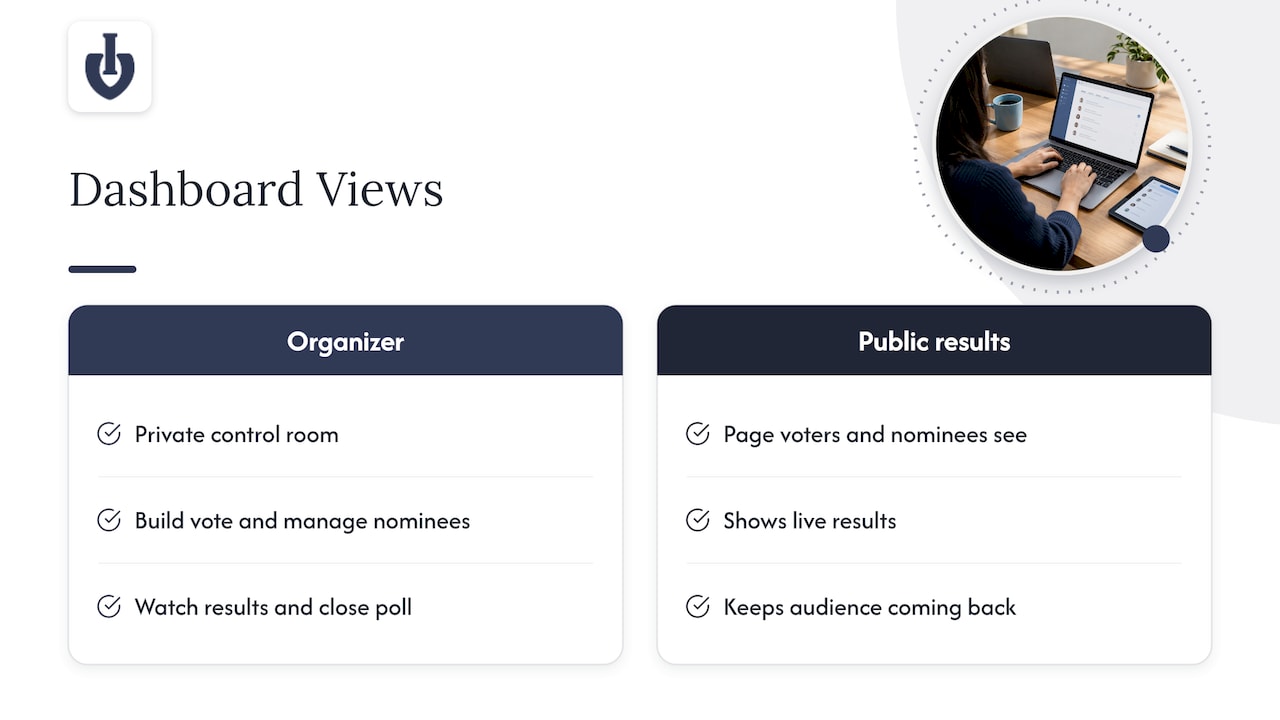
    The first is the organizer dashboard. It is the private control room where you build the vote, manage nominees, watch results and close the poll. The second is the public results view, the page voters and nominees see. Many events use both: a private panel for the team and a live public page that keeps the audience coming back.

    Search results for this topic are full of government election dashboards that map turnout and registration data. Those are built for officials and analysts. An awards or contest dashboard has a different job: it runs a single event, usually for a few weeks, with a small team and an audience that wants to see who is winning. The features below are written for that job.
    What a voting dashboard actually does

    Core features every voting dashboard should have

    Live vote counts and standings

    This is the feature people picture first. You should see the current count for every nominee in every category without refreshing a spreadsheet or waiting for an export. For a fan award, the same live standings often appear on a public page, which turns the vote into content: nominees share their position, fans push to close a gap, and the audience checks back.

    Izivote’s live result dashboards work this way. Organizers watch votes as they come in, and a public results view can show the standings to everyone. You can see how a results page looks on a sample vote with results and nominees.

    Multi-category support

    Most awards are not one question. You may have Best Newcomer, Best Venue and Fan Favorite in the same event. The dashboard should let you manage all categories in one place, with separate totals for each, instead of forcing you to launch a new poll for every award. Check that you can switch between categories quickly and compare them.

    Nominee profiles and media

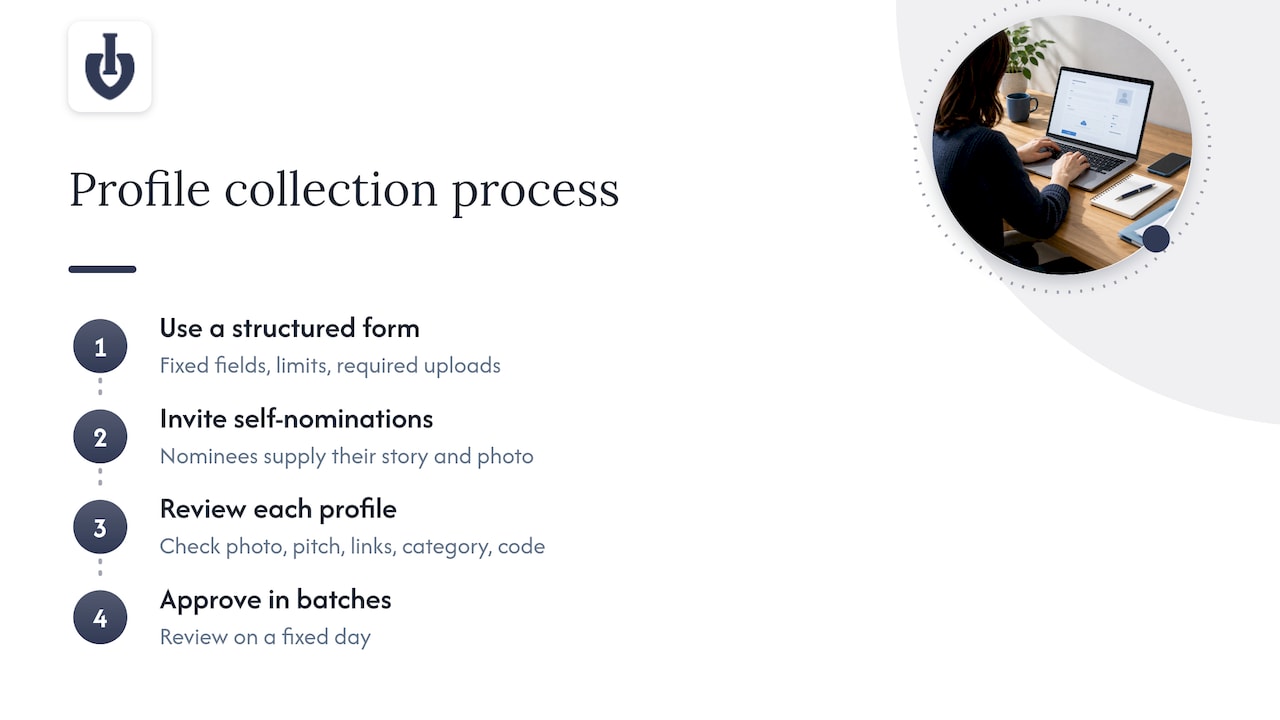
    Voters decide faster, and more fairly, when each nominee has a photo and a short description. The dashboard is where you add, edit and reorder those profiles. Izivote supports nominee photos and profiles, and it also supports self-nomination, which lets nominees put themselves forward so you are not collecting entries by email.

    Scheduling and automatic closing

    Disputes often start with the end time: “I voted at 11:58, why didn’t it count?” A dashboard with automatic vote closing removes that argument. You set the end time, the vote closes on its own and the final results are fixed. Izivote includes automatic closing, so nobody has to be online at midnight to stop the count.

    Embedding and sharing

    Votes happen where your audience already is: your website, a ticketing page, a school portal, a social bio. Look for a voting page you can embed on your own site, plus a clean public link for sharing. Izivote offers voting page embedding, so the vote can live on your site instead of sending people somewhere unfamiliar.

    Tracking votes and participation in real time

    A live count answers “who is winning?” Participation tracking answers a better question: “is this vote healthy?”

    What to watch while the vote runs:

    1. Total votes over time. A steady curve usually means organic interest. A sudden spike at 3 a.m. deserves a look.
    2. Votes per nominee. If one nominee jumps far ahead in an hour, find out why. It may be a good social post or a problem.
    3. Votes per category. Low participation in one category tells you where to promote.
    4. Traffic and conversion. If many people open the vote page but few vote, the page is too complicated or the voting method asks for too much.

    Real-time analytics let you act during the vote, not after it. If a category is lagging, you can send a reminder. If a nominee is surging, you can congratulate them publicly and use it for promotion. Our guide to real-time vote monitoring for events and awards goes deeper on what to look at and when.

    The same idea shows up in other live-scoring tools. A live digital scorecards and leaderboards setup updates standings the moment a score is entered, and audiences now expect voting results to feel just as immediate.

    Voting modes: the settings that shape your results

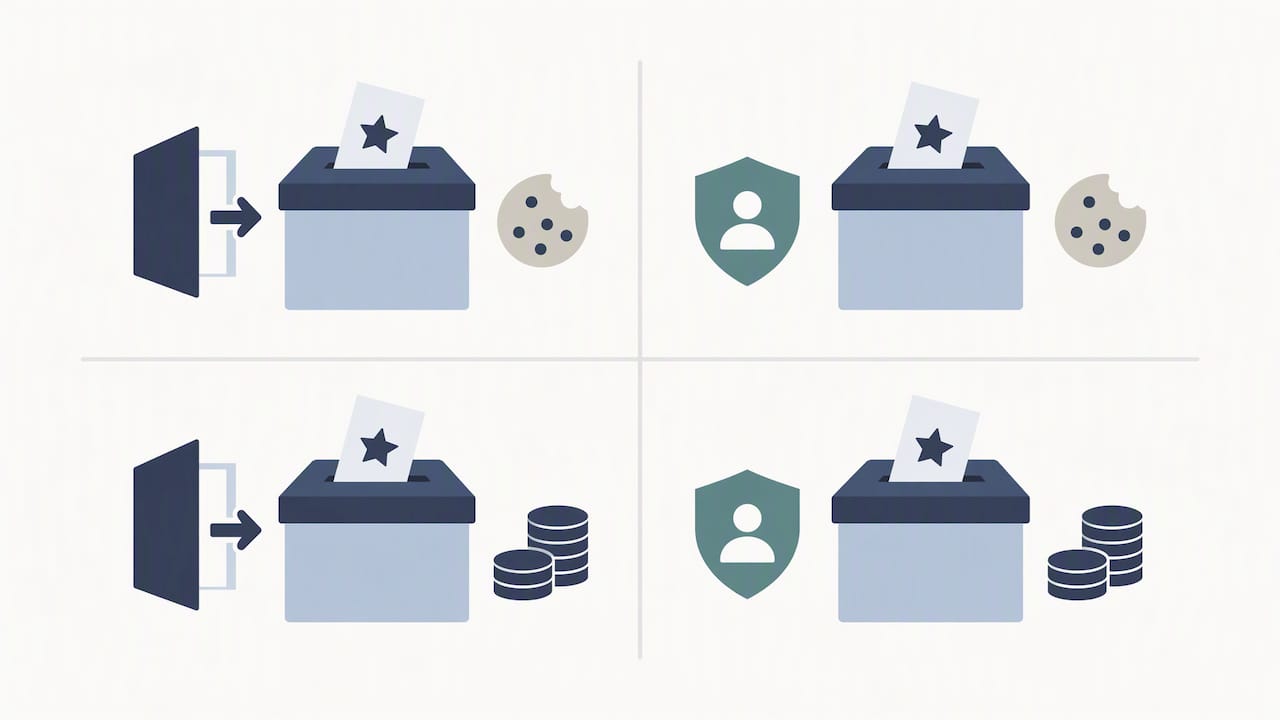
    The dashboard is also where you decide who can vote and how often. This choice affects the credibility of your results more than any chart does. Izivote offers four modes: open, paid, login-based and identity-based. The full detail is in the voting types and voter identity help page.

    ModeBest forWhat to consider
    Open votingCasual community polls, quick fan favoritesEasiest for voters, but gives the least protection against repeat voting
    Paid votingFundraisers, fan awards that raise moneyEach vote has a cost, so you need payment handling and clear fee rules
    Login-based votingClubs, schools, member groupsTies votes to an account; see our guide to login-based voting
    Identity-based votingEvents where one person, one vote mattersVerifies the voter, for example by email; read about email verification voting

    A dashboard that lets you change modes per vote, rather than locking you into one approach, saves you from outgrowing the tool. A school election and a public fan award have different needs, and the same account should handle both.

    Trust and transparency features

    People accept a result they can understand. They reject one that feels like a black box. The dashboard should support trust in two directions.

    Research on election verification describes this as end-to-end verifiability: voters should be able to check that their selection was recorded correctly, and the public should be able to check that recorded votes were included correctly in the tally. That framework was written for formal elections, and an awards vote does not need that level of cryptography. The principle still translates into practical questions for any contest:

    • Can a voter see confirmation that their vote was recorded?
    • Can the audience see the standings, so the final result does not come as a surprise?
    • Can you explain, in one sentence, how duplicate votes are limited?
    • Is the tally something the organizer cannot quietly adjust?

    Public live results are a simple transparency tool. When everyone watches the same numbers rise, there is less room for suspicion at the end. Identity-based and login-based modes add another layer, because each vote is connected to a verified person or account. Izivote is designed around clear, secure and transparent voting, and its voting modes give you the controls to match the level of protection to your event.

    Features that make voting easy for participants

    A dashboard is only as good as the voting page it controls. If voters struggle, your numbers will be small and your results will be thin. Check these participant-side features, which you configure from the dashboard:

    • Mobile-friendly pages. Most fans vote from a phone, often after seeing a social post.
    • Few clicks. Pick a nominee, confirm, done. Every extra step costs votes.
    • Clear visual nominees. Photos and short profiles help people choose without leaving the page.
    • Obvious rules. Show how many votes each person gets and when voting closes.
    • Familiar placement. An embedded vote on your own site feels safer than an unfamiliar link.

    If you run a school election, the needs shift toward simplicity and verification. Our page on online voting for student elections shows how those features apply in a school setting.

    Paid voting: what the dashboard must handle

    Paid voting turns an awards vote into a fundraiser, and it changes what you need from the dashboard. You are no longer just counting votes; you are handling money and expectations.

    Look for:

    • Built-in payment handling, so you are not collecting cash or bank transfers by hand.
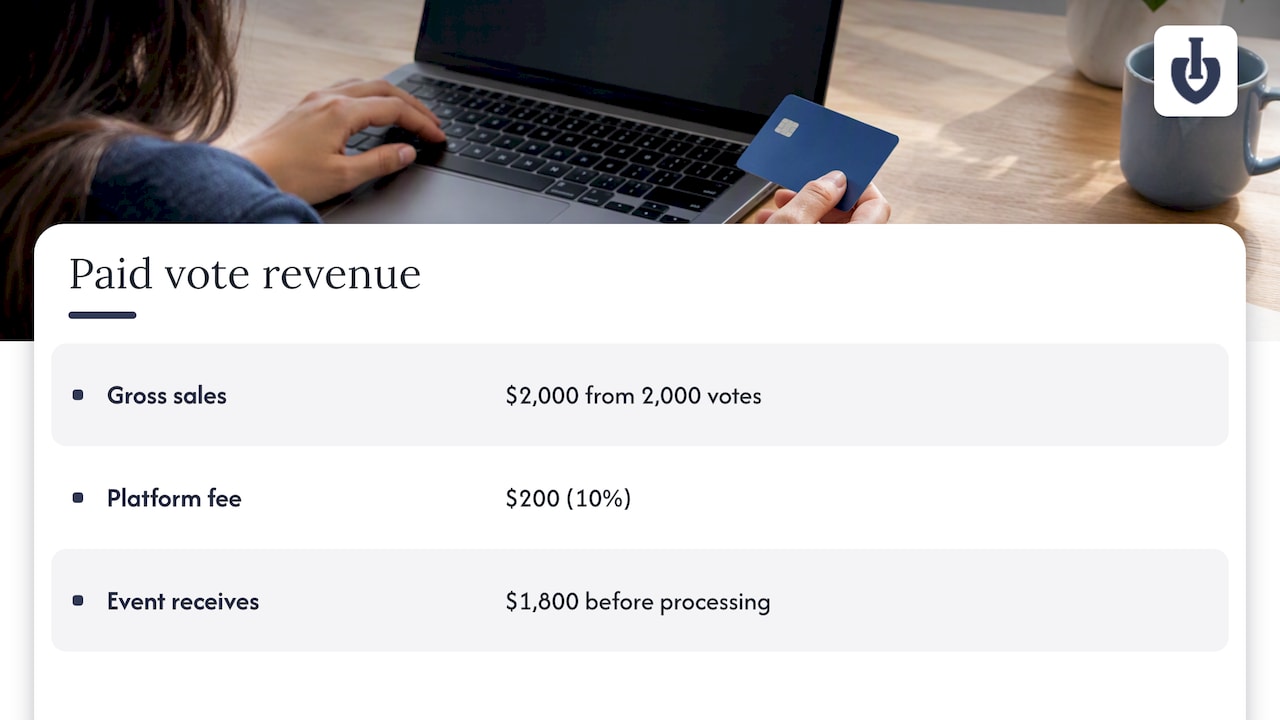
    • A clear statement of the platform fee. Izivote’s fee on paid voting is 10% per vote, as listed on the pricing page.
    • Visibility of votes bought alongside votes cast, so you can reconcile money with results.
    • The ability to run free and paid rounds, or separate categories, if you want a mix.

    Fairness is the other half. Paid votes can feel unfair to nominees with smaller audiences unless the rules are stated up front. Many organizers pair paid votes with a free daily vote, or cap paid voting to a defined window. Two guides cover this in detail: open voting versus paid voting and how to monetize fan voting, including sponsors and fairness. For the product itself, see our paid voting platform.

    Reports, filters and results you will want

    When the vote closes, you need to turn numbers into decisions and announcements. Whatever tool you use, think about what you will do with the data:

    • Winner announcement. You need final standings per category, with a clear tie-break rule decided in advance.
    • Sponsor reporting. Sponsors want to know how many people took part and how long the vote ran.
    • Nominee feedback. Nominees often ask how they did; a results page answers that.
    • Next year’s planning. Compare categories by participation to decide what to keep, rename or drop.

    Before you commit to any platform, ask yourself which of these outputs you actually need and confirm the tool supports them. Izivote’s real-time analytics and user-friendly dashboard are built so organizers can monitor votes throughout and see the standings at any point in the event.

    How to choose a voting dashboard

    Use this checklist to compare options by type: form builders, judged-only award software, mobile app-based voting and purpose-built public voting platforms.

    1. Is it built for public voting? A general form tool collects answers. It does not show live standings, handle nominee profiles or manage paid votes.
    2. How fast can you launch? Self-serve setup means you can start the same day, not after a sales call.
    3. Which voting modes are available? Make sure open, login, identity and paid options match your event.
    4. Can it live on your site? Embedding keeps your audience in your own space.
    5. Does it close automatically? This protects the integrity of the final result.
    6. What does it cost? Count subscription fees plus any per-vote fee, and check that the free tier is enough for a trial run.
    7. Can voters use it easily on a phone? Test the voter journey yourself, start to finish.

    Our positioning is simple: Izivote is purpose-built for public audience awards and events, with instant self-serve setup, embeddable voting, visual nominee profiles and live public results. It is designed to be easier to launch and more transparent than form builders, judged-only solutions or app-based alternatives. You can see how organizers use it on our customers page and browse the full features overview.

    Matching features to your event

    Different events lean on different parts of the dashboard.

    Start with a free vote

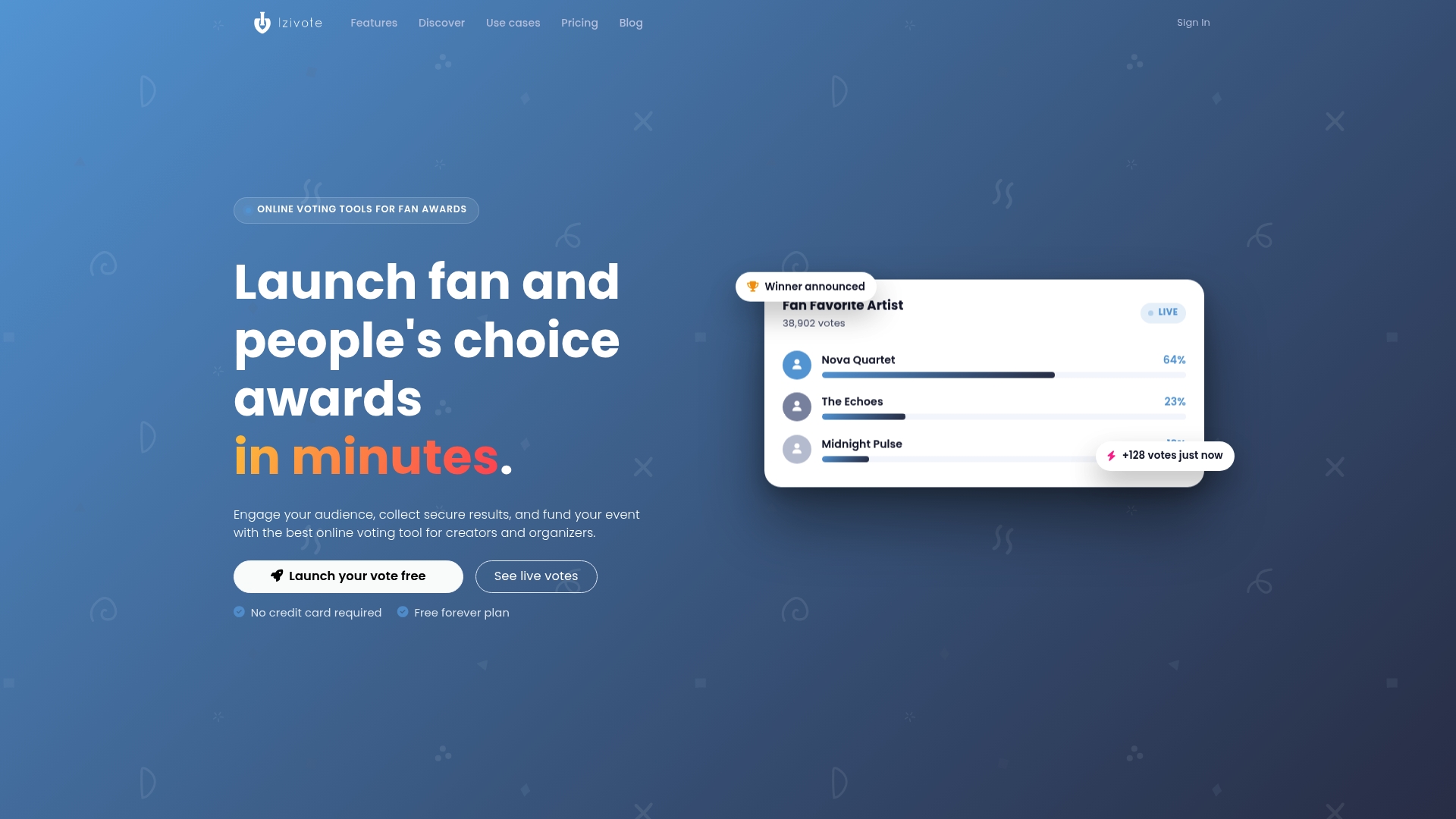
    If you want to see a voting dashboard working before you decide, Izivote has a Free plan for small events. When you need more, Pro costs $6 per month or $60 per year, and Premium costs $14 per month or $140 per year. Paid voting carries a 10% platform fee per vote. You can build your first vote in minutes: add categories, upload nominee photos, choose a voting mode and share the link.
    Izivote

    Ready to try it? Create a fan award or online vote for free, or compare plans on the pricing page.

    FAQ

    What is the most important voting dashboard feature?

    Live visibility of votes per nominee and category is the foundation, because every other decision depends on it. Right behind it is control over voting modes, so you can limit repeat voting and match the vote to your event. Without both, you have a counter, not a dashboard.

    Can I run a voting dashboard on my own website?

    Yes, if the platform supports embedding. Izivote lets you embed the voting page on your own site, so voters stay in your environment while the dashboard tracks the results behind the scenes.

    How do I stop people from voting many times?

    Choose a voting mode that fits the stakes. Open voting is easiest for voters but gives the least protection. Login-based and identity-based modes tie votes to an account or verified person. Whichever you choose, state the rules clearly on the voting page.

    Is a free voting dashboard enough for a small event?

    Often, yes. Izivote has a Free plan aimed at small events, and you can move to Pro or Premium later if you need more. Check the pricing page for what each plan includes.

    Sources

    Recommended

  • Award Show Live Results: How to Run Them Right

    Award Show Live Results: How to Run Them Right

    Live results at an award show come from three things working together: a fixed voting window, a counting system that updates as votes arrive, and a verification step before anyone announces a winner. Big broadcasts keep a live leaderboard moving, then validate the final tally before the reveal. You can run the same model for a fan award, a pageant or a community event with an online voting platform, a results screen and a clear rulebook.

    This guide explains how the big shows do it, what you can borrow at any size, and how to set up your own live results without losing the audience’s trust.

    Izivote
    Bring Live Results to Your Award
    Manage fan and people’s choice voting with real-time analytics and a dashboard to monitor votes.

    Key Takeaways

    • Live results are a display choice. You can show a running leaderboard, show nothing until the reveal, or share a temporary ranking and confirm the final tally after voting closes.
    • Set the voting window, the rules and the voter identity method in writing before voting opens.
    • Protect the count with identity checks, vote limits and monitoring. Then verify before you announce.
    • Leave time between the close of voting and the reveal. Live programming needs that gap for the final tally.
    • A platform with real-time dashboards, embeddable voting pages and automatic vote closing removes most of the manual work.

    Table of Contents

    What “live results” means at an award show

    People search for “award show live results” for two different reasons. Some want the winners as they are announced on television. Others, and this guide is for them, run an award and want to show results while the audience votes.

    For organizers, live results usually means one of three formats:

    1. Running leaderboard. Vote totals update on a public page or a screen as votes come in.
    2. Hidden count, live reveal. Votes are collected and counted in the background. Nobody sees totals until the announcement.
    3. Hybrid. A temporary ranking or a top-three view is shown during voting, and the confirmed result follows once voting closes and the tally is checked.

    Each format changes how people behave. A running leaderboard drives excitement and sharing, because nominees and their fans can watch progress and push for more votes. A hidden count protects the surprise and cuts down on last-minute vote swings. The hybrid keeps energy high without promising a final result before it is verified.

    Choose the format first. Everything else, from the technology to the script on stage, follows from it.

    How the big broadcasts handle live voting

    Television shows are a useful model because they deal with huge volumes, hard deadlines and public scrutiny.

    Eurovision: instant recording, careful validation

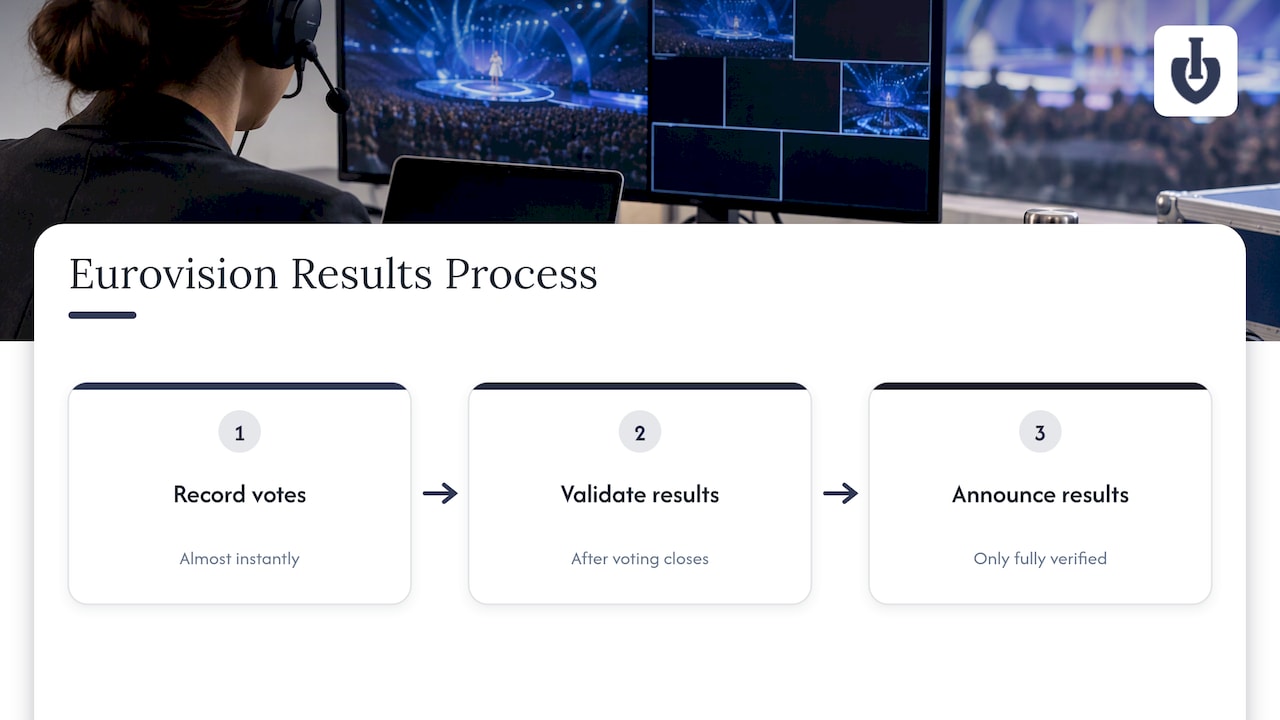
    Eurovision says its votes are transmitted and recorded almost instantly as they are cast, with real-time monitoring of incoming traffic. Final validation and reconciliation happen right after voting closes, and an on-site team makes sure only fully verified results are displayed and announced during the broadcast.

    The lesson for any organizer is the split between two jobs. Collecting and counting votes happens continuously. Declaring a winner happens only after validation.

    Eurovision: instant recording, careful validation

    America’s Got Talent: a hard cutoff and an on-the-spot count

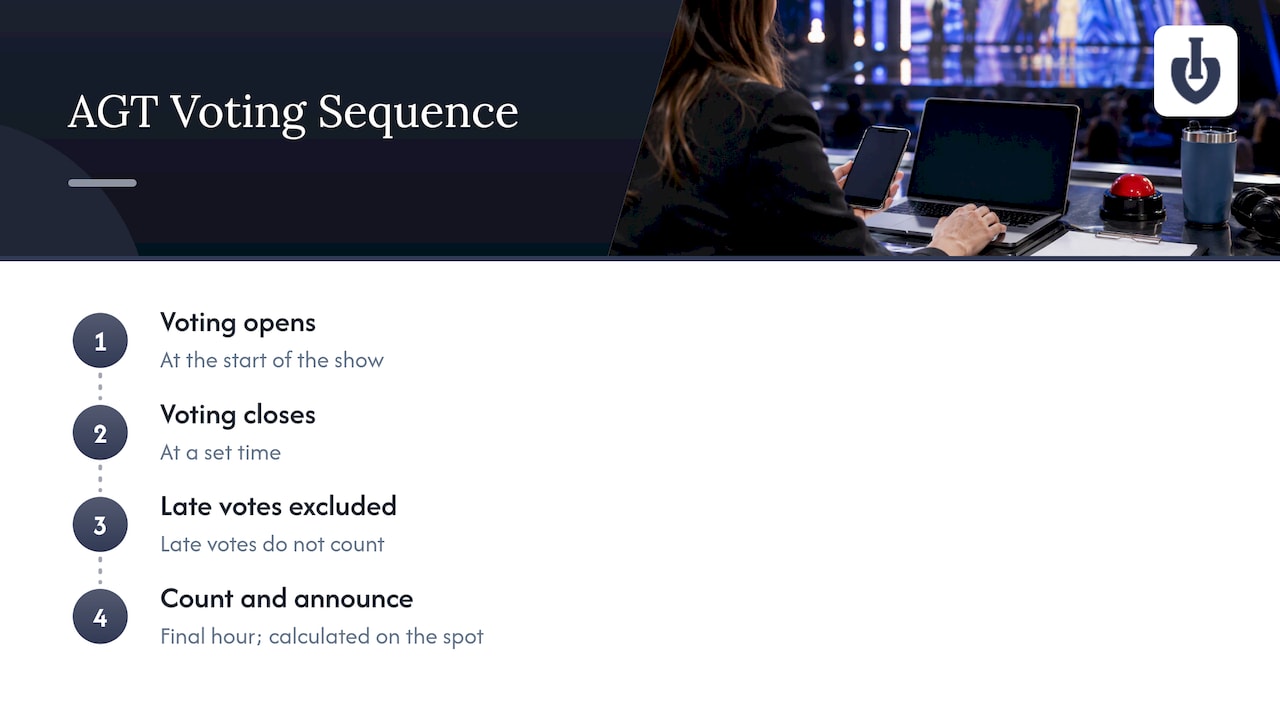
    NBC’s guide to the live episode explains that voting opens at the start of the show and closes at a set time, and that the final hour is a results show where votes are calculated on the spot and announced right away. Viewers have to vote early because late votes do not count.

    For your own event, this is the case for a visible countdown and automatic closing. A voting window that ends at a defined moment is easier to defend than one that someone closes by hand.

    America's Got Talent: a hard cutoff and an on-the-spot count

    Sky Italia’s X Factor: sharing a temporary ranking

    Sky Italia’s report on its voting platform describes near real-time results sharing introduced in 2022, where the host shares a temporary ranking while voting is still in progress. It also notes that closed sessions are checked live by a notary who documents the results, and that the platform reached a peak of 400,000 votes per minute.

    That is the hybrid format at broadcast scale: a ranking you can talk about on stage, plus a documented check when voting ends.

    Choose your results format and rules before voting opens

    The most common live-results problem is not technical. It is a rule that nobody wrote down. Before you launch, settle these points and publish them where voters can see them.

    The BBC’s audience interactivity guidance says organizers should consider whether a public vote is appropriate, choose a method that suits the target audience, make sure rules and terms are clear, plan with adequate resources, and agree a contingency plan before the vote runs. Referendum Lab’s guide to online voting adds that the building blocks are a defined ballot, a fixed voting window and an automatic count with an audit trail.

    Turn that into a short rulebook:

    DecisionWhat to fix in writing
    Voting windowExact opening and closing time, with time zone
    Who can voteAnyone, logged-in users, or verified identities
    Votes per personOne per category, one per day, or unlimited if paid
    Paid votesWhether they exist, their price, and whether they affect the ranking
    What is shown liveFull leaderboard, top few, percentages only, or nothing
    Tie ruleHow a tie is resolved and who decides
    Final announcementWhen and how winners are confirmed
    ContingencyWhat happens if the site goes down or a result is challenged

    The tie rule and the contingency line are the two most often skipped. Write both now, because you will not want to invent them under pressure.

    Choose a voting method that matches your audience

    Izivote supports several voting modes, so you can match the method to the event. Our voting types guide covers how each one works.

    • Open voting. Anyone with the link can vote. It is fast and low friction, which suits casual community contests and school events. It also needs the most monitoring.
    • Login-based voting. Voters sign in first, which ties each vote to an account. Read how login-based voting works before you choose it.
    • Identity-based voting. Voters confirm who they are, for example by email. Our guide to email verification voting explains when this fits.
    • Paid voting. Voters buy votes, which turns the contest into a fundraiser. See the comparison of open and paid voting for how each affects fairness.

    A simple way to decide: the higher the stakes and the more money involved, the stronger the identity check should be. A office photo contest can run open. A pageant with a cash prize or a charity gala with ticketed votes should not.

    Show live results without losing trust

    A live display can create excitement or doubt. What decides which is mostly how you present it.

    Label what the audience is seeing

    If a leaderboard moves while voting is open, say it is provisional. A line such as “Current standings, final results confirmed after voting closes” sets the expectation. Sky Italia’s practice of sharing a temporary ranking while voting is still in progress works because the host frames it that way.

    Pick the right display for the room

    • On a big screen at a live event: show the top three or top five per category with large nominee photos, not a full table. Audiences read a screen from a distance.
    • On a public results page: show every nominee with a photo, name and vote count or share, so entrants can point their followers to it.
    • On social channels: post screenshots at set intervals, such as at the halfway point and one hour before close, instead of constant updates.

    Live scoreboards change how participants feel about an event. A write-up on why live results change the participant experience makes the case for tournaments, and the same logic applies to fan awards. Pairing a visible leaderboard with good audience engagement strategies keeps people returning to the page while voting is open.

    Decide what you hide

    If the reveal is part of the show, hide the final hours. A common approach is to freeze the public display shortly before close while the count continues behind the scenes. Announce the freeze in your rules, so nobody reads it as manipulation.

    Keep the count clean: duplicates, fraud and monitoring

    A live leaderboard attracts attention, and attention attracts gaming. Eurovision describes its integrity approach as a combination of telecom controls, platform safeguards, real-time monitoring and post-vote verification, so only valid votes are counted. You can use the same layers at your own scale.

    1. Limit what one person can do. Decide how many votes each voter gets, and enforce it through accounts or verified identities, not only a browser cookie.
    2. Watch the live feed for spikes. A nominee who jumps by thousands of votes in minutes deserves a look. Our guide to real-time vote monitoring shows what to watch for during an event.
    3. Use the strongest identity method you can afford in friction. Each extra step reduces abuse and also reduces turnout, so match it to the stakes.
    4. Review flagged votes before the reveal. Keep a short list of anomalies and decide ahead of time what you will do with them.
    5. Keep a record. An export of votes by time and category lets you answer a challenge with facts.

    Security researchers also warn that polls, whether authenticated or anonymous, can be manipulated if validation is weak, which is why oversight matters more than a polished interface.

    Verify the tally and announce winners

    The reveal is where trust is won or lost. The big awards share a pattern: a defined count, an independent check and tight control over who knows the result.

    • The Academy says Oscars voting is by secret online ballot tabulated by an independent accounting firm, and winners are announced live on the broadcast.
    • The Tony Awards rules say online balloting runs in the weeks before the ceremony and that strict precautions keep the winners’ names known only to a limited number of accounting firm representatives until the telecast.
    • Eurovision describes an audit step after voting closes to confirm compliance with the rules before results enter the official tally.
    • The BBC says votes must be run in a robust, fair and accurate manner, and that enough time must be allowed between closing and announcing so votes can be received, verified and collated, especially in live programming.

    For a fan award, you do not need an accounting firm. You do need a repeatable routine:

    1. Voting closes automatically at the published time.
    2. One named person exports the final totals and checks them against the live dashboard.
    3. Flagged or invalid votes are handled by the rule you wrote earlier.
    4. A second person confirms the winners before they go into the script or the envelope.
    5. Winners are announced, and the results page is updated to show the confirmed standings.

    Allow at least a short buffer between close and reveal. Even a few minutes lets you complete steps two to four without rushing.

    A run-of-show timeline for a live award

    This timeline works for a gala, a stream or a school showcase.

    WhenWhat happens
    Weeks beforePublish rules, categories and nominee profiles. Open the voting page.
    During the campaignShare nominee links. Check the dashboard daily for unusual activity.
    Day of the eventRemind voters of the closing time. Test the results screen.
    During the showShow a provisional ranking if your rules allow it. Take final votes up to the cutoff.
    CloseVoting ends automatically. Freeze the display if you planned a reveal.
    VerificationExport totals, check flags, confirm winners with a second person.
    AnnouncementReveal winners and publish the confirmed results page.

    Privacy, accessibility and payments to plan for

    A few practical points belong on your checklist before you collect votes from the public.

    • Privacy. If voters sign in or verify an email address, tell them what you collect and why, and link to your privacy notice from the voting page. Collect only what the voting method needs.
    • Accessibility. Make sure nominee names, photos with descriptive text, buttons and the results display can be used by people with different abilities. Check your screen colors for contrast, and do not rely on color alone to show who leads.
    • Payments. If you run paid voting, state the price per vote, what a vote does, and whether purchases are refundable, before the voter pays. On Izivote, paid voting carries a platform fee of 10% per vote, which is listed on our pricing page. Our article on the 10% fee, sponsors and fairness explains how organizers handle it.

    If your event involves minors, regulated fundraising or a prize with legal conditions, check the rules that apply where you operate with a local attorney or your fundraising regulator before launch. Rules differ by country and state.

    Run live results with Izivote

    Izivote is built for public audience awards, so the pieces in this guide are part of the platform: multi-category voting pages, nominee photos and profiles, several voting modes, automatic vote closing, and a dashboard with real-time analytics for organizers. You can embed the voting page on your own site and use paid voting to raise funds for the event.

    Izivote

    The Free plan lets you set up a small event without a published fee. The Pro plan is $6 per month or $60 per year, and Premium is $14 per month or $140 per year, as listed on the pricing page. Ready to build your first ballot? Create a fan award or online vote, or see how the platform handles people’s choice awards and live event voting.

    Pre-launch checklist

    Go through this list the week before voting opens.

    • Rules published, including the closing time, vote limits, tie rule and what the live display shows.
    • Voting method chosen and tested on a phone and a laptop.
    • Nominee photos and short profiles uploaded for every category.
    • Results display tested on the actual screen or stream you will use.
    • Two named people assigned: one to monitor the dashboard, one to confirm the final tally.
    • Contingency plan agreed: what you do if the connection drops, a result is disputed or a fraud pattern appears.
    • Announcement script written with a line that separates provisional standings from confirmed results.

    FAQ

    How do award shows show live results?

    Most shows count votes continuously and display a provisional ranking or nothing at all until the reveal. When voting closes, the totals are validated and checked before the winners are announced. Eurovision, for example, validates results right after voting closes and displays only verified ones.

    Should I show a live leaderboard during voting?

    Show one if you want excitement and sharing, and hide it if the surprise matters more. A hybrid works well: show standings while voting is open, label them provisional, and freeze the display shortly before close. Whatever you choose, put it in the rules.

    How do I stop people from voting more than once?

    Use a voting method that matches the stakes: login-based or identity-based voting for important awards, and open voting only for casual contests. Add vote limits, watch the dashboard for spikes and review flagged votes before you announce winners.

    How long should I wait between closing the vote and announcing winners?

    Long enough to export the totals, review flagged votes and have a second person confirm the result. The BBC’s guidance requires enough time between closing and announcing for votes to be received, verified and collated, particularly in live programming. For most fan awards, a few minutes is the minimum.

    Sources

    Recommended

  • How to Collect Nominations Online: A Step-by-Step Guide

    How to Collect Nominations Online: A Step-by-Step Guide

    To collect nominations online, publish one clear entry page, ask only for the details you need to judge a nominee, keep the window open for about two weeks, and review every entry before anything goes to a vote. Whether you run a fan award, a school election or a community contest, the same five decisions decide how clean your shortlist is: the timeline, the form, the anti-duplicate rules, the review step and the handoff to voting.

    This guide walks through each one with examples from real award and election programs, then shows how nominations feed a public vote.

    Izivote
    Turn nominations into a trusted vote
    Izivote helps organizers move from online nominations to voting, with options including paid, login and identity-based voting.

    Get started

    Key Takeaways

    • Run nominations first and voting second. Open nominations early, keep them open for roughly two weeks, and start voting only after they close.
    • Ask for the minimum: nominator, nominee, category and a short reason. Every extra required field costs you entries.
    • Cap duplicates and bots with one entry per person per category, verified email and a review step before publishing.
    • Clean the list before voting: check completeness, merge duplicates and get each nominee to confirm.
    • With Izivote you can allow self-nomination, show nominees with photos and profiles, and move straight into open, paid, login or identity-based voting.

    Table of Contents

    Nominations and voting are two different jobs

    A nomination answers “who should be in the running?” A vote answers “who wins?” Mixing them is the most common reason award pages feel chaotic: voters see half-checked names, nominees pile up under spelling variations, and the winner is questioned afterward.

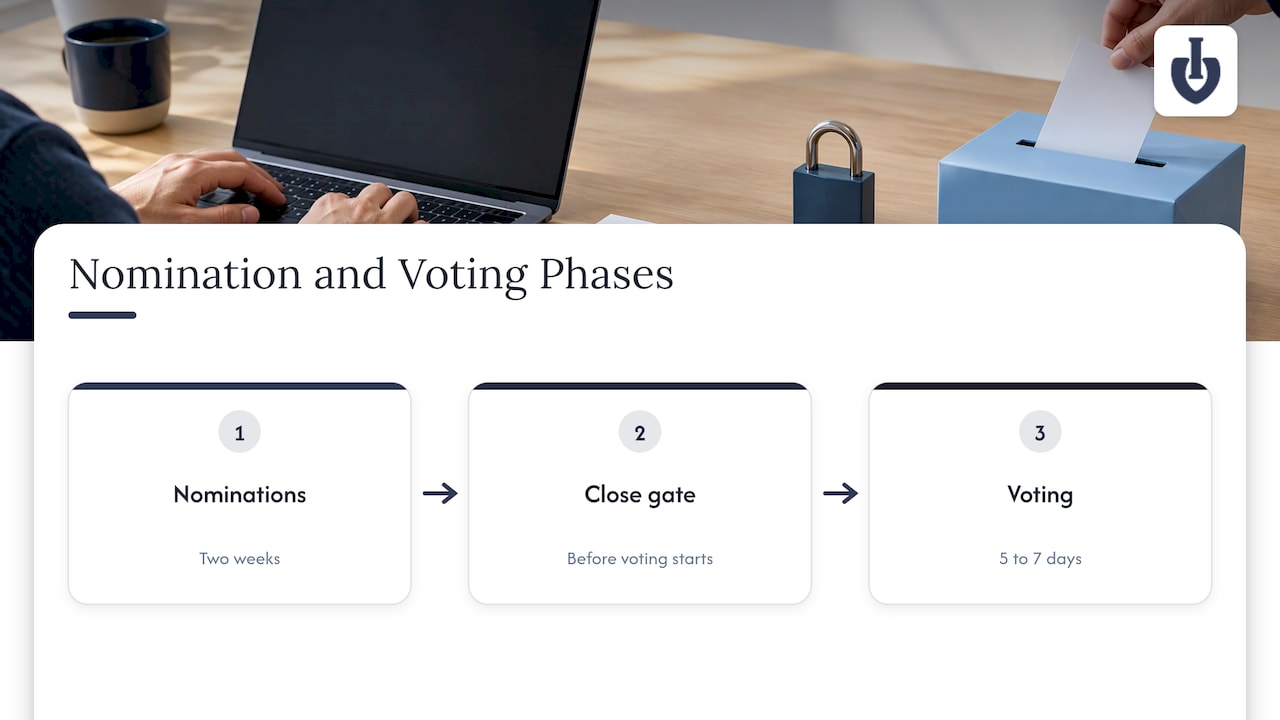
    Treat them as two phases with a gate between them. Student election guidance from Cardiff Students states that the voting period should start after the nominations period closes, not at the same time, and suggests leaving nominations open for two weeks and keeping voting open for 5 to 7 days. That is written for campus elections, but the logic carries over to fan awards: a short, focused nomination window, then a short, focused vote.

    Timeline separating nominations from voting

    The Jenkins project’s board election walkthrough shows the same sequence in a different setting: an announcement, a nominations phase, a registration phase, then voting and results, each with its own dates.

    Step 1: Set the timeline before you build anything

    Write down five dates before you touch a form:

    1. Announcement: when the public hears about the award.
    2. Nominations open and close.
    3. Review and nominee confirmation.
    4. Voting open and close.
    5. Results announcement.

    A workable pattern for a community or fan award looks like this:

    PhaseTypical lengthWhat happens
    NominationsAbout 2 weeksPublic or members submit names and reasons
    Review3 to 5 daysYou check, merge and confirm nominees
    Voting5 to 7 daysThe public votes on the shortlist
    ResultsSame day voting closesWinners announced

    These lengths follow the Cardiff Students guidance above; shrink or stretch them to fit your audience. Give the review phase real time. If you skip it, the cleanup lands in the middle of voting, when it is hardest to fix.

    Don’t copy a calendar from another event. Pick dates that fit your own audience’s rhythm, and announce them everywhere you promote the award so nobody is surprised when the window closes.

    Step 2: Decide who can nominate

    There are three common models, and the choice shapes your form:

    • Open public nominations. Anyone can suggest a name. Best for fan awards and people’s choice awards where reach matters. Expect the most duplicates.
    • Member or login-only nominations. Only people with an account or membership can nominate. Best for associations, schools and employee programs.
    • Self-nomination. Nominees put themselves forward. Best for creators, local businesses, pageants and contests where nominees want the exposure.

    You can mix them. A pageant might allow self-nomination for contestants, while a “best local business” award might let the public nominate and then ask each business to confirm. Izivote supports self-nomination, so contestants can submit their own entries, and you can pair it with the voting mode that matches your audience.

    Step 3: Build a short, clear nomination form

    A nomination form should feel like a two-minute task. Real programs show a wide range, though, and the right length depends on how formal the award is.

    At the heavy end, the UK government’s page on nominating someone for an honour or award asks for the nominee’s details, a detailed description of why they are being nominated, relevant work or volunteering, and two supporting letters. The Wisconsin Library Association’s Library of the Year form asks for nominator and nominee information, three letters of support and five narrative answers of 250 words or fewer. The 2025 UN SDG Action Awards changemaker guidance asks for a bio of up to 200 words, a headshot of at least 1000 by 1000 pixels and short answers on impact and scalability.

    Those are juried honors. For a fan or people’s choice award, where the public decides the winner, you need far less.

    The core fields

    • Nominator name and email (so you can verify and follow up).
    • Nominee name, spelled as it should appear on the ballot.
    • Category.
    • One to three sentences on why they deserve it.
    • Nominee contact, if the nominator knows it, so you can ask for acceptance.

    Fields worth adding for a ballot

    • A photo upload, since voters respond to faces and logos.
    • A short bio or description for the nominee profile.
    • A link to the nominee’s website or social page.

    If you use narrative fields, state the word limit directly above the box. LegalClarity’s nomination form guidance suggests a limit around 500 words for formal programs and limiting uploads to common formats such as PDF or DOCX with a sensible size cap. For a public award, 50 to 100 words is plenty.

    One more field matters when judges or committees are involved: a conflict-of-interest question. The same guidance recommends asking nominators to disclose family ties, shared financial interests or overlapping memberships with the nominee. For a pure fan vote you can skip it. For an industry award with a panel, it protects your credibility.

    Write the form like a person

    Use plain labels (“Who are you nominating?”), show an example under the category field, and tell people what happens next: “We’ll review nominations, then open voting on the shortlist.” A short confirmation message after submission reduces repeat entries from people who weren’t sure it went through.

    Step 4: Make it work on a phone

    Most people will nominate from a phone, usually after seeing your post on social media. A form that needs pinching and zooming loses them.

    Government design guidance for mobile services recommends touch targets of at least 48 by 48 pixels, with space between tappable elements and the main action placed in the lower part of the screen where a thumb reaches it. Apply that to your submit button and dropdowns.

    A few practical checks:

    • One column, no side-by-side fields.
    • Large submit button, fixed label like “Submit nomination”.
    • Photo upload that works from the camera roll.
    • Page loads quickly on mobile data.
    • Readable contrast and labels that stay visible while typing.

    If you also embed the page on your own site, why responsive design matters applies to your hosting page as well: the form can be perfect and still frustrate people if the page around it isn’t built for small screens. For the voting side, our guide on award voting page design covers layout, trust and mobile tips.

    Step 5: Stop duplicates and fake entries

    Open nominations attract two kinds of noise: honest duplicates (ten people nominate the same bakery, spelled four ways) and dishonest entries (a nominee’s friends or a script flooding the form).

    Real award rules show what organizers do about it. The SXMA Awards terms, for example, require verified accounts and allow one nomination per user per category, prohibit bots, scripts and VPN identity manipulation, and permit automated and manual fraud checks. The same notice explains what data they process for anti-fraud purposes, such as email, verification status and IP address, and how long raw voting data is kept.

    You can borrow the approach:

    1. Limit entries. One nomination per person per category is the simplest rule.
    2. Verify the nominator. Email confirmation or a login filters out most throwaway submissions.
    3. Add bot protection. A CAPTCHA or hidden honeypot field on the form is enough for most community awards.
    4. Review before publishing. Don’t let raw submissions go straight onto the public ballot.
    5. Tell people what you collect. Add a short note on the form saying what personal information you gather, why, who sees it and how long you keep it. LegalClarity’s form guidance recommends this, and it matters most when your audience includes people in regions with privacy laws. If you handle sensitive data, ask a qualified privacy lawyer which rules apply to you.

    For the voting phase, Izivote offers several voting types and voter identity options, and a walkthrough of login-based voting shows how to require an account when the stakes are higher.

    Step 6: Review, merge and confirm the shortlist

    Raw nominations are not a ballot. Before voting opens, do a pass that covers four things:

    • Completeness. Does each entry have a name, category and reason?
    • Eligibility. Does the nominee fit the category and your rules?
    • Duplicates. Merge variations of the same name into one entry, and count them as a signal of popularity.
    • Acceptance. Ask nominees to confirm they want to be listed.

    The CMX Community Industry Awards team describes a similar routine: they check that nominations are complete and fit the category, combine nominations for the same person or community, and require nominees to accept by the due date to advance to voting.

    A simple way to work: export submissions into a spreadsheet, add a status column (approved, merged, rejected, awaiting confirmation) and a column for the final display name. Keep a note of why anything was rejected in case someone asks.

    How many finalists per category?

    Five to ten is a comfortable range for a public ballot. Fewer than three feels uncompetitive, and a list of thirty makes people leave without voting. If you receive far more worthy names than that, use nomination counts to cut the list, or run a quick judge pass for the final slots.

    Step 7: Turn nominations into a public vote

    Once the shortlist is confirmed, build the ballot. This is where nominee photos and short profiles do their work: voters rarely read long descriptions, but they will notice a clear image and a one-line story.

    With Izivote, you set up categories, add nominees with photos and profiles, choose how people may vote, and publish a voting page you can share or embed on your own site. Voting can close automatically at the time you set, and you can watch results as they arrive through real-time vote monitoring.

    Choose the voting mode based on your goals:

    GoalFits best
    Maximum reach and quick participationOpen voting
    Fundraising for the event or a causePaid voting
    Members, students or staff onlyLogin-based voting
    Tighter control over who countsIdentity-based voting

    If you’re deciding between the first two, our comparison of open voting versus paid voting goes into the trade-offs, and the full process is laid out in how to run award show voting.

    Choosing a tool for the whole process

    Tools for this job fall into a few types, and each suits a different event.

    • General form builders. Good for collecting entries quickly, but voting and public results usually need a separate solution.
    • Judged awards-management software. Built for panels, scoring and corporate or association programs, often with heavier setup.
    • Dedicated audience voting platforms. Built for public votes, live results and nominee pages.

    Before choosing, ask:

    1. Can the public see nominee profiles with photos?
    2. Can you choose between open, paid, login and identity-based voting?
    3. Does it close voting automatically?
    4. Can you embed the page on your own site?
    5. Do you get live analytics, not only a final tally?
    6. Is there a free tier so you can set up a small event without a budget?

    For public fan and people’s choice awards, a dedicated voting platform keeps nominees and votes in one place. Our pages on people’s choice awards and fan awards show how that works for each kind of event.

    Run nominations and voting on Izivote

    Izivote is built for public audience awards: you can launch a voting page fast from the web, allow self-nomination, present nominees with photos and profiles, and choose open, paid, login or identity-based voting. Results show live on a dashboard, and voting can close automatically.

    Izivote

    The Free plan covers small events. Pro costs $6 per month or $60 per year, and Premium costs $14 per month or $140 per year. If you run paid voting, the platform fee is 10% per vote. See the pricing page for what each plan includes, or create a vote for free and set up your categories today.

    A sample two-week nomination plan

    Here is how the pieces fit for a local “best of the year” fan award:

    • Day 1: Announce the award, categories and dates on social media and your site. Open the form.
    • Days 2 to 7: Share a category spotlight each day. Post a running reminder that anyone can nominate.
    • Day 8: Midpoint push, tagging businesses or creators who already have several nominations.
    • Days 9 to 13: Final reminders. Tell nominees you will contact them for confirmation.
    • Day 14: Close the form.
    • Days 15 to 18: Review, merge duplicates, confirm nominees and gather photos and short bios.
    • Day 19: Publish the ballot and open voting for a week.

    When nominees are told early that they are in the running, many share the voting link with their own followers, which brings in voters you could not reach alone.

    Common mistakes to avoid

    • Opening voting while nominations are still coming in. Late entrants start behind, and people complain.
    • Asking for too much. Long forms suit juried honors, not public awards.
    • Skipping the review. Typos and duplicates make the ballot look careless.
    • No confirmation from nominees. You may list someone who doesn’t want to take part.
    • Unclear rules. Say who can nominate, how many times and what disqualifies an entry.

    FAQ

    How long should nominations stay open?

    Two weeks is a good default for most public awards and campus-style elections, based on student election guidance. Shorter windows can work for small communities that respond quickly. Longer ones tend to lose momentum.

    Can nominees nominate themselves?

    Yes, if you decide to allow it. Self-nomination suits creators, pageant contestants and small businesses, and Izivote supports it. Add an eligibility rule and a review step so you can check each entry before it appears on the ballot.

    What information should a nomination form ask for?

    At minimum: nominator name and email, nominee name, category and a short reason. Add a photo and short bio if the nominee will appear on a public ballot. Formal honors ask for much more, such as letters of support, but a fan award does not need them.

    How do I stop one person from nominating the same entry many times?

    Limit each person to one nomination per category, verify the nominator by email or login, and add basic bot protection to the form. Then merge variations of the same name during review, so repeat suggestions strengthen one entry instead of creating several.

    Can I move from nominations straight to voting?

    Yes. Once you have approved and confirmed the shortlist, add the finalists to your voting page with photos and profiles, choose the voting mode, and set the closing time. The voting phase should start after nominations close.

    Sources

    Recommended

  • How to Prevent Duplicate Votes in Online Contests and Awards

    How to Prevent Duplicate Votes in Online Contests and Awards

    You can’t stop every duplicate vote, but you can make cheating costly and visible. The practical answer is to choose a voting mode that matches the stakes of your contest (open, email-based, login-based or identity-based), set a clear one-vote rule, and audit the results before you announce a winner. The stronger the identity check, the harder it is to vote twice. The stricter the check, the fewer people will finish a ballot, so the goal is the right level of friction, not the maximum.

    This guide walks through each layer, what it catches, what it misses, and how to combine them for a fan award, a school election or a paid voting campaign.

    Izivote
    Make Every Vote More Trustworthy
    Izivote offers identity-based voting and real-time analytics to help organizers run more authentic, transparent fan and people’s choice awards.

    Explore Izivote

    Key Takeaways

    • No single control is perfect. Cookies can be cleared and IP addresses are shared, so combine a voter limit with identity checks and an after-the-fact audit.
    • One vote per email address is a useful speed bump, not a lock, because one person can own many addresses.
    • Match friction to stakes: open voting for casual polls, email or login for public awards, identity-based voting where the result carries real weight.
    • Written rules and a post-vote audit matter as much as software. Publish your one-vote rule and say you will remove invalid votes.
    • Plan for real life: shared devices, lost access and bad connections need a documented fix before voting opens.

    Table of Contents

    Why duplicate votes happen in the first place

    Most duplicate voting is not sophisticated. A fan refreshes the page and votes again. A nominee asks a group chat to vote from five phones. A relative uses three email addresses. Occasionally, someone writes a script. The motive is almost always the same: the contest is public, the prize or bragging rights matter, and voting is easy.

    That last point is the trade-off. One contest-administration firm warns that low barriers to entry can invite vote spamming and fraud. Yet every barrier you add also costs you legitimate voters. Good design starts by deciding how much fraud risk you can live with, then picking the lightest control that holds that line.

    A few questions help you decide:

    • What is at stake? A office-lunch poll and a regional “best of” award with sponsors are different problems.
    • Is money involved? Paid votes change the question from “one vote per person” to “how many votes may one person buy,” and the rules should say so.
    • Who are your voters? Students on school accounts are easy to identify. Anonymous fans on social media are not.
    • Will the result be challenged? If a loser could dispute the outcome, you want records you can defend.

    What each duplicate-vote control actually catches

    The vendor documentation for one content platform is blunt about the limits of browser-level methods: browser cookies can be deleted or bypassed with another browser, and IP addresses do not map one-to-one to people because networks are shared and addresses change. That is why the usual toolkit stacks several controls.

    ControlStopsMissesVoter friction
    Cookie or browser flagCasual refresh votingClearing cookies, private windows, a second browserNone
    IP address limitRepeat votes from one connectionShared networks (schools, offices, venues) get blocked unfairly; mobile and VPN users get around itNone
    One vote per emailRepeat voting with the same addressAnyone with several addressesLow
    Email verificationTypos and throwaway addresses that never receive the codePeople with several real inboxesLow to medium
    Login or account requiredAnonymous repeat votingFake accounts, unless sign-up is controlledMedium
    Identity-based votingMultiple votes by one verified personOnly as strong as the identity source you useMedium to high
    Post-vote auditPatterns that slip through (clusters, bursts)Nothing in real timeNone for voters

    Read the table from top to bottom as a ladder. Each step costs voters a little more effort and buys you a little more certainty.

    One vote per email: how far it gets you

    This is the most common request, and for good reason: it is simple to explain and simple to enforce. It is also not foolproof. One contest-administration guide notes that email limits can be abused with multiple addresses, and that fraud controls often add rate limiting and suspicious-pattern analysis on top.

    Three things make an email limit much stronger:

    1. Verify the address. Sending a code or link to the inbox proves the voter controls it. Our guide to how email verification voting works and when to use it covers the setup in detail.
    2. Watch for patterns. Dozens of addresses on the same domain, sequential names or votes arriving seconds apart are signs of a batch.
    3. State the rule. “One vote per person, one valid email per voter” gives you grounds to remove votes later without argument.

    For most public fan awards, verified email is the sensible default. It stops the lazy repeat voter, and it filters out the casual fraud that makes up the bulk of the problem.

    One vote per user: accounts and sign-in

    Requiring a login moves the question from “which browser” to “which account.” The platform documentation suggests that you allow only signed-in users to vote and store a flag against the account, and then make multiple accounts difficult, for instance by approving registrations manually or tying accounts to email addresses.

    That last clause is the catch. A login is only as trustworthy as the sign-up behind it. If anyone can create an account in ten seconds with any address, you have rebuilt the email problem with extra steps. Logins work best when:

    • accounts come from a closed group (students, members, employees, ticket holders);
    • the sign-in uses an identity the voter already has and does not casually duplicate; or
    • you cap new registrations during the voting window and review spikes.

    Izivote offers several voting modes, including open, paid, login and identity-based voting. The Voting Types and Voter Identity help page explains what each one asks of the voter, so you can match the mode to your event instead of defaulting to the strictest one.

    Identity-based voting and the privacy question

    When the stakes are high, such as a student council election, a membership vote or a ranking that determines a prize, you want to tie one vote to one verified person. This is where privacy comes in, and it deserves care.

    A vote record that links a named person to their choice can be a problem. The U.S. Department of Labor, writing about union elections, says ballot secrecy requires that no person can identify a member with their choice, and that avoiding a connection between identity and vote is one way to preserve it. A Canadian national standard for municipal online voting similarly requires protocols that protect vote secrecy so choices cannot be traced back to identifiable voters.

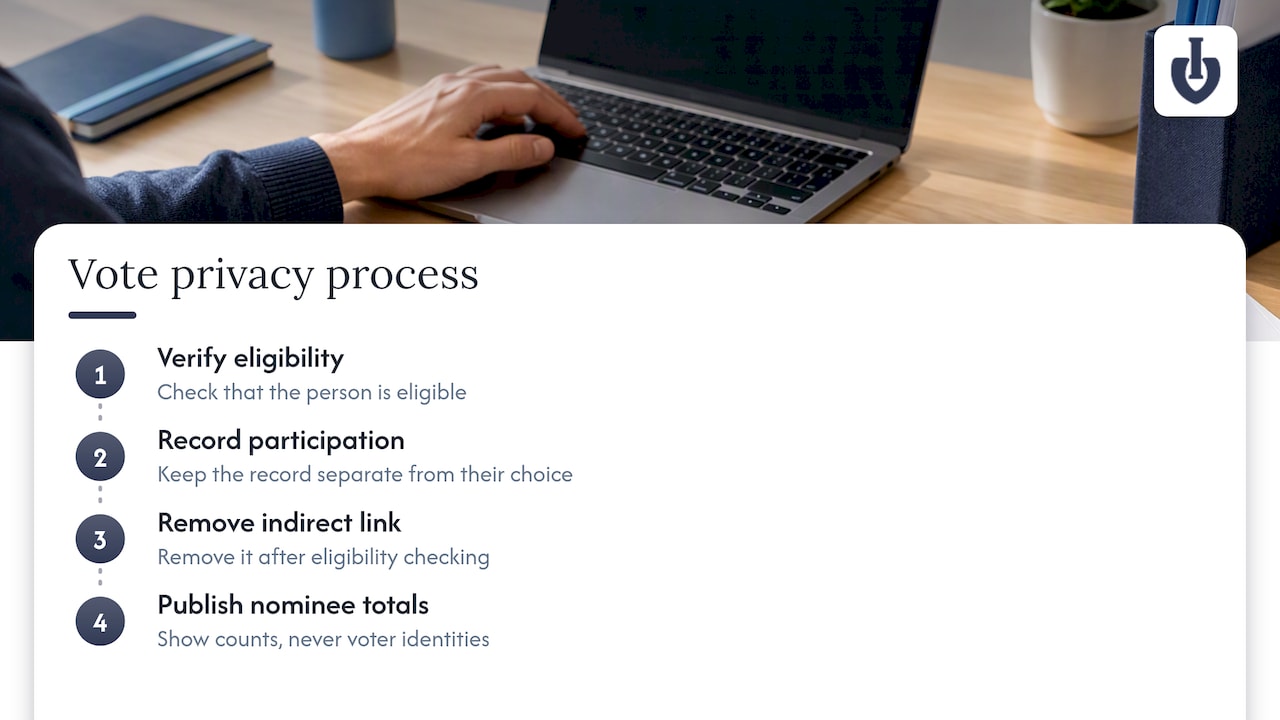
    Those are formal elections with legal requirements, and a fan award is not bound by them. But the principle carries over in a useful way: separate the question “has this person voted?” from the question “what did they choose?” Your system needs to know the first to enforce one vote. It rarely needs to expose the second to anyone.

    Researchers working on blockchain-style voting describe the same split, using off-chain voter authentication and cryptographic hashes to prevent duplicate voting without exposing personal information. You do not need a blockchain for a fan award, but the design lesson stands: prove eligibility in one place, record the choice in another, and limit who can see both.

    In practice, for an awards organizer:

    • Tell voters what you collect and why before they vote.
    • Collect the minimum: an email or a login is usually enough.
    • Keep the voter list away from public result pages.
    • Do not publish who voted for whom unless voters knew that up front.

    Izivote’s enhanced voter identity experience is one example of how a platform can make identity visible to organizers without making the voting flow harder for fans.

    Layer your defenses

    Strong systems rarely rely on one check. Academic work on electronic voting describes layered validation, such as backend authentication followed by cryptographic verification of vote hashes, as a dual defense that significantly reduces the success of replay attacks and ballot stuffing. You can borrow the idea at awards scale without any cryptography:

    1. At the door: require a verified email or a login, depending on the mode.
    2. At the ballot: apply a per-voter limit per category, and per day if your rules allow repeat voting.
    3. Behind the scenes: rate-limit bursts, flag clusters, and keep a timestamped record of each vote.
    4. After the close: review the data and remove invalid votes before results are final.

    The fourth layer is the one most small organizers skip, and it is the one that wins arguments. A UK theater publication running a readers’ awards in 2020 combined a one-vote-per-person rule, a valid-email requirement, a ban on automated votes and post-vote auditing. It then reported removing more than 10,000 duplicate votes in one week, including duplicate email and IP-address patterns. The point is not the number. It is that the controls at the door let them through, and the audit caught them afterward.

    Should you show live counts?

    Live results are exciting, and they can also fuel gaming. Contest experts advise that in high-stakes contests you avoid displaying real-time raw vote counts or percentages, since they can encourage vote-buying or discourage supporters of trailing candidates.

    A reasonable approach: show live results for low-stakes fan polls where momentum drives sharing, and hide or round them for contests where a prize, sponsorship or reputation is on the line. Either way, keep the full numbers in your organizer dashboard. Our overview of real-time vote monitoring for events and awards shows how organizers watch for unusual spikes while voting is still open.

    Paid voting: a different kind of duplicate

    In a paid-voting fundraiser, voting more than once is the product. Supporters buy votes, and the rule changes from “one vote per person” to “votes are limited by what each person chooses to buy.” That is fine, but it must be explicit.

    • Say in the rules that votes can be purchased and how many votes each payment buys.
    • Keep free and paid votes distinguishable in your records.
    • Treat refunds, chargebacks and failed payments as reasons to adjust the tally.
    • Decide whether paid and free voting run together or in separate rounds.

    Izivote charges a platform fee of 10% per vote on paid voting, which the paid voting page describes, and our comparison of open and paid voting helps you choose between them. If you are weighing the fundraising side, the 10% fee, sponsors and fairness is worth reading before you publish your rules.

    Handling the messy cases

    The policy is easy to write. The hard part is the call you get on voting day. Decide these ahead of time.

    Shared devices and shared networks

    Schools, offices and live venues put many real voters behind one IP address. A strict IP limit will block honest voters, so lean on email or login controls there and keep IP data as a signal to review, not a hard wall. If voters share a tablet at a booth, require sign-in or code entry for each ballot so the previous person’s session cannot carry over.

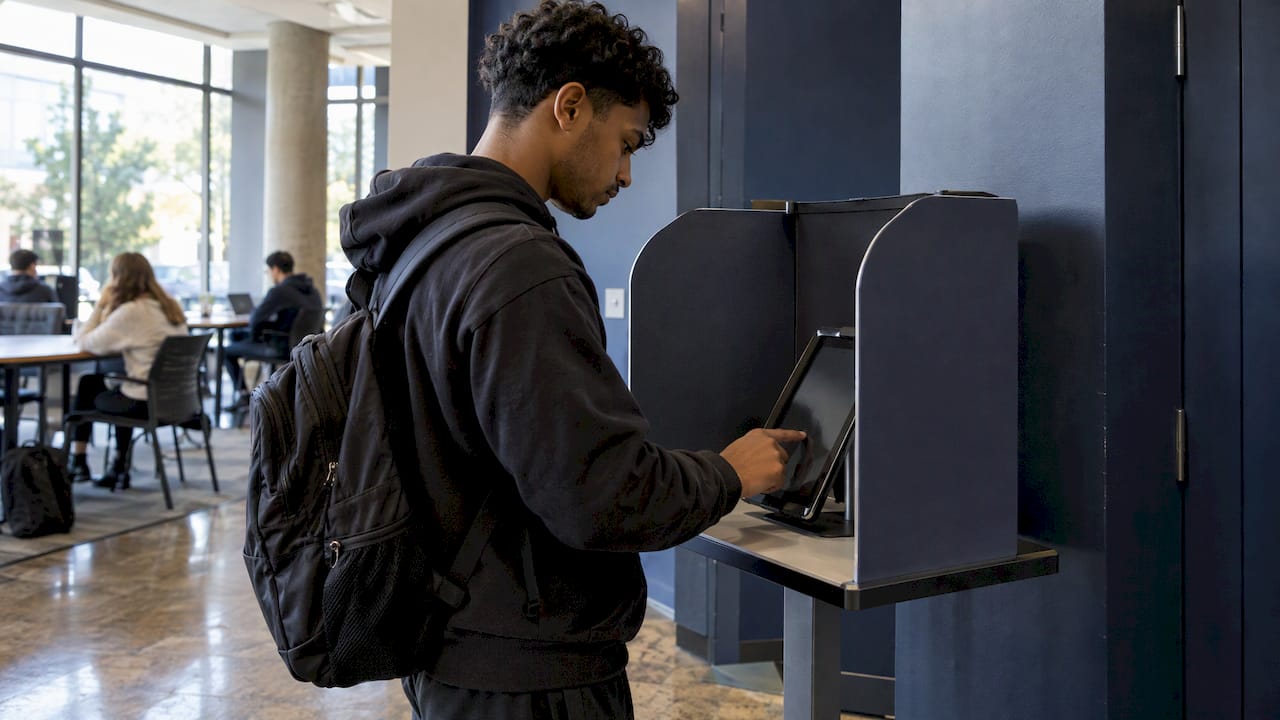
    Student entering a code on a shared voting tablet

    Lost access and reissued credentials

    Voters lose codes and links. When you replace them, the process matters. U.S. labor-election guidance says that when credentials are replaced or were never delivered, materials must be secured when not in use and observers must be allowed to observe the process. For a fan award, scale that down sensibly: keep a log of every reissue, confirm the person through the original email, and invalidate the old credential when you issue the new one.

    Connection drops and half-finished ballots

    A voter on a weak signal may tap submit three times. Make the system treat repeat submissions from the same verified voter as one vote and show a clear confirmation. The Canadian standard also recommends a timeout limit for voting sessions that balances security and usability, so voters are not logged out mid-ballot, and it says that after a voter cancels, vote information must not be stored on the voter’s device. Good advice for any ballot page.

    Protecting the organizer account

    Your own login is part of the attack surface. Anyone who gets into the dashboard can change settings or export voter data. Use a unique password and two-factor sign-in, and consider hardware security key compatibility if several team members manage the event.

    When you suspect fraud

    1. Export the vote log and sort by time, email domain and IP.
    2. Look for bursts, sequential addresses and one domain dominating a category.
    3. Remove votes that break your published rule, and record why.
    4. Tell finalists that an audit took place, without naming individuals.
    5. Close voting automatically at the announced time so nobody can add votes after the deadline.

    Accessibility is part of the control

    A control that locks out legitimate voters is its own kind of failure. The Canadian municipal standard calls for defined accessibility requirements so that all voters can successfully cast a ballot. For awards, that means a mobile-friendly page, readable contrast, short forms and a verification step that works on a phone. Our notes on voting page layout, trust and mobile design cover the practical details.

    Publish the rules before voting opens

    The cheapest control is a paragraph. Put these points on the voting page and in your contest terms:

    • how many votes each person may cast, per category and overall;
    • what counts as a valid email or account;
    • that automated or scripted votes are not allowed;
    • that you audit results and may remove invalid votes;
    • how paid votes work, if you offer them;
    • when voting closes and how winners are decided.

    Nominees who read this before voting begins are less likely to coach their followers into breaking it, and you have a clear basis for any decision you make later.

    How Izivote helps you enforce one vote per person

    Izivote is built for public audience awards, and it lets you pick the voting mode that fits your event: open, paid, login or identity-based. You can set up a vote quickly, embed the voting page on your own site, close voting automatically, and watch results in a real-time organizer dashboard so you can spot odd patterns while the contest is still running.

    Izivote

    There is a Free plan for small events. Pro costs $6 per month or $60 per year, and Premium costs $14 per month or $140 per year. Paid voting carries a 10% platform fee per vote. See the pricing page for what each plan includes, or create a vote for free and test the voting modes on a small category first. If you run people’s choice awards, the same controls apply to every category.

    Choosing the right level of control

    Your situationSuggested approach
    Casual poll among friends or followersOpen voting, a published one-vote rule, a quick look at the results
    Public fan award with sponsorsVerified email, rate limiting, post-vote audit, hidden or delayed live counts
    School or club electionLogin or identity-based voting with a closed voter list
    Paid voting fundraiserClear vote-purchase rules, payment records, audit of free versus paid votes
    High-stakes ranking or prizeIdentity-based voting, minimal data stored, documented audit and dispute process

    If you are running a school vote, the school election setup guide walks through the steps.

    FAQ

    Can you completely prevent duplicate votes online?

    Not with absolute certainty. Cookies and IP limits are easy to get around, and email limits can be beaten with several addresses. You can make duplicates rare and detectable by combining verified email or login, rate limiting and an audit before announcing results.

    Is one vote per email address enough?

    For many casual or fan contests, a verified email is a reasonable baseline. For higher stakes it is not enough on its own, since one person can hold many inboxes. Add pattern checks, and move to login or identity-based voting when the result matters.

    Should I limit votes by IP address?

    Use it as a signal rather than a hard rule. Many honest voters share one IP at schools, offices and events, and others change addresses on mobile networks. Flagging a cluster for review works better than blocking it automatically.

    What should I do if I find duplicate votes after voting closes?

    Export the vote log, identify the votes that broke your published rule, and remove them with a note of the reason. Then recheck the final tally before you announce winners. Having the rules posted in advance makes this far easier to defend.

    Does requiring identity make people vote less?

    Usually some, because every extra step loses a few voters. That is why the control should match the stakes. Keep sign-in short and mobile friendly, and save the strictest checks for contests where the result truly needs them.

    Sources

    Recommended

  • Login-Based Voting: How It Works and How to Set It Up

    Login-Based Voting: How It Works and How to Set It Up

    Login-based voting means a person has to sign in, with an email, a username and password, a school or company account, or a code you send them, before they can cast a ballot. The login is what lets you check eligibility, allow one vote per person and keep a record you can audit. This guide explains how a login-to-vote system works, which login methods suit which events, and how to set one up without making voting a chore.

    Izivote
    Make Every Vote Count
    Izivote supports identity-based voting and real-time analytics, helping organizers run fan and people’s choice awards with clear, transparent results.

    Get started

    Key Takeaways

    • A login-based system verifies who is voting first, then records the vote. That is how organizers enforce one ballot per eligible person.
    • The login method should match the stakes: a verified email suits a community contest, while a school or company account suits a formal election.
    • Identity and ballot can be kept separate. Well-designed systems confirm who you are, then store the vote without linking it back to you.
    • Most risks come from stolen credentials, compromised devices and weak servers. Strong authentication, encryption and monitoring reduce them.
    • Pick the lightest login that still protects your results, because every extra step costs you voters.

    Table of Contents

    What login-based voting is

    In an open poll, anyone with the link can click a choice, and the same person can click again and again. In a login-based vote, the voter first proves they are someone the system recognizes. Only then does the ballot open.

    That proof can be light or heavy. At the light end, a voter enters an email address and confirms it with a link or code. At the heavy end, voters sign in through a single sign-on account from a school, employer or association, or use a unique credential you issued from a voter list.

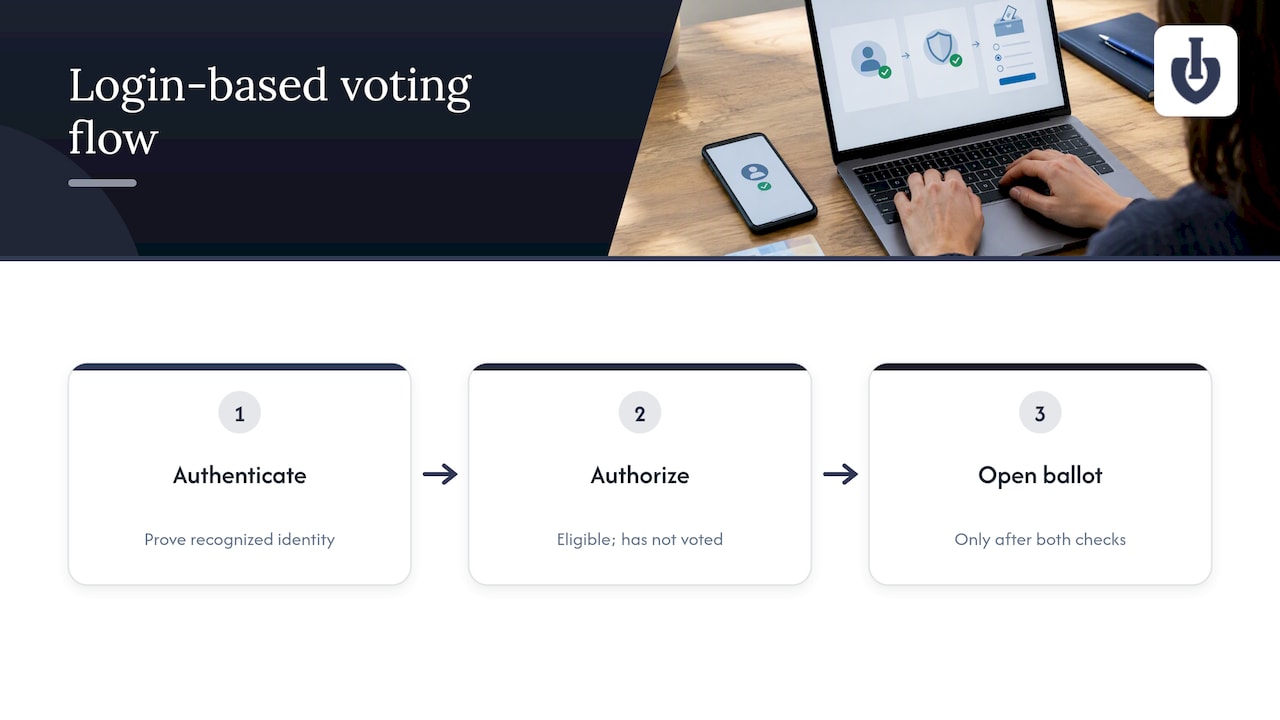
    The idea is the same in each case. Voting is split into two steps: authentication (who are you?) and authorization (are you allowed to vote, and have you already?). Splitting them is what makes results defensible.

    Authentication and authorization before the ballot

    It is also what people mean when they search for a “login to vote system.” They want a way to let the right people vote, once, from any device, without handing out paper ballots or trusting an honor system.

    How a login-to-vote system works

    The flow is nearly identical across platforms:

    1. The organizer defines who may vote. This might be anyone with a confirmed email, members on a list, students at a school, or fans who sign in with a social account.
    2. The voter arrives at the voting page. It could be a standalone page or a voting widget embedded on your own site.
    3. The voter signs in. They use a code, a link, a password or an account you accept.
    4. The system checks eligibility and history. Is this person on the list, and have they used their vote already?
    5. The voter makes their selections and confirms.
    6. The ballot is recorded and the login is marked as used. A second attempt is blocked or limited by your rules.
    7. The organizer sees results and logs. Totals update, and the record shows what happened.

    The credential is the gate and the counter at once: it decides who gets in and how many votes that person has left.

    Choosing a login method

    No single method is best. A 2010 Council of Europe e-voting handbook notes that, without a physical token, remote voters could use a username and password with a control question such as date of birth. The same handbook also warns that remote authentication without a physical token is less reliable. So match the method to what you are protecting.

    Login methodHow it worksBest forMain trade-off
    Email verificationVoter confirms an email with a link or codeFan awards, community contests, pollsEasy to create extra addresses, so pair with limits
    Username and passwordCredentials you issue from a voter listMember organizations, boardsYou must handle resets and lost credentials
    Single sign-on (school or work account)Voter signs in with an existing organizational accountStudent elections, internal company votesNeeds the organization’s identity setup
    Social loginVoter signs in with a social accountAudience and influencer contestsSome voters will not link a social profile
    Unique code or linkOne-time code sent to each voterClosed ballots, small electoratesDistribution takes planning

    If you run a public awards program, a verified email is usually the right balance. Our guide to email verification voting covers when it is enough and when to step up. For formal elections inside a school or association, an account the organization already controls is stronger.

    As a rule of thumb: the more the result matters and the smaller the eligible group, the stronger the login should be. The more public and casual the contest, the lighter it should be.

    How the system verifies eligibility and blocks repeat votes

    Two checks do the work.

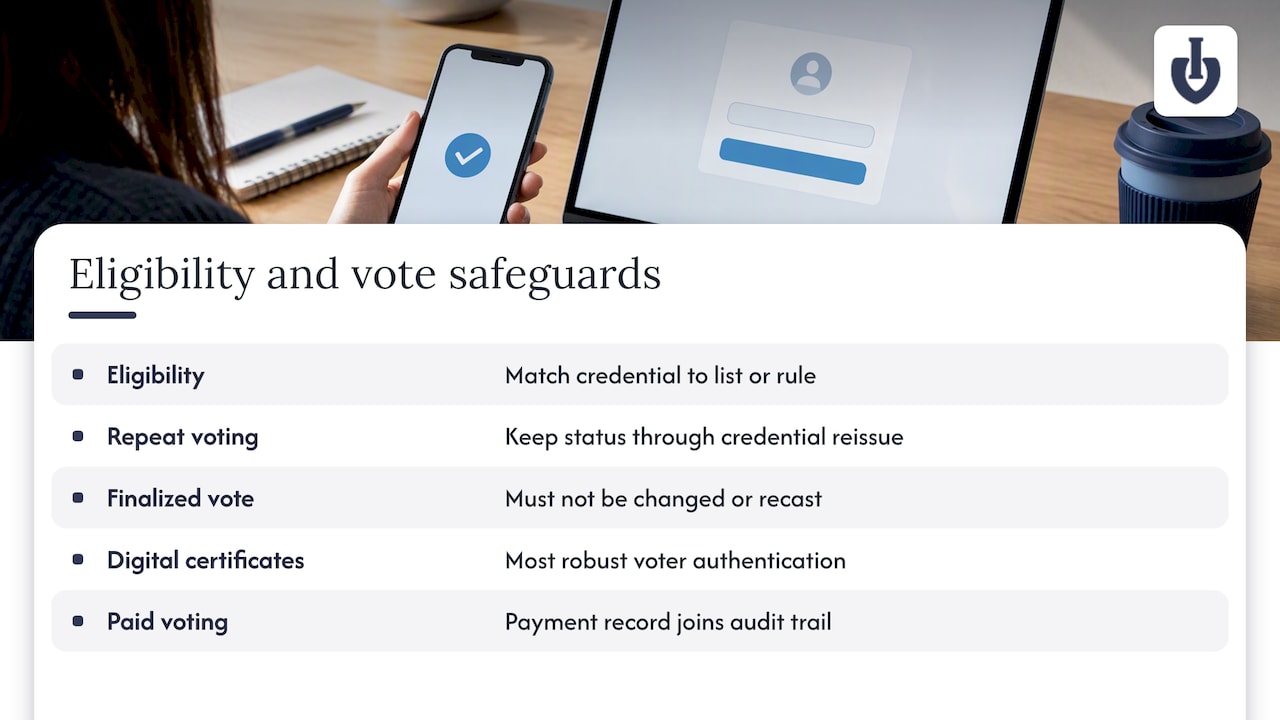
    Eligibility. Either the voter is on a list you provided, or they meet a rule you set, such as owning a verified email or an organizational account. The credential is matched against that list or rule before any ballot appears.

    One vote per voter. The system has to guarantee each voter votes only once, and the Council of Europe handbook also says a system needs to issue replacement usernames or passwords at short notice when someone loses theirs. That detail matters in practice: if a replacement credential creates a second vote, your count is wrong. A good platform reissues access but keeps the voting status attached to the voter record.

    An Indian government e-voting checklist makes the same two points in plain terms. It calls for safeguards against unauthorized votes being added and says voters must not change or recast a vote once it is finalized.

    At the strongest end, a position paper presented at a NIST workshop describes digital certificates as the most robust voter-authentication method, because voters can digitally sign their encrypted votes. That level suits government-grade elections. Most awards, schools and nonprofits do not need it, but it shows the direction: stronger proof of identity, stronger proof the vote is genuine.

    If your votes carry a price, one more point applies. With paid voting, supporters may buy many votes by design, so the login still identifies the buyer and the payment record becomes part of your audit trail.

    How the system verifies eligibility and blocks repeat votes

    Keeping identity and ballot separate

    A common worry: if voters log in, can you see how they voted? It depends on the design, and in a well-built system the answer is no.

    The NIST workshop paper describes anonymizing votes before decryption to break the links between votes and voters, and it recommends data-level encryption to protect vote secrecy if a server is compromised. The archived U.S. voting system guidelines go the same way, stating that system records must not associate voter identity with ballot selections. An academic paper on a Peruvian e-voting design adds that once identity is verified, the system no longer needs information about the user, and votes are encrypted after submission.

    For your event, that means a clear split:

    • The login record shows that a person was eligible and has voted.
    • The ballot record shows what was chosen.
    • Nothing in the reports you see joins the two, unless your event is deliberately public, such as a contest where voters opt in to being shown.

    Tell voters which type you run. A short sentence on the voting page (“We confirm your email to prevent duplicate votes. We do not publish who voted for whom”) answers the question before anyone asks it.

    Security risks and how to reduce them

    The risks are well understood. The e-voting handbook lists intercepted credentials, malware that changes vote choices, and server compromise, and recommends strong authentication, vote encryption, and individual and universal verification. Translated into organizer actions:

    • Intercepted or shared credentials. Use one-time links or codes, expire them after use and limit how long a session stays open. The handbook also notes that disclosed credentials make vote-selling easier, so do not make credentials transferable.
    • Malware on a voter’s device. You cannot control it, but you can show voters a confirmation of their choices before submission, which is the idea behind individual verification.
    • Server compromise. The NIST workshop paper points out that SSL still leaves votes in clear text at the voting server, so an attacker with server access could expose voter privacy. Ask any vendor whether votes are encrypted at the data level, not only in transit.
    • Undetected fraud. A 2026 French cybersecurity agency guide for non-political elections recommends detecting and alerting administrators to events, including malfunctions or fraud, that could alter the sincerity of the vote. In practice: watch for sudden spikes, repeated attempts from one source and unusual patterns, and keep the logs.
    • Too much exposed surface. Archived U.S. guidance says voting systems should use multiple layers of controls and limit attack surfaces by cutting unnecessary code and data paths. For you, that means choosing a purpose-built tool over a patchwork of forms and spreadsheets. A Google Forms voting checklist shows where improvised setups fall short.

    Keep perspective, too. An EU compendium on election cybersecurity says digital election solutions are no more or less secure than paper-based solutions, but should be introduced prudently and meet the same legal requirements. Online voting is not riskier by nature. It needs deliberate controls, as paper does. For a broader view of why these controls matter on any website that handles user accounts, see why cybersecurity matters online.

    Setting up login-based voting step by step

    A U.S. Center for Internet Security guide to election security describes the same sequence: organizers define eligibility requirements, select an authentication method such as SSO or unique credentials, and choose a platform with secure, encrypted and auditable processes. Management then means directing voters to a specific portal, watching for anomalies and auditing the results afterward.

    Here is that process as a working checklist.

    1. Decide who may vote

    Write one sentence: “Eligible voters are ___.” Members on this list, students enrolled this term, anyone with a confirmed email. If you cannot say it in one sentence, your login rule will not work either.

    2. Pick the lightest login that protects the result

    Use the table above. Public fan vote: email verification. Closed election: accounts or issued credentials. Review the voting types and voter identity options your platform supports before you commit.

    3. Set vote limits and timing

    Decide how many votes each voter gets, per category or overall, and when voting opens and closes. Automatic closing removes the risk of someone forgetting to end the vote and keeps results clean.

    4. Send voters to one official page

    One portal, one link, announced everywhere. Embedding the voting page on your own site helps voters trust it, since they are not asked to sign in on an unfamiliar address.

    5. Test with a few people

    Have three people vote: one on a phone, one on a laptop, one who has forgotten their login. Fix what confuses them before launch.

    6. Monitor while it runs

    Watch the live totals and the voting pattern. Sudden jumps or many attempts from one source are the cue to look closer.

    7. Audit and publish

    When voting closes, check counts against your logs, then share results openly. Public contests earn more trust when people can see how the count was done. Our guide to transparent voting results shows how.

    Making login easy for voters

    Every step between the link and the ballot loses some voters. Accessibility is part of security, because a login people cannot complete pushes them to workarounds.

    • Ask for as little as possible. An email and a code is usually enough for an audience vote.
    • Work on any device. Voters should be able to use a phone, tablet or computer, with no app to install.
    • Explain failure in plain words. “This email already voted” beats “Error 403.”
    • Offer a recovery path. Lost codes should be easy to reissue without allowing a second vote.
    • Keep the language simple. Short instructions, readable type, good contrast and labels that work with screen readers.
    • Think about your audience. Students may already have a school account, while fans of a pageant or a local award may only have an email address.

    For schools, an account the school already issues is the natural fit, and our page on student election voting shows how that works. For public contests, see online voting for awards and competitions.

    Running login-based voting with Izivote

    If you run a fan award, a people’s choice contest, a pageant or a school vote, we built Izivote for this job. You can choose among open, paid, login and identity-based voting modes, add nominee photos and profiles, embed the voting page on your site, and watch results on a live dashboard. Voting closes automatically when you set it to.

    Izivote

    The Free plan lets you start a small event without paying. Pro is $6 per month or $60 per year, and Premium is $14 per month or $140 per year. If you run paid voting, a 10% platform fee applies per vote, with payment handling included. You can see everything on the pricing page, or go straight to create your vote and set up a login-protected ballot in one sitting.

    FAQ

    Is login-based voting the same as identity-based voting?

    They overlap but are not identical. Login-based voting means voters sign in before voting. Identity-based voting means the sign-in confirms who the voter is, for example through a verified email or an organizational account. Different login methods give different levels of identity assurance.

    Can organizers see who voted for whom?

    Not in a well-designed system. The login proves eligibility, and the ballot is stored without being linked to the voter. Research on secure e-voting recommends separating the two and encrypting votes. Tell your voters up front what your event does and does not record.

    What if a voter forgets their login?

    Reissue access to the same voter record, so the replacement does not create a second vote. Good systems let organizers replace usernames or passwords quickly while still enforcing one vote per voter. Plan this in advance for closed elections with issued credentials.

    Do I need a login for a small community contest?

    Often a verified email is enough. It blocks casual repeat voting without making people create accounts. If the contest has prizes or serious stakes, or if you are raising money with paid votes, use a stronger login and monitor results during voting.

    Sources

    Recommended

  • Real-Time Vote Monitoring for Events and Awards

    Real-Time Vote Monitoring for Events and Awards

    Real-time vote monitoring means watching votes arrive as they are cast, through a dashboard that shows totals, trends and unusual activity while voting is still open. For an awards show, a fan contest or a live event, it does two jobs: it keeps the audience engaged, and it lets you catch problems such as duplicate or bot votes before they decide the outcome. The setup that works best is simple: a private view for you with full detail, a public view you control, and a clear rule for when the final count becomes official.

    Izivote
    izivote.com
    Monitor Event Votes in Real Time
    Izivote gives organizers real-time analytics and a user-friendly dashboard to monitor votes for awards, fan contests, and events.

    Get started

    Key Takeaways

    • Treat the live number as a fast snapshot and the final tally as the official record, confirmed after voting closes.
    • Track a short list of metrics: votes over time, votes per category, unique voters, vote sources and, for paid voting, revenue.
    • Decide in advance whether the public sees live totals, because partial counts can shape how people judge the result.
    • Choose a dashboard for transparency, duplicate-vote controls, testing and an audit trail, not just for how fast the numbers move.
    • Izivote gives organizers live result dashboards and real-time analytics, with a free plan for small events.

    Table of Contents

    What real-time vote monitoring actually means

    In a live poll, the audience watches a tally move in near real time. Engineers who write about this describe the number on screen as an approximate snapshot, with the final tally reconciled once the poll closes. The same source describes a common design: votes are submitted over HTTP or WebSocket connections, validated at the entry point, and tally snapshots are pushed to viewers (Build a Live Poll and Real-Time Vote Tally System).

    You do not need to build any of that, but the idea matters for how you run an event. There are really two numbers:

    • The live count, optimized for speed. It is what people see while voting is open.
    • The final record, optimized for accuracy. It is what you announce and archive after close.

    When those two are clearly separated in your communication (“live totals are updating, final results are confirmed after voting closes”), nobody feels cheated if a number shifts slightly at the end.

    Monitoring also differs by event type. An election night reporting system for government races pulls counts from many local sources and passes them on. As one example, the Associated Press describes collecting votes through local stringers, state or county websites and state electronic data feeds. A fan award is simpler: every vote goes through one platform, so monitoring is about watching one system closely rather than reconciling many.

    What to track while voting is open

    Most organizers open a dashboard, see a leaderboard and stop there. The leaderboard is the least useful part during the event. These are the numbers worth watching.

    Votes over time

    A line of votes per hour tells you whether your promotion is working. Voting usually spikes after an email, a social post or an on-stage mention, then decays. If you see a spike that no campaign explains, look at it before you celebrate it.

    Votes per category and per nominee

    In a multi-category awards program, some categories draw ten times the traffic of others. A thin category is a signal to feature it in your next message. A category where one nominee jumps far ahead in minutes deserves a closer look at where those votes came from.

    Unique voters versus total votes

    If your rules allow several votes per person, compare the two. A healthy event has a ratio that matches the rules you published. A ratio far outside that pattern suggests either a very enthusiastic fan base or something automated.

    Vote source and timing patterns

    Where votes come from (your embedded page, a social link, an email) shows which channel earns its keep. Bursts of votes arriving at a perfectly regular pace, or in the same second, are the classic mark of a script.

    Paid voting revenue

    If you run paid votes to raise funds, watch revenue next to vote counts. Izivote charges a 10% platform fee on paid votes, so the figures on your dashboard let you see what the campaign is bringing in. For the fairness side of charging for votes, our guide to monetizing fan voting walks through sponsors and the fee.

    A simple example

    Imagine a community awards night with eight categories and a two-week voting window. On day three, the dashboard shows 70% of votes landing in one category after a nominee shares the link. That is good news for engagement and a prompt to push the other seven categories. On day nine, one nominee in a quiet category gains 400 votes in ten minutes from a single source. You pause, review, and decide whether to require logins for that category. That sequence only works if you can see the data while voting is still open.

    Should the public see live results?

    This is the decision that matters most, and it is a choice, not a default.

    Reasons to show live results. Visible totals create excitement, give nominees something to share, and make the process feel honest. Our piece on transparent voting results covers how to run public votes people trust.

    The risk to plan for. Research on the 2020 U.S. election found that people tend to favor early leaders in partial counts and become suspicious of fraud when the eventual winner takes a late lead. The authors suggest rethinking how partial results are communicated (“Stop the Count!” study). That was an election, but the psychology carries over: if your live leader is not your final winner, people will ask why.

    Practical ways to manage it:

    1. Say what the numbers are. Label the public page as live and unofficial until close.
    2. Pick a visibility mode that fits the event. Full live totals suit fan contests and fundraisers. Hidden totals with a reveal at the ceremony suit formal awards.
    3. Hide totals for the last stretch. Some organizers show standings until the final day, then freeze the public view and reveal at the show.
    4. Close automatically. A fixed end time, enforced by the platform, removes any suspicion that the window was extended for a favorite.

    If the vote affects something that matters to people, match the safeguards to the stakes. The BBC’s editorial guidelines say a voting mechanism’s robustness should match the editorial significance of the vote, and that results must be properly collated and verified between the close and the announcement (BBC guidance on audience interactivity). A school spirit poll and a scholarship award are not the same level of risk.

    Catching duplicate and fraudulent votes

    Monitoring is not just a scoreboard. It is your early warning system. Technical guidance for live polls lists the basic checks a voting system should run on each submission: verify the user ID, validate the poll period and the chosen option, check user permissions, and handle simultaneous votes so they are not miscounted (PubNub’s live polls documentation).

    In practice, you choose how strict to be through the voting mode:

    Voting modeHow it worksBest for
    Open votingAnyone with the link can voteLow-stakes community fun
    Login-basedVoters sign in before votingContests where you want one account per person
    Identity-basedVoters are tied to a verified identityStudent elections, member votes, higher-stakes awards
    Paid votingVoters buy votes, payments are handled by the platformFundraising and fan awards

    Izivote supports all four modes, so you can match the control level to the event rather than forcing every vote through the same gate. Our comparison of open vs. paid voting helps you decide.

    What to watch on the dashboard for signs of trouble:

    • A nominee’s count growing faster than their promotion could explain
    • Many votes in the same minute with no matching campaign
    • A big gap between unique voters and total votes in a one-vote-per-person category
    • A sudden stop in votes for everyone else while one nominee keeps climbing

    A flag is not proof. Look first for a benign explanation, such as a newsletter going out or a nominee’s school sharing the link, before you act. Then apply a documented rule, and tell nominees what the rules are before voting opens, not after.

    Verification, audit and privacy: what to expect from a system

    High-stakes voting research is a useful benchmark even for small events, because it shows what goes wrong. An academic analysis of the Neovote system found it lacked end-to-end verification, that its verification process did not guarantee integrity, and that this allowed errors and attacks, including the temporary publication of an erroneous tally. The researchers argue that voting systems should be scrutinized and audited by independent actors (Springer analysis of Neovote).

    The lesson for an organizer is modest and practical: do not rely on a number you cannot check. The National Democratic Institute’s 2024 model checklist says election bodies should audit software and hardware performance in real time or after an election, and that audit methods depend on the system’s function, for instance parallel manual counts of paper audit trails in random samples (NDI Model Checklist). You will not run a paper audit for a fan award, but you can export results and compare them with what you saw on the dashboard before announcing a winner.

    A light-weight audit routine for events:

    1. Before launch, cast test votes in every category and confirm they appear correctly, then clear them.
    2. During voting, screenshot or export totals at set times, such as daily.
    3. At close, export the final results and compare with your last snapshot. Explain any differences, such as flagged votes removed.
    4. Keep the export and your written rules for the record.

    How to evaluate a live results dashboard

    The same NDI checklist gives a useful frame: voting technology should be transparent, protect ballot secrecy and data privacy, be tested, and allow audits, recounts and a paper trail (NDI). Translated to events and awards, here is a checklist you can use when you compare tools of any type, whether form builders, judge-only scoring tools or app-based systems.

    Question to askWhy it matters
    Do totals update live without a page refresh?Engagement drops when numbers look stale
    Can I show results to the public and keep a more detailed private view?You need detail, voters need simplicity
    Which duplicate-vote controls exist?Determines how much you can trust the counts
    Can I export results?Needed for your audit and record
    Does voting close automatically?Prevents disputes about extended windows
    Can it handle payments if I want fundraising?Paid voting needs clean handling and reporting
    Can I embed voting on my own site?Keeps voters in your brand and your traffic
    Is there a free tier to test it?Lets you run a rehearsal before the real event

    Form builders typically collect responses but are not designed to show a public live leaderboard. Judged-only tools suit panels, not audience votes. App-based systems often ask voters to download something first, which costs participation. Those are the gaps a purpose-built audience voting platform is meant to close.

    Showing live results on stage or on a stream

    Audience watches live results at awards

    At a live show, a results screen is part of the production. Keep the display simple: category name, top few nominees, a clear “voting closes at” time. If you are broadcasting the ceremony, your display and your streaming production need to work together, and a good video streaming setup helps you put a live results view on screen without a lag that makes the numbers look wrong.

    A few production habits help:

    • Test the results page on the venue network and on a mobile hotspot as a backup.
    • Use a large, high-contrast layout for the room, since it is read from far away.
    • Have one person own the dashboard, and decide in advance who calls “voting is closed.”
    • If you hold the reveal for the ceremony, confirm the final export before you walk on stage.

    How Izivote handles live monitoring

    Izivote is built for public audience awards and events. Organizers get a dashboard that shows votes as they come in, real-time analytics, and live public result pages that you can choose to share. Voting can be open, paid, login-based or identity-based, and it closes automatically at the time you set. You can embed the voting page on your own site, add nominee photos and profiles, and allow self-nomination.

    Pricing is published on the pricing page: a Free plan, Pro at $6 per month or $60 per year, and Premium at $14 per month or $140 per year. Paid voting carries a 10% platform fee per vote.

    Izivote

    If you want to see your own dashboard before committing, create a free vote, run a few test ballots and watch how the numbers move. For a look at what events like yours have done, see our customer stories, or read how people’s choice awards and live event voting are typically set up.

    A monitoring plan you can copy

    One week before voting opens

    • Write your rules: who can vote, how many times, when voting closes, how disputes are handled.
    • Choose the voting mode for each category.
    • Run test votes and a dry run of the results page.

    While voting is open

    • Check the dashboard at set times, for example morning and evening.
    • Note spikes and match them to your campaigns.
    • Investigate odd patterns before taking any action, and record what you did.

    At close

    • Let the platform close voting automatically.
    • Export results and compare with your last snapshot.
    • Announce the winners, and publish how the count was checked.

    After the event

    • Review which channels drove votes and which categories lagged.
    • Keep the export for next year’s planning and for any questions from nominees.

    This plan scales down to a school poll and up to a multi-category awards program. The only thing that changes is how strict the voting mode is and how formal your audit step becomes. For school-specific setups, the student elections page and the school election setup guide cover the details.

    FAQ

    What is the difference between live results and final results?

    Live results are a fast snapshot of the count while voting is open. Final results are the confirmed count after voting closes and any flagged votes are reviewed. Tell your audience which one they are looking at.

    Should I show live vote totals to the public?

    It depends on the event. Public totals boost engagement and suit fan contests and fundraisers. Hidden totals with a reveal suit formal awards, partly because research shows early leaders in partial counts can shape perceptions of the final outcome.

    Which metrics matter most during an awards vote?

    Start with votes over time, votes per category, unique voters versus total votes, and the source of votes. If you run paid voting, add revenue. These tell you whether your promotion works and whether anything looks unusual.

    How do I stop duplicate or fake votes?

    Choose a voting mode that fits the stakes: login-based or identity-based voting for events where each person should count once. Then watch for unexplained spikes and mismatches between unique voters and total votes, and publish your rules before voting opens.

    Can I try real-time monitoring before a real event?

    Yes. Izivote has a free plan, so you can set up a test vote, cast sample ballots and see the dashboard before you launch.

    Sources

    Recommended

  • Vote Audit Trail: What to Record and How to Use It

    Vote Audit Trail: What to Record and How to Use It

    A vote audit trail is the chain of evidence that lets anyone with the right access show how an online vote was run: who was allowed to vote, what the system did, how the votes were counted and whether the final totals match. Illinois election law defines it as a continuous trail of evidence linking the individual transactions involved in casting a vote, the vote count and the summary totals, without identifying the voter. This guide explains what a good trail contains, what to capture at each stage, where it can fail, and how to check a platform before you trust it with your awards, board election or student ballot.

    Izivote
    Run Awards With Clearer Voting
    For fan and people’s choice awards, Izivote offers identity-based voting, real-time analytics, and a dashboard to monitor votes.

    Get started

    Key Takeaways

    • An audit trail links casting, counting and final totals, and it must do so without revealing how any individual voted.
    • Having records is not enough. A trustworthy result needs both the evidence trail and someone who actually checks it.
    • Capture records in three phases: setup before voting opens, activity while it is open, and certification after it closes.
    • Logs from outside systems, such as login or identity providers, can leak voter behavior even when the ballot itself is secret.
    • Before choosing a platform, ask whether logs are automatic, exportable in an open format, and reviewable by someone other than the vendor.

    Table of Contents

    What a voting audit trail actually is

    People use “audit trail” for several different things, so it helps to separate them.

    The audit trail. The definition above is the core idea. It connects three layers: the individual vote-casting transactions, the count and the summary totals. If you can walk from the totals down to the underlying events, and back up again, you have a trail.

    The audit log. A voting system audit log is an electronic record of events relevant to assessing how the system and the election process performed. A study prepared for the California Secretary of State describes these logs as used to track operator actions and reconstruct election events for accountability. The log is one ingredient of the trail.

    The voter-verified paper audit trail (VVPAT). This is the term that dominates search results, and it is narrower. A VVPAT is a physical record that voters can inspect before casting their ballot, so they can confirm their intent matches the electronic record, as described in a NIST addendum to the voting system standards. It was designed for polling-place machines. A fully online vote has no paper, so its trail has to be built from digital records instead.

    Auditability versus auditing. Researchers writing in the Journal of Cybersecurity make a useful distinction: an evidence-based election needs auditability, meaning the creation of an evidence trail, and auditing, meaning the actual checking of that trail. A log nobody reads proves nothing. Plan who will review the records, and when, before voting opens.

    Why it matters even for a fan award or school election

    Statutes and standards on this topic are written for government elections, but the reasoning carries over. When a people’s choice award goes to the runner-up in the eyes of fans, or a student council result is disputed, the organizer needs to answer three questions quickly:

    1. Were only eligible people able to vote, and only as often as the rules allowed?
    2. Did anything unusual happen during the voting window?
    3. Do the published totals match what the system recorded?

    The U.S. Election Assistance Commission has stressed that automated, system-generated audit records reduce the chance of errors from manually generated logs and make it easier to reconstruct election events. That matters for public confidence, and it matters when someone challenges a result. An organizer with a clean record can settle a complaint in an afternoon. An organizer without one is left defending a screenshot.

    The stakes rise when money is involved. If votes are paid, the trail must also tie each counted vote to a processed payment, so that refunds, chargebacks and fees are explainable. We cover how paid and open voting differ in our guide to open versus paid voting.

    What to record: before, during and after voting

    The law’s wording gives a good checklist. Illinois requires the trail to include a log of machine activities and system status, covering both routine and unusual interventions by authorized or unauthorized individuals, and a record of each step from defining ballots through software installation, testing and tabulation. The California study adds that logs should capture the timing, sequence and system status of election phases, including ballot definition, readiness tests and voting operations.

    Voting audit records across election phases

    Translated to an online award, board election or school vote, that looks like this.

    Before voting opens

    This is the phase most organizers skip, and it is where disputes are won or lost. Keep:

    • The ballot definition. The final list of categories, nominees, descriptions and photos, with the date each was approved. If a nominee is added or removed later, that change should be recorded too.
    • The rules. Voting type (open, login, identity-based or paid), votes allowed per person per category, start and end times, and the eligibility list if there is one.
    • Configuration changes. Who changed what, and when. Any edit to settings after the page is published is exactly what a skeptic will ask about.
    • A test record. Evidence that you ran test votes, then cleared them, before going live. All test plans and results used to verify a voting system should be part of the public record under the Illinois statute, and a smaller organizer can borrow the habit by keeping a short written note of the test.

    On our platform, the step that moves a page from draft to live is covered in the publishing and opening help page. Treat that moment as a checkpoint: screenshot or export your configuration before you click.

    While voting is open

    This is the live evidence stream. A useful trail captures:

    • Each accepted vote as a timestamped event tied to a category and nominee, without exposing the voter’s identity to the public.
    • Each rejected or flagged attempt, such as a duplicate vote, a failed login or a blocked repeat from the same source.
    • Payment events for paid voting: amount, status and the number of votes purchased.
    • System and administrator actions, including pausing voting, extending the deadline or editing a nominee profile.
    • Anomalies. A sudden spike of votes in a few minutes is not proof of fraud, but it is a reason to look. Live analytics help here because you can see the spike while it is happening rather than after the winners are announced.

    Organizers using Izivote get real-time analytics and a dashboard to monitor votes as they arrive, so unusual patterns can be spotted during the voting window and investigated while the evidence is fresh.

    After voting closes

    Certification is the step that turns raw records into a result people accept. Keep:

    • The closing time, and proof that voting stopped when the rules said it would. Automatic vote closing removes the risk of a human forgetting, or being accused of leaving the door open for a favorite.
    • The final tally per category, exported before any adjustments.
    • A record of every adjustment, such as removing invalid votes, with the reason and who approved it.
    • The published result and the date it went public, so you can show the announcement matched the export.

    For the public-facing side of this, see our piece on running transparent voting results.

    How to use the trail: eligibility, irregularities and confirming results

    Collecting records is half the job. Here is how organizers put them to work. These steps are practical routines drawn from the principles above rather than legal requirements, so a regulated body election should follow its own bylaws and counsel’s advice.

    Verifying eligibility

    Start from the rule, then test the log against it. If your vote is limited to members, students or ticket holders, compare the number of distinct verified voters against the size of the eligible list. A total that exceeds the eligible population is a red flag. If you used login or identity-based voting, the trail should show that each counted vote came through that gate. Our help page on voting types and voter identity explains the available modes, and our post on the enhanced voter identity experience shows how identity features change what you can see.

    A stricter voting mode gives you a stronger eligibility record, at the cost of a little friction for voters. An open public vote gives you reach, and the trail then proves volume and timing rather than identity. Pick the mode that matches what you need to be able to prove.

    Investigating irregularities

    When someone alleges something went wrong, work in this order:

    1. Pin down the claim. Which category, which time window, what exactly is alleged?
    2. Pull the events for that window. Look at vote timing, rejected attempts and any administrator actions.
    3. Compare against the baseline. What did a normal hour look like earlier in the campaign?
    4. Check the configuration record. Did the rules change mid-vote?
    5. Write down what you found and what you did, even if the answer is “nothing unusual.” That note becomes part of the trail.

    This is where automated records beat memory. Because system-generated records reduce the errors of hand-kept logs, as the EAC notes, you can rebuild events from the system rather than from recollections.

    Confirming results

    Reconcile three numbers: the sum of accepted vote events, the dashboard total, and the published figure. They should match. For paid voting, add a fourth: votes purchased against payments received, minus the platform fee. If you ever publish results to a skeptical audience, offer to show the reconciliation to an independent person, such as a board member, a teacher advisor or a sponsor’s representative. A result confirmed by someone outside the organizing team carries more weight than one confirmed by the people who ran it.

    The broader principle, put by the Journal of Cybersecurity authors, is that officials must not only find the true winner but also give voters convincing, verifiable evidence that the outcome is correct.

    Transparency without exposing how people voted

    A good trail proves the process without unmasking voters. The Illinois definition builds this in: the trail links vote-casting transactions and documents ballot definition and system steps without allowing identification of the voter.

    In practice, split your records into two tiers:

    RecordWho sees itWhy
    Final totals per categoryPublicLets everyone check the announced winner
    Rules, dates and ballot definitionPublic or on requestShows the contest was run as described
    Vote counts over timeOrganizer, optionally publicShows the race developing and exposes spikes
    Payment and identity dataOrganizer only, minimal retentionNeeded for disputes, risky if widely shared
    Administrator action logOrganizer and reviewerShows who changed what

    Keep the personal data tier small, and delete it on a schedule you can state in advance. If you collect fewer personal details, you have fewer to leak.

    If the form of your vote involves public leaderboards, remember that live public results are a transparency feature, and our platform shows them as a deliberate choice you can turn to your advantage. Visible, real-time counts discourage quiet manipulation because everyone can watch the same numbers.

    Where audit trails break down

    Trails fail in predictable ways, and knowing them helps you set realistic expectations.

    Outside logs can reveal voter behavior. Researchers studying Estonian online voting showed that composition attacks can turn logs from external systems, such as national eID services, into metadata side channels that reveal voter behavior even when the voting system itself is secure. The same research notes that retained metadata, like timestamps of interactions, can undermine anonymity and coercion resistance even if the vote content stays secret. For you, the lesson is simple: every login provider, payment processor and analytics tool you connect keeps its own logs. Decide what each one records and for how long.

    Digital records are not independent evidence. The IFES guide to risk-limiting audits says that if an online voting system does not produce an independent, voter-verifiable record of intent, risk-limiting audits are effectively impossible by definition. That is a high bar written for government elections, and an online award is a different kind of contest. But it is an honest reminder that an electronic log shows what the system says happened, not what each voter intended. Match your level of assurance to the stakes: a fan award can reasonably rely on strong logs and open totals, while a binding board election with legal consequences may need extra safeguards set out in its bylaws.

    Closed log formats. The California study identifies as a significant weakness the lack of open, non-proprietary formats for audit logs, which hinders third-party analysis and public transparency. It found that most systems provide poor support for public analysis, often storing logs in undocumented, proprietary formats that raise barriers for observers. If you cannot export your records in a format a reviewer can open, your trail is only as strong as your trust in the vendor.

    Records that exist but are never checked. The most common failure is the dullest one. Schedule the review, name the reviewer and put both in your rules before launch.

    Where audit trails break down — overview diagram

    Questions to ask before you choose a voting platform

    Use this checklist with any provider, including us.

    1. Are records generated automatically? Manual logs invite gaps and disputes.
    2. Can you export them? Look for open formats such as CSV that an outside reviewer can open without special software.
    3. Does the system record configuration changes and administrator actions, not only votes?
    4. What voting modes are available? You want the option to match eligibility rules, whether open, login-based, identity-based or paid.
    5. How are duplicates and suspicious activity handled, and can you see the attempts that were blocked?
    6. What happens at closing? Automatic closing and a locked final tally beat manual shutdown.
    7. What does the payment flow record, and what is the fee? Paid voting should be reconcilable line by line.
    8. What personal data is stored, where, and for how long?
    9. Who else can review it? A platform that lets you share results and logs with an outside reviewer is easier to defend.

    For a deeper look at what a document-level audit trail should contain, this overview of audit trail duties and contents is a helpful companion when you design your own record-keeping.

    How Izivote supports a defensible vote

    Izivote is built for public audience awards, people’s choice contests, student elections and community votes. For audit purposes, the features that matter are the ones that make a vote easy to run cleanly and easy to explain afterward:

    • Multiple voting modes: open, paid, login and identity-based, so the gate matches your eligibility rules.
    • Real-time analytics and a live dashboard, so you can watch counts and catch unusual patterns during voting.
    • Live public results, which let supporters see the same numbers you see.
    • Automatic vote closing, so the end time in your rules is the end time in practice.
    • Paid voting with payment handling, with a platform fee of 10% per vote, which makes the money side easy to reconcile.

    You can start free. The Free plan has no published price, Pro is $6 per month or $60 per year, and Premium is $14 per month or $140 per year, all listed on the pricing page. If you run an awards program, the awards and competitions page shows how a setup looks, and you can create a vote for free to test the flow before your real campaign.

    Izivote

    For school settings, our student elections page and the school election setup guide cover the practical steps, and the people’s choice setup guide does the same for fan awards.

    A simple audit-trail routine you can adopt this week

    You do not need a compliance department. A one-page routine is enough for most community, school and fan contests:

    1. Before launch: write down the rules, dates and eligibility, run a test vote and note the result.
    2. At launch: export or screenshot the configuration.
    3. Daily during voting: glance at the dashboard and note any spike with a short comment.
    4. At close: confirm voting stopped at the stated time and export the final tally.
    5. Before announcing: reconcile totals, and for paid votes reconcile payments, then have a second person confirm.
    6. After announcing: store the records for a period you have decided in advance, then delete personal data.

    That routine takes under an hour in total for most contests, and it turns “trust us” into “here is the evidence.”

    FAQ

    What is the difference between an audit trail and a VVPAT?

    An audit trail is the whole chain of evidence linking vote-casting events, the count and the totals. A VVPAT is one specific component: a paper record a voter can check before their ballot is cast. Online-only votes have no paper, so they rely on digital logs and reconciliation instead.

    Does an audit trail reveal who I voted for?

    It should not. The standard definition links the transactions and system steps without identifying the voter. Be careful with connected services, though, because login, identity and payment tools keep their own logs that can expose metadata such as timing.

    How long should I keep voting records?

    Choose a retention period before voting starts, and write it in your rules. Keep the ballot definition, rules, final tally and a record of adjustments for as long as a dispute could reasonably arise, and delete personal data sooner. If your organization is governed by bylaws or a regulator, follow their retention requirements.

    Do small events and school elections need an audit trail?

    Yes, a light version. Any contest can be disputed, and a short record of the rules, the closing time and the final reconciliation settles most complaints. Scale the effort to the stakes.

    Can a platform’s audit trail prove that every vote reflects what the voter intended?

    Not by itself. A digital log shows what the system recorded, and without an independent record of voter intent that cannot be verified to the standard used in government audits. For fan awards and community votes, strong logs, live totals and an independent reviewer are a reasonable level of assurance.

    Sources

    Recommended

  • Transparent Voting Results: How to Run Public Votes People Trust

    Transparent Voting Results: How to Run Public Votes People Trust

    Transparent voting results mean anyone can understand how a vote worked, who could vote, how ballots were counted and why the winner won. For an online award or contest, that comes down to four things: published rules, live totals that match the final tally, a record that can be checked afterward, and a plain-language results page. Do those four and most arguments about “rigged” votes never start.

    This guide is for people who run fan awards, people’s choice contests, school elections and community polls. It borrows standards from election administration, scales them to the size of an awards program, and shows where a platform helps and where the organizer still has to act.

    Izivote
    Make Every Vote Easier to Trust
    Izivote helps award organizers run clear, secure voting with real-time analytics and a dashboard for monitoring votes.

    Get started

    Key takeaways

    • Transparency is about making the system, the procedures and the reasons for the vote understandable. Secrecy about how votes are counted is what breeds distrust, not the loss itself.
    • Publish the rules before voting opens: who can vote, how many times, what counts as a valid vote, and how ties and disputes are handled.
    • Give voters evidence, not just a number: live totals, a clear close time, a results page that explains the count, and a record you can audit if challenged.
    • Protect privacy while you do it. Show totals per nominee, never a public list of who voted for whom.
    • Decide your dispute process before you need it, and label interim numbers as unofficial.

    Table of Contents

    What “transparent” means for an online award

    Most pages ranking for this phrase are about government elections, but the definition carries over. The Council of Europe’s guidelines describe transparency as making the voting system, the surrounding procedures and the reasons for choosing electronic voting understandable to voters and stakeholders, which in turn supports public confidence.

    Translate that to a fan award and you get a simple test. Could a skeptical nominee, with no inside access, explain to their followers how the winner was decided? If the answer relies on “trust us,” the vote is not transparent, however honest it was.

    A public award has a particular weakness. Nominees are competitors, and they bring their own audiences. Every loser has an incentive to question the result, and every winner has an incentive to be defensive. Transparency protects both sides.

    What to publish before voting opens

    The cheapest transparency measure is a rules page written before the first vote. The Council of Europe guidelines recommend that observers can reach election documentation, such as minutes, certification, testing and audit reports and detailed system documentation, preferably online and well before voting. You do not need a certification file for a regional awards night, but the principle holds: put the documents out early.

    A useful rules page covers:

    1. Eligibility. Who may vote: anyone with the link, only logged-in users, verified identities, or a closed list such as students or members.
    2. Vote limits. One vote per person, one per category, one per day, or unlimited paid votes. State it exactly.
    3. Paid votes. If votes can be bought, say so, say what a vote costs, and say where the money goes. Hidden monetization is the fastest way to lose a community.
    4. Opening and closing times, with time zone. Automatic closing removes the suspicion that someone kept the polls open for a friend.
    5. What is shown live. Totals, percentages, or ranking only. Decide this up front, because it changes voter behavior.
    6. How invalid votes are handled, such as duplicates, bots and refunded payments.
    7. Tie-breaking and dispute rules, covered below.

    Post the link on the voting page itself, not buried in an email.

    Choose a voting mode that matches the trust you need

    The more a result matters, the more the voting mode should limit who counts. Open voting is easy and generates reach, but it is the easiest to game. Login-based and identity-based modes make it harder to stuff the ballot box, at the cost of some friction.

    Here is how the modes compare in practice:

    ModeBest forMain riskWhat to disclose
    Open votingLow-stakes polls, social contestsRepeat votes, botsAny limits per device or per day
    Paid votingFundraising awards, fan contestsPerception that money buys the winPrice per vote, fee, and where proceeds go
    Login votingCommunities, member groupsFake accountsWhich login methods are accepted
    Identity-based votingSchool elections, member votesPrivacy concernsWhat identity data is collected and who can see it

    Izivote supports open, paid, login and identity-based modes on the same platform, so you can match the mode to the event. You can see the full list on the features page. For schools, the student election setup is built around identity-based voting.

    Show live results without distorting the vote

    Live public results are the strongest transparency signal an online award can give. Voters see their vote register. Nominees see the race. Nobody can quietly adjust the totals at the end.

    Live results have a trade-off, though. A visible leaderboard can discourage voters for trailing nominees, or encourage a last-minute rush of paid votes. Neither is a flaw; both are behaviors you should expect and describe in the rules. Some organizers show live rankings while a contest runs and reveal exact numbers at the close. Whichever you choose, say so before voting starts, and keep it consistent.

    The Center for Civic Design, in its guidance on displaying election results, advises that displays summarize how votes accumulated for the winner and that interim results be labeled as incomplete and unofficial. Both ideas fit awards well. A banner reading “Voting is open. Totals are live and not final” prevents the screenshot that goes viral on day two and gets quoted as the outcome.

    Build a record that can be checked

    Transparency is not only what voters see. It is what an independent person could verify later.

    Ronald Rivest and colleagues argue that a trustworthy voting process should provide evidence so voters and observers can check the result, rather than simply trusting it. The same paper sums up end-to-end verifiability in three steps: cast as intended, recorded as cast, and counted as recorded.

    For a fan award you will not run cryptographic ballots, but you can apply the same three questions:

    • Cast as intended: Does the voter see a clear confirmation of which nominee they picked?
    • Recorded as cast: Is every accepted vote stored with a timestamp and a status (valid, duplicate, refunded)?
    • Counted as recorded: Does the public total equal the sum of valid stored votes, and can you export the data to prove it?

    Official guidance on auditable e-voting systems points the same way. Thailand’s Electronic Transactions Development Agency, for example, requires that systems detect and record errors and make changes to stored votes traceable, and that access logs record items like user identity, access time and successful and failed attempts, with protection against alteration. That is a national standard for formal elections, not a rule for your contest, but it shows what a defensible audit trail contains. When you pick a platform, ask whether you can export vote records and whether changes leave a trace.

    The Council of Europe’s guidelines also suggest, where feasible, archiving configuration and tallying protocols and letting observers watch testing. At a small scale, that translates into something easy: take a screenshot or export of your settings (categories, nominees, vote limits, close time) before voting opens, and keep it.

    Protect voter privacy while showing the count

    Transparency about totals must not become exposure of individuals. Publish how many votes each nominee received, never who cast them.

    The same Thai guidance says votes should not be directly linked to voter identity or personal information. It allows an indirect link, such as for checking eligibility, only temporarily, and requires that the link be removed afterward. For an identity-based school or club vote, the practical version is: verify that a person is eligible, record that they voted, and keep that record separate from what they chose in any public view.

    Voting eligibility separated from ballot and results

    Tell voters in plain words what you collect and why. If you use identity verification, explain what the organizer can see and what the public can see. Izivote has described how it presents voter identity in its post on the enhanced voter identity experience.

    Write a results page people can understand

    A transparent count that nobody can read is not transparent. The Center for Civic Design recommends that a results page identify the winner first, then explain how counting worked, and use both words and visuals. That order suits awards well: readers want the answer, then the proof.

    A solid post-vote results page includes:

    • The winner and the final vote totals for every nominee, by category.
    • The exact close time and time zone.
    • The voting mode and any vote limits that applied.
    • A line on how many votes were removed as invalid and why, if any.
    • A short “how we counted” paragraph in everyday language.
    • A contact for questions, with a response window.

    Interface choices matter more than most organizers expect. Clear labels, readable charts and consistent wording help voters understand what they are looking at, and voting system examples for communities show how presentation shapes trust in a reported outcome.

    Keep the results page live permanently. A page that disappears after the ceremony looks like something was hidden. Izivote gives each vote a public page with nominees and results; the classicvote page is an example of how a finished vote can look.

    What to do when totals are disputed

    Disputes are rare, but they come at the worst moment: right after the winner is announced. Decide the process in advance, and put a short version in your rules.

    1. Set a challenge window. For example, a few days after the close, with a named contact. State the window in the rules, not after the first complaint.
    2. Ask for specifics. A dispute that names a category, a time range or a pattern (hundreds of votes in minutes) can be checked. A general accusation cannot.
    3. Check the records. Compare the public total with your exported valid votes, look at timing spikes, and look at duplicates and refunded payments.
    4. Correct and explain. If you find an error, fix the result, mark the earlier figure as superseded, and publish what happened. A visible correction builds more trust than a flawless-looking page that nobody can question.
    5. Keep the original export. Archive the data from the moment of closing so you can show what changed and why.
    6. Name a decider. In close or contested votes, a neutral person, such as a board member, teacher or outside accountant, should rule on the evidence rather than the organizer who benefits from the result.

    The same logic applies to errors you discover yourself. Announce them promptly, say how many votes were affected, and state the corrected totals. Silence is the worst option.

    Features to look for in a transparent voting platform

    If you are comparing tools, resist the pitch about “security” in general. Ask for specifics, which map to the official guidance above:

    • Rules and system information available to voters, ideally before voting begins.
    • Live public totals that come from the same data as the final result.
    • Automatic closing, so the end time cannot be moved quietly.
    • Exportable vote records with timestamps, so you can audit when challenged.
    • Controls for who can vote, from open to identity-based.
    • Clear handling of payments if you run paid voting, including the fee.
    • An organizer dashboard to watch votes as they arrive and spot odd spikes.

    Alternatives fall into rough types. Form builders collect responses but are not designed for public leaderboards. Judged-only award software focuses on scoring by panels, not open audience votes. App-based voting services require voters to install something. A purpose-built audience voting platform covers public setup, embedding, live results and several voting modes in one place, which is the gap Izivote was built for.

    Run a transparent vote with Izivote

    Izivote is an online voting platform for fan and people’s choice awards. You set up categories and nominees with photos and profiles, choose open, paid, login or identity-based voting, embed the vote on your own site, and watch results in a live dashboard. Voting closes automatically, and results are public in real time.

    The Free plan suits small events. Pro costs $6 per month or $60 per year, and Premium costs $14 per month or $140 per year. If you run paid voting, the platform fee is 10% per vote; the post on monetizing fan voting explains how to present that fee and sponsorship fairly to your audience. When you are ready, you can create a vote for free, or look at the people’s choice awards setup first.

    FAQ

    What does transparent online voting mean?

    It means voters and stakeholders can understand how the voting system works, who was eligible, how votes were counted and how the result was reached. In practice that is published rules, live or final totals, and a record that can be checked if someone challenges the outcome.

    Should I show live results during voting?

    Usually yes, if the rules say so from the start. Live totals show that votes are registering and that nothing changes behind the scenes. Label them as unofficial until voting closes, and consider hiding exact numbers if you think a visible race will skew behavior.

    Can results be transparent and still protect voter privacy?

    Yes. Publish totals per nominee and the rules for the count, but never a list linking people to their choices. If you verify identity, use it only to confirm eligibility and keep it apart from the public view of results.

    Is paid voting compatible with a fair, transparent result?

    It can be, if you disclose it. State the price per vote, the platform fee and where the money goes, and show totals as they are. Problems arise when paid votes are hidden or when the rules change mid-contest.

    Sources

    Recommended

  • Open Voting vs Paid Voting: Which Fits Your Awards?

    Open Voting vs Paid Voting: Which Fits Your Awards?

    Open voting lets anyone with the link vote for free, with no account. Paid voting asks voters to pay for each vote, which raises money and makes casual ballot stuffing less attractive. Open voting is the right default for casual polls and early reach. Paid voting suits fan awards, pageants and fundraisers where votes carry real enthusiasm. Login and identity voting sit between and beyond the two, and this guide shows how to pick among all four.

    Izivote
    Choose Voting That Fits Your Awards
    Izivote supports paid and identity-based voting for fan and people’s choice awards, with real-time analytics to monitor votes.

    Get started

    Key takeaways

    • Open voting gives the widest reach and the lowest friction, but it is the easiest mode to game, since it relies on a browser cookie to stop repeat votes.
    • Paid voting turns votes into revenue and a natural brake on bot traffic, but it works best when your audience is passionate and you are open about where the money goes.
    • Login and identity voting answer a different question: not “free or paid?” but “who is allowed to vote, and can we prove it?”
    • Live results boost participation and can also sway later voters, so decide on purpose whether to show them.
    • You can mix modes across categories or stages, for example open nominations followed by a paid final round.

    Table of Contents

    What each voting mode actually means

    The phrase “open vs paid voting” mixes two separate decisions: how voters are identified, and whether a vote costs anything. Treating them separately makes the choice easier.

    Two independent dimensions of voting choice

    Open voting. Anyone with the link can vote, with no login. On Izivote, an anonymous voter is kept from voting repeatedly by a browser cookie. That is a light check, not a locked door. Someone who clears cookies or switches browsers can try again, which is why frequency limits and monitoring matter.

    Paid voting. Each vote is purchased. The organizer sets the price and the platform handles payment. On Izivote, paid voting carries a 10% platform fee per vote, and the rest goes to your event or cause.

    Login voting. Voters sign in, for example with a social account, before voting. This is the usual answer to “anonymous vs registered voting”: one account, one set of votes.

    Identity voting. Only people you approve can vote, each with an identity you control. Izivote supports a manual list of voter IDs on every plan, plus SSO/SAML and OAuth methods on paid plans, currently in beta. Use it for student councils, member elections and staff votes where eligibility matters more than reach.

    All four types also let you set how often a voter may vote in each category: once only, or once every hour, day or week.

    Open, paid, login and identity side by side

    OpenPaidLoginIdentity
    Who can voteAnyone with the linkAnyone willing to payAnyone with an accountOnly people you list or approve
    Cost to voterFreePer voteFreeFree
    FrictionLowestMedium (checkout)Medium (sign-in)Highest (must be on the list)
    Duplicate controlBrowser cookiePayment is the filterAccountAssigned identity
    Main benefitReachRevenue and commitmentAccountabilityVerified eligibility
    Best forCommunity polls, quick fan votesFan awards, pageants, fundraisersPublic contests where you want fewer duplicatesElections, staff and school votes

    No column wins everywhere. The right choice depends on what a “good result” means for your event: the most participation, the most money, or the most defensible outcome.

    When open voting is the right call

    Choose open voting when reach matters more than precision and the stakes are low.

    • Community and club polls. A neighborhood “best local business” poll or a club’s favorite-photo contest does not need ID checks.
    • Early-stage nominations. If you are collecting suggestions or running a first round, friction only costs you participants.
    • Brand new events. You have no audience data yet, so you want as many people as possible to try the page.
    • Small budgets. Open voting works on a free plan, so a first event costs nothing to run.

    There is research behind the idea that letting the crowd decide draws people in. A study of crowdsourcing contests found that each 10% increase in the share of prize money decided by crowd voting was associated with a 7% rise in the odds of user participation. That is an association in one setting, not a promise for your awards, but it supports the instinct that audience voting energizes entrants.

    The tradeoff is integrity. With no sign-in, the cookie is your only safeguard. If a nominee has a large and motivated following, expect them to push votes hard, and expect some of those votes to come from automated tools. Online polls have a long record here: researchers writing in The Conversation note that some polls are susceptible to bot manipulation, and that a black market for buying online votes exists.

    If you go open, reduce the risk with a sensible vote frequency (once per category, or once per day rather than once per hour), a defined voting window, and a habit of watching the dashboard for sudden spikes.

    When paid voting is the right call

    Paid voting makes sense when votes express real enthusiasm and you want that enthusiasm to fund something.

    Fan awards and pageants. Supporters of a performer, a contestant or a team already want to do more than click once. Letting them buy extra votes channels that energy into your budget instead of into workarounds.

    Fundraisers. Schools, nonprofits and clubs can treat each vote as a small donation toward a cause, with the leaderboard as the incentive.

    Events with costs to cover. Venue, production and prizes are real expenses. Paid votes can offset them without ticket price increases.

    A worked example of the economics

    Suppose you price a vote at $1 and the event collects 2,000 paid votes. That is $2,000 in gross vote sales. With a 10% platform fee, $200 goes to the platform and $1,800 reaches you, before any payment processing charges your payment provider may apply. These figures are illustrative; you set the real price. The point is that the fee is tied to usage: if nobody buys votes, you owe no vote fee.

    Gross vote sales split into fee and event funds

    Plan subscriptions are separate. Izivote’s Free plan has no published price, Pro is $6 per month or $60 per year, and Premium is $14 per month or $140 per year. Check the pricing page for what each plan includes before you commit.

    What paid voting does to integrity

    Paying changes the incentive in both directions. Mass-producing fake votes now costs real money, which discourages casual abuse. But paid votes also let the best-funded fan base win, so a result reflects willingness to pay as well as popularity. That is fine for a fundraiser and awkward for an award that claims to name the “best”.

    Three habits keep paid voting credible:

    1. Say it plainly. Tell voters that votes are paid, what a vote costs, and where the proceeds go.
    2. Separate prestige from money where it matters. Some organizers run a paid fan-favorite category alongside a free or judged category.
    3. Publish the rules. Voting window, vote caps if any, and how ties are handled should be on the page before voting opens.

    For a closer look at how charging per vote works, see our paid voting platform page.

    Where login and identity voting fit

    Many readers searching “open vs login voting” are really asking whether to require accounts. The question comes down to what you are protecting.

    Anonymous vs registered voting

    Anonymous voting removes barriers and protects privacy, which suits light, fun contests. Registered voting ties each ballot to an account, which cuts duplicates and makes it harder for one person to cast dozens of votes. The cost is drop-off: every extra step loses some voters, and some people will not sign in to vote on a trivia poll.

    A useful rule: if a duplicate vote would embarrass you, require a login. If it would not, keep it open.

    Login vs identity voting

    These sound alike but solve different problems.

    • Login proves that a vote came from an account. It does not prove the person is eligible.
    • Identity proves that a vote came from someone on your approved list. You decide who is eligible, and each identity gets its own vote.

    An identity page is the better fit for a student council election, a board vote, an employee-of-the-month ballot or a members-only award. You build the list of eligible IDs, and anyone outside it cannot vote. Our pages for student elections and corporate and employee polls cover typical setups.

    One practical note: the identity method you choose is permanent for that voting page, so decide before you publish.

    Secrecy and transparency

    There is also a question of whether people’s choices are visible. Historically, open ballots, where voters voted openly, were the norm before the secret ballot spread. For awards, the equivalent question is whether you publish who voted for whom. In nearly every public contest the answer should be no: show totals, keep individual choices private, and tell voters that up front.

    Live results: a boost with a catch

    Showing a live leaderboard is one of the best ways to keep voters returning. It turns the contest into a race. It also changes how people vote.

    As researchers explain in The Conversation, live results can boost participation but invite “cascades”, where early, possibly manipulated votes steer later voters toward the apparent average. If a nominee jumps ahead on day one, genuine voters may follow the crowd rather than their own view.

    What to do about it depends on the mode:

    • Open voting: consider hiding totals until the final days, or showing rankings without raw counts, since it is the mode most exposed to early manipulation.
    • Paid voting: live totals usually help, because they drive extra purchases. Just be clear that the leaderboard reflects paid votes.
    • Identity voting: manipulation risk is low, so show or hide results according to how formal the election is.

    The way you present results is part of your survey design too. If you want a refresher on question and response design, this guide to designing effective surveys covers principles that apply to any poll.

    How to choose: a short decision path

    Work through these questions in order.

    1. Does the result need to be defensible? If the winner will be treated as an official outcome (an election, a staff award), use identity voting and stop here.
    2. Do you want to raise money? If yes, and your audience is enthusiastic, use paid voting. If your audience is lukewarm, a paid model may suppress participation, so test with an open early round.
    3. Is reach your top goal? If you need maximum participation and the prize is bragging rights, use open voting with sensible frequency limits.
    4. Is duplicate voting a worry you cannot monitor? Add a login, or move to identity.
    5. Will outsiders try to game it? Assume yes if a nominee has a large online following. Pick a mode with a stronger gate, and watch the dashboard.

    Quick matches

    ScenarioSuggested mode
    Local “best of” community pollOpen
    Fan favorite award for a streamer or bandPaid, or open with a login
    Pageant with a charity beneficiaryPaid
    High school student councilIdentity
    Employee of the yearIdentity
    Conference audience poll in the roomOpen or login

    Mixing modes in one event

    You do not have to choose once for the whole event. Common combinations:

    • Open nominations, paid finals. Let anyone put names forward or vote in a free semifinal, then open paid voting for the top finalists, when fans are most invested.
    • Free category plus paid category. Offer a free “community pick” next to a paid “fan champion”, so people who do not want to pay still have a voice.
    • Identity for judges, open for the audience. Combine a verified panel vote with a public vote and report both.

    Izivote supports multi-category pages, nominee photos and profiles, self-nomination, embedding the voting page on your own site, and automatic vote closing, so these hybrids do not require stitching tools together. See how it works for people’s choice awards and awards and competitions.

    Set up your first vote with Izivote

    Izivote is built for public audience awards: you can launch a voting page quickly on the web, choose open, paid, login or identity voting, add nominee profiles, watch results on a live dashboard and close voting automatically. A Free plan is available for smaller events, and paid voting is charged as a 10% fee per vote. Compare plans on the pricing page or start from the Izivote homepage.

    FAQ

    Is paid voting fair?

    It is fair when everyone knows the rules. Paid voting rewards enthusiasm and funds the event, but it means a larger or wealthier fan base can outspend others. If your award claims to name the best, consider a free or judged category alongside it.

    Can I run open voting without people voting twice?

    Not perfectly. On an open page, a browser cookie stops casual repeat voting, but determined people can work around it. Set a conservative frequency, such as once per category, and watch for odd spikes. If duplicates would damage trust, require a login or use identity voting.

    What is the difference between login and identity voting?

    Login confirms that a vote came from a signed-in account. Identity confirms that the voter is on a list you control, such as enrolled students or members. Choose identity when eligibility matters.

    Should I show live results?

    Often yes, because a visible race keeps people voting. But early leads can influence later voters, so for open polls consider revealing rankings only near the end.

    Can I switch the voting type after I publish?

    No. The voting type is fixed for the life of an Izivote page, so choose it before you publish. If your plans change, create a new page for the next round.

    Sources

    Recommended

  • Nominee Profile Pages: What to Include and How to Build Them

    Nominee Profile Pages: What to Include and How to Build Them

    A nominee profile page is the one place where a voter learns who a nominee is and why they deserve a vote. Build it with a name, one strong photo, a short story of 50 to 150 words, a few proof points and links, and it will do most of the work of your awards. Leave it thin or inconsistent and voters scroll past, judges guess, and nominees lose interest.

    This guide covers what belongs on each profile, how to set image guidelines, how to lay out the gallery that links to every profile, and how to collect all of it from nominees without chasing them by email.

    Izivote
    Turn Nominee Profiles Into Votes
    Izivote helps organizers run fan and people’s choice awards with clear voting, while real-time analytics track participation.

    Key takeaways

    • A profile has one job: give a stranger enough to decide in under a minute. Name, photo, short pitch, proof and a link are the core.
    • Consistency beats polish. Fixed fields, word limits and one photo format make nominees comparable, which is what voters want.
    • Set image rules before nominations open, and write alt text, so every nominee looks fair and every voter can use the page.
    • The gallery is the front door. Make it searchable by category, and let each card lead to a full profile and a vote button.
    • Collect profiles through one structured form or self-nomination, not through scattered emails and attachments.

    Table of Contents

    What a nominee profile page is for

    There are two audiences, and they want different things.

    Judges and committees often know nothing about the person in front of them. Experts who review formal nominations note that the narrative has to stand on its own, because the committee relies entirely on the documentation provided. Public voters are even less patient. They arrive from a social post, look at one or two profiles, and vote or leave.

    Election guidance makes a useful comparison. One voter-guide author describes a candidate profile as essentially a resume and tells voters to think like a boss hiring for the role. A fan award is lighter in tone, but the logic holds: the profile is the application, and the voter is deciding who gets the job of winning.

    So write every field with a stranger in mind. If a line only makes sense to people who already know the nominee, cut it or explain it.

    What a nominee profile page is for — overview diagram

    The fields every profile needs

    Formal award programs ask for a lot. A typical honors nomination includes a full name, contact details, a short biography often capped at 200 to 300 words, a citation of 300 to 500 characters, supporting work and a CV or media links, as the ASME nomination instructions show. A public vote needs a lighter version of the same idea.

    FieldPublic?Suggested limitWhy it matters
    Display nameYesAs the nominee wants it shownAvoids misspellings on the winner graphic
    CategoryYesOne or morePuts the nominee in the right race
    PhotoYesOne main imageThe first thing voters see
    Short pitchYes150 to 300 charactersShows in gallery cards and share previews
    Full storyYes50 to 150 wordsGives voters a reason
    Proof pointsYes2 to 4 bulletsResults, past wins, audience size, projects
    LinksYesWebsite and 1 to 3 social profilesLets voters verify the nominee is real
    Contact emailNoRequiredFor notifications and prizes
    Eligibility confirmationNoCheckboxKeeps invalid entries out

    The pitch line

    The short pitch is the most valuable field on the page. Formal programs treat the citation as the heart of a nomination: a fixed-length statement that tells reviewers right away why the person is worth the award. Borrow that discipline. A 150 to 300 character pitch shows on the gallery card, in link previews and on mobile, and it forces nominees to lead with their best point.

    A weak pitch: “Maria has been a member of our community for many years and does lots of things.”

    A stronger one: “Maria runs the Saturday food pantry that served 4,000 neighbors this year, with no paid staff.” (An example of the shape, with invented details for illustration.)

    Proof and links

    Voter guides note that profile tools often include links to social media and official websites, which help confirm a candidate’s authentic public image. The same applies to a fan award. A link to a channel, shop or portfolio tells voters the nominee is real and gives them somewhere to go after they vote, which nominees appreciate.

    Private fields

    Keep contact details and eligibility answers off the public page. Collect them in the same form, but show only what a voter needs.

    Build in the eligibility check

    A common pitfall in formal awards is accepting nominations first and checking eligibility later. Insiders recommend putting criteria such as age, membership status or previous wins directly into the submission flow, so invalid entries never reach the judging stage, as the ASME guidance suggests.

    For a people’s choice award, that can be as simple as three checkboxes: “I live in the eligible region,” “I have not won this award before,” “I agree to the rules.” Add a visible rules link, and decide in advance who can remove a profile and why. Removing a nominee mid-vote is far more painful than declining an entry on day one.

    Image guidelines for nominee photos

    Images decide how professional your awards look. Mixed sizes, blurry selfies and logos stretched into squares make a gallery look careless, and they quietly favor nominees with better cameras. Publish rules before nominations open.

    What to ask for

    • One main image per nominee, in a single aspect ratio. A square or 4:3 crop works well on cards. Say which one you use.
    • High resolution. One professional association asks award winners for headshots saved at 8 by 10 inches and 300 dots per inch, with a plain background and even lighting, and room around the head and shoulders so designers can crop. That is a print standard. For a web vote you can ask for less, but the advice on plain backgrounds and cropping space carries over.
    • A minimum pixel size, such as 1200 pixels on the longest side, so images stay sharp on large screens.
    • Accepted formats: JPG or PNG, with a file size cap you state up front.
    • Rights: nominees confirm they own the image or have permission, and that you may display it for the award.
    • Category-specific rules. For product awards, ask for a product shot. For teams, a group photo. For people, a face that is easy to see at thumbnail size.

    What to forbid

    Ask for no watermarks that cover the subject, no heavy filters, no text-heavy flyers as the main image, no images of minors without a guardian’s consent, and nothing misleading. If you let nominees upload anything, expect a poster with tiny text that is unreadable at card size.

    Alt text and accessibility

    Images need text alternatives. The W3C’s guidance says informative images need a short description conveying the essential information, while purely decorative ones should have empty alt text. For a nominee photo, the alt text can be as simple as “Maria Lopez outside the food pantry.” Research presented at a security workshop also points out that accessibility affects how users with disabilities are exposed online, so organizers should check that their nominee pages meet accessibility standards such as WCAG. Practically: good contrast, readable type sizes, keyboard-friendly vote buttons and no information that exists only inside an image.

    Designing the gallery that leads to profiles

    The gallery is the page most voters see first. Organizers use public galleries of accepted nominees to build excitement, often with photos, short statements and sometimes the ability to comment on or vote for entries. Designs range from simple lists to interactive pages with search and filters.

    For most awards, this setup works:

    1. Group by category. Voters come to vote in one race. Do not make them hunt.
    2. Use cards, not walls of text. Photo, name, pitch line, a View profile link and a vote button.
    3. Keep card sizes equal. Uneven cards suggest some nominees matter more.
    4. Randomize or alphabetize. Fixed order by submission time quietly favors early nominees. Say which you use.
    5. Add search once you pass about 20 nominees.
    6. Make each profile shareable. Nominees will send the link to their followers, and that is where much of your traffic comes from.

    If you have hundreds of entries, galleries can load slowly. Large entry sets sometimes need a quick refresh before all images appear, so keep image files compressed and test the page on a phone with weak signal.

    A profile that works on a phone

    Most public voting happens on mobile. Put the photo, name and vote button above the fold, keep the story short enough for two or three screens at most, and avoid pop-ups on top of the vote button. A voter should never need to pinch and zoom.

    How to collect profiles without chasing people

    The biggest hidden cost of nominee pages is gathering the material. Anyone who has run an awards program knows the pattern: some nominees send a photo as an email attachment, some send a phone screenshot, a few send nothing, and you retype everything.

    Two practices fix most of it.

    Use one structured form. Fixed fields, character limits and required uploads produce profiles that look alike. Formal programs go further: one fellowship program asks for a specific CV format, and the principle is sound for organizers, since a template or clear guide on what to include reduces the burden on nominators and yields comparable profiles. A form with examples beside each field does the same job for a public award.

    Let nominees nominate themselves. In a fan award, most nominees know their own story best and want to supply the photo. Self-nomination, followed by your approval, moves the work off your desk. Keep a review step so nothing goes public unchecked.

    Then set a review checklist: Is the photo within the rules? Is the pitch inside the limit? Do the links work? Is the nominee in the right category? Does anything violate your code of conduct? Approving profiles in batches, on a fixed day, keeps the process predictable.

    How to collect profiles without chasing people — overview diagram

    Profile writing tips you can give nominees

    Most nominees have never written about themselves for strangers. Give them a short guide on the form:

    • Lead with what you do and who it helps, not with your job title.
    • Use real numbers when you have them: customers served, episodes published, years running.
    • Write in the first or third person, but pick one and stay with it.
    • Mention one thing that makes you different from the other nominees in your category.
    • Finish with the action: where voters can follow you.
    • Proofread. Spelling errors on a public page are visible to everyone who votes.

    For awards that photograph well, such as photography contests, the visuals do much of the persuading. If you run that kind of award, it helps to see how public votes work in photo awards and what entrants do to attract them.

    Setting up nominee profiles with Izivote

    Izivote is built for public audience awards, so nominee profiles are part of the setup rather than something you assemble from a form builder and a website editor. You can add nominees with photos and profile details, run several categories in one vote, accept self-nominations, and embed the voting page on your own site. Results show live on a dashboard, and voting can close automatically on the date you set.

    You can also choose how people vote: open, paid, login or identity-based. The voting types guide explains each one, and the features overview lists what is included. If your award is a people’s choice contest, the people’s choice use case shows how it fits together, and you can create a fan award to see your nominee gallery take shape.

    Pricing is published on the pricing page. There is a Free plan for small events. Pro costs $6 per month or $60 per year, and Premium costs $14 per month or $140 per year. If you run paid voting to raise funds, there is a 10% platform fee per vote.

    A profile template you can copy

    Paste this into your nomination form or your instructions for nominees.

    1. Name as it should appear: (up to 60 characters)
    2. Category: (choose one)
    3. Main photo: JPG or PNG, at least 1200 pixels on the longest side, one subject, plain or uncluttered background, no text overlays
    4. One-line pitch: (150 to 300 characters)
    5. Your story: (50 to 150 words)
    6. Proof: (2 to 4 bullet points: results, past recognition, audience size)
    7. Links: website and up to three social profiles
    8. Contact email: (private, for notifications only)
    9. Confirmations: I am eligible, I own the rights to this photo, I accept the rules.

    Test the template yourself first. Fill it in as a nominee would, then view the result on a phone. If any field produces a messy result, change the limit before you open nominations.

    Common mistakes to avoid

    • Letting each nominee choose their own format. The gallery ends up uneven and voters notice.
    • Hiding the vote button. If a voter has to scroll or log in repeatedly, you lose votes.
    • Skipping the review step. A single inappropriate image damages trust in the whole award.
    • Forgetting alt text and contrast. It excludes voters and weakens the page.
    • Changing profiles mid-vote. Edits after voting opens can look like favoritism. Freeze profiles when voting starts, except for corrections.
    • Burying the rules. Link them from every profile.

    FAQ

    What should a nominee profile include?

    At minimum: name, category, one photo, a short pitch, a short story, a few proof points and a link to the nominee’s website or social profile. Keep contact details and eligibility answers private. Formal programs often add a biography and a citation of fixed length, and the same discipline makes public profiles easier to compare.

    How long should a nominee bio be?

    For a public vote, 50 to 150 words is enough, plus a pitch line of 150 to 300 characters for gallery cards. Formal honors often cap biographies at 200 to 300 words, so treat that as an upper limit. Shorter is better on mobile.

    What size and format should nominee photos be?

    Choose one aspect ratio, such as square, and set a minimum pixel size, for example 1200 pixels on the longest side. Accept JPG or PNG and state a file size cap. Ask for a clear, uncluttered image, and require that nominees own the rights.

    Can nominees create their own profiles?

    Yes, and it saves a lot of work. Offer self-nomination through a structured form, then review each entry against your eligibility rules and image guidelines before it goes public. Izivote supports self-nomination for this purpose.

    How do I make a nominee gallery easy to use?

    Group nominees by category, use equal-sized cards with a photo, name and short pitch, and put a vote button on every card. Add search once you have more than about 20 nominees, and test on a phone before launch.

    Sources

    Recommended