
A live event voting display is a screen that shows votes as they come in, so the room sees results move in real time. It has three parts: a way for people to vote, a system that counts and protects those votes, and a view of the tally that you put on a projector, LED wall or stream. Get all three right and the vote becomes part of the show instead of a form people fill in on the side.
This guide explains how each part works, the participation methods available, what to put on screen, and what to test and tell your audience before you start. It is written for people running awards, fan contests, pageants, school elections and live shows.
Key Takeaways
- A live voting display needs three things: an easy way to join, controls that stop duplicate or fake votes, and a results view that is readable from the back of the room.
- Phones, web links and QR codes suit large or remote audiences. Handheld keypads suit a seated room where everyone is on site.
- Decide in advance what the screen shows (live totals, rankings, or a reveal) and when voting opens and closes.
- Test the full path, from scanning the code to seeing the number change on the big screen, on the venue’s own network and projector before the event.
- Tell the audience how to vote, how long they have and whether results are live. Most confusion comes from unclear instructions, not from technology.
Table of Contents
- What a live event voting display is
- How the audience joins and votes
- What to show on the screen
- How votes appear in real time
- Keeping the vote honest
- Choosing a voting display setup: a checklist
- Making voting easy and reliable for everyone
- What to test and announce before you start
- Running a live vote with Izivote
- FAQ
- Sources
What a live event voting display is
The term covers any setup where votes are collected during or around an event and the running result is visible to the audience. Some versions are on-site and hardware based. Others are fully online, with the audience voting on their own devices and a public results page doing the work of the display.
The display itself is simple: a bar chart, a ranked list of nominees with photos, or a counter. The hard part is everything behind it: who can vote, how many times, and how quickly the number updates. A good display is only as trustworthy as the voting method feeding it.
There are two broad models:
- Audience response in the room. Everyone is present, the question is shown on a slide, and people answer in a short window. Think of a live quiz, a quick poll in a keynote or a town hall.
- Awards and contest voting. Voting runs for days or weeks across many categories, often with public nominee profiles. The live display appears at the event itself, or the public results page stays open for fans to follow.
The second model is where live event voting and audience polls overlap with fan awards, and it is the one we build for at Izivote.
How the audience joins and votes
The method you choose decides who can take part, how fast they can do it and how much you need to set up. Here are the main options.
Handheld keypads
Keypad polling uses handheld wireless devices that connect to a main laptop during a presentation. According to a Community Heart & Soul guide, each keypad has 10 buttons to press in response to questions or statements, and it takes little or no training to operate. That makes keypads a fit for seated rooms such as town halls, boardrooms and workshops, where you can hand a device to every attendee.
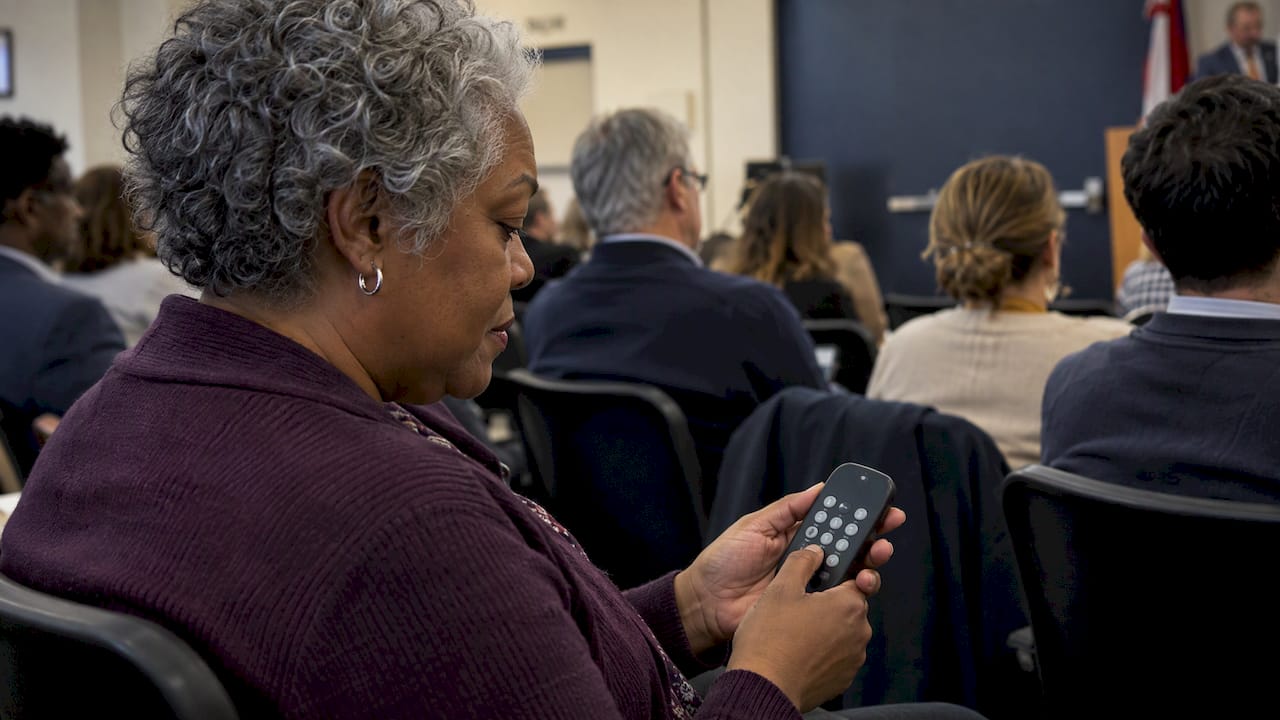
The tradeoff is logistics: devices must be handed out, collected and counted, and they only work for people physically in the room.
Phones, QR codes and web links
Most modern events let people vote on the phone they already carry. You show a QR code or short link on screen, the audience opens the voting page in a browser, and they vote. No hardware needs to be shipped or collected, and the same page works for people watching at home.
Academic work supports the general idea. One classroom study on audience response describes web, SMS and social-network response methods and reports that live polling through mobile phones and social networks can enhance student learning and satisfaction. The same logic carries to events: people already know how to use their phones, so the barrier to taking part is low.
Embedded voting pages
If your event has a website or a stream page, you can place the voting page directly on it. Visitors vote without leaving your site, and the on-screen display can pull from the same live tally. With Izivote you can embed a voting page on your own site, which helps when the vote is one part of a larger event page.
Which method fits which event
| Event type | Best fit | Why |
|---|---|---|
| Seated meeting or town hall | Keypads or phones | Everyone is present and answers are quick |
| Conference with a large audience | Phones and QR code | No hardware to distribute |
| Fan or people’s choice awards | Online voting page with public results | Voting runs over days, fans vote from anywhere |
| Pageant or live show | Phones plus on-stage screen | The audience can vote during the show and see the ranking change |
| School election | Login or identity-based voting | Each eligible student gets one vote |
What to show on the screen
The display should answer one question at a glance: who is ahead? Everything else is decoration. Some choices that work well:
- Ranked list with nominee photos. Best for awards. People recognize faces faster than names, and photos make the screen feel like part of the show. Visual nominee profiles are a core part of the Izivote voting page.
- Bar chart for a single question. Best for polls with a few answer options. Keep labels short and fonts large.
- Vote counter. A single large number works for fundraising-style contests where the total itself is the story.
- Hidden results until the reveal. For award shows, you may want to keep voting open but hide the standings, then show the winner on stage. Decide this before launch, because it changes what you tell voters.
A few design rules hold in every case. Use high contrast, large type and no more than five to eight items on screen at once. Put the voting instructions (QR code, link, deadline) in a corner of the display for as long as voting is open, so latecomers can join.
There is also a psychological reason to show results live. The Community Heart & Soul guide notes that seeing responses together in real time keeps the audience engaged and lets people see how their response fits with those of others, which can reveal common cause or majority opinion. For a fan contest, the same effect pushes people to share the page and rally support for their favorite.
How votes appear in real time
Behind the screen, each vote is recorded as it is submitted and the tally is recalculated. The display then reads that tally and redraws. Two details matter to organizers:
- Refresh behavior. Some displays update the moment a vote arrives, others refresh every few seconds. Either is fine for a room, but test it so you know what the audience will see.
- A single source of truth. The big screen, the public results page and your own dashboard should show the same numbers. Separate tallies in different places cause arguments on the night.
Izivote gives organizers a live results dashboard and real-time analytics, plus public live results that voters can follow. You can watch the count from the dashboard while the audience watches the public view. For more on watching a vote as it runs, see this guide to real-time vote monitoring.
Keeping the vote honest
A live display makes manipulation visible. When a number jumps suddenly, the whole room sees it. That is a good reason to set up integrity controls before voting opens.
Common controls include:
- One-time voting codes. Each voter gets a code that works once. One booth-based voting system, Right2Vote, describes one-time codes, private-poll access, IP restrictions, optional voter selfies, code cancellation and code-use tracking for on-site voting.
- Login-based voting. Voters sign in, which ties each vote to an account. See how login-based voting works.
- Identity-based voting. Useful when only a defined group may vote, such as students, members or employees.
- Open voting. Anyone with the link can vote. It is the simplest option and fits casual polls and early rounds.
- Paid voting. Voters buy votes, which suits fundraising. Read how open and paid voting compare.
Izivote supports open, paid, login and identity-based voting modes. You can read how each one works in the voting types help page. Pick the mode that matches the stakes: a casual audience poll can be open, while a scholarship contest or a student council election should tie votes to verified voters.
Anonymity can matter too. The Community Heart & Soul guide observes that anonymity lets people be candid when sharing opinions could be contentious or personally threatening. If your topic is sensitive, say clearly whether votes are anonymous.
Choosing a voting display setup: a checklist
When you compare options for an awards night, contest or election, run through these questions.
- Who votes, and where are they? In the room only, or also online?
- How long does voting run? Seconds for a poll, weeks for an award.
- Do votes need to be verified? If yes, pick login or identity-based modes.
- Do you want to raise money? If yes, you need payment handling built in.
- Can you show nominee photos and profiles? For awards, this makes the display and the voting page far more appealing.
- Can it close automatically? Automatic vote closing keeps the deadline fair and removes a manual step in a busy moment.
- How fast can you launch? A tool you can set up yourself in an afternoon beats one that needs a long onboarding.
- Can multiple categories run at once? Awards usually have several, and voters should move between them easily.
Izivote covers each of these: self-serve setup, multi-category voting, nominee profiles, embedding, automatic closing, paid voting with payment handling and live analytics. If your event is a people’s choice award, the people’s choice voting page shows how it fits that format.
Making voting easy and reliable for everyone
Even a good system fails when voters cannot figure it out. These habits help.
- One action to start. A QR code and a short link, both on screen. Some people cannot scan, so offer the link as a backup.
- Mobile first. Assume most voters are on a phone with a modest connection. Keep the voting page light.
- Readable instructions. Say what to do in a sentence: scan, pick, confirm.
- Accessible display. Use large fonts and strong contrast. Read the options aloud on stage so people who cannot see the screen are included.
- A fallback. Have a backup connection or a hotspot, and a person at a help desk for anyone who struggles.
If your audience engagement goes beyond the vote itself, these audience engagement strategies offer further ideas for keeping people involved before and after the event.
What to test and announce before you start
Treat the vote like any other live production element: rehearse it.
Test the full path
- Open the voting page on a phone on the venue’s own Wi-Fi and on mobile data.
- Cast a test vote and confirm the number changes on the display.
- Check that the QR code scans from the back of the room at the size it appears on screen.
- Confirm the display looks right on the actual projector or LED wall, not just on your laptop. Colors and small text often change.
- Test the close: confirm that voting stops at the set time and that late votes do not count.
- Clear test votes before going live.
Tell the audience what to expect
Announce four things, on screen and out loud:
- How to vote (scan the code or open the link).
- When voting opens and closes.
- Whether results are live or revealed later.
- The rules: one vote per person, or multiple, or paid.
If voting is paid, state the price per vote and where the money goes. That builds trust and avoids complaints after the event.
Assign roles
Name one person to watch the dashboard, one to run the screen and one to answer voter questions. When the vote is live, nobody should be improvising.
Running a live vote with Izivote
Izivote is a voting platform built for public audience awards and events. You can create a vote on the web, add categories and nominee profiles, choose a voting mode, embed the page on your site and follow results as they arrive. Votes have been cast across 500+ events in 20+ countries.
Pricing is published on the pricing page:
| Plan | Monthly | Yearly |
|---|---|---|
| Free | No published price | No published price |
| Pro | $6 per month | $60 per year |
| Premium | $14 per month | $140 per year |
Paid voting carries a platform fee of 10% per vote. The free plan is meant for small events, so you can try a vote before committing to anything.
Ready to put a live vote in front of your audience? Create a vote for free and have a voting page ready to share and display.
FAQ
Do I need special hardware for a live voting display?
Not necessarily. Keypad systems use handheld devices connected to a laptop, but most events now let the audience vote on their own phones. You only need a screen or projector to show results, plus a reliable connection.
Can people vote from home while the event is live?
Yes, if you use an online voting page. Remote viewers open the same link as the people in the room, and their votes count toward the same live tally. You can also embed the page on your stream or event site.
How do I stop people from voting more than once?
Choose a voting mode that fits the stakes. Login-based and identity-based voting tie each vote to a verified voter, while one-time codes limit each code to a single use. Open voting is simpler but suits casual polls better.
Should results be visible while voting is open?
It depends on the format. Live results keep the audience engaged and encourage sharing, which suits fan contests. For award shows with a stage reveal, you can keep the standings private and show the winner at the end. Tell voters which approach you are using.
Sources
- Using Keypad Polling in Community Heart & Soul
- Booth-Based Digital Voting System, Right2Vote
- Using Social Networks and Internet Based Audience Response, SSRN
Leave a Reply