
A voting deadline across time zones needs three things: one governing time zone, a cutoff written as a date, a clock time and a zone, and a check that the conversion is right for voters in every place you reach. Get those right and nobody can claim they voted “on time” in their own midnight. Online voting differs from a polling place because everyone shares one closing instant, so the way you state it matters more than the hour you choose. With Izivote, votes close automatically at the time you set, so the stated deadline is the one that is enforced.
Key Takeaways
- Choose one governing time zone for the whole vote and name it in every announcement. Do not let each voter’s local midnight decide.
- Write the deadline as date, time, zone and, ideally, a UTC equivalent, and say plainly whether a vote at the cutoff still counts.
- Daylight saving time can skip or repeat an hour, so avoid cutoffs near a clock change, or confirm them with a converter.
- Test the converted time for at least three places your voters live before you publish.
- Use automatic closing so the platform, not a person with a laptop, ends the vote at the stated moment.
Why an online deadline is not a poll closing time
U.S. election polls close by local clock, state by state. In states split across two time zones, one local closing time can produce two real closing moments, as Quartz explains for Kentucky and Indiana: a 6 p.m. closing means two different instants an hour apart. Voters who are already in line when polls close can still cast a ballot, so the closing time marks when the line stops growing, not the last vote cast.
That model fits a physical place. An online award, school election or fan contest has no line and no building. There is one ballot box and one clock, and voters in Lagos, Los Angeles and London all hit the same cutoff at the same moment. Elections Canada, for example, handles time zones by staggering local voting hours, which works because voters walk into local stations. You cannot do that online without running several different deadlines, and several deadlines invite disputes.
So the principle is simple: one instant, stated so that every voter reads it the same way.
Step 1: Choose the time zone that governs the vote
Pick the zone that makes the most sense for your audience and your staff, then keep it for everything: announcements, the voting page, social posts and emails.
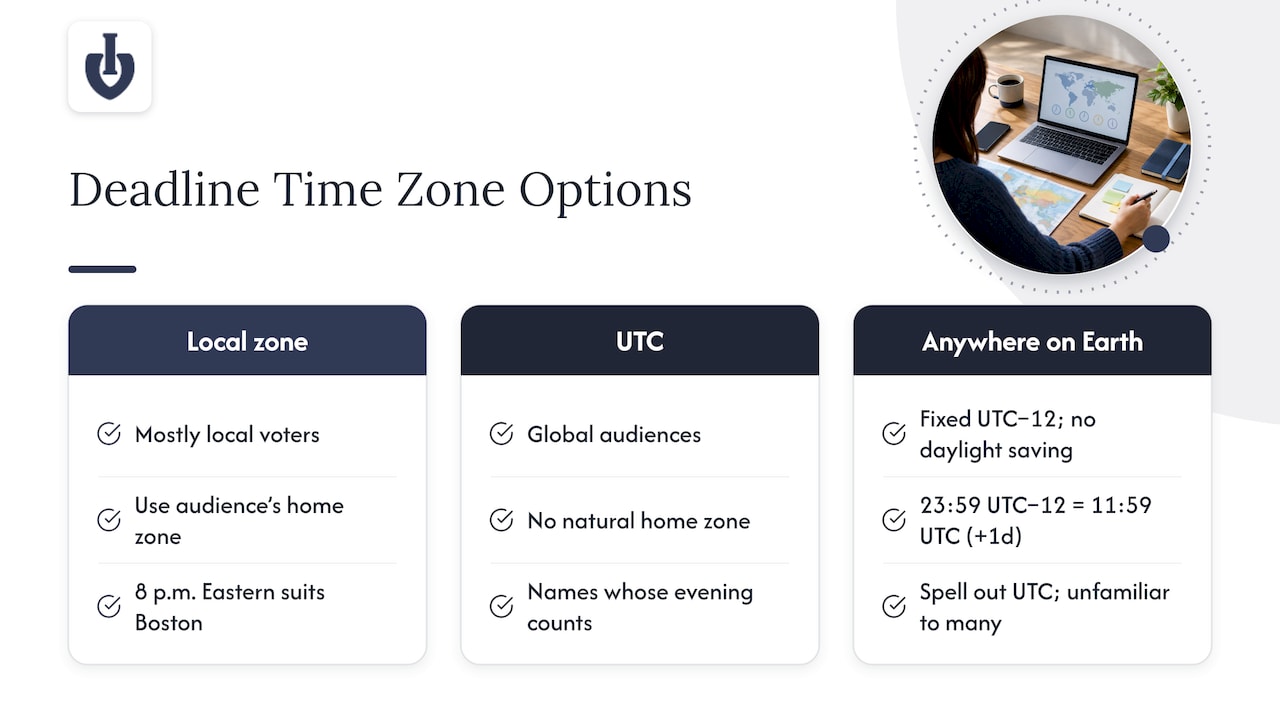
Use the organizer’s home zone when the audience is mostly local. A town fundraiser, a school election or a regional people’s choice award is best served by the zone where most voters live. A deadline of 8 p.m. Eastern is easy for a Boston audience to picture.
Use UTC or a fixed reference when the audience is global. A fan award with voters on several continents has no natural home zone. Naming UTC removes any argument about whose evening counts. Some contests use “Anywhere on Earth” (AoE), a fixed offset of UTC−12 that does not change with daylight saving. An AoE deadline ends at 23:59 in UTC−12, which is 11:59 UTC the next day. It is generous to late voters, but many casual voters have never heard of it, so if you use it, spell out the UTC time as well.
Avoid “midnight” as the cutoff. Midnight is ambiguous: does “midnight on March 15” mean the start or the end of that day? Use 11:59 p.m. or a clear mid-evening time such as 8:00 p.m., and keep staff available when it arrives.
Match the zone to the people who will watch the result. If your team announces winners live at 9 p.m. Pacific, close voting early enough that you can verify results before that moment. Real-time dashboards help here, and our guide to real-time vote monitoring for events and awards covers what to watch as a deadline approaches.
Step 2: Handle daylight saving and ambiguous abbreviations
Two traps cause most deadline errors.
Abbreviations that mean more than one thing
“CST” can mean Central Standard Time in North America, China Standard Time or Cuba Standard Time. “EST” in the middle of summer is technically wrong, because the East Coast is on daylight time then. Many voters do not notice the difference, and it is the kind of detail a complaining runner-up will notice. Name the place instead: “8 p.m. Eastern Time (New York)” or “8 p.m. Central European Time (Berlin)”. “ET” and “PT” cover both standard and daylight time for their regions and are the safest short forms for U.S. audiences.
Hours that vanish or repeat
When clocks spring forward, one local hour does not exist. When they fall back, one hour happens twice. Programmer Jon Skeet shows the effect with a London example: 1:30 a.m. on 31 March 2019 never happened, and 1:30 a.m. on 27 October 2019 happened twice. The same thing happens in the United States on the nights clocks change, in the small hours of a Sunday.
The practical rules for organizers:
- Do not schedule a cutoff between 1 a.m. and 3 a.m. on a clock-change weekend. A repeated hour means “1:30 a.m.” could be read two ways.
- Remember that fixed references do not move. UTC and AoE ignore daylight saving, but a voter’s local time does. A cutoff at 02:00 UTC is 9 p.m. Eastern in winter and 10 p.m. Eastern in summer, so recalculate the local times whenever your voting window crosses a change.
- Keep the original intention. If your announcement says “9 p.m. Eastern”, that is the promise. The UTC time is a derived figure that must be rechecked if rules shift.
- Hold the vote away from the change weekend if you can. A two-week voting window that ends mid-month avoids the problem entirely.
If a window does cross a clock change, tell voters in one sentence, for instance: “Clocks in the U.S. change on the first Sunday of November, but this deadline stays at 9 p.m. Eastern Time.”
Step 3: Write the deadline so nobody can misread it
A good deadline statement answers four questions in the first glance: when exactly, in which zone, what that means in other places, and what happens at the cutoff.
The formula: day of the week, date, time, zone, and a conversion.
Voting closes Friday, March 20, at 8:00 p.m. Eastern Time (New York), which is 5:00 p.m. Pacific and 00:00 UTC on Saturday, March 21.
Three details make this stronger.
- Include the weekday. A date and weekday pair catches typos. “Friday, March 20” will be noticed if the year’s calendar says otherwise.
- Give two or three conversions for your main audience. If your nominees come from Texas, Ontario and the U.K., list Central, Eastern and London time. Do not make voters do arithmetic; arithmetic is where subtraction replaces addition and the deadline shifts by a day.
- State the cutoff rule. Say whether a vote registered at exactly 8:00:00 p.m. counts. A simple line works: “Votes recorded before 8:00 p.m. Eastern count; votes after that do not.” Unlike physical polls, where people in line when closing arrives can still vote, online ballots need a hard stop with no exceptions, so say that too.
Then repeat the identical wording everywhere. When a social post says “ends Friday night” and the voting page says “8 p.m. Eastern”, the two will be quoted against each other in the comments.
A short worked example
Suppose a community choir contest wants voting to end at 7:00 p.m. Pacific on a Sunday in early March, with supporters in Seattle, Denver, Chicago and London.
| Place | Local time at cutoff (before U.S. clocks change) |
|---|---|
| Seattle (Pacific) | 7:00 p.m. Sunday |
| Denver (Mountain) | 8:00 p.m. Sunday |
| Chicago (Central) | 9:00 p.m. Sunday |
| London (UTC+0 in winter) | 3:00 a.m. Monday |
That London entry is why the date line matters. A London voter who reads “Sunday” and assumes they have until Sunday midnight local time would be mistaken by many hours, and the same drift can go the other way. Putting “3:00 a.m. Monday, London time” in the announcement removes the question. If the clocks in the U.S. change before the window ends, the London difference shrinks by an hour for a few weeks, and the table has to be rebuilt for the new week.
Step 4: Verify the conversion before you publish
A published deadline is a promise, so check it as if it were a contract date.
- Run it through a converter. Time and Date’s Time Zone Converter calculates the matching local times in the places you choose and accounts for daylight saving changes worldwide.
- Check at least three places: your own, your largest voter group, and the place furthest from you.
- Check the date, not only the hour. The most common failure is a correct hour on the wrong day for voters far east or west.
- Avoid the classic slips. The AoE guide lists them: reading an AoE date as your own midnight, subtracting 12 hours when you should add them, and leaving things to the last minute when systems slow down. That last point applies to voters too: tell them to vote a few hours before the cutoff.
- Have a second person read it. A colleague in a different time zone who reads the announcement cold will spot ambiguity faster than the author.
- Test the live page. Open your voting page as a voter would and confirm it shows the same time you announced.
If you are running school elections, the same checks apply, and our school election voting setup guide walks through the timeline from opening to closing.
Step 5: Let the platform enforce the cutoff
A deadline written perfectly still fails if a person has to close the vote by hand. Someone is asleep, stuck in traffic or on stage, and votes keep arriving after the stated time. That is how disputes start.
Izivote includes automatic vote closing, so the vote ends when the schedule says it does. The organizer dashboard shows votes in real time, which lets you watch the final hour without touching anything. You can see how voting is opened in the publishing and opening help page, and the full list of online voting tool features shows the other controls available.
For paid voting, where voters are spending money, the stakes are higher. A voter who pays for ten votes at 7:59 p.m. and finds the page closed at 8:00 p.m. will want an explanation, so the cutoff rule needs to be written on the page before payment. Our overview of paid voting covers how charging per vote works.
Choosing a deadline length that suits time zones
Length is part of fairness. A 24-hour contest punishes voters whose evenings fall outside your window, and the same 24 hours is the middle of the night for a quarter of the globe. Longer windows soften the time zone problem.
| Audience | Suggested window | Why |
|---|---|---|
| One school or town | 3 to 7 days | Everyone shares a zone, so the main need is a clear weekday cutoff |
| National fan award | 1 to 2 weeks | Gives voters across four U.S. zones several evenings |
| International audience | 2 to 4 weeks | Several evenings in every region; use UTC in addition to a local zone |
| Live-event voting | Minutes to hours | Close on a announced signal, and show the countdown on screen |
These are planning suggestions, not rules. The point is that the more zones your voters span, the more time they need.
For live shows, where voting runs during the event, the cutoff is usually tied to a moment in the program rather than a calendar date. State it as a clock time in the venue’s zone and, if people are watching online from elsewhere, add a countdown. Our guide on live event voting display explains how to show votes on screen.
Announcing and reminding
The announcement schedule matters as much as the wording.
- Launch post: full formula with conversions.
- Midpoint reminder: same wording, plus a note on how many days are left.
- 48-hour and 24-hour reminders: repeat the zone and the conversion.
- Final-hours reminder: keep it short: “Voting closes tonight at 8:00 p.m. Eastern. That is 5:00 p.m. Pacific.”
- After close: confirm that voting has ended and when results will be published.
Because a reminder may be seen by someone in another zone, never write “tonight” or “tomorrow” without a zone attached.
Set up your vote with a clear cutoff
If you are launching a fan award, people’s choice contest or student election, Izivote lets you create a vote and set its closing on a free plan, with paid plans for more capacity: Pro at $6 per month or $60 per year, and Premium at $14 per month or $140 per year. Paid voting carries a 10% platform fee per vote. See the pricing page for what each plan includes, or start from the people’s choice awards page.

If you want to build the vote straight away, you can create a fan award or online vote and set the closing time as part of the setup.
A pre-launch checklist
Before you publish, confirm each of the following:
- One governing time zone is chosen and named.
- The cutoff is written with weekday, date, time and zone.
- Conversions for your three biggest voter groups are listed.
- The cutoff does not fall in a clock-change night.
- The rule for votes at the cutoff is stated.
- A second person in a different zone has read it.
- Automatic closing is set and the voting page shows the same time as your announcement.
- Every reminder uses the same wording.
FAQ
What time zone should I use for an online voting deadline?
Use the zone where most of your voters and your team are, and name it everywhere. If your voters are spread across continents, state the deadline in UTC as well as one local zone so there is a single reference everyone can convert from.
Do daylight saving changes affect my voting deadline?
They can. A fixed reference like UTC never shifts, but local times do, so a cutoff that falls in a skipped or repeated hour on a clock-change night is ambiguous. Schedule the cutoff away from that weekend, or recheck the local conversions with a time zone converter.
Should I use “midnight” as the closing time?
It is better not to. Midnight can be read as the start or the end of a date. A time such as 11:59 p.m. or 8:00 p.m. with the zone named leaves no doubt about which day the vote ends.
Does a vote at the exact cutoff count?
That is your rule to set, and you should say it in the announcement. A clear line such as “votes recorded before 8:00 p.m. Eastern count” works. Unlike physical polls, where voters already in line can still cast a ballot, an online vote usually needs a hard stop so everyone is treated the same.
How do I make sure the vote really closes on time?
Use a platform that closes voting automatically at the time you set. Izivote offers automatic vote closing and a live dashboard, so you can watch the final votes arrive without closing anything by hand.
Leave a Reply