
The most reliable way to integrate social media with a vote is to let social platforms do what they do best, reach people, and send every voter to one dedicated voting page that counts the ballots. Native polls on social platforms are built for quick opinion checks. They are not built for multi-category awards, nominee profiles, fraud controls or results you can publish with confidence. That is the gap a purpose-built platform like Izivote fills: your posts bring the audience, and the vote page holds the ballot.
This guide shows what social polls can and cannot do, how to wire social media into a vote step by step, how to keep promotion fair, and how to test everything before launch.
Key Takeaways
- Native social polls are limited to a few short options and short windows, so they work as teasers, not as the official ballot.
- Send every post, story and bio link to one voting page, so all votes land in a single count with a single set of rules.
- Match the verification level to the stakes: stronger checks reduce fraud but also reduce participation.
- Publish promotion rules before voting opens and feature every nominee equally.
- Run the whole flow, including duplicate votes and the closing deadline, before you announce anything.
What native social polls can and cannot do
Before you decide how deep the integration goes, it helps to know the limits of the built-in tools. According to a 2026 comparison of poll features, polls on X, Threads and LinkedIn allow two to four options of up to 25 characters each. X polls run from 5 minutes to 7 days, Threads polls run 24 hours and cannot be edited once posted, and LinkedIn polls run up to two weeks. Instagram offers polls only as a Stories sticker.
For a people’s choice award that matters in practice:
- Four options is not a category. A fan award with 10 nominees across six categories cannot fit in a native poll.
- No nominee profiles. A 25-character label cannot carry a photo, a bio or a reason to vote.
- The platform sets the rules. You cannot choose one vote per day, add a paid voting option or close at an exact time of your choosing.
- Results live inside the post. They are hard to embed on your site or show on a screen at a live event.
Native polls still have a role. A one-question poll in a story (“Which category are you most excited about?”) builds anticipation and gets people talking. Treat it as a teaser, and make the real ballot a separate page.
Three ways to connect social media to a vote
Organizers generally choose one of three patterns, and the right one depends on how official the result needs to be.
Pattern 1: Social as the megaphone, a vote page as the ballot
This is the pattern we recommend for almost every awards contest. Posts, stories, newsletters and creator shout-outs all carry the same link. Voters tap it, land on a page with every category and nominee, and vote there. Because all votes go through one system, you get one count, one set of fraud rules and one live dashboard.
Izivote is built for this. You launch a voting page with multi-category voting, nominee photos and profiles, and automatic vote closing. You can also embed the voting page on your own website, so a fan who arrives from Instagram or a creator’s link sees your branding rather than a stranger’s app. See the online voting for awards and competitions page for how this looks in practice.
Pattern 2: Hashtag or comment voting
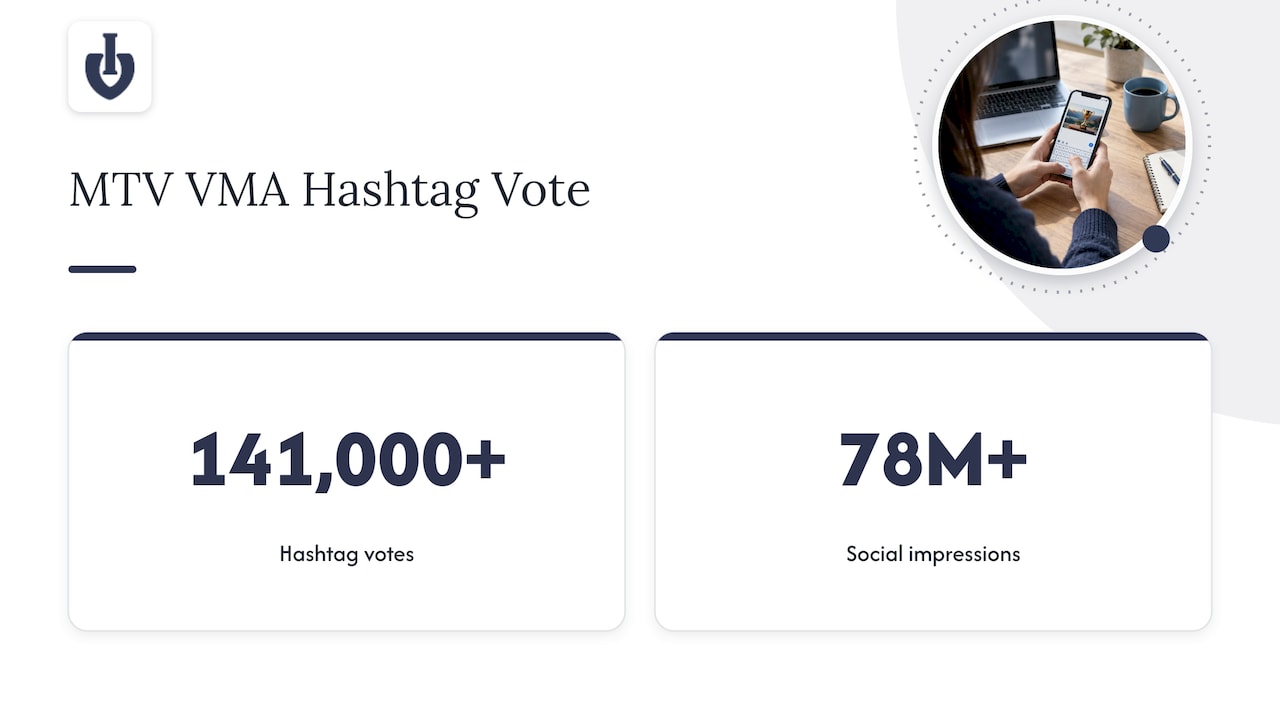
Here fans vote by posting a hashtag. It can generate enormous noise. In the 2017 MTV VMAs, Taco Bell and MTV ran Best New Artist as a hashtag vote, where fans tweeted #voteKhalid or #voteJuliaMichaels, and the category drew over 141,000 hashtag votes and more than 78 million social impressions, according to the Shorty Awards entry.
The tradeoff is control. Public posts need public accounts, the count depends on an outside platform’s search and data access, and one person can post many times unless you build a way to filter. If you want that spectacle, pair it with a real ballot: hashtag posts create the buzz, and the verified vote page decides the winner.
Pattern 3: Social login on the ballot
Some organizers ask voters to sign in with an account before voting, which makes duplicates harder. This raises the bar for casual voters, so use it when the stakes justify it. Izivote offers open, paid, login and identity-based voting modes, so you can pick the level of verification per event. The voting types guide explains each mode.
How to set up the integration, step by step
1. Build the vote page first
Set up categories, nominees, photos and short descriptions before any post goes out. A voter who arrives from social media decides in seconds. A page that loads quickly on a phone, shows faces and names, and makes the vote button obvious converts far better than one that needs explaining. Most social traffic is mobile, so check the page on a phone first.
If you take nominations from the public, self-nomination lets people enter themselves rather than waiting for you to collect names. Our guide on running award show voting walks through the full setup order.
2. Choose the voting mode
Decide who can vote and how often:
- Open voting suits friendly community contests where speed matters more than airtight security.
- Login or identity-based voting suits school elections, employee polls and awards where credibility matters.
- Paid voting suits fundraisers and fan awards where each vote carries a price. Izivote handles payments and charges a 10% platform fee per paid vote. The paid voting page and the open vs paid voting comparison help you choose.
The tradeoff is built into the method. The Awards Platform’s guidance notes that deeper verification increases security but reduces participation, so match the check to what is at stake. A neighborhood pet contest does not need identity documents. A national award might.
3. Create one link per channel
Use the same vote page everywhere, and where you can, tag the link per channel (Instagram bio, newsletter, creator posts). That gives you a clear view of which channel brings voters, without splitting the count. Put the link where each platform allows it: the bio link on Instagram, a pinned post on X, a link sticker in Stories, the description on video platforms.
4. Write posts that show the work, not just the button
Posts that spotlight a nominee (a photo, a quote, a short clip) give people a reason to click. The Awards Platform’s advice is to showcase the work rather than the vote button, so that voting feels like a contribution rather than an obligation. A simple weekly rhythm works well: a launch post, a “meet the nominees” series, a midpoint reminder and a final-day push.
5. Show results where people already are
Voters return when they can see movement. Share a periodic leaderboard graphic if your rules allow it, or embed the live results on your site. For events, you can put results on a big screen: see how to show votes on screen at a live event.
6. Close automatically and announce
Set an automatic closing time so the deadline is the same for everyone, then announce winners on the same channels that brought voters in. Because the platform stores the votes, the number you announce is the number on your dashboard.
Keeping promotion fair
Social promotion is where fairness problems start. Nominees with large followings can outpull better work, and a few enthusiastic supporters can turn a contest into a popularity race. Three habits protect the result.
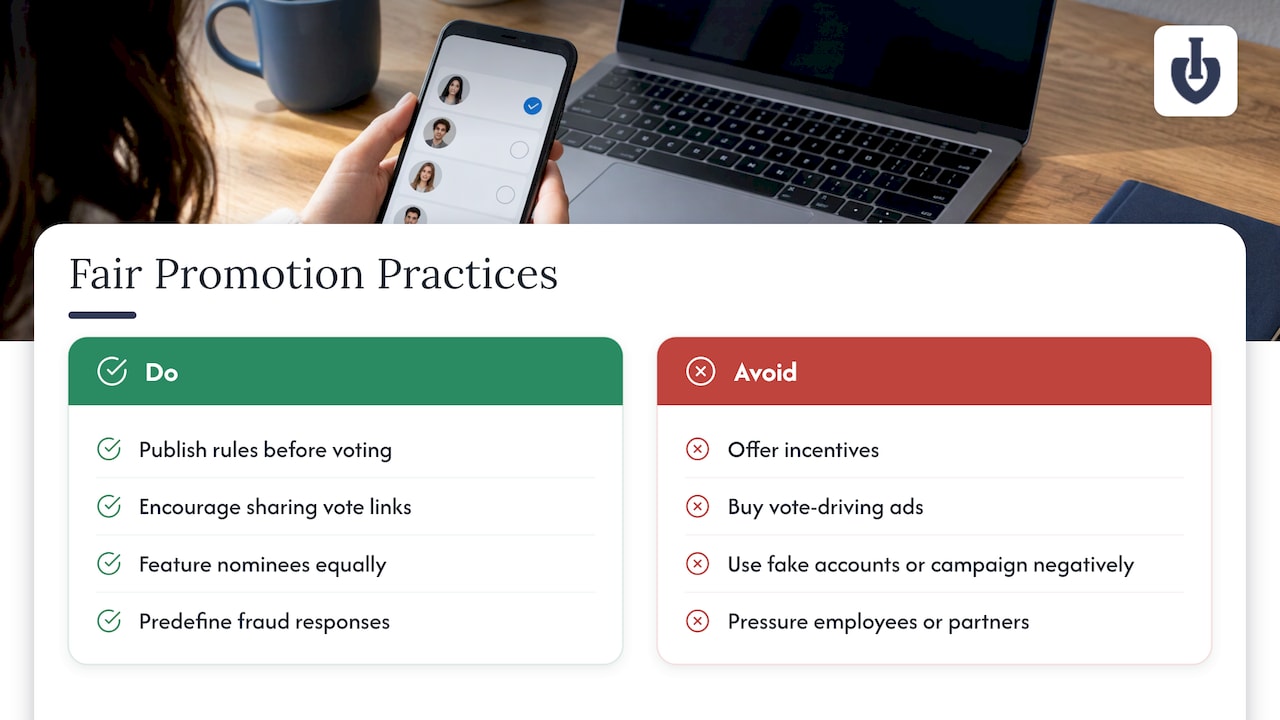
Publish the promotion rules before voting opens. The Awards Platform recommends putting guidelines in the entry terms: encourage entrants to share their voting links on personal and company accounts, and prohibit incentives, bought vote-driving ads, fake accounts, pressure on employees or partners, and negative campaigning.
Feature every nominee equally. The same source advises organizers to treat every shortlisted entry the same in their own channels and highlight the vote itself rather than individual campaigns. A shared event, not a competition for attention, is the goal.
Decide in advance what you will do about fraud. Possible responses to confirmed manipulation include removing votes, disqualifying an entry, suspending an account or publishing a transparent result adjustment, as that guide on vote manipulation lists. Putting this in writing before launch makes any later decision easier to defend.
If you want more ideas on turning followers into participants, this overview of audience engagement strategies covers campaign thinking that pairs well with a voting push.
Preventing duplicate and automated votes
Social traffic is exactly the kind that brings both real fans and bots. No single control gives you one human, one vote on the open internet. TechBloat’s 2026 breakdown notes that accounts can be multiplied, emails shared, access codes passed around, IP checks can block households, offices and schools, and cookies can be cleared. Its advice is to use the strongest practical identifier and be open with voters about its limits.
In practice, layer the controls:
- Pick the voting mode that fits the stakes (open, login or identity-based).
- Limit how often one voter can vote, for example once per category per day.
- Watch the dashboard for unusual spikes. A sudden jump in votes in a short window, especially at odd hours, deserves a look before you announce results.
- Keep a record of how you handled any flagged votes.
Our guide on preventing duplicate votes in online contests and awards goes deeper, and real-time vote monitoring shows what to watch while voting is live. Izivote’s real-time analytics and dashboard give you that view without exporting anything.
A simple rule helps voters trust the result: tell them how votes are verified and what happens to flagged ones. People forgive strict rules they were told about. They do not forgive surprises.
Test the whole flow before you announce
Run the full journey from a social post to a result before anyone outside your team sees it. Use a private or unpublished version of the page and check the following:
- The click path. Tap the link from each platform you plan to use, on both iPhone and Android, and confirm the page opens fast and reads clearly.
- Duplicate behavior. Vote twice from the same device and account and confirm the rule you set is enforced.
- Deadline behavior. Try voting just before and just after the closing time.
- Each voting mode. If you use login or paid voting, go through that path end to end, including a test payment.
- Result visibility. Check what voters see, what the public sees and what only you see.
- Accessibility. Confirm names and buttons are readable on a small screen and labeled clearly.
- The final count. Compare the dashboard totals against your own tally of the test votes.
Fix what fails, clear the test votes, then launch. This takes an hour and saves an awkward correction later.
What to tell voters about privacy and results
Voters arriving from social media are often new to your organization, so be clear about what you collect and why. State what data the vote requires (an email, a login, nothing), how long you keep it, who can see it and when results will be public. The UN Development Programme’s guide to digital participation platforms advises hosts to connect online votes back to real-world institutions and to let participants export their data, which is a good standard for any organizer to aim at. Put the closing time, the results date and the verification method on the voting page itself, so it is one tap away from any post.
Where Izivote fits
If you run a fan award, people’s choice contest, pageant, school election or community poll, Izivote gives your social campaign a place to land. You set up the voting page yourself, choose open, paid, login or identity-based voting, watch results in real time and let votes close automatically. Votes have been cast across 500+ events in 20+ countries.
The Free plan suits small events. Pro costs $6 per month or $60 per year, and Premium costs $14 per month or $140 per year. Paid voting carries a 10% platform fee per vote. See the pricing page for what each plan includes, or start from the people’s choice awards page.
FAQ
Can I run my whole vote inside Instagram or X?
You can, but only for very small contests. Native polls allow two to four short options and fixed durations, so they do not handle multiple categories or nominee profiles. Most organizers use a post as the invitation and a dedicated voting page as the ballot.
How do I stop one person from voting many times after a social media push?
Layer your controls: choose a login or identity-based mode when the stakes are high, limit votes per voter per day and watch the dashboard for spikes. No single check is perfect, so match the strength to the stakes and explain the rules to voters.
Can nominees share their own voting links?
Yes, and it usually helps participation. Write rules into your entry terms first: share links freely, but no incentives, fake accounts, bought vote-driving ads or negative campaigning. Feature all nominees equally in your own posts.
Can I embed the voting page on my own website?
Yes. Izivote supports embedding the voting page on your site, so voters coming from social media see your branding and your event page, and the votes still count in one place.
Is paid voting allowed on social-driven contests?
It works well for fundraisers and fan awards when you state the price per vote and where the money goes. Izivote handles payments and applies a 10% platform fee per paid vote. Check any rules that apply to fundraising or contests in your location before launch.
Leave a Reply